





suchamoneypit
Members
-
Joined
-
Last visited
Everything posted by suchamoneypit
-
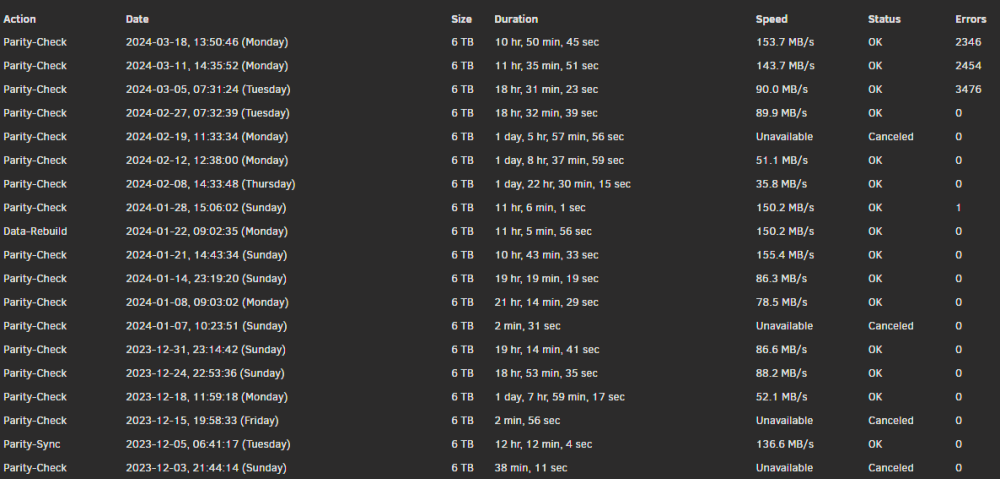
Recently on my last few parity checks I've been getting thousands of parity errors when before I consistently got zero, or 1 or 2. Doing some light research I keep seeing people asking for diagnostics files, specifically after running a parity check without error correction. I've done so, but having trouble seeing someone also explain where to look for the info on what's at error. Could someone help me figure out what is causing parity errors, and really I would like to know if you could point me to where specifically I should be looking to where the errors are occurring? My uneducated guess would be a hardware issue. There are no reported errors on any of my drives though. Attached is diagnostics I ran recently with error correction off. Below is also a history of my parity checks. 3/5 and 3/11 were error correcting, and once I saw it repeat with similar error count I ran 3-18 without error correcting. s-cartographer-diagnostics-20240320-1752.zip
-
Although I am incredibly thankful to everyone who provided advice and took the time to read my issue and try to help, ultimately your post telling me to setup a second router so I get internet and I can get my Unraid server an IP is what got me on the road to victory. I was convinced the whole server was down, but it was only the local GUI. Getting the second router setup and editing my network.cfg allowed me to get access back to the WebGUI and begin to setup my server after restoring my flashdrive on a new one. I did say $20 to anyone who leads me to the solution or tells me the solution, I think because your comment is what got me to the WebGUI, this is you. I am a man of my word so please private message me something like paypal or venmo and I will happily buy you a couple cups of coffee.
-
Yes, thank you very much for the help on the plugins. At first they wouldn't work because the internet source was the VM which came up after the plugins load. I was able to use my secondary router I used earlier to get to the web GUI and do initial config and get the server working again to edit my network.cfg to get it on the right IP address to match the secondary router's network, boot up, get my plugins loaded, then I shut down the machine, edited the network.cfg back to my OPNsense IP scheme, and switched my internet back to my OPNsense VM. Everything is 100% working now, with new CPU and RAM installed. One thing that was weird was my Plex and Jellfin containers removed themselves but the data was still there. I had appdata backups though and it was pretty easy to restore those. I still have not yet verified that the local GUI loads now that I have the Nvidia driver driver plugin loaded. The important lesson learned here is that the unraid machine being the router too is obviously the major thing that made troubleshooting such a pain. What started the issue was my USB dying in middle of the hardware upgrade, and the fact my network went down because of that just made it worse. I am definitely working on setting up a second machine and migrating OPNsense to that so this never happens again. I appreciate everyones help and advice on this. I was SO relieved to get the server back up.
-
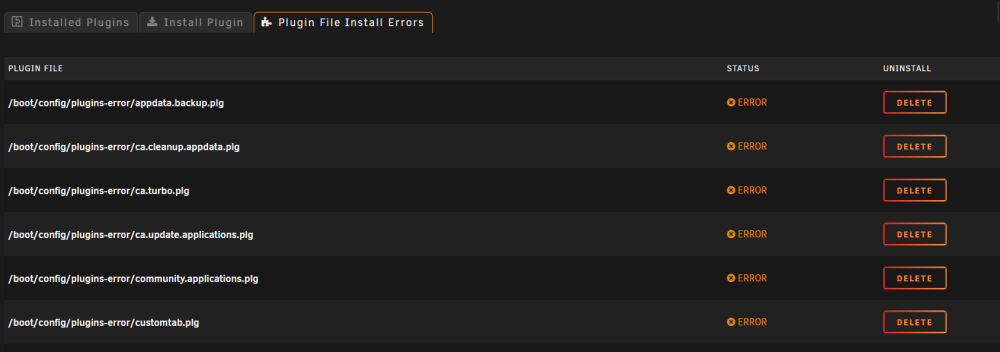
Do you know of a good way to restore my plugins? The folders are there, but unraid seems to not like it and lists errors for them all. And notably before I ever installed the nvidia driver plugin, the GUI worked just fine through my 1060. I only ever got the plugin once I wanted to do GPU transcoding with Plex/Emby.
-
No motherboard change, only CPU and RAM. Im going to post a better explanation later, im tried and have to work again now that I have internet. Long story short: my server is back and running. The only exception currently is that although my USB plugins folder has all my plugins, in unraid it shows zero installed plugins. The local GUI is still not working, but with zero plugins the nvidia driver one is not installed. I'm going to have to dig into that later unless in the meantime someone has a solution or answer to that. The server is running with the new CPU but old RAM. now that the flashdrive is working later today im also going to put back in the new RAM.
-
More to come regarding this, this seemed to be the key (I think you're gonna get the $20 bounty) Initially no, I had nothing else to hook up to the ISP modem so I had no internet or wifi. I had to do everything and troubleshooting from my phones data or hotspot data which was terribly slow. I do now have unraid connected to a router thats getting internet. I actually have two ISPs. one I had essentially in a dormant setup as I was going to disconnect that service as unraid and OPNsense run my new provider which is fiber. I hooked back up my old ISP's router so I have wifi and internet.
-
I will say when I checked my USB, the .plg file did not exist. I'm guessing it never downloaded because the server never had Internet access since the new flash drive
-
I am still holding my breath but I got an older router working and with my old ISP I have yet to disconnect services with but still had an account with (switched ISPs a few months ago), but after doing this, and then manually editing my network.cfg, I have been able to get to the webGUI on that network. Currently slowly restoring things back as they way and verifying everything is still working at each step. This may have have been the key. As I suspected when I got in nothing was running because even before I could start the array it made me transfer my license to the new USB. I will provide an update soon but I'm feeling quite hopeful which has not been the case for nearly 10 hours of troubleshooting prior.
-
unRAID is not a VM, OPNsense (my home router), runs as a VM on unRAID itself.
-
I'll see if I can get that going and if I can get to webGUI I will say that even without the Nvidia plugin, it worked just fine with my 1060 before for basic display output
-
Yes, it won't boot into GUI mode. And I assume because it's a new USB, if I boot into CLI, nothing works, no VMs or Dockers start. Because the array needs to be set back to its initial config and started. unRAID runs an OPNsense VM, so even if I manually assign an IP, there is no router for another computer on my network to connect to unRAID. GUI refuses to load when testing locally. I have a kbm and monitor hooked up right to the machine. Previously when troubleshooting network down situations when I was getting the VM working with OPNsense, loading the GUI locally was of no issue. If the GUI won't load locally, I can't imagine I'll get it up on the network.
-
Server is my router. OPNsense runs as a VM which is down. It won't get an IP currently. No services will start and I can't get to webGUI to check anything. I'm am troubleshooting with a monitor hooked up to the server.
-
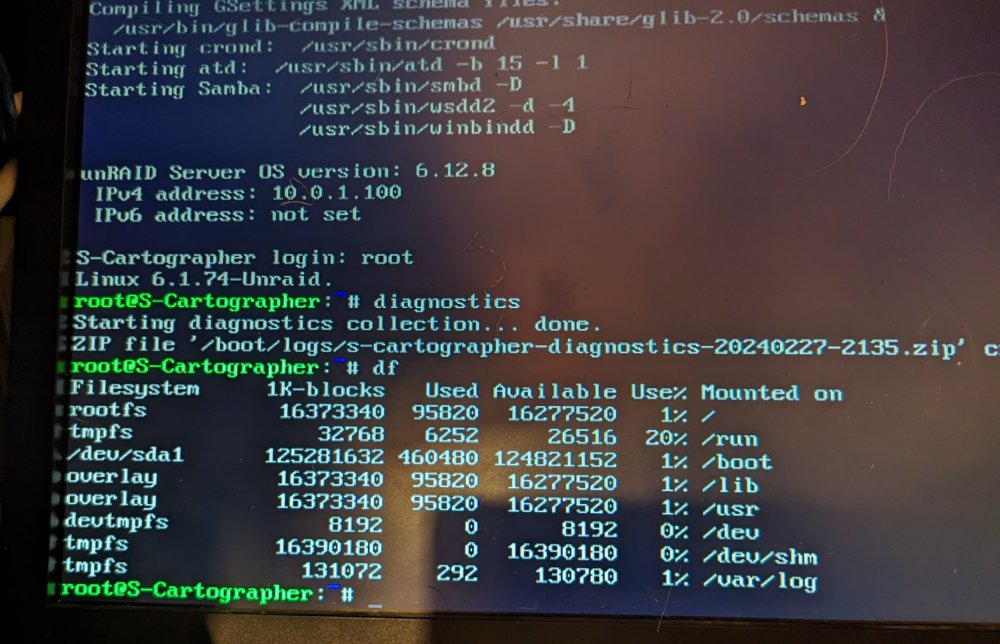
Diagnostics when ran using my backup USB files. Also the results of running the "df" command which should should if there was a flash mounting issue. I am now heading to bed, unsuccessful, at at 3am, 9 hours after I started what was supposed to be a standard hardware upgrade. Praying to the computer gods someone out there takes pity on me and knows enough to help me get my stuff back. I mean hell, if anyone directly leads me to or tells me the fix, $20 is yours. s-cartographer-diagnostics-20240227-2135.zip
-
I got this diagnostics file from the CLI, when trying booting to nonGUI with a fresh install tower-diagnostics-20240227-2117.zip
-
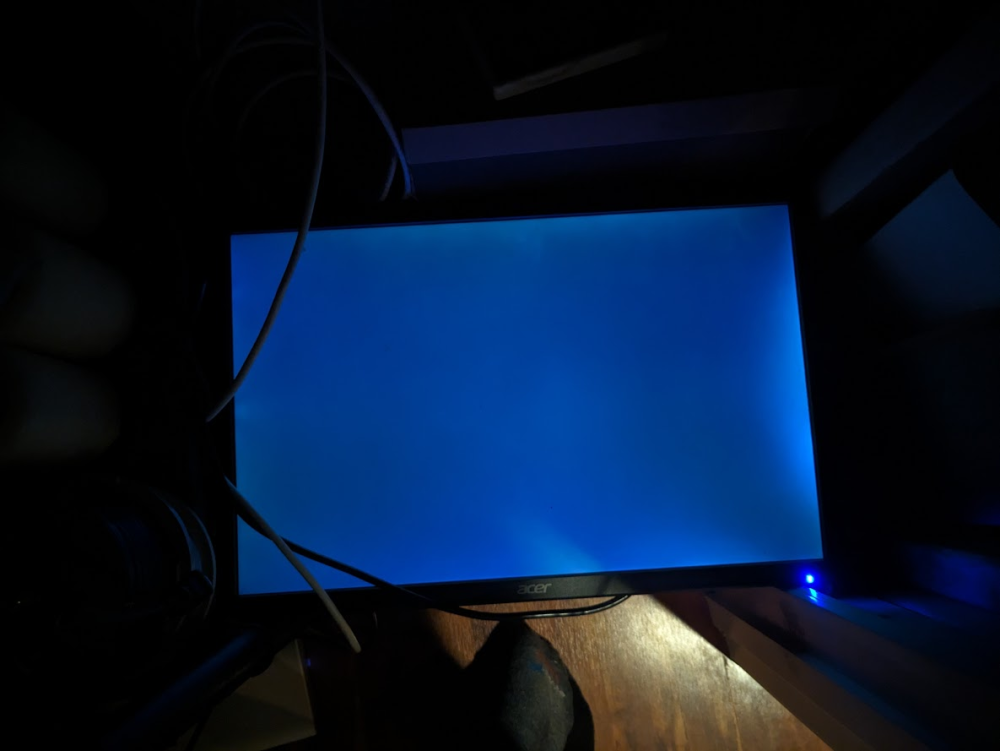
My server is completely screwed, I am desperate for help or guidance. I have spent 8 hours straight trying to get this working. I started at 5:45pm and im writing this now as of 2am. It was also my home router, opnsense was running as a VM. I work from home and this it's literally taking me offline. I was planning to segregate the two but now Im paying the ultimate price for not getting to it sooner. Once this is (hopefully) resolved thats getting done ASAP. I had a ryzen 2700x and 48GB RAM. I upgraded to a 5950x and 128GB. After rebooting after doing this, unraid failed to start at all. After hours, i realized the USB for unraid would not load even in windows. A dead USB after a reboot? super odd. I realized I had a super recent backup from unraid connect just 8hrs prior. Thought this was my saving grace and I would be back and running shortly. NOPE. Setup a new USB, tried to boot, and now I'm completely stuck. No matter what I do, dockers or VMs don't run and it can never get to GUI. It just boots to a black screen with a typing cursor in the top left. After booting up, the initial few hundred lines of text from unraid show, but then for gui boots it goes to a blank screen with a cursor. For my BIOS, I have csm enabled, SVM enabled, legacy USB support enabled, fast boost and secure boot off. The system boots in ubuntu with the live installer/preview without any issues. I tried switching back to my old RAM. No matter what I do, the GUI will not come up. I get display output throughout the initial boot process. If I try to go to GUI from there, it goes to the blank screen with a cursor once I enter "slim". Same thing in GUI safemode as well. No dockers will launch or VMs. I tried launching a VM from CLI with "vrish start OPNsense" and got "failed to connect to hypervisor". "operation not supported. Cannot use direct socket mode if no URI is set". I've tried this with a fresh unraid install using the official tool both with a new download, and by using a ZIP. Exact same behavior. Im using a Samsung 128GB USB 3.0 flashdrive formatted with Fat32. You would have thought a flashdrive backup from unraid connect would have been a simple ordeal, it has honestly become a nightmare from me. I followed the exact steps in their "Manual method" for restoring the backup. Im literally going to take the day off of work tomorrow because my whole network is down and I cant get unraid working. BIOS Settings: SVM enabled (virtualization) CSM enabled legacy USB enabled fast boot off (I also tried with the BIOS defaults, with SVM off) Main hardware: ryzen 5950x CPU Gigabyte Aorus Master B550, Bios F15 (latest is F16 with minor update, F10 supported 5950x) Tried many RAM configs including one that was working prior I'm booting with UEFI, my folder on the USB is "EFI". It won't boot if I try non UEFI. I was doing this before as well. And again, this system has posted a hundred times now at this point and live linux (ubuntu) loads and runs just fine. Unraid refuses to. If anyone knows whats going on I would be IMMENSELY thankful. EDIT: SOLUTION: Something that really made troubleshooting a problem was my unraid server was also my router, with an OPNsense VM. The main problem that kicked this all off was my USB died during my hardware upgrade. Without unraid array started, I also had no router or network, meaning no WebGUI access. For some reason, the local GUI stopped working for me. I believe it was because I also lost my Nvidia Driver plugin, but I will note it did work before without that. In retrospect, the webGUI was likely up the entire time once I setup my backup USB, but I could not access it with no network as OPNsense VM was down. Setting up an old secondary router allowed me to get my network online. I connected the unraid server to this router and got it on a network (manually setting correct IP scheme by editing network.cfg on the USB), and from there I was able to access the WebGUI, setup the new USB license, then get my array started again. From there is was standard setup getting everything back to working order.
-
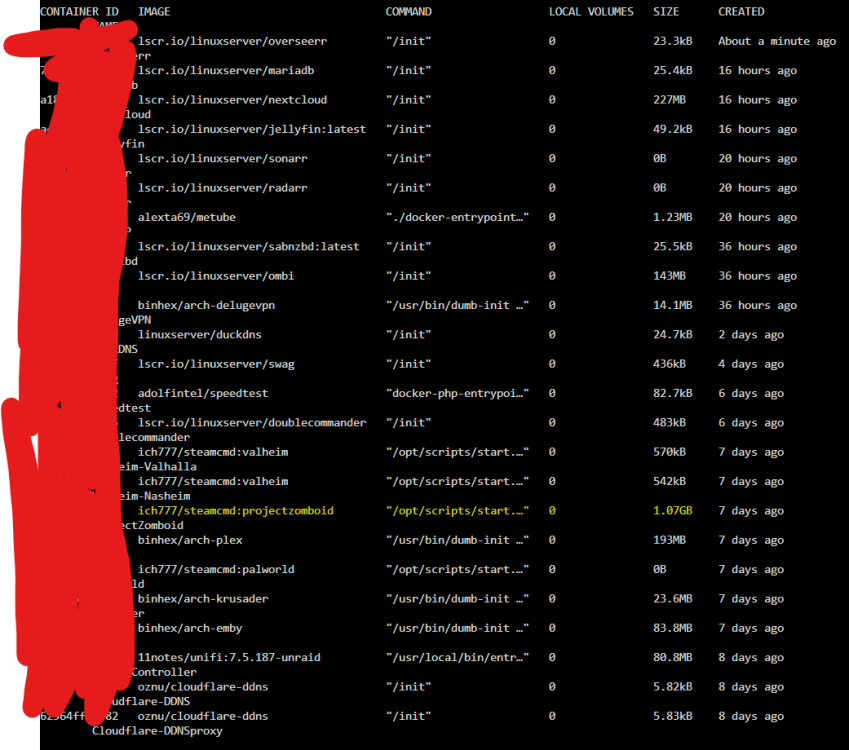
thank you, that did take it from 1.07GB to 6.04kB. Will keep and eye on it and see if it climbs in size again.
-
Hey, for some reason Project Zomboid specifically is taking up a significantly larger size of my docker img file than my other services, I don't think this is proper?
-
I have 3, 3TB SSDs in a pool for my cache. The Size correctly reports 3TB, but the "Used" and "Unused" incorrectly total to around 2.15TB. Notably, when doing a large amounts of downloads, the other day the Used space got up to 2.8TB+ of Used space. This seems to confirm the reported free space is being incorrectly calculated or displayed. The True capacity of 3TB seems correct, but the Free space utility never lists it. It should be showing 2.7-2.8TB of free space right now but only lists 2.04. Diagnostics ZIP is attached. My Unraid has done a couple upgrades and this issue has been around since I installed these 3 drives to the pool. diagnostics.zip
-
My DNS was set to Comcast's DNS, 75.75.75.75 and 75.75.76.76. Seeing that, I've just updated unraid to use 1.1.1.1 and 1.0.0.1. As for the other things - No LAN Cache - Server has exclusive access to the internet - No Unifi network gear - No network ad blocking I guess now I'm just going to see when the game updates next, and see if with the new DNS settings if I see the same behavior.
-
Deleting everything but the .config and backups folder and starting the container like @ich777 recommended I do last time worked again, and the server is working now. However I am still confused as to why the container refuses to update normally without doing this. I left my other server as-is if anyone has suggestions I can test on that one, as this is bound to happen every single game update base on my experience so far.
-
I am running unRaid 6.12.6. I have now restarted the containers for both my Valheim servers twice now, I still receive imcompatible version errors trying to connect.
-
Another issue with my Valheim server. Last night the Valheim game updated. I updated my game client, and checked for a docker update, which there was none. Trying to join, I get incompatible version and cannot join. I restart the docker container to restart the server, and still, no updates, and I get incompatible version and cannot play. Last time I essentially deleted everything but my world info, and that resolved it. However, is this really necessary every single game update? Why won't the server fetch the latest version? Is there a command I can manually invoke via console to make it update? note: as I confirmed last time I had this problem, update check and validate are set to true.
-
Thank you, that is exactly the solution, and I confirmed it's working as intended! Thank you for your support and frequent responses in here. You are really a wonderful member of the unraid community.
-
Question about my Valheim servers, is there a way to have the backups save to a separate share? Its possible this can already easily be done with the following fields, but Im unsure of exactly what data is kept in each: I currently have the docker running on a single cache only share. What is the difference between ServerFiles and SteamCMD? I have boat loads of HDD space, but I want my server running as fast as possible on my SSD cache. I would be cool with a pretty stupid number of backups, but I don't want to hog up SSD space with 200GB of backups that in all reality I likely won't use. If say SteamCMD is what's used for running the server, and the backups are under ServerFiles, could I make a dedicated share that is Cache -> Array to allow a stupid number of backups to be kept, but the data to flow off onto my much cheaper HDD storage?

-
Thank you! I've never really messed with those docker entries before, just filled out what was already there. You were right, I had to remove/delete the ones there, then add them back with the same details but with my desired ports. Second server is working now, thanks again!




