





suchamoneypit
Members
-
Joined
-
Last visited
-
Application Name: Warhost GitHub Repository: Warhost Unraid Template: warhost.xml About WARHOSTWARHOST runs Eugen Systems' official WARNO dedicated server on Unraid, along with a WebGUI for configuring server settings in a way that emulates the game itself, allowing much easier setup and management of your dedicated server. I have been a Wargame and WARNO fan for a while. Its been years an no one has brought this to Unraid, so I took it upon myself to make it happen as my first every Unraid community app. Server Keys: You must request server keys from [email protected]. One login and key pair supports 5 servers. Eugen took several days to respond to my request for them. Main FeaturesGUI configuration of server settings: The default way of configuration is entering in a bunch of specific values and looking up specific scenario IDs for every map. This way of configuring your server settings is significantly easier Steam Workshop Mod support: Modded maps and full conversion mods. Mod support is even more tedious for the server; you must lookup the workshop ID, but every time the mod authors implements a version change it breaks. This version # is only within a downloaded file in the mod. This includes a system for checking steam workshop, downloading this file only, and checking and setting the version number for you. Multi-Instance support: This docker template plays nice and expects you to run multiple instances at once. A single Eugen key supports up to 5 servers. Installation & SetupAdd WARHOST docker container from Unraid community app store Configure your template options. Settings folder: Default setting is fine for your first server, but you must increment or change the port number for additional servers or you will overwrite the same folder. Eugen Login: You must request server keys from Eugen [email protected] (they provide a login + dedicated key) Eugen Dedicated Key: You must request server keys from Eugen [email protected] Public WAN IP: Enter your WAN IP. You can view this easily at https://whatsmyip.com/ Game Port: Default setting is good for your first server. You must change this port number along with the settings file path as you add servers 2 and more. Apply and startup the docker container. Your server has now launched live with default settings. Open the WebUI and configure your server settings. In the bottom right, Save and Restart to apply these. Make sure the game port is port forwarded on your router TCP/UDP, and the server will show up in the public server list and be working. Support & Bug ReportsIf you encounter any bugs or have feature requests, please leave a message here or on github. Providing docker logs and/or screenshots would greatly help. I am committed to supporting this. Base game maps and features are working fantastic. modded maps have been used on multiple games play to completion and are working. I am one person and not actually playing a lot of WARNO right now so there could be issues with extensive use specifically with mods.
-
Sad to hear. Thank you so much for all the contributions you've made and all the time you spent helping people and replying to forum posts.
-
I had someone say that its normal for the server to sit there until someone connects; its not. I setup a windows server 2025 VM to run this server instead after all the troubleshooting I've been doing and there is pretty clear additional logs that output after that line. There is both additional logs once this succeeds and a ton of logs that show up on connections from other players. For some reason I could never get the server to get past that point in the logs, it always hangs right there. This I believe is preventing the server from starting up whatsoever, so nothing networking wise was working. I also was never able to get the server working with DirectConnect on docker or in windows server. On windows server, I left DirectConnect off, and in my OPNsense router I added the UPnP plugin, enabled it, and setup a default-deny all with rules just for this specific server and it started working flawlessly using the share code. After doing that, I tried the same UPnP setup with this docker container and it still failed because the server still just sat indefinitely at: 5LogPreloader: Display: [000064] UR5Preloader::Load Start preloading GenlandiaMulty [D:\Source\Build\work\gameRepoCheckoutDir\Source\R5Preloader\Private\R5Preloader.cpp:39]So in summary after trying like everything I can think of including all mentions in this thread: On docker: DirectConnect and P2P/UPnP don't work, server just hangs during preload. No successful launches. WindowsServer2025: DirectConnect not working, UPnP is. Regardless, server never has any trouble starting up the server itself successfully And like I mentioned before, this is running on my "GamerServer" unraid machine which host other servers, internal and external just fine. LAN and WAN players. Including an AbioticFactor Server that can use port 7777. So I don't understand why this specific docker container would be plagued with networking issues when others are not, which is what people seem to think is going on. I'm still pretty confident in my initial assessment that the server should not be hanging during that preload like it is regardless and I'm not even getting to any networking because the server isn't properly starting. Anyways, Im running it and have a bunch of players using the Windows Server virtual machine now, so Im happy with my setup, but I wanted to share my results because I spent hours on this trying to get it to work. I am certainly no expert but I have 4 unraid servers and an array of services/servers so Idk why this single container would be having networking problems. I did consider weird permissions issues but I did run the Docker Safe New Perms tool early in troubleshooting.
-
I've had a friend connect via a true external connection and still no connection. I tried bridge and host networking. I have many other services and servers hosted that are working fine, including my abiotic factor server that operates on the same port. This server works for internal and external just fine. I am not actively running it though because it conflicts with Windrose.
-
By attempting to connect via a VPN, I am connecting as if I were connecting from the outside just like a mobile data hotspot, and I still can't connect. I have also tried with and without windrose-xvfb.
-
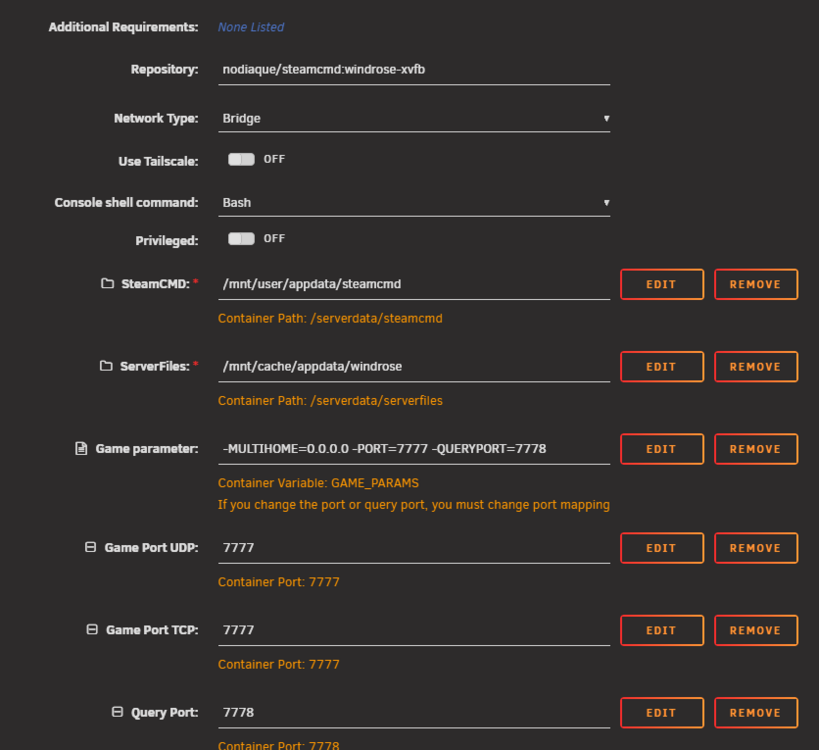
Yes I believe my game_params is correct. I left the default ports. I believe multihome should be left as 0.0.0.0 The direct IP of this server is 10.0.1.105 so that is one of the addresses im trying to direct connect to on port 7777. But like I mentioned Im trying everything, including turning on a VPN on my gaming PC and trying to connect via my WAN IP and port (which is port forwarded ports 7777-7778 TCP/UDP). I didn't touch the DirectConnectionServerAddress because of that warning I saw also but I can give it a try. Its extra confusing because other people here seem to be having success without any trouble. I can't even connect on LAN. Which is what initially lead me to believe that the server was not starting at all and was hanging on world gen. EDIT: no change in behavior when setting DirectConnectionServerAddress to either its LAN IP 10.0.1.105 or my WAN IP address.
-
Correct, I'm port forwarding 7777 and 7778 TCP/UDP. When testing via LAN it shouldn't matter either, but I've tested from LAN and WAN with port forwarding.
-
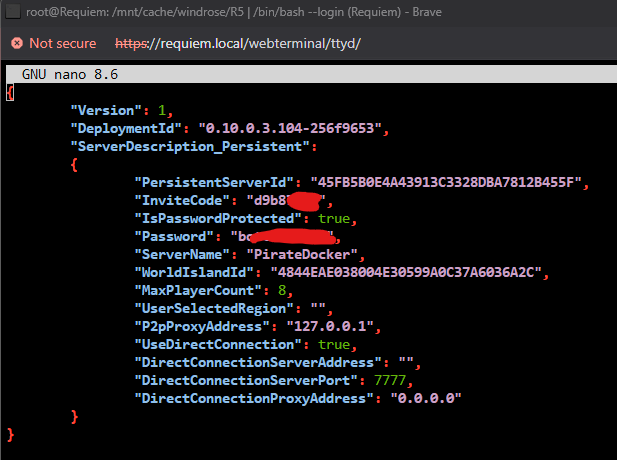
Yeah I've enabled direct connect, here is that config file: I can't connect to it using the LAN IP (10.0.1.105), WAN IP, or any of my domains/subdomains. I also can't connect to it if I use a VPN to connect externally via WAN. Same behavior every time, I type in IPs, enter port 7777, type my password, it loads for 10-20 seconds, then reloads the main menu. I did also try the invite code, with the one thats in there on install and a custom one. I also tried with the docker in bridge and host network. I have tried the docker installed with the default wine tag and the headless wine one. Through all those connect attempts, zero logs show on the docker logs. It just sits at R5LogPreloader: Display: [000069] UR5Preloader::Load Start preloading GenlandiaMulty [D:\Source\Build\work\gameRepoCheckoutDir\Source\R5Preloader\Private\R5Preloader.cpp:39]
-
I cant seem to get my server to boot up; it hangs at the same spot every time in the docker logs: R5LogPreloader: Display: [000064] UR5Preloader::Load Start preloading GenlandiaMulty [D:\Source\Build\work\gameRepoCheckoutDir\Source\R5Preloader\Private\R5Preloader.cpp:39] I've deleted everything and retried a few times. Tried host and bridge. It doesnt seem to be a networking thing, it just never gets past this preloading. If i try to connect via direct IP or share code, it just loads for a bit and then dumps me to the main menu with no message.
-
Do you take requests for new containers? Would you be able to make a template for https://hub.docker.com/r/whykickamoocow/dsp-server ? Never done this before and trying to load the template and do the whole autoconfigure thing completely fails for me. https://github.com/WhyKickAmooCow/dsp-docker-server Dyson Sphere Program is an incredible factory game and the Nebula Mod works incredible for it, but no unraid template exists. Note that a big update just released today for DSP that is incompatible with the multiplayer mod but its being updated.
-
Per the discord it seems that its a physically connected drives limit as otherwise plugins like unassigned devices could override the key limits.
-
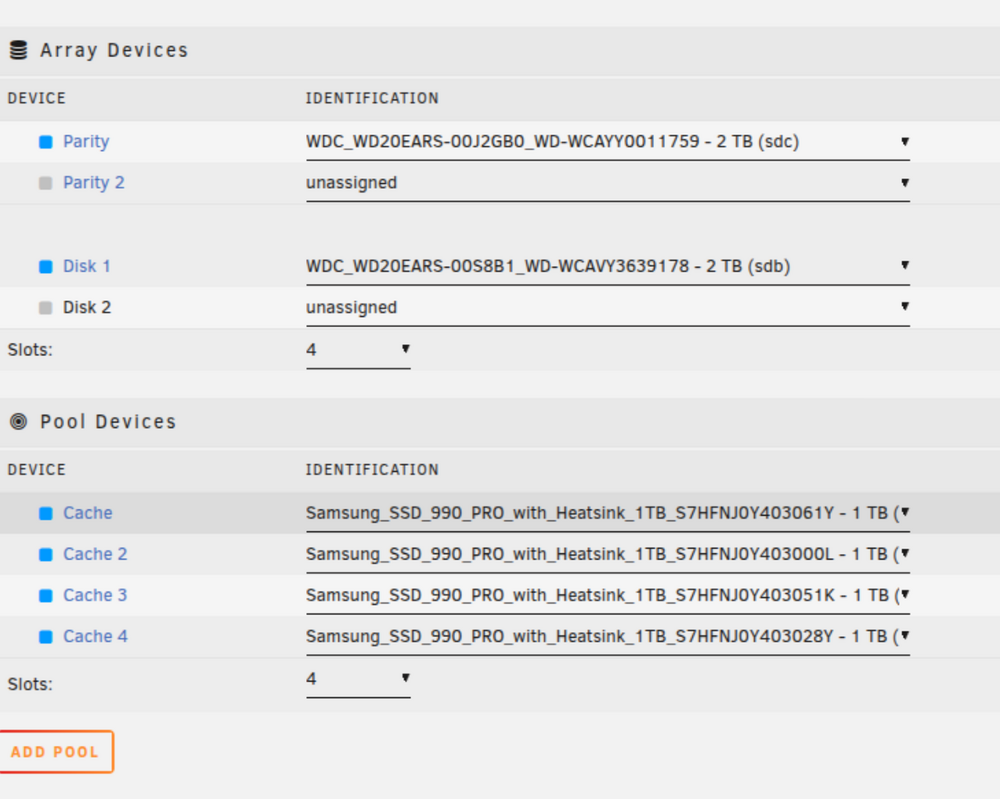
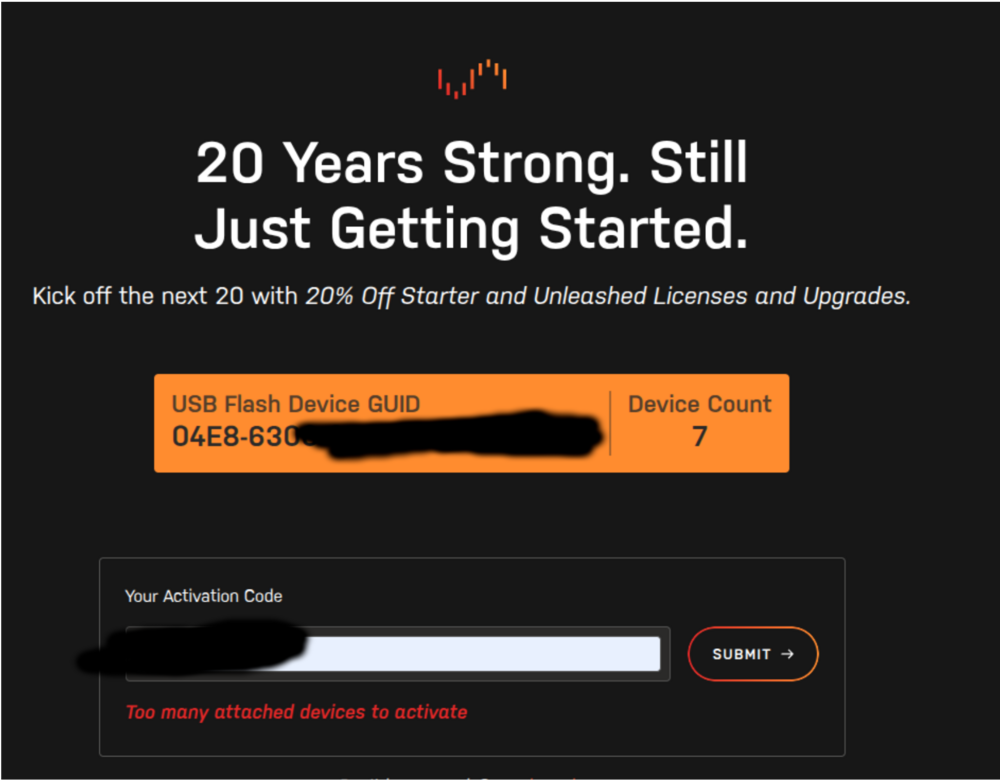
I had a server with 7 drives. Did a free trial to test the config first. I buy my basic key, which supports 6 drives, so when I go to activate it refuses to stating I have 7 drives. Understandable. However once I drop to 6 drives in my dashboard, it refuses to update to 6 drives and I can't enable my key. I then reboot, it boots up with 6 drives, and it still refuses to activate my key saying I have 7 devices. Why would you not just enforce this drive limit when the user goes to start the array with a set number of devices? You're just outright blocking the key activation?I now have to un-rack my server, crack it open, and physically disconnect one of my extra HDDs just to activate my key. Certainly there is a more user friendly way to go about this?
-
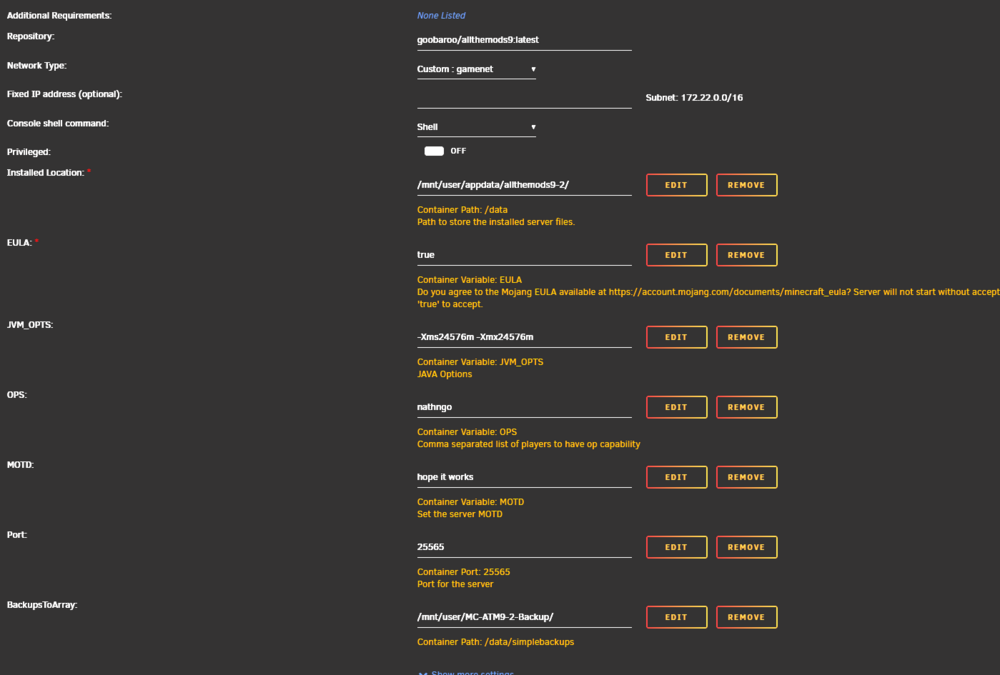
So I had Server 1, then wanted to make Server 2. I copied the template from Server 1, and modified it for Server 2. At the time of this copying, Server 1 was 1.0.2. Both containers are set to pull "latest". Server 1 has been shut down since I made Server 2. I shut down Server 2, and started Server 1, and it instantly grabbed 1.0.3 correctly. Strange. I then shut down Server 1, started Server 2, and it did not. Still stuck on 1.0.2. So what I did was backup Server 2, totally deleted the container, and added a new one and did not use the template from Server1 (which I used to save some work entering in info in the template fields). That new container pulled 1.0.3. I then copied back over the world folder, and its working on 1.0.3. Not sure what about copying the template and then modifying that broke it so it won't update itself. But seems to be all set now.

-
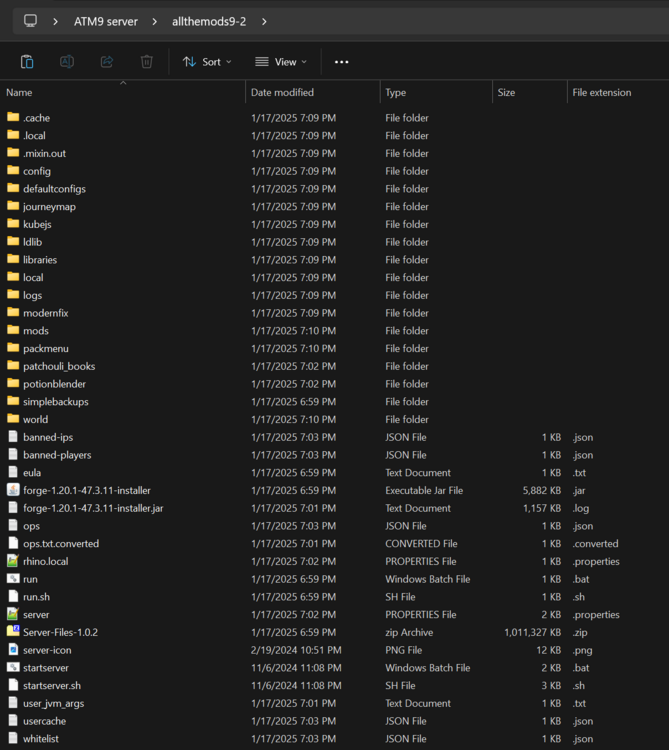
So what i additionally did was delete absolutely everything in /data and let it boot up and grab everything, and above is what it grabbed. Still 1.0.2. I can upload all the files to my nextcloud too if you wanted a deeper look. Its uploading now but taking some time. Notably the server updated itself through several version before fine. I can see you updated the latest tag to be 1.0.3, and my docker container settings are set to latest.
-
I deleted the 1.0.2 server files and restarted the container and it just grabbed 1.0.2 again and not the latest 1.0.3.



