






RhinoMedia
Members
-
Joined
-
Last visited
-
Honestly I got busy with other things and forgot about this. Additionally, I'm not quite sure how I go about limiting Plex's memory in the container settings.
-
This what I get when I enter that: 0 /var/log/pwfail 8.0K /var/log/unraid-api 0 /var/log/swtpm/libvirt/qemu 0 /var/log/swtpm/libvirt 0 /var/log/swtpm 0 /var/log/samba/cores/rpcd_lsad 0 /var/log/samba/cores/samba-dcerpcd 0 /var/log/samba/cores/winbindd 0 /var/log/samba/cores/nmbd 0 /var/log/samba/cores/smbd 0 /var/log/samba/cores 48K /var/log/samba 0 /var/log/plugins 0 /var/log/pkgtools/removed_scripts 0 /var/log/pkgtools/removed_packages 0 /var/log/pkgtools 4.0K /var/log/nginx 0 /var/log/nfsd 8.0K /var/log/libvirt/qemu 0 /var/log/libvirt/ch 12K /var/log/libvirt 480K /var/log
-
Third week is the charm. Same error as usual along with a new one: /var/log is getting full (currently 79 % used) which I just posted about in the FCP forum per the note in the error message. This weeks diags are attached. Whatever is causing this (these) issue hasn't otherwise affected the day to day use of my server thus far. So I'm not freaking out about it. But I would like to figure it out before it becomes a bigger issue. rhino9094-diagnostics-20240114-0605.zip
-
Woke up this morning to a notification telling me this: /var/log is getting full (currently 79 % used) This is in addition to the: Out Of Memory errors detected on your server message which seems to happen every Sunday for the past three weeks, that I posted about in General support starting on New Years eve. Rebooting resolves the issue the server seems to eb fine otherwise. But per the FCP I'm posting here with diags. rhino9094-diagnostics-20240114-0605.zip
-
Plex takss are scheduled for 0200
-
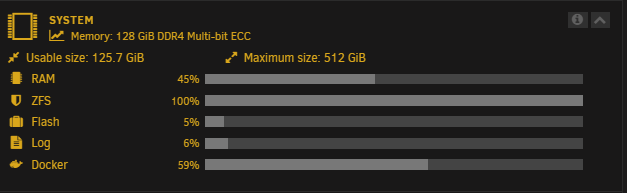
So I woke up this morning to the same error. The one thing I noticed that was the same this time and last time was this Note hoow ZFS is at 100%. The only drives I have as ZFS right now are my cache drives. Rebooting resolved this last weekend. I haven't done the swap file thing yet. Getting ready to reboot again for now. rhino9094-diagnostics-20240107-0837.zip
-
Thanks. so far this is the first time I've ever gotten this error so hopefully it's just an anomally. I may still adda dn start using the swapfile plugin though. That seems like a very useful idea.
-
As noted under more information for this issue I have captured diagnostics prior to rebooting. If you can assist me with figuring out the issue that would be fantastic? rhino9094-diagnostics-20231231-0815.zip
-
I know the main topic says Windows 10 but I'm having the same issue with an Ubuntu VM I've got an Xubuntu 22.04 LTS VM. It uses 6 cores (12 threads) and 32GB of RAM. The Vdisk size is 250GB. It's the daily driver I use for stuff I do with Plex. I used VirtioFS to map four of my shares to it by editing /etc/fstab so they auto-mount. When the VM is idle and I'm not sure how long it remains idle before this happens, all the CPUs will max out to 100% and it locks up. There is nothing in the logs (Unraid or the VM logs) and the only way to fix it is to stop the VM and then start it again. It is fine while I am using it. It only happens when it is idle. If I change the VM drive settings to 9P Mode and modify the mappings in fstab the same thing happens. I have to set the xml from <memoryBacking> <source type='memfd'/> <access mode='shared'/> </filesystem> back to its default to prevent it from freezing. I really hope there is way to resolve this. VirtioFS is just so much faster than SMB or 9P for accessing shares from a VM.
-
Do I need to be concerend here? I ahve found three of these attempts in my logs the past 24 hours. "Feb 11 06:50:40 rhino9094 nginx: 2023/02/11 06:50:40 [crit] 6828#6828: *658370 SSL_do_handshake() failed (SSL: error:141CF06C:SSL routines:tls_parse_ctos_key_share:bad key share) while SSL handshaking, client: 154.89.5.117, server: 0.0.0.0:443" I have a complex root password and my server is only accessible via MyServers ported through another 4 digit port to [IP Address]:443 and via Plex. It doesnpt look like they were successful, but I find it intersting that one of them occurred about the same time my Docker froze/stopped working and I had to reboot. AbuseIPDB says the IP address is from a bad actor in China.
-
In this situation I did not experience any lock-ups with my VMs. I had eneable VirtioFS in my Xubuntu VM but could not mount any of the shares using cmd line. So I left it and used SMB for a few days. It wasn't until I learned I could add them in fstab and have them automount that the VM started freezing. Happened again last night with a brand new install of KDE Neon but without any of the Fstab edits or shares mounted. Always occurs when the VM is idle. Hasn't happened when I am using it . At least not yet.
-
I can confirm this happens in Linux. I have 5 shares mapped in fstab in and Xubuntu VM and in an KDE Neon VM. Connect to Xubuntu via Windows RDP and to KDE via NoMachine. This happens when I am away from the computer. Both VMs lose the remote connect and the allocated cpus are pinned at 100%. The only way to resolve it is to force stop the VM and restart it. If I remove the VirtioFS drives from fstab and use 9P or SMB it is fine.

