Majyk Oyster
Members
-
Joined
-
Last visited
Everything posted by Majyk Oyster
-
You found the issue, even though I already checked and missed it. I have around 12 TB of free space available to this share, and didn't check any further, but for some reason one of the disks had just under 500 GB of available space, which is the minimum free space I set. It was enough for unraid to trigger the limit. Everything is back to normal, thanks a lot !
-
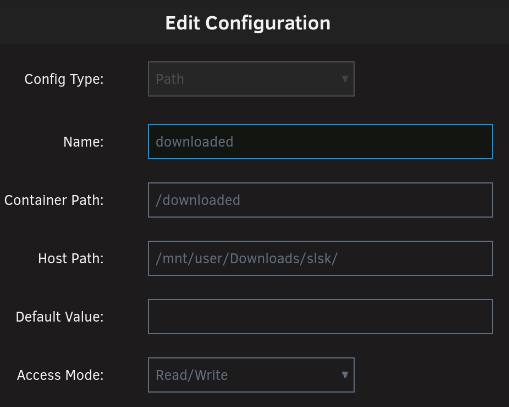
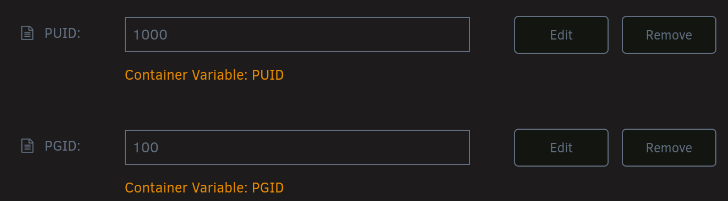
Thanks for looking into this ! Yes, I get this message : The Downloads field specifies a directory '/downloaded' that exists, but is not writeable. Here's the configuration of "/downloaded" and PUID/GUILD in docker : PUID 1000 refers to my main user, GUID 100 to group "users".. I've tried "chmod -R username:users /mnt/user/Downloads/slsk" and "chmod -R nobody:users /mnt/user/Downloads/slsk". Permissions are set to 777 by default, I didn't touch this. Deleting the "/downloaded" path brings this error : The Downloads field specifies a non-existent directory '/downloaded'. Adding an "/incomplete" path pointing to a folder with the same permissions as "/downloaded" doesn't do anything, no extra error in the log and slskd still fails to start. The command execution : docker run -d --name='slskd' --net='bridge' --pids-limit 2048 -e TZ="Europe/Paris" -e HOST_OS="Unraid" -e HOST_HOSTNAME="hostname" -e HOST_CONTAINERNAME="slskd" -e 'SLSKD_REMOTE_CONFIGURATION'='false' -e 'PORT'='5030' -e 'SLSKD_UPLOAD_SLOTS'='10' -e 'SLSKD_UPLOAD_SPEED_LIMIT'='1000' -e 'SLSKD_SLSK_USERNAME'='username' -e 'SLSKD_SLSK_PASSWORD'='maybeAnActualPassword' -e 'SLSKD_SLSK_DESCRIPTION'='Boredom won'\''t get me tonight' -e 'SLSKD_SLSK_DIAG_LEVEL'='None' -e 'SLSKD_USERNAME'='username' -e 'SLSKD_PASSWORD'='maybeAnActualPassword' -e 'PUID'='1000' -e 'PGID'='100' -l net.unraid.docker.managed=dockerman -l net.unraid.docker.webui='http://[IP]:[PORT:5030]/' -l net.unraid.docker.icon='' -p '5030:5030/tcp' -p '5031:5031/tcp' -p '50300:50300/tcp' -v '/mnt/user/appdata/slskd/':'/app':'rw' -v '/mnt/user/Music':'/shared':'ro' -v '/mnt/user/Downloads/incomplete':'/incomplete':'rw' -v '/mnt/user/Downloads/slsk':'/downloaded':'rw' 'slskd/slskd:latest' edfc4f529fc65aecd5dcd1cacf06eefd4dcafa163b4ccef2648eac0be3ff6a8c The command finished successfully! The log just after the execution : The Downloads field specifies a directory '/downloaded' that exists, but is not writeable. /incomplete path generates no error, while having the exact same permission : drwxrwxrwx 1 nobody users 10 Sep 26 17:47 incomplete/ drwxrwxrwx 1 nobody users 4.0K Sep 28 01:37 slsk/ No idea where to look next.
-
I have the same issue. slskd was working fine for months, and it stopped working today. I haven't changed a thing. No idea what's the issue.
-
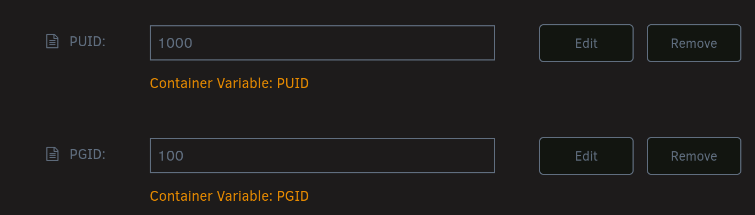
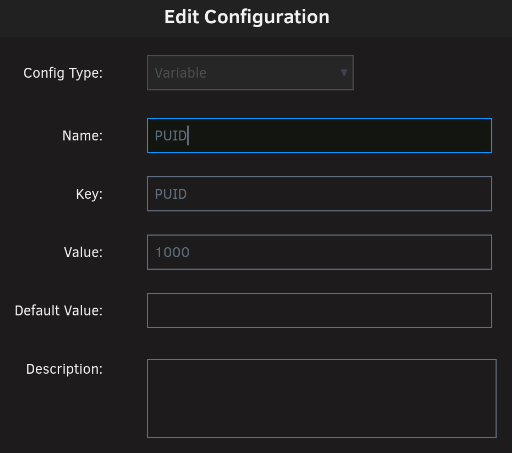
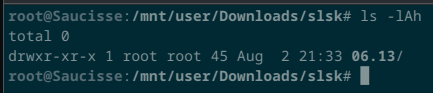
Despite reading the previous posts on the issue, then reading https://hub.docker.com/r/realies/soulseek/, my downloaded files are still owned by root:root. What I am doing wrong ? My user ID is 1000, its group is 100, which points to the group "users". I set both PUID and PGID as variables to the container. I don't understand this comment. Everywhere I look the PUID and PGID are indeed in capital letters. Switching to lowercase didn't change anything. I'm pretty sure this is trivial, but I can't put my finger on it. Any inputs appreciated !

-
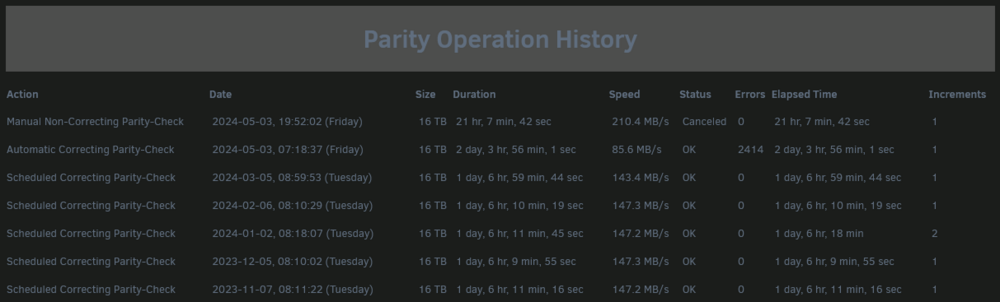
Thanks for the replies ! 🍻 Here's what the history looks like : I'm running another parity check right now, we'll see. I have no idea why the elapsed time differ, looks like they run at the same time or something. Can't tell which would be right. I only have backups of a small portion off the array, the critical stuff. I'm going to check this, and hope for the best for the media library. I'm indeed using XFS, I'm looking into the File Integrity plugin right now.
-
Hi folks, Yesterday my beloved dog stepped on the switch of the power strip of my server. After scratching his ears and giving him a treat to show him who's boss, I restarted the server, and launched a parity check. I was relived when I got this message : Event: Unraid Parity-Check Subject: Notice [SAUCISSE] - Parity-Check finished (0 errors) Description: Duration: 1 day, 6 hours, 46 minutes, 53 seconds. Average speed: 144.4 MB/s Importance: warning To my surprise I got this other message 5 minutes latter : Event: Parity Check Tuning Subject: [SAUCISSE] Automatic Correcting Parity-Check finished (2414 errors) Description: Elapsed Time 2 day, 3 hr, 56 min, 1 sec, Runtime 2 day, 3 hr, 56 min, 1 sec, Increments 1, Average Speed 85.6 MB/s Importance: alert I fail to understand the difference in error number. Could you help me with that ? Bonus question : how can I know where/in which files are these 2414 errors ? saucisse-diagnostics-20240503-2010.zip
-
Hi folks I noticed an error in my unraid logs, appearing every few minutes : May 3 20:03:04 Saucisse kernel: r8169 0000:03:00.0 eth0: Rx ERROR. status = 352cc31c May 3 20:09:00 Saucisse kernel: r8169 0000:03:00.0 eth0: Rx ERROR. status = 352cc37b May 3 20:14:56 Saucisse kernel: r8169 0000:03:00.0 eth0: Rx ERROR. status = 352cc1aa May 3 20:19:44 Saucisse kernel: r8169 0000:03:00.0 eth0: Rx ERROR. status = 352cc07d I tried searching for the few keywords in the messages, all I can tell is it's about the NIC of my server (Realtek r8169). I have no idea what to do next, any idea ? 🥲 saucisse-diagnostics-20240503-2010.zip
-
I just noticed the exact same message popping in my logs. Allow me to take a seat. saucisse-diagnostics-20240503-2010.zip
-
Thanks for your inputs. Seems like I had a brain fart. I guess I debugged it when clearing the last disk of my array. I'm updating my previous post.
-
I did that and more changes a few does ago, you can see it on the previous page. There's so many links pointing at RobJ's initial post, that would be nice if there was a way to mention updates.
-
Do you need the certificate updated for the Unraid server or for a hosted VM/container ?
-
When I started replacing my old 3-6TB regular disks with 8 TB NAS ones, shucking was way cheaper. I paid 160€ for my first My Book in early 2020 on westerndigital.com. They're 50% more expensive today. In the meantime it seams like the price difference between a WD My Book and a WD Red decreased a lot, not it's around 10%. I bought my last 3 or 4 8TB drives used, for around 100€. Good thing is all of them except one were very lightly used (less then 100 hours). I'm pretty sure it's almost impossible to find used Reds that fresh. Not sure about the future of shucking, we'll see in a couple years when I need to hoard more data.
-
I actually have access to an actual certified disk shredder. I work for a managed security services provider, specialized in hosting critical data (for hospitals, health insurances, ministry of defense...). I haven't worked as a sys admin for a while, but my colleagues in the datacenters can turn my drives into coarse powder if need be.
-
I just watched Spaceinvader One video about the plugin, and I indeed saw that there was an option for multiple cycles (couldn't find it mentioned in the plugin thread). I don't want to sound like I'm arguing for the sake of it, but I just noticed Squid mentioned on the Preclear plugin thread that it was incompatible with Unraid versions 6.9.0+ and should be uninstalled. So there's that. As for the final check for the actual destruction of the data, the fact that "successful" shred commands could actually fail to destruct the data beyond recognition didn't occur to me. I'd have to look into that.
-
I checked the documentation on that plugin, but if it actually renders the previous data unrecoverable the info eluded me. Zeroing a device doesn't prevent a potentially malicious person from using data recovery tools to obtain potentially private data. The previous magnetic state of the device has to be randomly altered several times to obtain a satisfactory protection.
-
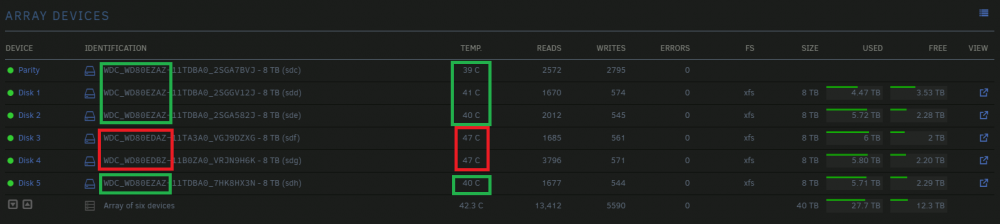
Not sure where to put that info, so there it is : newish (2021-) disks shucked from Western Digital My Book run hotter than older ones. Could be a matter of regular air Vs helium or something.
-
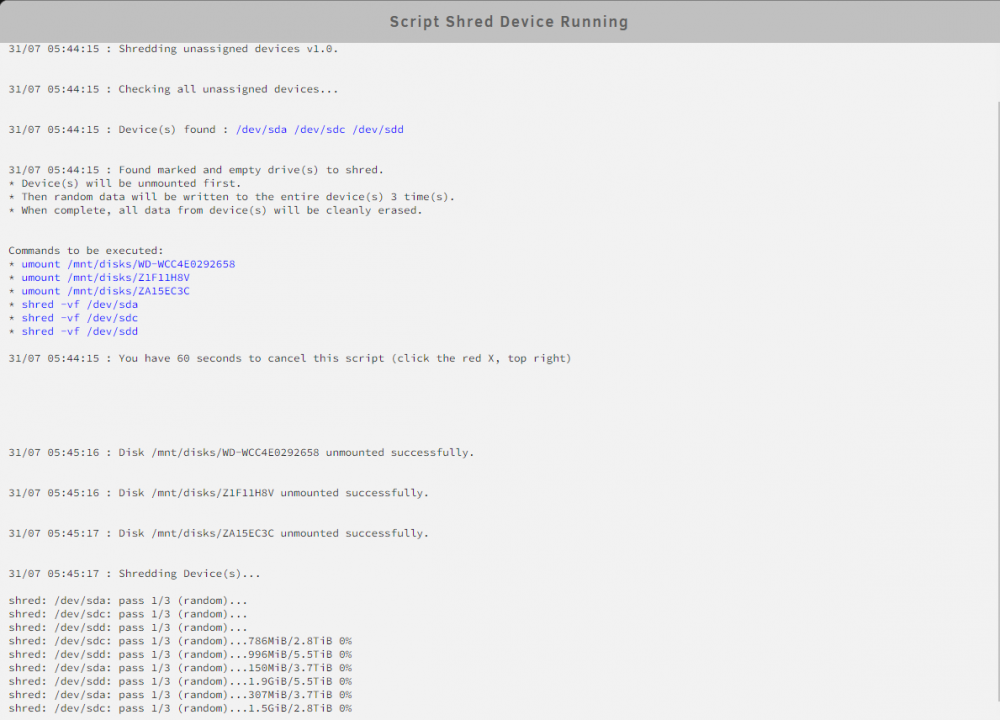
After removing devices from the array, I needed to shred any trace of previous data to sell the HDDs, so I made this. #!/bin/bash # The purpose of this script is to remove every trace of the data that was once on a device (aka data shredding), so it can be discarded or sold. Multiple devices can be shredded simultaneously (not one after another). # How the script works : # - Using the Unassigned devices plugin, format and mount (if needed) the devices you want to shred. # - If any data remains on the devices, remove it completely. # - Create a "shred-me" folder on each device you want to shred. Any other device will be ignored. # - Launch the script via the "User Scripts" plugin (preferably in background) or via CLI. # - A list of the devices correctly prepared for shredding will be displayed. # - Devices to shred will be unmounted, and won't be remounted after shredding. # - Shredding will then start on all relevant devices simultaneously. Progression will be visible in real time for each device. # - A notification will be sent on completion, using Unraid notification system. # # Version 1.0 - This is a script by user Majyk Oyster on forums.unraid.net. Some elements of RobJ's Clear An unRaid Data Drive were used. ############# # Functions # ############# funDisplay () { echo -e "\n`date +%d/%m" "%T` : $1\n" logger -t$tag "$2" } funMail() { /usr/local/emhttp/webGui/scripts/notify -i normal -s "$1" -d "$2" } ############# # Variables # ############# # Sets the number of passes. 3 is standard, you can increase the value for even safer data removal. passes=3 scriptVersion="1.0" marker="shred-me" tag="shred_unassigned_device" started=0 found=0 wait=60 scriptDir=$(dirname "$0") userscriptstDir="/tmp/user.scripts" # Colors management if [[ "$scriptDir" == "$userscriptstDir"* ]]; then # running from User.Scripts GUI. Sets html colors. colorStart="<font color=blue>" colorFinish="</font>" else # running from CLI. Sets shell colors colorStart="\x1b[36;01m" colorFinish="\x1b[39;49;00m" fi ########## # Checks # ########## funDisplay "Shredder v$scriptVersion." funDisplay "The purpose of this script is to remove every trace of the data that was once on a device (aka data shredding), so it can be discarded or sold. Multiple devices can be shredded simultaneously." # checks if a disk is ready for shredding disks=`ls -d /mnt/disks/* 2> /dev/null` devicesToShred="" funDisplay "Checking all unassigned devices..." for disk in $disks; do itemsList=`ls -A $disk 2> /dev/null` itemsNumber=`echo "$itemsList" | wc -l` # test for marker and emptiness if [ $itemsNumber -eq 1 -a "$itemsList" == "$marker" ]; then itemsSize=`du -s $disk | awk '{print $1}'` if [ $itemsSize -eq 0 ]; then disksToShred="$disksToShred $disk" device=`df | grep "$disk" | awk '{print $1}' | sed 's/.$//'` devicesToShred="$devicesToShred $device" ((found++)) fi fi done # No drive or multiple drives found to clear if [ $found -eq 0 ] || [ -z "${devicesToShred// }" ]; then funDisplay "Did not find an empty drive ready and marked for shredding. To use this script, the drive must be completely empty first, no files or folders left on it. Then a single folder should be created on it with the name 'shred-me', exactly 8 characters, 7 lowercase and 1 hyphen. This script is only for safely removing all data from unassigned devices, typically after removing them from the array." exit else funDisplay "Device(s) found : $colorStart $devicesToShred $colorFinish" fi ############ # Warnings # ############ funDisplay "Found marked and empty drive(s) to shred. \t* Device(s) will be unmounted first. \t* Then random data will be written to the entire device(s) $passes time(s). \t* When complete, all data from device(s) will be cleanly erased." echo -e "\n Commands to be executed:" for diskToShred in $disksToShred; do echo -e "\t* $colorStart umount $diskToShred $colorFinish" done for deviceToShred in $devicesToShred; do echo -e "\t* $colorStart shred -vf $deviceToShred $colorFinish" done if [[ "$scriptDir" == "$userscriptstDir"* ]]; then # running in User.Scripts funDisplay "You have $wait seconds to cancel this script (click the red X, top right)\n" sleep $wait else #running from CLI funDisplay "Press ! to proceed. Any other key aborts, with no changes made. " ch="" read -n 1 ch echo -e -n "\r \r" if [ "$ch" != "!" ]; then exit fi fi ############# # Preparing # ############# funDisplay "Unmounting device(s)... \r" for diskToShred in $disksToShred; do if `umount $diskToShred`; then # unmount success funDisplay "Disk $diskToShred unmounted successfully." else # unmount failure funDisplay "Disk $diskToShred unmount failed. Exiting." exit fi done ############# # Shredding # ############# funDisplay "Shredding Device(s)..." startTime="`date +%c`" if [ ! -z `cat $userscriptstDir/tmpScripts/*/log.txt 2> /dev/null | grep "Shredding unassigned devices"`]; then logFile="ls $userscriptstDir/tmpScripts/*/log.txt" else logFile="/tmp/shredLog.txt" touch $logFile fi for deviceToShred in $devicesToShred; do shred -vf $deviceToShred | tee -a $logFile & done wait endTime="`date +%c`" ######## # Done # ######## funDisplay "Shredding is complete" funDisplay "Started @ $startTime\nFinished @ $endTime" funDisplay "Unless errors appeared, the device(s) is/are now shredded!" funMail "Shredding complete on device(s) $devicesToShred." "Shredding complete on following device(s): $devicesToShred Started @ $startTime Finished @ $endTime " Your devices to shred should look something like that before using the script (formated, mounted) : Here's how the script looks like in User Scripts :

-
Check my post above, I think it might help.
-
Hi there. I needed to use RobJ's "Clear An unRaid Data Drive" script, and noticed it wasn't compatible with Unraid 6.10 (version verification checked only 1 digit). So I dived into the script and found a few things I could update or do differently. Since RobJ doesn't seem to be around anymore, I took the liberty to rewrite most of it. Change log : Version check adapted for Unraid 6.10 and up. Check if unmount successful before clearing. Send mail notification when clearing finished. Script adapted for more then 9 drives. Dead code removed. Code simplified and optimized. Ambiguous variables renamed. Progression of the dd command sent to the GUI log Error message more explicit if more than 1 drive is prepared for clearing. #!/bin/bash # A script to clear an unRAID array drive. It first checks the drive is completely empty, # except for a marker indicating that the user desires to clear the drive. The marker is # that the drive is completely empty except for a single folder named 'clear-me'. # # Array must be started, and drive mounted. There's no other way to verify it's empty. # Without knowing which file system it's formatted with, I can't mount it. # # Quick way to prep drive: format with ReiserFS, then add 'clear-me' folder. # # 1.0first draft # 1.1add logging, improve comments # 1.2adapt for User.Scripts, extend wait to 60 seconds # 1.3add progress display; confirm by key (no wait) if standalone; fix logger # 1.4only add progress display if unRAID version >= 6.2 # 2.0 - This is an update/fork of RobJ script by user Majyk Oyster on forums.unraid.net. #Change log : #Version check adapted for Unraid 6.10 and up. #Check if unmount successful before clearing. #Send mail notification when clearing finished. #Script adapted for more then 9 drives. #Dead code removed. #Code simplified and optimized. #Ambiguous variables renamed. #Progression of the dd command sent to the GUI log # 2.1 - Fix to clear the found disk ############# # Functions # ############# funDisplay () { echo -e "\n`date +%d/%m" "%T` : $1\n" logger -t$tag "$2" } funMail() { /usr/local/emhttp/webGui/scripts/notify -i normal -s "$1" -d "$2" } ############# # Variables # ############# scriptVersion="2.0" marker="clear-me" tag="clear_array_drive" started=0 ddArg="" #used for dd command found=0 wait=60 scriptDir=$(dirname "$0") userscriptstDir="/tmp/user.scripts" # Colors management if [[ "$scriptDir" == "$userscriptstDir"* ]]; then # running from User.Scripts GUI. Sets html colors. colorStart="<font color=blue>" colorFinish="</font>" else # running from CLI. Sets shell colors colorStart="\x1b[36;01m" colorFinish="\x1b[39;49;00m" fi ########## # Checks # ########## funDisplay "Clear an unRAID array data drive v$scriptVersion." # check unRAID version unraidVersion=`cat /etc/unraid-version | cut -d '"' -f 2` majorVersion=`echo $unraidVersion | cut -d "." -f 1` minorVersion=`echo $unraidVersion | cut -d "." -f 2` if [ $majorVersion -eq 6 -a $minorVersion -ge 2 ]; then ddArg="status=progress" else funDisplay "This script was not validated for this version of Unraid ($majorVersion.$minorVersion.x)." if [[ "$scriptDir" == "$userscriptstDir"* ]]; then # running in User.Scripts funDisplay "You have $wait seconds to cancel this script (click the red X, top right)\n" sleep $wait else #running from CLI echo "Press ! to proceed. Any other key aborts, with no changes made. " ch="" read -n 1 ch echo -e -n "\r \r" if [ "$ch" != "!" ]; then exit fi fi fi # checks if array is started disks=`ls -d /mnt/* | grep disk | grep -v disks` drivesNumber=`echo "$disks" | wc -l` if [ $drivesNumber == 0 ]; then funDisplay "ERROR: Array must be started before using this script. Exiting." exit fi # checks if a disk is ready for clearing funDisplay "Checking all array data drives (may need to spin them up)..." for disk in $disks; do itemsList=`ls -A $disk 2> /dev/null` itemsNumber=`echo "$itemsList" | wc -l` # test for marker and emptiness if [ $itemsNumber -eq 1 -a "$itemsList" == "$marker" ]; then itemsSize=`du -s $disk | awk '{print $1}'` if [ $itemsSize -eq 0 ]; then foundDisk=$disk ((found++)) fi fi done # No drive or multiple drives found to clear if [ $found -eq 0 ]; then funDisplay "Checked $drivesNumber drives, did not find an empty drive ready and marked for clearing! To use this script, the drive must be completely empty first, no files or folders left on it. Then a single folder should be created on it with the name 'clear-me', exactly 8 characters, 7 lowercase and 1 hyphen. This script is only for clearing unRAID data drives, in preparation for removing them from the array. It does not add a Preclear signature." exit elif [ $found -ge 2 ]; then funDisplay "Checked $drivesNumber drives, found multiple empty drives ready and marked for clearing! To use this script, the drive must be completely empty first, no files or folders left on it. Then a single folder should be created on it with the name 'clear-me', exactly 8 characters, 7 lowercase and 1 hyphen. This script is only for clearing unRAID data drives, in preparation for removing them from the array. It does not add a Preclear signature." exit else disk=$foundDisk deviceNumber=`echo $disk | cut -d "/" -f 3 | cut -c 5- ` device="/dev/md$deviceNumber" funDisplay "Device found : $colorStart $device $colorFinish" fi ############ # Warnings # ############ # First, warn about the clearing, and give them a chance to abort funDisplay "Found a marked and empty drive to clear: $colorStart Disk $deviceNumber $colorFinish ( $device ) * Disk $disk will be unmounted first. * Then zeroes will be written to the entire drive. * Parity will be preserved throughout. * Clearing while updating Parity takes a VERY long time! * The progress of the clearing will not be visible until it's done! * When complete, Disk $disk will be ready for removal from array. * Commands to be executed: \t* $colorStart umount $disk $colorFinish \t* $colorStart dd bs=1M if=/dev/zero of=$device $ddArg $colorFinish" if [[ "$scriptDir" == "$userscriptstDir"* ]]; then # running in User.Scripts funDisplay "You have $wait seconds to cancel this script (click the red X, top right)\n" sleep $wait else #running from CLI funDisplay "Press ! to proceed. Any other key aborts, with no changes made. " ch="" read -n 1 ch echo -e -n "\r \r" if [ "$ch" != "!" ]; then exit fi fi ############# # Preparing # ############# funDisplay "Unmounting $disk ... \r" funDisplay "Unmounting Disk $disk (command: umount $disk ) ..." if `umount $disk`; then # unmount success funDisplay "Disk $disk unmounted successfully." else # unmount failure funDisplay "Disk $disk unmount failed. Exiting." exit fi ############ # Clearing # ############ funDisplay "Clearing Disk $disk (command: dd bs=1M if=/dev/zero of=$device $ddArg ) ..." startTime="`date +%c`" if [ ! -z `cat $userscriptstDir/tmpScripts/*/log.txt 2> /dev/null | grep "Clear an unRAID array data drive"`]; then logFile="ls $userscriptstDir/tmpScripts/*/log.txt" dd bs=1M if=/dev/zero of=$device $ddArg >> $logFile else dd bs=1M if=/dev/zero of=$device $ddArg fi endTime="`date +%c`" ######## # Done # ######## funDisplay "Clearing Disk $disk is complete" funDisplay "Started @ $startTime\nFinished @ $endTime" echo -e "A message saying \"error writing ... no space left\" is expected, NOT an error. Unless errors appeared, the drive is now cleared! Because the drive is now unmountable, the array should be stopped, and the drive removed (or reformatted)." funMail "Clearing complete on $device." "Clearing complete on $device.\nStarted @ $startTime\nFinished @ $endTime"
-
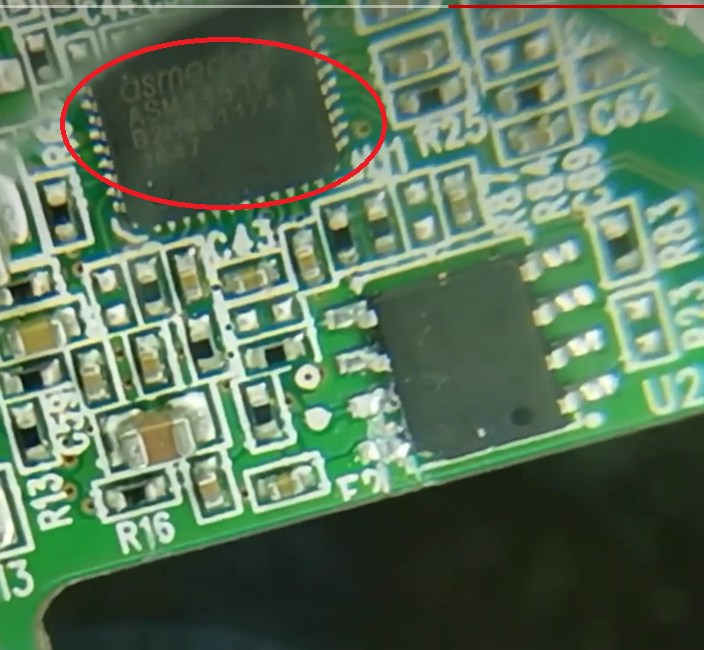
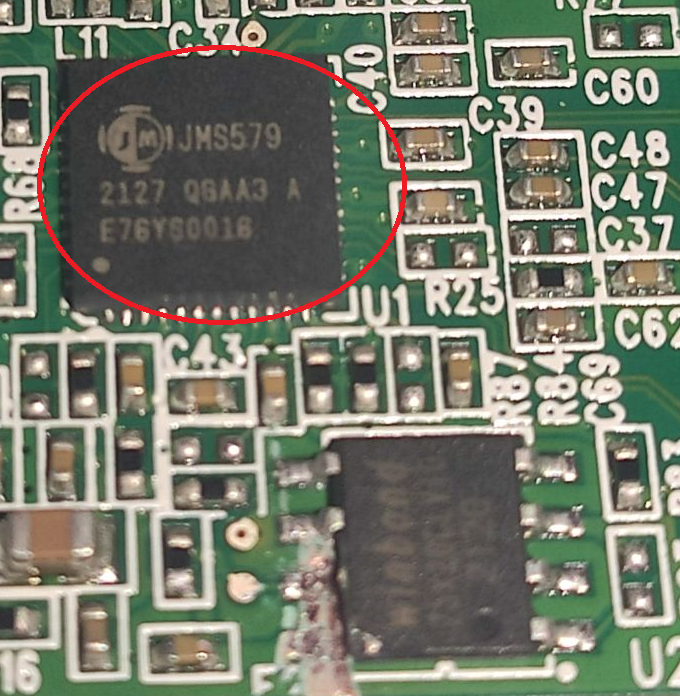
tl;dr : If you entend to reuse a WD My Book enclosure that's less than 2 year old (approximatively), maybe don't do it. I've looked around for the info, but couldn't find it, so I'll share. I've shucked several WD My Book hard drives in the past, and found it useful to reuse a couple of the enclosures with older WD HDs or other brands. The trick, because WD had the brilliant idea to put a hardware lock, is it break 2 pins on a Winbond chip. So today I got 2 new 8TB My Book, and thought I'd do it again to house a 4TB HD. Not only did it now work, but the enclosure doesn't work anymore. As far as I know, here's the info I got to tell the old and new versions appart : Functioning enclosures after the mod were all "WDC_WD80EZAZ-11TDBA0". They use an Asmedia controller. The new, non reusable, enclosures are "WDC_WD80EDBZ-11B0ZA0". They use a JMS579 controller.