





Damix21
Members
-
Joined
-
Last visited
-
I have the same problem (in Sonarr too, I upgraded to Sonarr-v3 and the problem is gone). Maybe it is the same problem:
-
binhex-radarr support v3?
-
I tried a different server and works
-
Yes, with VPN enabled is not possible to access the GUI. When set 'no' to 'VPN_ENABLED' the GUI works.
-
You're right, thank you so much!
-
Hi. I've some trouble with this docker. When I start or stop a VM home assistant don't detect the new status of the VM until I restart Unraid-API docker.
-
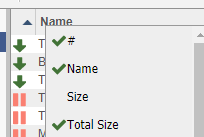
Hi, in the WebUI of qBittorrent the priority field is selected but is not shown. With the developer tools the table head of priority is set to invisible. <th title="#" style="width: 30px;" class="column_priority invisible">#</th>

-
Hi, today I try to add hosts by adding line to local.list but when I restarted the container the changes reset. How can I solve?
-
Thank you! I'll try
-
Thank you atom-diagnostics-20200315-2056.zip
-
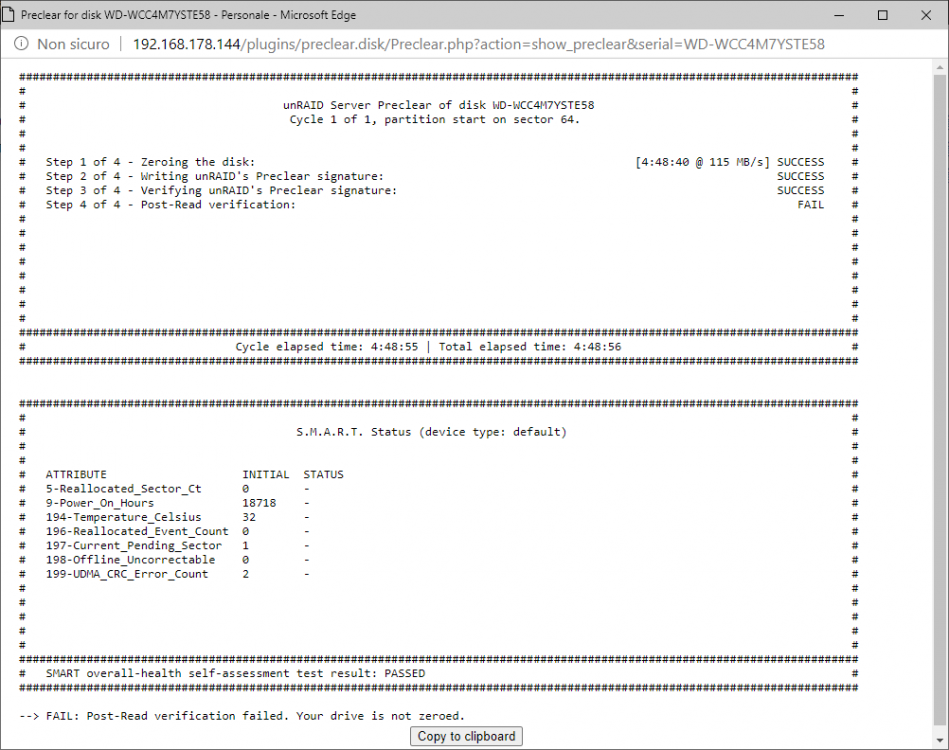
Hi, new problem for me After the Zeroing the Post-Read verification failed because "Your drive is not zeroed". I'm already try 2 times (one with the pre-read, same error)
-
-
Maybe it is that. Thank you so much
-
I don't know why but I restarted 2-3 times the server, reinstall the plugin and now work. Thank you for the help
-
No luck, not work
