





helpermonkey
Members
-
Joined
Everything posted by helpermonkey
-
thank you so much - I use the general tab under the server to turn on debug and then use the troubleshooter to download all logs in that zip - which ones should i be looking at/providing? and how do i "clean" the logs? sorry for the noobish questions.
-
I've got several recently added movies won't play in Plex regardless of the client (Nvidia Shield, Windows app, browser). Files play fine in VLC, confirming they're not corrupted. The problem only affects recent additions to my Movies and Documentaries libraries—both of which are film libraries. I have been unable to recreate the issue with any files that have been in my library for longer than a few weeks. Behavior: Shield: Button press sound, nothing happens Browser: "An error occurred loading items to play." Affected files seem random—no consistent pattern Here are my most recent films: Gaslight (new) - plays fine One Battle After Another (new) - won't play Frankenstein (new) - won't play One Flew Over the Cuckoo's Nest (upgrade) - won't play Docs library: Going Postal (new) - plays fine Generation Wealth (new) - won't play Come See Me in the Good Light (new) - won't play Orwell: A Final Warning (new) - played successfully yesterday, won't play now In Waves & War (new) - plays fine Troubleshooting attempted: Restarted Plex container Changed the host path for the /transcode directory to /dev/shm Rebooted Unraid server Performed "Plex dance" Downloaded lower resolution version (still won't play) Checked for updates Environment: Plex Version: 1.42.2.10156 Platform: Unraid (Docker) Log file: https://pastebin.com/aQKLDNsk Suspect corrupted database. How do I fix this? I looked into https://support.plex.tv/articles/repair-a-corrupted-database/ but I don't see plex sql in the install directory so it doesn't work in terminal - so not sure what to do about that.
-
great thanks for the clarity - much appreciated.
-
Thanks for the advice. I will look into GluetunVPN docker - but just to make sure, are you saying i should run that and hotio's qbittorrent-vpn in conjuction or just GluetunVPN is sufficient? And will this require me to do any modifications to nginx?
-
I'm setting up torrenting on my Unraid server and wanted to sanity check my approach. I just want to protect my torrenting traffic — nothing more, nothing less. Background: I have Unraid box with CloudflareDNS and Nginx Proxy Manager already running. I'd say i have decent technical skill — I can run Docker containers, follow guides, and troubleshoot light issues. I was about to set up hotio/qbittorrent-vpn and subscribe to PIA (found a deal: 3 years for ~$2/mo) But then I noticed VPN Manager under the Unraid Network Settings, read https://docs.unraid.net/unraid-os/manual/security/vpn/ and have a couple of questions: Questions: Is VPN Manager sufficient for isolating and protecting torrent traffic, or is a VPN-based Docker container (like hotio/qbittorrent-vpn) still the better route? If VPN Manager isn't enough on its own, is there any reason not to go with hotio/qbittorrent-vpn + PIA? Is this VPN Manager a relatively new feature? It feels like it could potentially eliminate the need for VPN-wrapped containers, but I'm not sure where it shines vs. where it's limited. Bonus: I noticed WireGuard is available as a free option. Does that offer similar protection if configured right?
-
will do. thanks
-
For the past few days, my server starts producing Exit Status Errors. Unraid seems to stop working at this juncture, so while i can still ping my server on my local network, everything else goes kaput. I have a KVM hooked up to the server and when looking at it - i see a bunch of Exit Status Errors and when i'm prompted to login - it kicks back with an error: /usr/share/bash-completion/bash_completion: Input/output error. Any ideas? buddha-diagnostics-20240523-1152.zip
-
I have a slew of entries in this field in my config (i don't remember why - as i set this up years ago). Is it safe to delete all of those and just go with 1.0.0.1 and 8.8.8.8? I am happy to post all the addresses i have in that key field if that would help.
-
where do you change the DNS servers for this?
-
thanks!
-
thanks for that tip. A question about the instructions for rebuild-dndc.... https://github.com/elmerfdz/rebuild-dndc on step 2 where it talks about ... docker network create container:master_container_name do i need to change master_container_name to binhex-delugevpn?
-
just deleting them is sufficient.
-
still having this problem - is there a paid support service available? this is quite problematic.
-
just thought i'd throw this back up to the top.
-
Just a bump to see how to get this fixed.
-
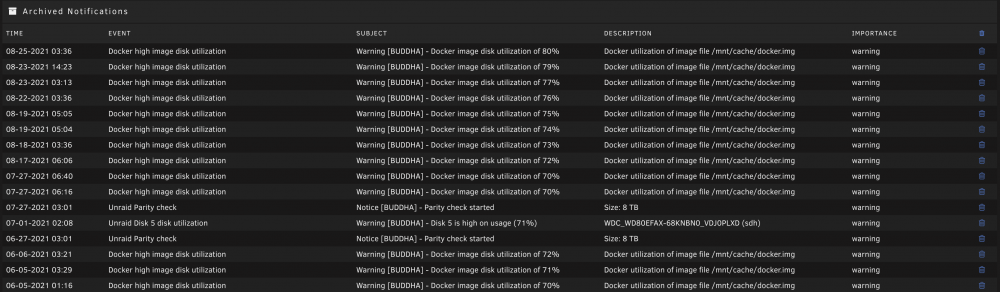
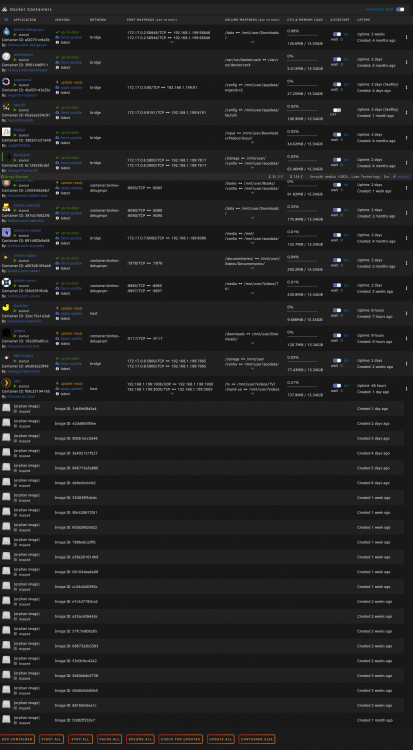
Whenever an update for one of my docker images becomes available, my unraid installtion ends up with orphan images which in turn creates high image disk utilization. The only solution I've found is to log in every few days and delete the orphan images manually. Attached are my diagnostics, as well as a notification list and my docker page. i deleted those orphan images and applied the updates after collecting the diagnostics that are attached. Is it possible this is a bug? I have mentioned this problem here in the past but we have not been able to uncover a solution. Any suggestions appreciated. buddha-diagnostics-20210825-1229.zip
-
rather than start a new thread - i thought i'd add to this one. For those that see this post here's a short summary of my situation: Whenever my server finds an update of an installed docker, i end up with an orphaned docker image. These dockers are no automatically updating. I have suggested it might be a bug but mindful that I am not technically capable of determining that. Any suggestions on things to try would be appreciated.
-
@Squidwould you happen to have any thoughts?
-
roger! thanks for all your help to this point.
-
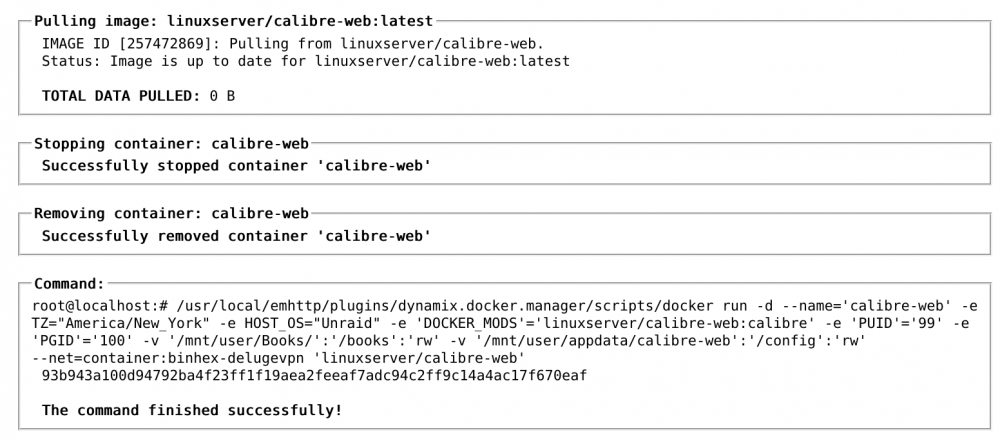
@trurl would you have any thoughts on this? was hoping some others might help take the weight of your shoulders. I left the server alone for a few days - came back today and there were 7 orphans with 5 images needing updates applied. I'm curious that the Total Data Pulled is always 0 B for any docker.... is this unrelated to the size of the file or is it because the data is downloaded ahead of time and then the update is applied so the dockder run doesn't show the download? (or something else? again out of my depth here).
-
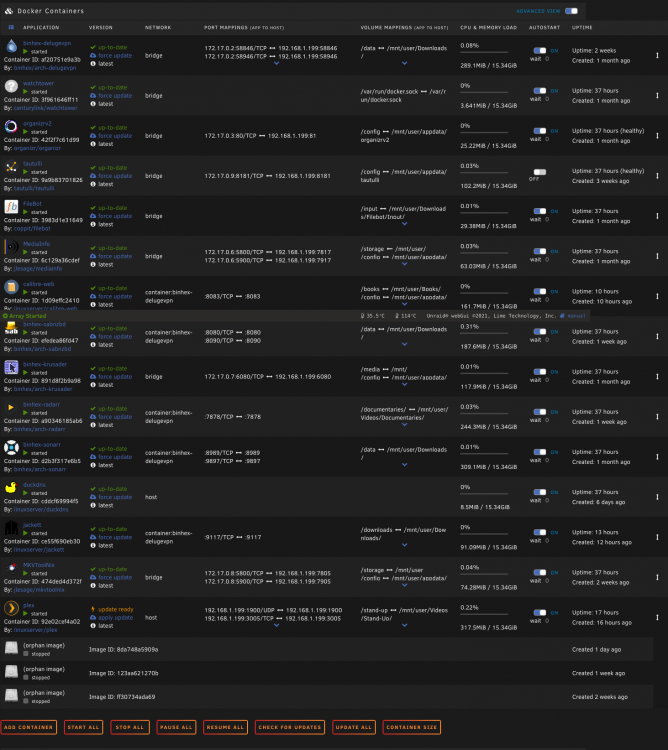
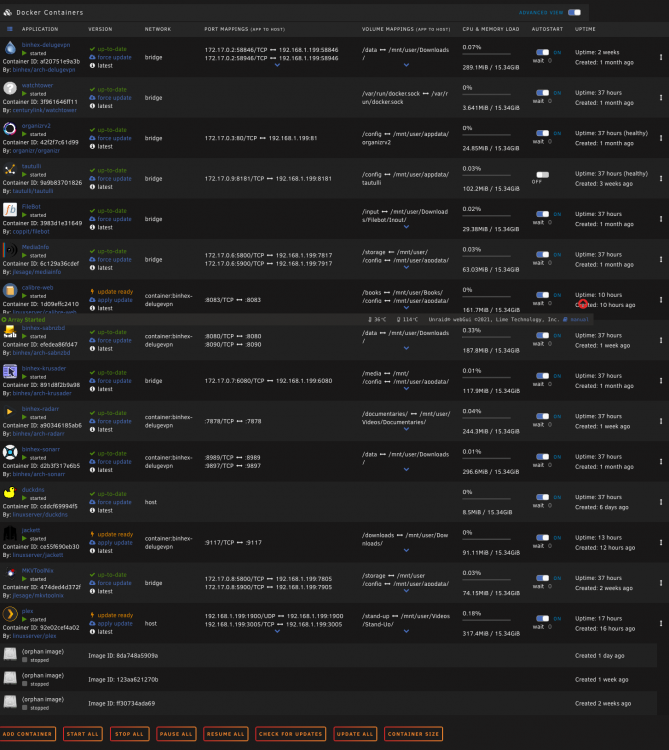
okay so when i logged in today - you will notice that i had 3 orphans and one image saying it needed to be updated: After hitting check for updates - there were indeed 3 that had updates ready. I deleted the orphan images, applied the updates and took this screen cap of the docker run for calibre web... I'm guessing it's tied to the way my containers are updating - i haven't changed any settings and have tried to show in previous posts all the configurations. Any suggestions?
-
they don't appear to be. okay so interestingly enough - i just checked - a new orphan had appeared - i ran "check for updates" and Jackett had an update ... is it normal for a docker to have an update 3 consecutive days? here's the docker run from that install.... This is really strange and i appreciate your continued help on it.

-
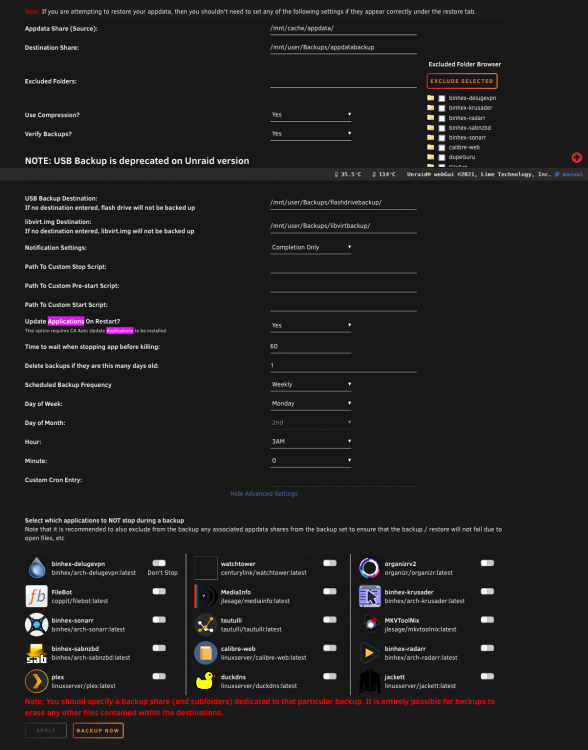
I do have that set to yes ... here are all my settings:
-
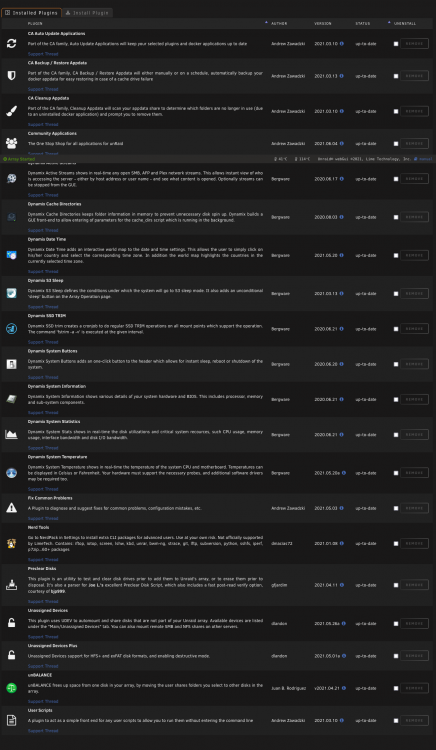
Yeah, i am all about using google and forum search to turn up stuff but if you don't know what to input - it can severely limit what i'm able to turn up. Is it possible this is tied to a plugin that is somehow checking for updates surreptitiously? Here are my plugins...
-
@trurl okay so some more information for you - i logged into my server a few minutes ago and saw that there were again 2 new orphan images. I then compared the ids to the ones from the screenshot a few back and they are indeed different (not sure if that's surprising or not). I then ran "check for updates" - and found that two of the containers needed to be updated ... so perhaps this is not a hacker and is in fact tied to some sort of "bug" in my system??? Here are the docker runs: Pulling image: linuxserver/duckdns:latest IMAGE ID [1600041090]: Pulling from linuxserver/duckdns. Status: Image is up to date for linuxserver/duckdns:latest TOTAL DATA PULLED: 0 B Stopping container: duckdns Successfully stopped container 'duckdns' Removing container: duckdns Successfully removed container 'duckdns' Command: root@localhost:# /usr/local/emhttp/plugins/dynamix.docker.manager/scripts/docker run -d --name='duckdns' --net='host' -e TZ="America/New_York" -e HOST_OS="Unraid" -e 'SUBDOMAINS'='REMOVEDBYME' -e 'TOKEN'='REMOVEDBYME' -e 'PUID'='99' -e 'PGID'='100' 'linuxserver/duckdns' cddcf69994f595a1ce33e8d26098396b65978d772d49307284c96adf864282cf The command finished successfully! and the other one was jackett which updated last night too so i don't see much having changed there 🙂



