





helpermonkey
Members
-
Joined
Everything posted by helpermonkey
-
Okay - so i left things alone for an hour - and i can get back into the deluge GUI. I still can't access the sab gui using either ipaddress:8080 or servername.local:8080
-
192.168.1.199
-
ah whoops - yes sorry that was something i tried and forgot to switch it back. FYI - i havej sut switched it back and i'm still not able to access Deluge or SAB gui.
-
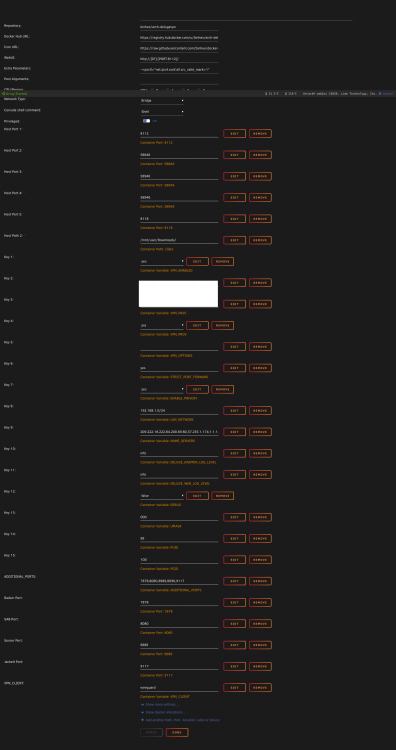
Okay - attached are screen shots of SAB & Deluge (taken before i turned debug on in deluge) as well as the log files per those instructions. supervisord.log supervisord.log
.thumb.png.5414b0d35a0a5daaeabebd482699ef0a.png)
-
I have been having all sorts of problems and need some help getting everything functional again. Here's a brief timeline of what's gone on. With the recent updates to a variety of dockers, it seems that some configuration changes were needed on my end to get my "setup" functional. Essentially - running DelugeVPN in conjunction with sonarr, radarr, jackett, and sab. With some help from folks here - i managed to work my way through https://github.com/binhex/documentation/blob/master/docker/faq/vpn.md After doing so, everything seemed to be working without trouble. Sometime later, I was unable to access the SAB GUI. Here is a log file from SAB that shows the problems i was having there. https://pastebin.com/cXiZcNwm After being advised to give the fAQ another try - I attempted to add "VPN_INPUT_PORTS" with a value of 8080 to my container. Upon applying that, the command failed - i was taken back to the list of installed dockers and the docker had disappeared. I returned my previously installed apps page - installed it again and again continued to get a command failed notice due to bindings. I restarted my server, all off my dockers are listed again and everything "seems" okay - however, I can't get into DelugeVPN GUI anymore due to the following: 2021-03-15 20:17:47,497 DEBG 'start-script' stderr output: parse error: Invalid numeric literal at line 4, column 0 2021-03-15 20:17:47,956 DEBG 'start-script' stderr output: parse error: Invalid numeric literal at line 1, column 7 2021-03-15 20:17:47,957 DEBG 'start-script' stdout output: [warn] Unable to successfully download PIA json to generate token from URL 'https://143.244.41.129/authv3/generateToken' [info] Retrying in 10 secs... Meanwhile I still cannot access SAB's GUI due to the aforementioned log file (the latest logs have the same exact errors). I can access sonarr and radarr without trouble and both seem to be functional save for sending anything to SAB. Search and such works no problemo. Any idea what's going on here?
-
okay now something new is happening - i will post over there.
-
@binhexwondering if you have any thoughts on this ... is it a bug or something else that may be unrelated to the container?
-
I cannot access the SAB GUI. I am running things through delugeVPN with PIA wireguard. here is a portion of my log file: https://pastebin.com/cXiZcNwm All of my other containers running the same way (Radarr, Sonarr, Jacket) are all up and running no problem. Someone suggested it might be a bug and i'm not sure. I am running the latest stable of all containers.
-
So i switched my endpoint to "Endpoint = ca-toronto.privacy.network:1337" and now when i try to launch SAB it won't open. Sonarr and Radarr and Deluge and such all work just fine. Here's a log from when i rebooted everything ... https://pastebin.com/cXiZcNwm any thoughts?
-
ha! tried to delete that before you saw it so as to not waste your time! found it 🙂
-
thanks i will add that extra parameter then.
-
That's great - i had it set to privelaged so i just added that. Out of curiosity - which endpoint do you use? Am I correct in that we have to use one of them listed under the port fowarding options here - https://www.privateinternetaccess.com/pages/client-support/? Thanks. I didn't have to do that though. I just followed @Hoopster's advice
-
Trying to follow the A.21 from https://github.com/binhex/documentation/blob/master/docker/faq/vpn.md and i'm having problems. I am a PIA user. Step 1 is to change the docker parameter from --cap-add=NET_ADMIN to --privileged=true. However, I don't see that NET_ADMIN parameter in place. Should I simply enter in --privileged=true i nthe Extra parameters field?
-
ever since i had to put the new system in place my downloads have been uber slow. I am using PIA and the CA-Montreal endpoint. Has anyone else experience very slow DL speeds with something like this? Is there a solution? Is there another PIA endpoint that people would suggest - i live in the eastern US if that makes a difference. In addition, the docker seems to only stay up for 12-20 hours at a time. i've noticed since the change that the other dockers that are pointed to it (sab,radarr,sonarr,jackett) that they end up having to rebuild as well - which makes sense b/c if the vpn is restarted they too need to restart.
-
oh - whoops - i didnt realize someone else had joined in. i thought you were talking to me ;-). I'm all good now back up and running - thanks for your help.
-
Are you sure? After i restarted - the first thing i did was launch plex. I got an error so i logged in - went to the dockers page - saw the dockers were turned off. I went to the settings to turn it back on and wasn't able to do it. I went to the main page and saw the cache drive was listed in the correct place but with the Unmountable error message. So if it wasn't wiped - what exactly happened where my server was working fine - i hit upgrade - then restart - and it was no longer functioning properly.
-
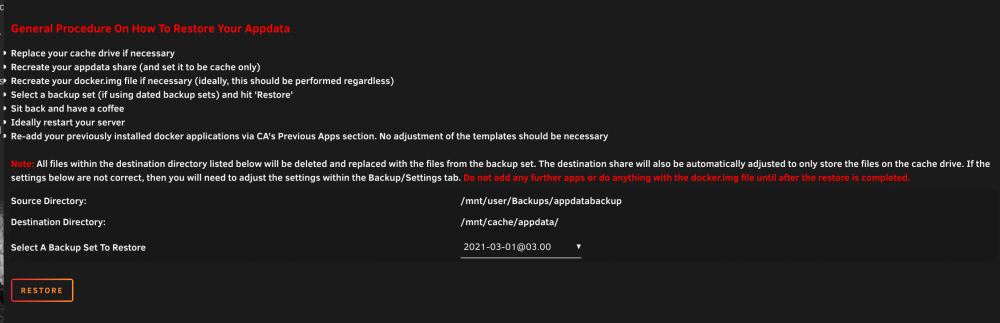
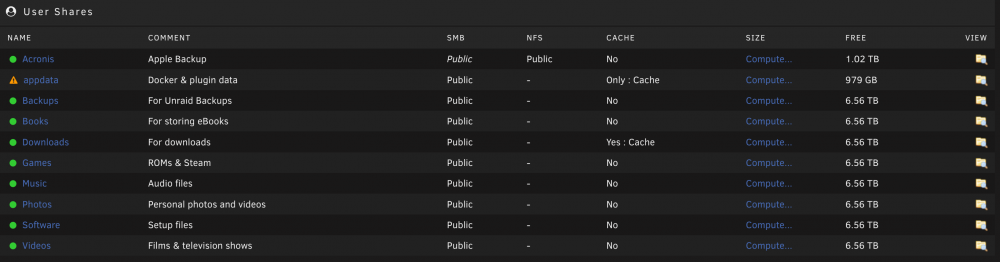
Okay so i've formatted the drive and i see the docker.img file on the cache drive ... can i just hit restore here? here are my shares as well.
-
Okay - good to learn- so what would have happened to cause the files to be deleted as after the "upgrade" it says to reboot to take effect - i always considered those part of the "upgrade".
-
interesting - so before the upgrade - everything worked and was fine - after the upgrade - the filesystem was gone. If i can provide anything that might help the devs team let me know. Nothing else was done other than the upgrade.
-
so i'm slightly curious as to how the upgrade deleted the filesystem but that being said - what's the best way to do that given that the device is showing as unmountable?
-
good question - not really - i just can't ever remember having set it up like that .... while this drive is technically on the newer side of things - i upgraded from the previous one which i setup years ago and honestly don't ever remember BTRFS - but it's not like i was looking keenly at that and the mind is a mysterious thing. See attached 🙂 buddha-diagnostics-20210303-1030.zip
-
yeah - i didn't have it set as BTRFS .... so since i've never restored like this - what's the best guide to follow?
-
i figured that would be the case - thanks for confirming. Standing by for next steps.
-
here ya go buddha-diagnostics-20210303-0950.zip
-
I first noticed the problem because docker wasn't started - i then couldn't turn it on and finally I arrived at my main page and the cache drive won't mount. i have tried to check the disk filesystems but the array needs to be started. when the array is up (in or out of maintenance mode), none of the options are available to me. Here some of my log from my cache drive: Mar 2 10:49:52 Buddha kernel: ata3: SATA max UDMA/133 abar m2048@0xf7e3a000 port 0xf7e3a200 irq 27 Mar 2 10:49:52 Buddha kernel: ata3: SATA link up 6.0 Gbps (SStatus 133 SControl 300) Mar 2 10:49:52 Buddha kernel: ata3.00: supports DRM functions and may not be fully accessible Mar 2 10:49:52 Buddha kernel: ata3.00: ATA-11: Samsung SSD 860 EVO 1TB, S5B3NMFNA09237W, RVT04B6Q, max UDMA/133 Mar 2 10:49:52 Buddha kernel: ata3.00: 1953525168 sectors, multi 1: LBA48 NCQ (depth 32), AA Mar 2 10:49:52 Buddha kernel: ata3.00: supports DRM functions and may not be fully accessible Mar 2 10:49:52 Buddha kernel: ata3.00: configured for UDMA/133 Mar 2 10:49:52 Buddha kernel: ata3.00: Enabling discard_zeroes_data Mar 2 10:49:52 Buddha kernel: sd 3:0:0:0: [sde] 1953525168 512-byte logical blocks: (1.00 TB/932 GiB) Mar 2 10:49:52 Buddha kernel: sd 3:0:0:0: [sde] Write Protect is off Mar 2 10:49:52 Buddha kernel: sd 3:0:0:0: [sde] Mode Sense: 00 3a 00 00 Mar 2 10:49:52 Buddha kernel: sd 3:0:0:0: [sde] Write cache: enabled, read cache: enabled, doesn't support DPO or FUA Mar 2 10:49:52 Buddha kernel: sde: sde1 Mar 2 10:49:52 Buddha kernel: ata3.00: Enabling discard_zeroes_data Mar 2 10:49:52 Buddha kernel: sd 3:0:0:0: [sde] Attached SCSI disk Mar 2 10:50:22 Buddha emhttpd: Samsung_SSD_860_EVO_1TB_S5B3NMFNA09237W (sde) 512 1953525168 Mar 2 10:50:22 Buddha emhttpd: import 30 cache device: (sde) Samsung_SSD_860_EVO_1TB_S5B3NMFNA09237W Mar 2 10:50:22 Buddha emhttpd: read SMART /dev/sde Mar 2 10:50:29 Buddha emhttpd: shcmd (67): mount -t btrfs -o noatime,space_cache=v2 /dev/sde1 /mnt/cache Mar 2 10:50:29 Buddha root: mount: /mnt/cache: wrong fs type, bad option, bad superblock on /dev/sde1, missing codepage or helper program, or other error. Mar 2 12:57:31 Buddha emhttpd: read SMART /dev/sde Mar 2 12:59:37 Buddha emhttpd: read SMART /dev/sde Mar 2 13:00:05 Buddha emhttpd: shcmd (507): mount -t btrfs -o noatime,space_cache=v2 /dev/sde1 /mnt/cache Mar 2 13:00:05 Buddha root: mount: /mnt/cache: wrong fs type, bad option, bad superblock on /dev/sde1, missing codepage or helper program, or other error. Mar 2 13:00:30 Buddha emhttpd: read SMART /dev/sde Mar 2 13:00:51 Buddha ool www[2874]: /usr/local/emhttp/plugins/dynamix/scripts/btrfs_check 'start' '/dev/sde1' 'Samsung_SSD_860_EVO_1TB_S5B3NMFNA09237W' '--readonly' Mar 2 13:02:02 Buddha emhttpd: read SMART /dev/sde Mar 2 13:02:50 Buddha emhttpd: shcmd (705): mount -t btrfs -o noatime,space_cache=v2 /dev/sde1 /mnt/cache Mar 2 13:02:50 Buddha root: mount: /mnt/cache: wrong fs type, bad option, bad superblock on /dev/sde1, missing codepage or helper program, or other error. When I unassign the drive - i am unable to hit mount (but it still appears in the pool drop down). I do have a backup but wondering if i just preclear the drive and start over again - will Unraid rebuild that drive like it does data drives?

.png.b4b757e5bbc916a7749a32ffbd9f957a.png)

