





cambriancatalyst
Members
-
Joined
-
Last visited
Everything posted by cambriancatalyst
-
It’s a less than year old M1 mac mini. It’s the fastest machine I own other than maybe my server. Its strange because this just started pretty randomly, everything worked fine on the same machine using the same browser for like 10+ months. Maybe Apple changed something behind the scenes with tab groups or something else. Anywho, I appreciate your response. Lmk if there’s any way I can help and enjoy your iMac!
-
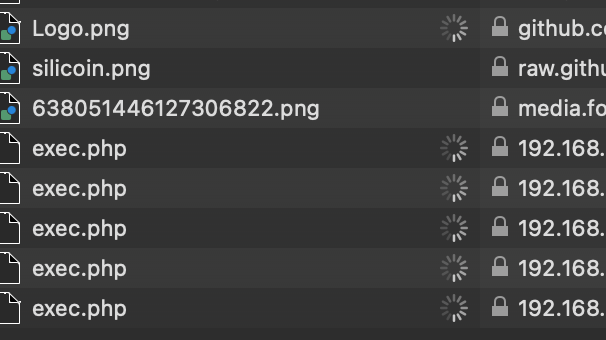
Hey there, still experiencing this behavior. Is there any info I can provide to help replicate or troubleshoot? Seems to be hanging on the exec.php but that's all I know thus far
-
Hi, yes. Firefox works just fine. Interesting... I guess this is a bug in safari. I apologize, should've checked that first. Bummer that I can't use safari but I'll live. Thanks again!
-
When the app tab freezes I get the following prompt from safari: "This webpage and one other page are not responding, so loading cannot be stopped. Do you want to force reload this page and "/usr/local/emhttp/webGui/scripts/run_cmd tail -f -n 90 /var/log/syslog (Tower):?"
-
I noticed that if I reboot and go directly to the App tab it works fine. It starts exhibiting the same behavior after I've checked for docker updates. Does this information help with troubleshooting?
-
Hi, I was waiting for parity check to complete. I just rebooted in safe mode and I am being prompted to install community applications when I navigate to my App tab. All other dockers are running normally. Does this mean my installation is corrupted in some way?
-
Apologies, I forgot my computer unzips on its own and that you required a zip. Please see attached and thank you tower-diagnostics-20230402-0054.zip
-
Hi all, I am experiencing some weird docker behavior. When I update all, I get stuck in loop that doesn't resolve unless I reboot the page. Also, when I load the App tab it stalls for about a minute and my browser forces me to refresh the screen. I've also recently been getting the app page displayed in upside down while this is happening. Any help is greatly appreciated. Please let me know if I can provide any more details to help troubleshoot this issue. Thank you domain.cfg flash.cfg cache_nvme.cfg vms_nvme.cfg docker.cfg rsyslog.conf vfio-pci-old2.cfg super.dat rsyslog.cfg ident.cfg share.cfg vfio-pci-old.cfg network.cfg go.txt disk.cfg vfio-pci.cfg smart-one.cfg pny_USB_2.0_FD_0060E04DEF39AC9182CF0C03-0-0-20230402-0054 flash (sda).txt eui.0025385301405020-20230402-0054 cache_nvme (nvme1).txt Samsung_980_PRO_with_Heatsink_2TB_S6WRNS0RB23813J-20230402-0054 vms_nvme (nvme0).txt eui.002538bb1142d95b-20230402-0054 vms_nvme (nvme0).txt WDC_WD140EDFZ-11A0VA0_9LG76RKA-20230402-0054 disk1 (sdc).txt WDC_WD140EDGZ-11B1PA0_9LJTJKWG-20230402-0054 disk2 (sdd).txt Samsung_SSD_970_EVO_Plus_500GB_S58SNJ0N311921W-20230402-0054 cache_nvme (nvme1).txt WDC_WD140EDFZ-11A0VA0_9MG7R7NJ-20230402-0054 parity (sdb).txt Windows 10.xml cmdline.txt btrfs-usage.txt nvidia-smi.txt drm.txt unraid-api.txt plugins.txt motherboard.txt iommu_groups.txt ethtool.txt folders.txt lsmod.txt lsscsi.txt thirdparty_packages.txt loads.txt memory.txt lspci.txt meminfo.txt lsusb.txt urls.txt top.txt ps.txt vars.txt lscpu.txt lsof.txt df.txt ifconfig.txt dhcplog.txt libvirt.txt docker.txt vfio-pci.txt syslog.txt Windows 10.txt unraid-6.11.5.txt appdata.cfg s-------g.cfg domains.cfg w-----------2.cfg t----------2.cfg b-----s.cfg d-------i.cfg isos.cfg p-----s.cfg c--e.cfg p-------s.cfg h-----t.cfg d-------y.cfg l------e.cfg t---------e.cfg system.cfg w----------k.cfg b---s.cfg s-----s.cfg d--a.cfg shareDisks.txt d-------s.cfg t---s.cfg s------d.cfg e--y.cfg n-------d.cfg t-------e.cfg t--p.cfg l--s.cfg t-----r.cfg
-
I have set all prefer cache shares to yes to temporarily move files to my array while I upgrade my cache pool drives. I have disabled docker and vm manager as well as enabled mover logging. It seems like nothing happens when I select move after applying these settings. I have attached the diagnostic folder. Any help is appreciated domain.cfg flash.cfg cache.cfg docker.cfg rsyslog.conf vfio-pci-old2.cfg super.dat rsyslog.cfg ident.cfg share.cfg vfio-pci-old.cfg network.cfg go.txt disk.cfg vfio-pci.cfg smart-one.cfg WDC_WD140EDFZ-11A0VA0_9LG76RKA-20221107-1927 disk1 (sdc).txt Samsung_SSD_970_EVO_Plus_500GB_S58SNJ0N311921W-20221107-1927 cache2 (nvme1).txt WDC_WD140EDFZ-11A0VA0_9MG7R7NJ-20221107-1927 parity (sdb).txt WDC_WD140EDGZ-11B1PA0_9LJTJKWG-20221107-1927 disk2 (sdd).txt Samsung_SSD_970_EVO_Plus_500GB_S58SNJ0N311484W-20221107-1927 cache (nvme0).txt eui.0025385301405020-20221107-1927 cache2 (nvme1).txt eui.0025385301404e6b-20221107-1927 cache (nvme0).txt pny_USB_2.0_FD_0060E04DEF39AC9182CF0C03-0-0-20221107-1927 flash (sda).txt cmdline.txt btrfs-usage.txt nvidia-smi.txt drm.txt unraid-api.txt plugins.txt motherboard.txt iommu_groups.txt ethtool.txt folders.txt lsmod.txt lsscsi.txt thirdparty_packages.txt loads.txt memory.txt lspci.txt meminfo.txt lsusb.txt urls.txt top.txt ps.txt vars.txt lscpu.txt lsof.txt df.txt ifconfig.txt dhcplog.txt libvirt.txt docker.txt vfio-pci.txt syslog.txt appdata.cfg s-------g.cfg domains.cfg w-----------2.cfg t----------2.cfg b-----s.cfg d-------i.cfg isos.cfg p-----s.cfg c--e.cfg p-------s.cfg d-------y.cfg l------e.cfg t---------e.cfg system.cfg w----------k.cfg b---s.cfg s-----s.cfg d--a.cfg d-------s.cfg t---s.cfg s------d.cfg e--y.cfg n-------d.cfg t-------e.cfg t--p.cfg l--s.cfg t-----r.cfg unraid-6.11.1.txt
-
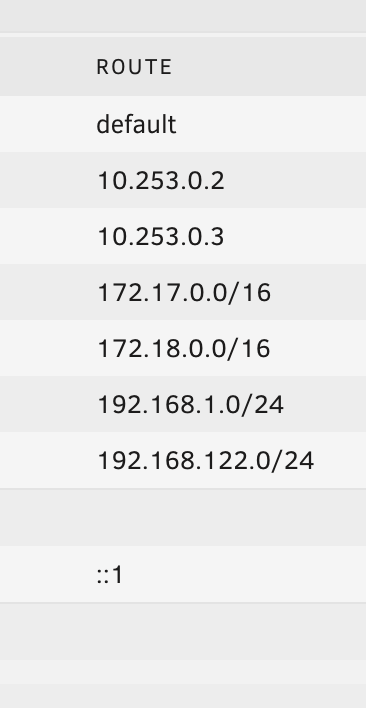
Apologies, I click the "Add Route" button after inputting the 3 required parameters but no new record is added to the table above, hence my assumption that nothing is happening and the changes are not being implemented. EDIT: To go into further detail, I have created a IOT VLAN with the following subnet: 192.168.20.0/24 I also created a port trunk on the port feeding my tower so the primary is my LAN with IOT as the secondary. When I navigate to network settings on unraid to add this vlan I input the following: I have also tried using different gateway and metric values (br20 and 1, respectively) for a total combination of 4 different attempts but each time I click add route the above table remains unchanged: This is my first time altering network settings so any help is appreciated. Thank you


-
Hi all, I'm trying to add my homebridge container to my iot vlan (set up with unifi) and have trunked my tower's switch port to accept both my regular LAN and my iot vlan. When I navigate to network settings in Unraid and attempt to add the new route for my vlan through the GUI nothing happens. What am I missing? Thanks
-
Thanks so much for this. I got greedy and attempted to run the Software Update to go from 1.4 to 1.5.3 and now I'm receiving an internal server error even after completely wiping the container/image and reinstalling. Any idea why this may be happening? I've provided the log output and a screenshot of the error message below. Any help is greatly appreciated and thank you again for creating this!

-
Started randomly getting this message out of the blue when I refresh the GUI instance from laptop device. Everything seems to be working correctly but the message recurs each time I refresh the dashboard. Any help troubleshooting is appreciated. Thank you tower-diagnostics-20201014-0431.zip


