





IT_Feldman
Members
-
Joined
-
Last visited
Everything posted by IT_Feldman
-
I thought I had responded to this sooner, but I guess I forgot. The links above helped me resolve my issue. It seems like I am also plagued by the power saving feature on the motherboards NIC. The steps outlined above to add the line of code to the syslinux configuration helped me resolve the issue. I'll paste all the links below in one spot for anyone else that has this problem: https://forums.unraid.net/topic/133803-intel-ethernet-adapter-sporadically-losing-connectivity-until-reboot/ https://forums.unraid.net/topic/138177-6115-igc-000009000-eth0-pcie-link-lost-ryzen-9-7950x-solved/ https://www.reddit.com/r/buildapc/comments/xypn1m/network_card_intel_ethernet_controller_i225v_igc/?embed_host_url=https%3A%2F%2Fforums.unraid.net%2Findex.php
-
Terribly sorry for the long delay on this. The situation has been frustrating and I haven't wanted to even turn my machine back on to try and troubleshoot it all. I started it back up and upgraded to 6.12.4, the problem persisted. I hope the syslog file here is correct, and I also captured another Diagnostics file too from the last time it crashed. syslog beast-diagnostics-20230919-0909.zip
-
Good day, I have been having constant network disconnection issues since rebuilding my server recently. Randomly it will be inaccessible over the network, no containers can be reached, the management console is unavailable, I cannot ping or SSH into it. I try to boot into GUI mode and I can at least navigate through the UI but that's it. It requires a reboot to function again. I have not been able to find anything that helps me understand what's happening. My assumption is that the components I'm using to build this new server are too new and maybe aren't supported yet, but I can't be sure. I also don't know what I'd do to work around that if that's actually the case. I've attached a few diagnostics exports from a while back for your review. Here are the specs of my server: AMD Ryzen 9 7950X 4.5Ghz 16-Core Processor Noctua NH-D15 chromax.black Asus ROG STRIX X670E-E GAMING WIFI ATX AM5 (C-State disabled) 2 x G.Skill Flare X5 32 GB (2 x 16 GB) DDR5-6000 CL36 2 x Crucial P5 Plus 2 TB M.2-2280 PCIe 4.0 X4 NVME 1 x Crucial MX500 500 GB 2.5" Solid State Drive Fractal Design Meshify 2 ATX Mid Tower EVGA SuperNOVA 850 GT 850 W 80+ Gold C beast-diagnostics-20230423-0903.zip beast-diagnostics-20230512-0936.zip beast-diagnostics-20230515-0926.zip beast-diagnostics-20230516-0903.zip
-
Good day all, I'm having an issue since rebuilding my server where every day or two I can't reach the machine over the network. No landing page, no containers, no ping responses, etc... I can only interact with it locally. I can't seem to figure out why this keeps happening and I'm hoping someone is able to point me in the right direction. I've provided diagnostics from the last few times it dropped for review. If it's important, I've included the details of my build below: AMD Ryzen 9 7950X 4.5Ghz 16-Core Processor Noctua NH-D15 chromax.black Asus ROG STRIX X670E-E GAMING WIFI ATX AM5 (C-State disable) 2 x G.Skill Flare X5 32 GB (2 x 16 GB) DDR5-6000 CL36 2 x Crucial P5 Plus 2 TB M.2-2280 PCIe 4.0 X4 NVME 1 x Crucial MX500 500 GB 2.5" Solid State Drive Fractal Design Meshify 2 ATX Mid Tower EVGA SuperNOVA 850 GT 850 W 80+ Gold C beast-diagnostics-20230516-0903.zip beast-diagnostics-20230515-0926.zip beast-diagnostics-20230512-0936.zip beast-diagnostics-20230423-0903.zip
-
Okay, not sure if I'm missing something but here's what I've seen after the backups ran last night: The error logs from the backups are much longer now, way more issues than before. Lots of size/mod time/content differs messages per container I've navigated to /tmp/ but there's no ca.backup-debug files, despite me adding the code you specified to the backup.php script When I went to double-check the backup.php script I no longer see ca.backup2 in the path /usr/local/emhttp/plugins/
-
Below is the logs as I found them from the Plugin "Backup / Restore Status" tab. Apologies, I mean that I don't understand the errors from the logs to know how to action on them. I'm aware that the logs are telling me what the issue is. [13.02.2023 03:00:01] Backup of appData starting. This may take awhile [13.02.2023 03:00:01] Stopping bazarr... done! (took 6 seconds) [13.02.2023 03:00:07] Not stopping calibre: Not started! [ / Created] [13.02.2023 03:00:07] Stopping ddns-updater... done! (took 0 seconds) [13.02.2023 03:00:07] Stopping duplicati... done! (took 4 seconds) [13.02.2023 03:00:11] Stopping filebot... done! (took 1 seconds) [13.02.2023 03:00:12] Stopping flaresolverr... done! (took 1 seconds) [13.02.2023 03:00:13] Stopping jellyfin... done! (took 4 seconds) [13.02.2023 03:00:17] Stopping jellyfin-alt... done! (took 4 seconds) [13.02.2023 03:00:21] Not stopping MKVToolNix: Not started! [ / Exited (0) 2 days ago] [13.02.2023 03:00:21] Stopping nginxproxymanager... done! (took 4 seconds) [13.02.2023 03:00:25] Stopping ombi... done! (took 5 seconds) [13.02.2023 03:00:30] Stopping prowlarr... done! (took 0 seconds) [13.02.2023 03:00:30] Stopping qbittorrent... done! (took 1 seconds) [13.02.2023 03:00:31] Stopping radarr... done! (took 4 seconds) [13.02.2023 03:00:35] Stopping radarr-alt... done! (took 5 seconds) [13.02.2023 03:00:40] Not stopping readarr: Not started! [ / Created] [13.02.2023 03:00:40] Stopping sabnzbd... done! (took 4 seconds) [13.02.2023 03:00:44] Stopping sabnzbd-alt... done! (took 5 seconds) [13.02.2023 03:00:49] Not stopping scrutiny: Not started! [ / Exited (255) 5 days ago] [13.02.2023 03:00:49] Stopping sonarr... done! (took 4 seconds) [13.02.2023 03:00:53] Stopping sonarr-alt... done! (took 4 seconds) [13.02.2023 03:00:57] Stopping Stash... done! (took 0 seconds) [13.02.2023 03:00:57] Not stopping uptimekuma: Not started! [ / Exited (0) 2 weeks ago] [13.02.2023 03:00:57] Not stopping vaultwarden: Not started! [ / Exited (255) 5 days ago] [13.02.2023 03:00:57] Backing up USB Flash drive config folder to /mnt/user/backups/usbbackup/ 2023/02/13 03:00:57 [31250] building file list 2023/02/13 03:00:58 [31250] .d...p..... ./ 2023/02/13 03:00:58 [31250] *deleting config/super.dat.CA_BACKUP 2023/02/13 03:00:58 [31250] *deleting config/plugins/nvidia-driver/packages/5.19.17/nvidia-525.85.05-5.19.17-Unraid-1.txz.md5 2023/02/13 03:00:58 [31250] *deleting config/plugins/nvidia-driver/packages/5.19.17/nvidia-525.85.05-5.19.17-Unraid-1.txz 2023/02/13 03:00:58 [31250] .d...p..... EFI/ 2023/02/13 03:00:58 [31250] .d...p..... EFI/boot/ 2023/02/13 03:00:58 [31250] .d...p..... System Volume Information/ 2023/02/13 03:00:58 [31250] .d..tp..... config/ 2023/02/13 03:00:58 [31250] >f..tp..... config/disk.cfg 2023/02/13 03:00:58 [31250] >f..tp..... config/docker.cfg 2023/02/13 03:00:58 [31250] >f..tp..... config/drift 2023/02/13 03:00:58 [31250] >f..tp..... config/forcesync 2023/02/13 03:00:58 [31250] >f..tp..... config/ident.cfg 2023/02/13 03:00:58 [31250] >f.stp..... config/parity-checks.log 2023/02/13 03:00:58 [31250] >f.stp..... config/passwd 2023/02/13 03:00:58 [31250] >f..tp..... config/random-seed 2023/02/13 03:00:58 [31250] >f..tp..... config/shadow 2023/02/13 03:00:58 [31250] >f..tp..... config/smbpasswd 2023/02/13 03:00:58 [31250] >f+++++++++ config/super.dat 2023/02/13 03:00:58 [31250] .d...p..... config/modprobe.d/ 2023/02/13 03:00:58 [31250] .d...p..... config/plugins-error/ 2023/02/13 03:00:58 [31250] .d...p..... config/plugins-removed/ 2023/02/13 03:00:58 [31250] .d...p..... config/plugins/ 2023/02/13 03:00:58 [31250] >f..tp..... config/plugins/dynamix.file.manager.plg 2023/02/13 03:00:58 [31250] >f.stp..... config/plugins/unassigned.devices.plg 2023/02/13 03:00:58 [31250] .d...p..... config/plugins/ca.backup2/ 2023/02/13 03:00:58 [31250] .d...p..... config/plugins/ca.cleanup.appdata/ 2023/02/13 03:00:58 [31250] .d...p..... config/plugins/ca.update.applications/ 2023/02/13 03:00:58 [31250] .d...p..... config/plugins/ca.update.applications/scripts/ 2023/02/13 03:00:58 [31250] .d...p..... config/plugins/ca.update.applications/scripts/starting/ 2023/02/13 03:00:58 [31250] .d...p..... config/plugins/ca.update.applications/scripts/stopping/ 2023/02/13 03:00:58 [31250] .d...p..... config/plugins/community.applications/ 2023/02/13 03:00:58 [31250] >f..tp..... config/plugins/community.applications/notification_scan.cron 2023/02/13 03:00:58 [31250] .d...p..... config/plugins/dockerMan/ 2023/02/13 03:00:58 [31250] .d..tp..... config/plugins/dockerMan/templates-user/ 2023/02/13 03:00:58 [31250] >f+++++++++ config/plugins/dockerMan/templates-user/my-MKVToolNix.xml 2023/02/13 03:00:58 [31250] >f+++++++++ config/plugins/dockerMan/templates-user/my-ddns-updater.xml 2023/02/13 03:00:58 [31250] >f.stp..... config/plugins/dockerMan/templates-user/my-prowlarr.xml 2023/02/13 03:00:58 [31250] >f+++++++++ config/plugins/dockerMan/templates-user/my-scrutiny.xml 2023/02/13 03:00:58 [31250] >f.stp..... config/plugins/dockerMan/templates-user/my-vaultwarden.xml 2023/02/13 03:00:58 [31250] .d...p..... config/plugins/dockerMan/templates/ 2023/02/13 03:00:58 [31250] .d...p..... config/plugins/dockerMan/templates/limetech/ 2023/02/13 03:00:58 [31250] .d..tp..... config/plugins/dynamix.file.manager/ 2023/02/13 03:00:58 [31250] >f+++++++++ config/plugins/dynamix.file.manager/dynamix.file.manager.txz 2023/02/13 03:00:58 [31250] .d...p..... config/plugins/dynamix.my.servers/ 2023/02/13 03:00:58 [31250] .d...p..... config/plugins/dynamix.system.stats/ 2023/02/13 03:00:58 [31250] .d..tp..... config/plugins/dynamix/ 2023/02/13 03:00:58 [31250] >f..tp..... config/plugins/dynamix/docker-update.cron 2023/02/13 03:00:58 [31250] >f..tp..... config/plugins/dynamix/language-check.cron 2023/02/13 03:00:58 [31250] >f..tp..... config/plugins/dynamix/monitor.cron 2023/02/13 03:00:58 [31250] >f..tp..... config/plugins/dynamix/mover.cron 2023/02/13 03:00:58 [31250] >f..tp..... config/plugins/dynamix/plugin-check.cron 2023/02/13 03:00:58 [31250] >f..tp..... config/plugins/dynamix/unraid-check.cron 2023/02/13 03:00:58 [31250] .d...p..... config/plugins/dynamix/notifications/ 2023/02/13 03:00:58 [31250] .d...p..... config/plugins/dynamix/notifications/agents/ 2023/02/13 03:00:58 [31250] .d...p..... config/plugins/dynamix/users/ 2023/02/13 03:00:58 [31250] >f.stp..... config/plugins/dynamix/users/adamskub.png 2023/02/13 03:00:58 [31250] .d...p..... config/plugins/gpustat/ 2023/02/13 03:00:58 [31250] .d..tp..... config/plugins/nvidia-driver/ 2023/02/13 03:00:58 [31250] >f..tp..... config/plugins/nvidia-driver/settings.cfg 2023/02/13 03:00:58 [31250] .d...p..... config/plugins/nvidia-driver/packages/ 2023/02/13 03:00:58 [31250] .d..tp..... config/plugins/nvidia-driver/packages/5.19.17/ 2023/02/13 03:01:14 [31250] >f+++++++++ config/plugins/nvidia-driver/packages/5.19.17/nvidia-525.89.02-5.19.17-Unraid-1.txz 2023/02/13 03:01:14 [31250] >f+++++++++ config/plugins/nvidia-driver/packages/5.19.17/nvidia-525.89.02-5.19.17-Unraid-1.txz.md5 2023/02/13 03:01:14 [31250] *deleting config/plugins/unassigned.devices/unassigned.devices-2023.02.05.tgz 2023/02/13 03:01:14 [31250] .d...p..... config/plugins/unassigned.devices-plus/ 2023/02/13 03:01:14 [31250] .d...p..... config/plugins/unassigned.devices-plus/packages/ 2023/02/13 03:01:14 [31250] .d...p..... config/plugins/unassigned.devices.preclear/ 2023/02/13 03:01:14 [31250] >f..tp..... config/plugins/unassigned.devices.preclear/.gitignore 2023/02/13 03:01:14 [31250] .d..tp..... config/plugins/unassigned.devices/ 2023/02/13 03:01:14 [31250] >f+++++++++ config/plugins/unassigned.devices/unassigned.devices-2023.02.08.tgz 2023/02/13 03:01:14 [31250] .d..tp..... config/pools/ 2023/02/13 03:01:14 [31250] >f..tp..... config/pools/cache.cfg 2023/02/13 03:01:14 [31250] .d...p..... config/shares/ 2023/02/13 03:01:14 [31250] .d...p..... config/ssh/ 2023/02/13 03:01:14 [31250] .d...p..... config/ssh/root/ 2023/02/13 03:01:14 [31250] .d...p..... config/ssl/ 2023/02/13 03:01:14 [31250] .d...p..... config/ssl/certs/ 2023/02/13 03:01:14 [31250] .d...p..... config/wireguard/ 2023/02/13 03:01:14 [31250] .d...p..... config/wireguard/peers/ 2023/02/13 03:01:14 [31250] cd+++++++++ logs/ 2023/02/13 03:01:14 [31250] >f+++++++++ logs/cerberus-diagnostics-20230207-1020.zip 2023/02/13 03:01:14 [31250] >f+++++++++ logs/cerberus-diagnostics-20230209-0851.zip 2023/02/13 03:01:14 [31250] .d...p..... previous/ 2023/02/13 03:01:14 [31250] .d...p..... syslinux/ 2023/02/13 03:01:14 [31250] sent 363,184,357 bytes received 1,683 bytes 20,753,488.00 bytes/sec 2023/02/13 03:01:14 [31250] total size is 1,032,566,658 speedup is 2.84 [13.02.2023 03:01:14] Backing up libvirt.img to /mnt/user/backups/libvrtbackup/ [13.02.2023 03:01:14] Using Command: /usr/bin/rsync -avXHq --delete --log-file="/var/lib/docker/unraid/ca.backup2.datastore/appdata_backup.log" "/mnt/user/system/libvirt/libvirt.img" "/mnt/user/backups/libvrtbackup/" > /dev/null 2>&1 2023/02/13 03:01:14 [31340] building file list 2023/02/13 03:01:14 [31340] sent 75 bytes received 19 bytes 188.00 bytes/sec 2023/02/13 03:01:14 [31340] total size is 1,073,741,824 speedup is 11,422,785.36 [13.02.2023 03:01:14] Backing Up appData from /mnt/user/appdata/ to /mnt/user/backups/appdatabackup/[email protected] [13.02.2023 03:01:14] Separate archives disabled! Saving into one file. [13.02.2023 03:01:14] Backing Up /usr/bin/tar: ./qbittorrent/qBittorrent/config/ipc-socket: socket ignored [13.02.2023 03:15:52] Verifying Backup gzip: stdin: invalid compressed data--crc error ./radarr/MediaCover/129/fanart-360.jpg: Contents differ /usr/bin/tar: Child returned status 1 /usr/bin/tar: Error is not recoverable: exiting now [13.02.2023 03:27:01] tar verify failed! [13.02.2023 03:27:01] done [13.02.2023 03:27:01] Searching for updates to docker applications [13.02.2023 03:27:16] Starting bazarr... (try #1) done! [13.02.2023 03:27:18] Starting ddns-updater... (try #1) done! [13.02.2023 03:27:20] Starting duplicati... (try #1) done! [13.02.2023 03:27:23] Starting filebot... (try #1) done! [13.02.2023 03:27:25] Starting flaresolverr... (try #1) done! [13.02.2023 03:27:27] Starting jellyfin... (try #1) done! [13.02.2023 03:27:30] Starting jellyfin-alt... (try #1) done! [13.02.2023 03:27:32] Starting nginxproxymanager... (try #1) done! [13.02.2023 03:27:34] Starting ombi... (try #1) done! [13.02.2023 03:27:36] Starting prowlarr... (try #1) done! [13.02.2023 03:27:39] Starting qbittorrent... (try #1) done! [13.02.2023 03:27:41] Starting radarr... (try #1) done! [13.02.2023 03:27:44] Starting radarr-alt... (try #1) done! [13.02.2023 03:27:46] Starting sabnzbd... (try #1) done! [13.02.2023 03:27:48] Starting sabnzbd-alt... (try #1) done! [13.02.2023 03:27:51] Starting sonarr... (try #1) done! [13.02.2023 03:27:53] Starting sonarr-alt... (try #1) done! [13.02.2023 03:27:55] Starting Stash... (try #1) done! [13.02.2023 03:27:58] A error occurred somewhere. Not deleting old backup sets of appdata [13.02.2023 03:27:58] Backup / Restore Completed
-
Hey everyone, My past few backups have been erroring out and I can't figure out why. The logs from the backup job show the following: . . [<Date>] Separate archives disabled! Saving into one file. . . gzip: stdin: invalid compressed data--crc error ./<container>/path: Contents differ /usr/bin/tar: Child returned status 1 /usr/bin/tar: Error is not recoverable: exiting now [<Date>] tar verify failed! . . [<Date>] A error occurred somewhere. Not deleting old backup sets of appdata I have the plugin set to backup Appdata, USB, and libvirt.img, and I'm wondering if there's a way to create separate backup jobs per container and source so I can see exactly what item is causing the problem. I don't really understand the outputs from the log above.
-
Interesting.... Tampermonkey was the problem. I don't understand, but I've disabled it for now lol Thank you
-
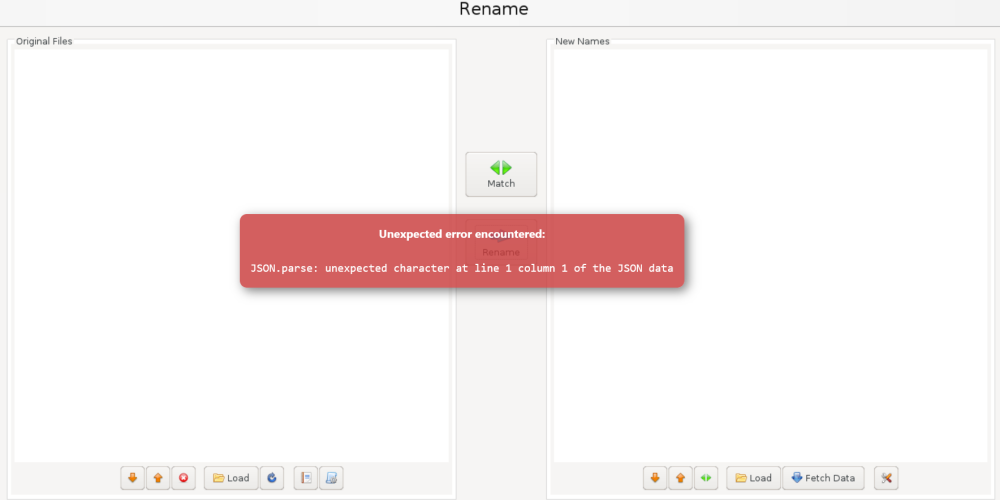
Hi everyone, I'm having an issue in the GUi for FileBot. There's an error message that never goes away and I'm not sure how to resolve it. The message is: "Unexpected error encountered: JSON.parse: unexpected character at line 1 column 1 of the JSON data". I have not seen anything in the logs that points to an issue, and I cannot find a JSON file in appdata that would be the source of the problem. Any thoughts on how to proceed?
-
Alright, my issue has been resolved. The new flash drive is up with the replacement key. Thank you everyone for helping me fix this!
-
Okay, it seems to have come back online but because it's yet another new flash drive my license key isn't valid and needs to be transferred over. I'll contact support and see if they can allow another transfer to a new drive within the year.
-
The last time this happened I made a backup from the GUI and it created a zip folder. Since I can't do that now is it fine to just copy the config folder from the source drive as-is and paste that overtop of the new drive's config folder? Or will I lose something? I worry about re-configuring the server because I don't want to lose my RAID or the data on it. Will keep this thread updated with the results
-
Okay.... so, I swapped network cables just for shits. This shouldn't have made a difference since everything is new and is never touched but lo and behold I can reach the initial landing page of the server with the new, empty flash drive (although not http://tower.local - but by IP). So I tried the old Flash Drive and I still can't see, or get to anything. I don't even get to the login prompt from the command line interface, just all those same "Warning: simplexml_load_file():" issues. Does this mean the Flash Drive is messed up? Or are the plugins the problem?
-
Here are the captured diagnostics. tower-diagnostics-20220727-0838.zip
-
Okay, so I've attempted to troubleshoot this with a different flash drive I had lying around but I'm not making progress. First off, I imaged the flash drive with a newly downloaded creator tool and plugged that into my server. I was met with a prompt to login so I figured the first boot process was going well. When I followed the instructions to get to the new server (I.e., http://<server-name>/local), it wouldn't connect. I rebooted the server into the OS with GUI, but I never got the GUI to appear (in Safe mode, or regular). So I attempted to try and copy some items from my original config folder on the new drive such as all the folders, the .cfg files, etc.. (all but the Network and key files) to see if it made a difference and I'm still having the same problem. Did I do something wrong?
-
So is there no need to install the plugin? Or will it still help?
-
I recently overwrote my license key on my flash drive when I was having prior problems and it stated I can't change it again for a year. If I use a trial key in place of that, and try to get my actual key back on the drive will I have a problem? Also.... how do I get a trial key for testing?
-
Thank you for that link! I've saved it for next time. I updated the thread to include my Diagnostics information.
-
Good day all, I'm having another problem with my server that I can't seem to figure out. Saturday night I was having issues accessing my containers and streaming video, but I could access the Unraid GUI just fine. The next day I was still having problems so I did a Reboot and the machine was not accessible again. It seems to come back online just fine but it's completely inaccessible over the network. I've booted into it in Safe Mode with a GUI so I could play with it and I can see it all locally, but even when it's online I still can't reach it by its IP. To clarify, I have tested that other devices plugged into the same switch/router are accessible and can be pinged so I don't believe it's a problem with my home network devices. When I boot it up normally, I get the following kinds of messages: Warning: simplexml_load_file(): !&# D; in /usr/local/emhttp/plugins/dynamic.docker.manager/scripts/fixDescriptions on line 12 Warning: simplexml_load_file(): ^ in /usr/local/emhttp/plugins/dynamic.docker.manager/scripts/fixDescriptions on line 12 Warning: simplexml_load_file(): - If you'd like (to'par worD proTect ygur sites,$ynu cAn use htpasscd, Rqn the in /usr/local/emhttp/plugins/dynamix.docker.manager/scripts/fixDescriptions on line 12 Warning: simplexml_load_file(): ^ in /usr/local/emhttp/plugins/dynamic.docker.manager/scripts/fixDescriptions on line 12 Finally, when I check the Tools -> System Logs, I don't see much. There are some lines about: device eth0 entered promiscuous mode br0: port1(bond0) entered disabled state But I don't know what those mean really, so I can't be sure if they're part of the problem. Thank you in advanced! EDIT: Attached the exported syslog zip file to the thread. This was taken from Safe Mode as there was no other way to access the machine, and was unfortunately captured after the reboot had occurred. cerberus-diagnostics-20220725-0941.zip
-
I was able to bring myself back online. Turns out that not only was the OS upgrade a problem wreaking havoc on my system, but it revealed that my flash drive was also not usable anymore. After trying to recreate the drive using the USB Tool I would get an error message once the process was complete, and then if I attempted to copy the config file over it would stop saying I did not have write permissions to the drive. So after getting a new flash drive and following your instructions I was able to get back up and running! Thank you!
-
Just to confirm, but when the instructions say to restore the files from the flash backup am I just copying and pasting them from the zip folder? Then based on the instructions in your link after I run the make_executable file do I then copy the Config file over?
-
Good day all, I apologize if these answers are easily available somewhere else, but I didn't have much luck finding it. Last week I attempted to upgrade to 6.10.0 from 6.9.X (I'm sorry I don't recall the version I was on) and it failed. Prior to performing the upgrade I went to Main and selected to make a Flash Backup which I saved on my local PC. Once the machine rebooted I was met with an error message: bzroot-gui checksum error which after doing some research I was able to resolve by enter the following argumentsprior to boot: intel_iommu=on iommu=pt My server came back online and I saw an iterative update to 6.10.1. I decided to update because perhaps it would resolve any other potential problems I may experience but this time I was met with a different error (and unfortunately I did not do another backup): kernel panic - not syncing: VFS: Unable to mount root fs on unknown-block(0,0). After some research I found advise stating that I should copy the config folder somewhere safe and run a chkdsk /f on the drive. That yielded no change when I tried to boot again and I feel like at this point my only option is to restore the backup I took while on 6.9.X, but I'm not sure how to go about that. I'm sorry that I do not have more details to provide, but if there's anything I can give to help resolve my issue I will do my best to find it. Thanks in advanced for any assistance.
-
Hey everyone, I'm kind of stuck and I don't know what to do, so I'm hoping you can help point me in the right direction. A few days ago all of my torrents stopped working. When I add a new torrent it immediately places it in an "Error" state and I can't find any information in either the container logs or any details of the file in the torrent client itself to help me understand what is happening. I removed the container entirely and rebuilt it (keeping all my original config files and everything) but I get the same problem. I don't know if it's related but around the same time I started to get Read errors on one of my drives but the directories I save to and have configured for /data and /config are all still accessible. Any help would be appreciated here.
-
Sorry, can you help me understand how to force update? I changed the tag to :latest and am now on v 2.0.0.5344 and don't see an update available in the GUI

