





jsooter1
Members
-
Joined
-
Last visited
-
Thank you! Made those changes and it all works! Bless you!
-
1. Valheim Docker stopped and files I sent you copied over 2. Start Valheim Docker. 3. Seed it should have loaded (khryss) 4. Seed it actually loaded (eqCUjmcgsd) 5. Correct file with seed I want. 5. .fwl file with wrong/random seed that it loads and appears after renaming correct/wanted files. So weird.

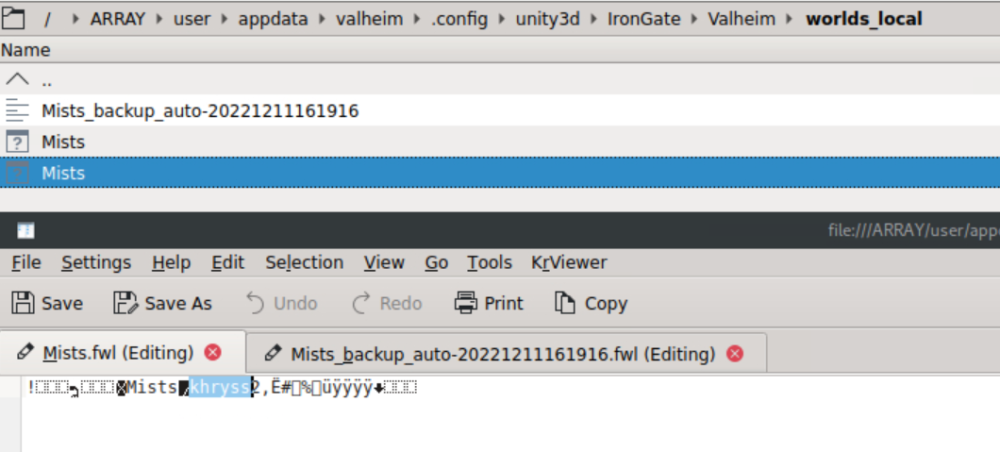
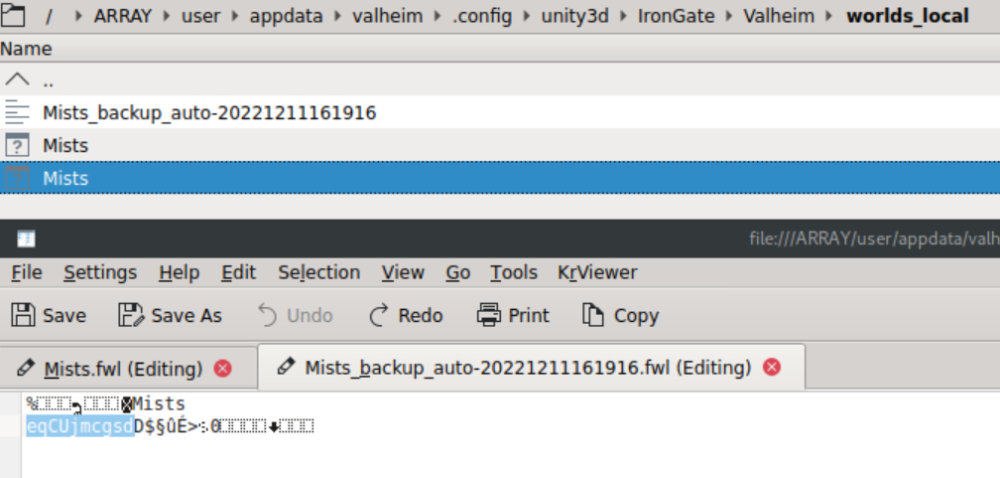


-
Here are my docker settings
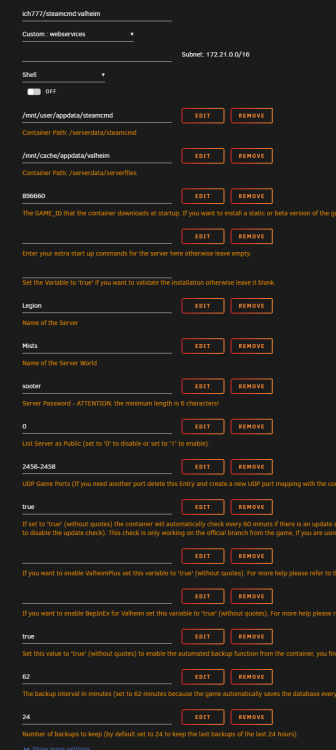
-
Any ideas why mine creates flies with the same names when I start Valheim Docker but with a random seed? It does not overwrite my wanted files but creates new ones of the same name and runs on those. Can you .zip up your files (from the screen shot) and send it to me so I can try them?
-
WantedSeed.zip
-
I copy the files over but when I start the Valheim Docker, it creates two new files of the same name and those are the ones that the game loads into. In Krusader, I only see the two correct files that I copied over but if I rename them (to .db1 and fwl1), then you see the incorrect ones that the game is loading into. root@Legion:/mnt/user/appdata/valheim/.config/unity3d/IronGate/Valheim/worlds_local# ls tester.db tester.fwl root@Legion:/mnt/user/appdata/valheim/.config/unity3d/IronGate/Valheim/worlds_local# ls tester.db tester.db1 tester.fwl tester.fwl1
-
What method did you use to copy over the files? Are there Permissions I need to change?
-
"How can I start a Valhiem Docker server with a specific Seed? " Generate it on your local PC and import it on the server. Can't seem to get that to work. 1. Setup Valheim docker with "Name of the Server World" set as "test" 2. Stopped Valheim docker 3. Replaced test.db and test.fwl ( .fwl in Notepad++ shows the Seed I want) made and working on Windows PC to appdata/valheim/.config/unity3d/IronGate/Valheim/worlds_local/ 4. Started Valheim docker 5. Confirmed that test.fwl in appdata/valheim/.config/unity3d/IronGate/Valheim/worlds_local/ shows the Seed I want. 6. Started Valheim on PC and connected to server. 7. Not the same Seed loaded that was made on the PC. What am I doing wrong?
-
How can I start a Valhiem Docker server with a specific Seed?
-
I'm having the same issue as "Tibbe". When copying DB from from windows, it won't load (is ignored while a DB of the same name is created in the folder). Testing: Started a new game in Valheim Docker. Made in-game changes. Closed game. Stopped Valheim Docker. Copied DB from Unraid into Windows. Loaded Copied DB in windows. Confirmed in-game changes remained. Made additional in-game changes. Closed game. Copied DB from Windows back into Unraid. Started Valheim Docker. Started game & connected to server. I am loaded into a new world. Closed game. Stopped Valheim Docker. In the DB folder, there now exists two DB files with the same name (one larger than the other).
-
I have watched them all. He is great! I have not seen a video where he mentions booting Unraid in legacy mode. Googling "Unraid legacy mode" got me nowhere. And since I have an ASUS ROG Zenith Extreme, and you seam to have defeated this challenge already, I sought your advice.
-
jsooter1 joined the community
-
Could you go into more detail about this as I would like to use my primary GPU in a VM and my current method of achieving this is a bit janky. How do I "boot Unraid in legacy mode" and what does it mean to be in legacy mode? Ramifications? Limitations? What is to "vfio stub the the GPU"? Does Hyper-V need to remain off or is that just to dump the vbios? Will a vbios (matching my GPU) downloaded from the interwebs suffice? Thank for sharing your expertise. Stay safe.



