cinereus
Members
-
Joined
-
Last visited
Everything posted by cinereus
-
I have a problem. I have a Supermicro SuperServer 6027R-E1R12T running a PWS-920P-SQ PSU and X9DRH-7TF V1.02 motherboard. The fans are very loud so I wanted to control fan speed so installed IPMI. Once installed I went to Fan Control, turned it on to Yes and then clicked apply. Instantly, the fan speed ramped up to be deafeningly loud. The server is in a very noise-sensitive location so I immediately toggled it off and clicked apply again but the fan speed remained the same. I uninstalled IPMI and still had the same issue. I then rebooted and had the same issue as soon as unRAID initialised. So I went for the final option and made a new USB drive for unRAID but as soon as the system loads unRAID the fans spin up to max. I've read the note about Supermicro boards in the OP I can't have it this loud for long enough to boot up, install plug ins and then mess about with the settings. I just want to go back to default fan speeds with a completely fresh install. How can I reset the fans to the default settings after whatever IPMI has done to mess them up? I'm starting from a completely fresh install of unRAID. Managed to fix it. Even though the server is on 192.168.0.52, did a scan and would a web server running on 192.168.0.53 which allowed me to log in and manually change the BIOS fan speed. Somehow IPMI had permanently altered this setting!
-
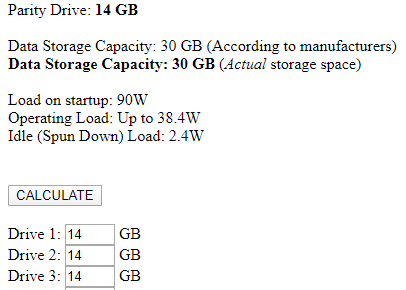
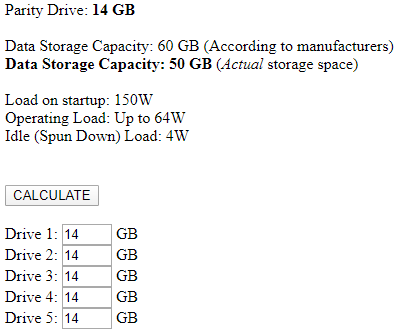
I know. I'm entering for a 14 GB hard drive, not a 14 TB one. It's also not a GB vs GiB issue as you can simply test by using other amounts. Again, it gives incorrect figures for examples using 14 GB and other numbers I didn't note down. If it can't get 14 GB right I'm worried about it getting numbers in TB wrong too.
-
Really? It doesn't seem to work for odd sized drives. e.g. 14 GB