





cinereus
Members
-
Joined
-
Last visited
Everything posted by cinereus
-
That's exactly what I'm asking. I want to know if it could cause any issues if an operation is already in progress. Sounds like it's safer to not try.
-
@itimpi Can you install this (and set it up to allow pauses) while a parity check or rebuild is in progress?
-
Anyone using henrywhitaker3/speedtest-tracker and finding it is stopping working more often now and not recovering? Five times in the last week for me. Nothing ever in the logs and every time a simple docker restart fixes it.
-
I already posted a few versions above.
-
For future reference, I had to do an unclean shutdown, cancel the parity check then use the unsafe shrink array method. It seems the Unraid docs are out of date as the dd shrink array method is not reliable enough to use in practice.
-
No it's not mounted since the umount command. What can I do?
-
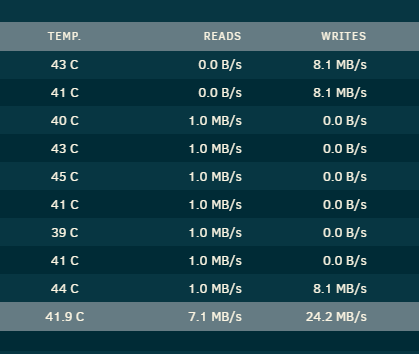
Yes. Exactly that. Even after terminating the dd script I am now seeing writes on the empty drive.
-
I have stopped Docker services but when I go to Open Files I get this:

-
Stop array button doesn't work. It just says this:

-
So it will be safe for me to cancel the dd command, stop array and go to a new config?
-
Do you think I could go straight to The "Remove Drives Then Rebuild Parity" Method now the disk have been taken off the array with umount. Thereby avoiding an unclear shutdown?
-
Does anyone from Unraid support have a better idea than unclear shutdown at this point?
-
Keeping parity is always safer. But how can I fix this without risking a reboot? How do I undo the umount command? And why does dd run so slowly to be unuseable?
-
The whole thing I'm trying to avoid is having to rebuild parity. That's why I chose the method that takes a lot longer but is a lot safer. I'm just trying to figure out how to stop the script that doesn't work from the unraid docs so I don't lose parity.
-
Diagnostics attached. The HDD has been performing normally for past 6+ months.fs-diagnostics-20250405-1558.zip
-
I'm shrinking an array on 6.9.2. Have done this with the clear array drive script before on this version so I don't need to rebuild parity. However, this time the script isn't working. It has unmounted the drive with umount but dd is not working. dd started at 4-5 MB/s but two days layers is now less than 1 MB/s (and this is a 20 TB drive!) How can I safely abort the script?
-
Would really rather avoid a reboot. All it's done is: umount /mnt/disk7 dd bs=1M if=/dev/zero of=/dev/md7 status=progress Can I format and remount in some way?
-
The script is running at 1 MB/s on a 20 TB drive. Does anyone know how to cancel it as it's clearly not working correctly?
-
I'm on 6.9.2 which is the same version I used it successfully with last time. It's just a dd command, I don't get why it is running at 1 MB/s. How do I cancel it now it is running?
-
Now down to 1.0 MB/s. Any ideas?
-
I'm using the script but it's been running at 4-5 MB/s overnight (and this is a 20 TB drive!) Is there any way to abort the script as it will take far too long like this (almost 2 months).
-
Is there any way to keep a record of images that are actually installed rather than have been installed at some time in the past? Or to backup network settings?
-
I think it might be a docker network issue. All appdata backups have the same problem 1. How can I backup docker network settings as well as appdata? 2. And why don't we backup docker.img too?
-
That's exactly what I've done. But as I said, many dockers aren't working (and there doesn't seem to be a way to find out which dockers were actually currently installed). Nextcloud isn't working at all after restoring for example. Is there any indication from the logs why docker.img was corrupted?
-
I had all these errors in the CA_backup log: [31.03.2025 07:21:18] Verifying Backup [31.03.2025 07:25:39] User aborted backup! [31.03.2025 07:25:39] done [31.03.2025 07:25:39] Starting audiobookshelf... (try #1) Error while starting container! - Code: [31.03.2025 07:25:44] Starting audiobookshelf... (try #2) Error while starting container! - Code: [31.03.2025 07:25:49] Starting audiobookshelf... (try #3) Error while starting container! - Code: [31.03.2025 07:25:49] Container did not started after multiple tries, skipping. [31.03.2025 07:25:51] Starting calibre-web-automated... (try #1) Error while starting container! - Code: [31.03.2025 07:25:56] Starting calibre-web-automated... (try #2) Error while starting container! - Code: [31.03.2025 07:26:01] Starting calibre-web-automated... (try #3) Error while starting container! - Code: [31.03.2025 07:26:01] Container did not started after multiple tries, skipping.

