cinereus
Members
-
Joined
-
Last visited
Everything posted by cinereus
-
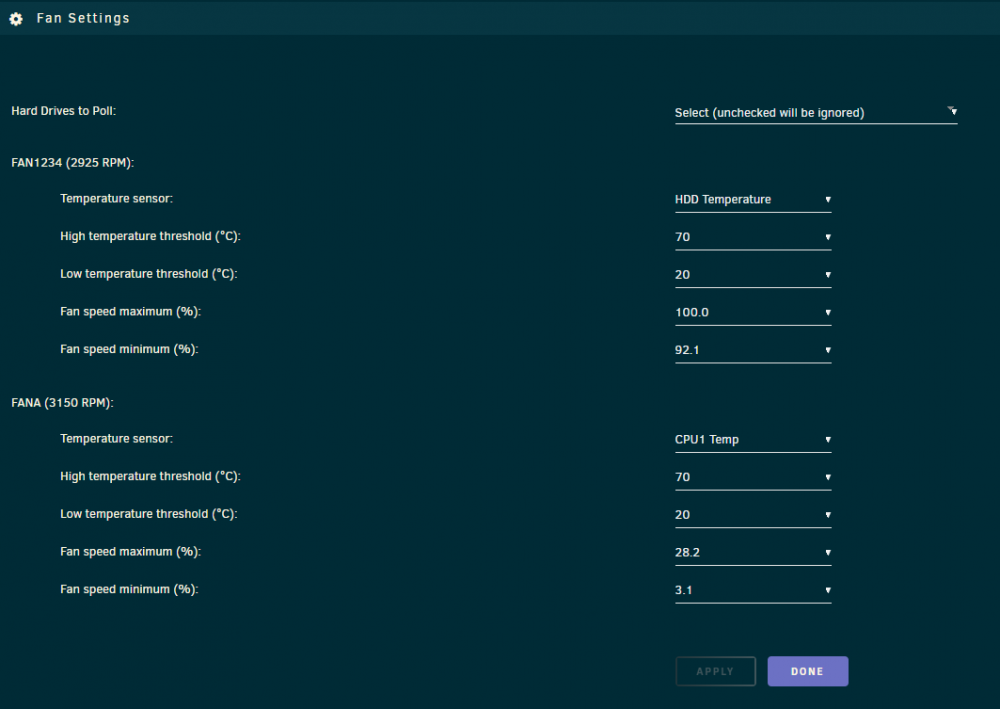
Seems it works (for some values) if you make sure you set fan settings before enabling fan control.
-
A two-bay dock presents both drives under the dock serial number rather than the drives' serial numbers.
-
When you click on the name and it says something like "type a new name" and the that's the name of the folder under /mnt/disks/
-
The issue is I now can't even add the disks independently as they have become entangled and changes to one reflect in the other. Sometimes it even mounts the EFI partition instead but there's no consistency. I want aware of auto mount issues but that is a fair point. Perhaps the best way to avoid such issues is to prevent renaming when two connected disks share the same serial number? I'm not sure if the best way to approach this or if there's a unique data point that could be used.
-
I know. I wasn't saying persistent device ID. I just meant for avoiding this renaming bug once connected.
-
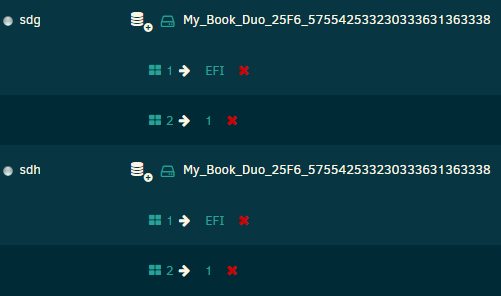
There's an issue using WD My Book devices since they com up under the same serial ID. If you try to rename the readable partition, it renames them both! Meaning you then can't mount them both. It should check to rename by device ID not Identification ID maybe?
-
Thanks. That's what I though (I did have one previously if that helps you debug). Your suggestion did the job!
-
/plugins/networkstats/vnstat.php?i=bond0&s=y&debug=1 vnstati -s -i bond0 -o /tmp/phpKevsWr /plugins/networkstats/vnstat.php?i=bond0&style=3&dh=h vnstati --style 3 -h -i bond0 -o /tmp/phpo2hUAX That's very cool. Is the debug parameter universal? root@fs:~# vnstat rx / tx / total / estimated docker0: Not enough data available yet. erspan0: Not enough data available yet. eth0: Apr '20 1.57 GiB / 2.44 GiB / 4.00 GiB / 5.24 GiB yesterday 69.28 MiB / 106.30 MiB / 175.58 MiB today 1.50 GiB / 2.33 GiB / 3.83 GiB / 4.21 GiB eth1: Not enough data available yet. gre0: Not enough data available yet. gretap0: Not enough data available yet. ip_vti0: Not enough data available yet. lo: Not enough data available yet. tunl0: Not enough data available yet. veth00073b1: Not enough data available yet. veth0e1f563: Not enough data available yet. veth0e6806b: Not enough data available yet. veth1477f2e: Not enough data available yet. veth1cbc675: Not enough data available yet. veth2400941: Not enough data available yet. veth24aac09: Not enough data available yet. veth2692dbc: Not enough data available yet. veth2fdba7b: Not enough data available yet. veth551d1c1: Not enough data available yet. veth5ca9984: Not enough data available yet. veth5dd187d: Not enough data available yet. veth6c1dd40: Not enough data available yet. veth743f3bb: Not enough data available yet. veth8040f42: Not enough data available yet. vetha19bdfc: Not enough data available yet. vethab2bc05: Not enough data available yet. vethb31a5b1: Not enough data available yet. vethc20780b: Not enough data available yet. vethc3e5264: Not enough data available yet. vethd58d01f: Not enough data available yet. vethd973cb3: Not enough data available yet. vethe1c5d7d: Not enough data available yet. vethe3ce0c6: Not enough data available yet. vethee32d42: Not enough data available yet. vethf2f531e: Not enough data available yet. vethf56c2fd: Not enough data available yet. vethf5fb3a8: Not enough data available yet. vethfcd68fe: Not enough data available yet. virbr0: Not enough data available yet.
-
-
It's been a couple of days...
-
This seems to be the most recently topic. I've followed the guide at https://wiki.unraid.net/UnRAID_6/Configuring_Apple_Time_Machine Regardless of whether I make it Time Machine (private) or just regular, I can mount the share but Time Machine itself refuses to let me add is as a backup target. I've read loads of threads on here but haven't found anything that works...
-
I realise that now. I thought they were both just standard NTFS and exFAT but 🤷♀️
-
Also alternating table row colours does not work with other themes. Is it possible to fix this?
-
If this is impossible, how can I limit the size of a Windows File History target? I'm using 12 TB drives so per drive free space isn't a workaround.
-
There's two broken links: /plugins/networkstats/vnstat.php?i=bond0&s=y /plugins/networkstats/vnstat.php?i=bond0&style=3&dh=h
-
There's a broken link to the image: /webGui/images/blue-on.png
-
Thanks! That did the trick
-
That doesn't explain why I can't mount that. I'm not 100% sure but it out that it doesn't recognise the disk filesystem(?) even when formatted as JBOD in a WD My Book Duo.
-
I have three hard drives. One brand new WD Red. One xfs formatted shucked drive with data on. One NTFS formatted shucked drive with data on. When I put them in the server, there's no option under UD to either format them or mount them. What am I doing wrong?

-
Have enabled /boot/ but when I open it in Krusader nothing shows up?
-
[delete]
-
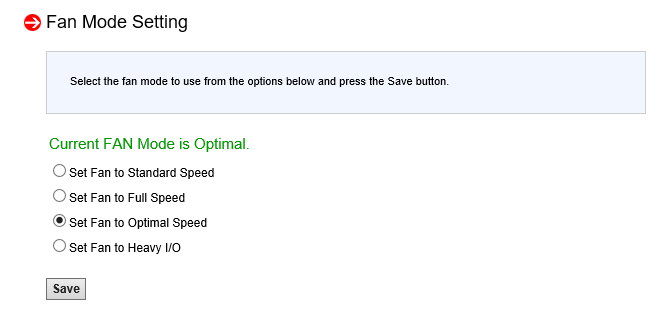
Okay so I've been playing about with this and can't get it to work. It won't let you set 200 but even if you try 300 for all the settings, the fans instantly spin up to max speed. If you go to the Supermicro IPMI web gui you can see that Configuration > Fan Mode has been changed to "Full Speed" instead of "Optimal Speed". I then tried tons of other permutations of threshold values. Does anyone have working settings for Supermicro boards? I've read tons of threads about how to set the thresholds and precisely what these four settings mean and nothing seems to work for this particular board.
-
Any idea why my fanspeeds have suddenly disappeared from netdata this morning (or how to get them back?)
-
Same issue as this!
-
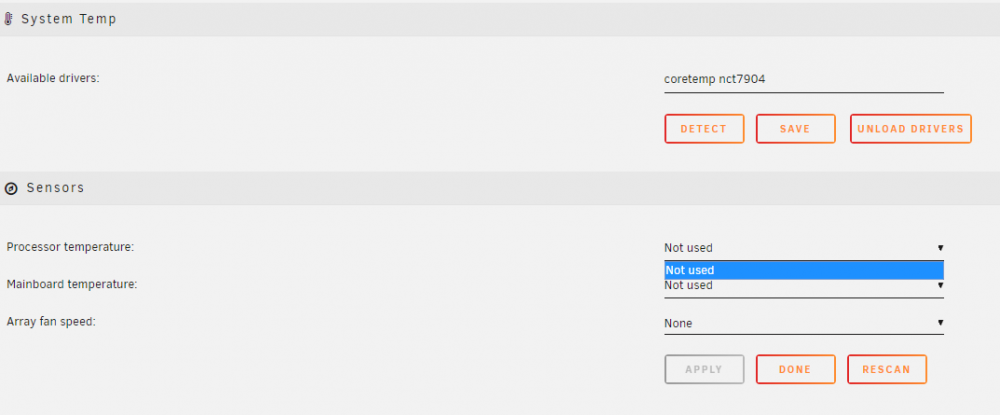
Any idea how to get System Temp to work (on Unraid 6.8.3 • Supermicro SuperServer 6027R-E1R12T (rev 03.54) • X9DRH-7TF V1.02) The first time I installed it immediately after clicking detecting and it finding the nct7904 I had a whole bunch of sensors detecting but the second I clicked Done they all disappeared and I'm left with this: My sensors seem to be found okay (although my fan speeds suddenly disappeared from netstat): root@fs:~# sensors coretemp-isa-0000 Adapter: ISA adapter Package id 0: +33.0°C (high = +74.0°C, crit = +84.0°C) Core 0: +27.0°C (high = +74.0°C, crit = +84.0°C) Core 1: +33.0°C (high = +74.0°C, crit = +84.0°C) Core 2: +27.0°C (high = +74.0°C, crit = +84.0°C) Core 3: +26.0°C (high = +74.0°C, crit = +84.0°C) Core 4: +28.0°C (high = +74.0°C, crit = +84.0°C) Core 5: +27.0°C (high = +74.0°C, crit = +84.0°C) Core 6: +29.0°C (high = +74.0°C, crit = +84.0°C) Core 7: +28.0°C (high = +74.0°C, crit = +84.0°C) coretemp-isa-0001 Adapter: ISA adapter Package id 1: +30.0°C (high = +74.0°C, crit = +84.0°C) Core 0: +30.0°C (high = +74.0°C, crit = +84.0°C) Core 1: +28.0°C (high = +74.0°C, crit = +84.0°C) Core 2: +24.0°C (high = +74.0°C, crit = +84.0°C) Core 3: +28.0°C (high = +74.0°C, crit = +84.0°C) Core 4: +26.0°C (high = +74.0°C, crit = +84.0°C) Core 5: +29.0°C (high = +74.0°C, crit = +84.0°C) Core 6: +30.0°C (high = +74.0°C, crit = +84.0°C) Core 7: +28.0°C (high = +74.0°C, crit = +84.0°C) Now no matter what I try (reinstalling from scratch, any permutation of Detect and Load/Unload drivers), I can't get any sensors to show whatsoever. How do I get this to work on my hardware?