





cinereus
Members
-
Joined
-
Last visited
Everything posted by cinereus
-
Thanks for your patience. Very helpful and seems to have actually worked I'm sure it was working before when not constrained to a single disk but hey ho. Appreciate it a lot as now I don't need to run a slow VM.
-
Thanks. I'll move that last. A previous script changes shell to zsh.
-
Thanks. I think we're getting somewhere. I relinked about 12 hours ago and it said: This computer is now linked to Dropbox. Welcome cinereus [ALERT]: So your files continue to sync, sign in to your Dropbox account and move Dropbox to a supported file system It's now made a .dropbox_cache with prefetch_cache and temp_dirs directories and the temp_dir has lot of copies of a 0 KB dropbox-upgrade-97.3.460.tar.gz but no files have been synced yet.
-
What software are these screenshots from?
-
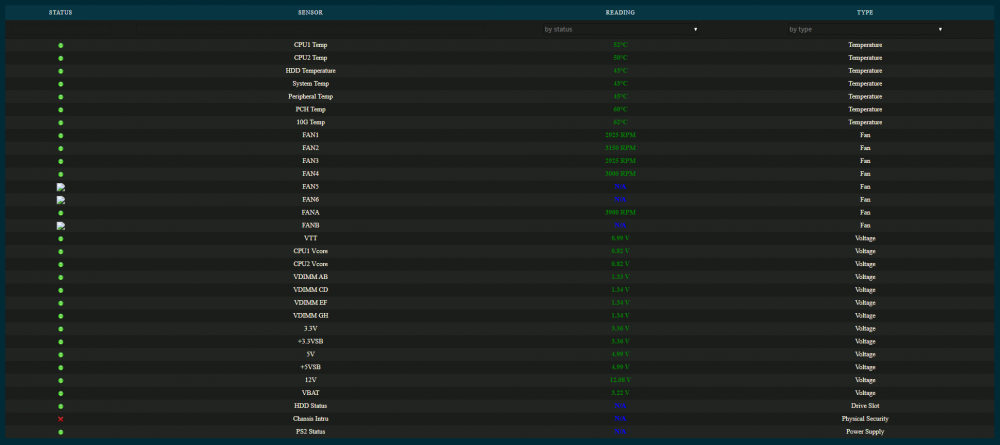
Any chance of fixing the CSS on dark theme at the same time? Blue on dark colours isn't very readable.
-
I have the following script: #!/bin/bash #arrayStarted=true # copy configs and restart zsh cp /mnt/user/test/.zshrc ~ && cp /mnt/user/test/.p10k.zsh ~ && exec zsh # install youtube-dl with softlink cp /mnt/user/test/youtube-dl/youtube-dl /usr/local/bin && chmod +x /usr/local/bin/youtube-dl # install bashtop and +x cp /mnt/user/test/bashtop/bashtop /usr/local/bin && chmod +x /usr/local/bin/bashtop It's set to run "At First Array Start Only". The first command always seems to run fine. The other two never do. How come? And how do it get it work?
-
Thanks. So I understand what I need to do correctly... Delete the Dropbox share and reinstate it? How exactly do I "remove the appdata mount point in unraid" without affecting all my other apps?
-
Why do you say there's a problem with shfs? It was working fine before. And I can't change to any cache locations since I don't have a cache drive. How can it possibly be the default?! Your assumptions about cinereis are correct. The only issue right now is the permissions issue which I posted the error for but I don't understand why that's the case as the permissions seem fine.
-
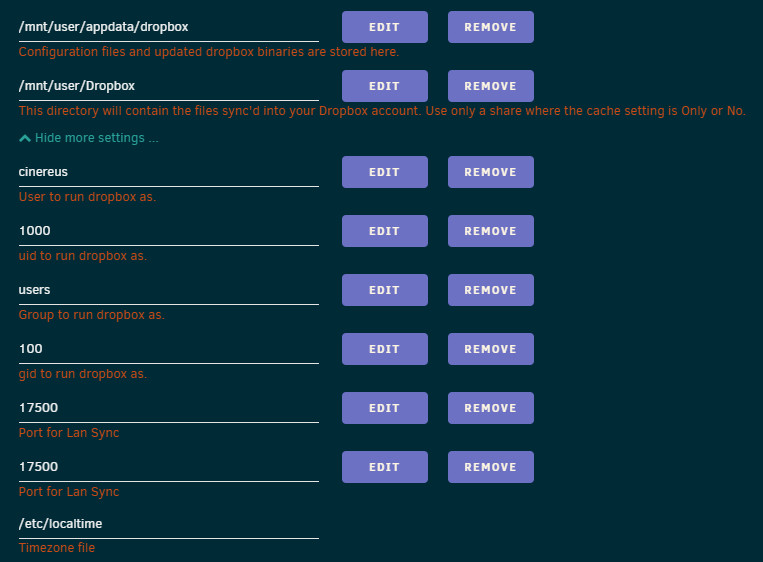
All kept as default apart from /mnt/user/Dropbox share
-
bn.BUILD_KEY: Dropbox bn.VERSION: 97.3.451 bn.constants.WINDOWS_SHELL_EXT_VERSION: 37 bn.is_frozen: True machine_id: 00000000-0000-0000-0000-000000000000 pid: 15 ppid: 1 ppid exe: failed uid: 1000 user_info: pwd.struct_passwd(pw_name='cinereus', pw_passwd='x', pw_uid=1000, pw_gid=100, pw_gecos='', pw_dir='/dropbox', pw_shell='/bin/bash') effective_user_info: pwd.struct_passwd(pw_name='cinereus', pw_passwd='x', pw_uid=1000, pw_gid=100, pw_gecos='', pw_dir='/dropbox', pw_shell='/bin/bash') euid: 1000 gid: 100 egid: 100 group_info: grp.struct_group(gr_name='users', gr_passwd='x', gr_gid=100, gr_mem=['cinereus']) effective_group_info: grp.struct_group(gr_name='users', gr_passwd='x', gr_gid=100, gr_mem=['cinereus']) LD_LIBRARY_PATH: None cwd: '/dropbox' real_path='/dropbox' mode=0o40777 uid=1000 gid=100 sh-4.3# cat dropbox_errorm6s1zhwe.txt bn.BUILD_KEY: Dropbox bn.VERSION: 97.3.451 bn.constants.WINDOWS_SHELL_EXT_VERSION: 37 bn.is_frozen: True machine_id: 00000000-0000-0000-0000-000000000000 pid: 15 ppid: 1 ppid exe: failed uid: 1000 user_info: pwd.struct_passwd(pw_name='cinereus', pw_passwd='x', pw_uid=1000, pw_gid=100, pw_gecos='', pw_dir='/dropbox', pw_shell='/bin/bash') effective_user_info: pwd.struct_passwd(pw_name='cinereus', pw_passwd='x', pw_uid=1000, pw_gid=100, pw_gecos='', pw_dir='/ dropbox', pw_shell='/bin/bash') euid: 1000 gid: 100 egid: 100 group_info: grp.struct_group(gr_name='users', gr_passwd='x', gr_gid=100, gr_mem=['cinereus']) effective_group_info: grp.struct_group(gr_name='users', gr_passwd='x', gr_gid=100, gr_mem=['cinereus']) LD_LIBRARY_PATH: None cwd: '/dropbox' real_path='/dropbox' mode=0o40777 uid=1000 gid=100 parent mode=0o40755 uid=0 gid=0 HOME: '/dropbox' appdata: '/dropbox/.dropbox/instance1' real_path='/dropbox/.dropbox/instance1' mode=0o40700 uid=1000 gid=100 parent mode=0o40700 uid=1000 gid=100 dropbox_path: '/dropbox/Dropbox' real_path='/dropbox/Dropbox' mode=0o40700 uid=1000 gid=100 parent mode=0o40777 uid=1000 gid=100 sys_executable: '/dropbox/.dropbox-dist/dropbox-lnx.x86_64-97.3.451/dropbox' real_path='/dropbox/.dropbox-dist/dropbox-lnx.x86_64-97.3.451/dropbox' mode=0o100755 uid=1000 gid=100 parent mode=0o40775 uid=1000 gid=100 trace.__file__: '/dropbox/.dropbox-dist/dropbox-lnx.x86_64-97.3.451/python-packages.zip/dropbox/client/ui/common/boot_error. pyc' real_path='/dropbox/.dropbox-dist/dropbox-lnx.x86_64-97.3.451/python-packages.zip/dropbox/client/ui/common/boot_error.pyc' not found parent not found tempdir: '/tmp' real_path='/tmp' mode=0o41777 uid=0 gid=0 I've tried starting a completely fresh Docker with user 99 and user 1000. And making the Dropbox share either 99 or 1000 too.
-
Am now getting this: Couldn't start Dropbox. This is usually because of a permissions error. What permissions should the Dropbox share have? I have read the posts of page 5 but you said you'd pushed some changes since then. I accidentally changed the user of the Dropbox fold but I've changed it back and still can't get it started let alone working any more.
-
The logs were cut off on my screen and for some reason everywhere else in the interface you use the drop down menu by clicking on the docker icon. My Dropbox log had the following after linking (how is the user supposed to know to check logs for a link URL?): [ALERT]: So your files continue to sync, sign in to your Dropbox account and move Dropbox to a supported file system. I see now this is not an issue.
-
You mention subfolders at the beginning but then only show examples for subdomains. I prefer subdomains too but is there anyway to allow you to use subdomains on your local network too or do you just need to set up a HOSTS file to go to the local IP? Or will that not work due to the ports?
-
Same here. Docker simply does not work as is. Has anyone got working instructions? ErrorWarningSystemArrayLogin [s6-init] making user provided files available at /var/run/s6/etc...exited 0. [s6-init] ensuring user provided files have correct perms...exited 0. [fix-attrs.d] applying ownership & permissions fixes... [fix-attrs.d] done. [cont-init.d] executing container initialization scripts... [cont-init.d] 01-envfile: executing... [cont-init.d] 01-envfile: exited 0. [cont-init.d] 10-adduser: executing... ------------------------------------- _ () | | ___ _ __ | | / __| | | / \ | | \__ \ | | | () | |_| |___/ |_| \__/ Brought to you by linuxserver.io ------------------------------------- To support LSIO projects visit: https://www.linuxserver.io/donate/ ------------------------------------- GID/UID ------------------------------------- User uid: 99 User gid: 100 ------------------------------------- [cont-init.d] 10-adduser: exited 0. [cont-init.d] 20-time: executing... Current default time zone: 'Europe/London' Local time is now: Tue May 5 13:50:39 BST 2020. Universal Time is now: Tue May 5 12:50:39 UTC 2020. [cont-init.d] 20-time: exited 0. [cont-init.d] 30-config: executing... installing openvpn-as for the first time Get:1 http://as-repository.openvpn.net/as/debian bionic InRelease [3,186 B] Hit:2 http://archive.ubuntu.com/ubuntu bionic InRelease Get:3 http://archive.ubuntu.com/ubuntu bionic-updates InRelease [88.7 kB] Get:4 http://archive.ubuntu.com/ubuntu bionic-security InRelease [88.7 kB] Get:5 http://as-repository.openvpn.net/as/debian bionic/main amd64 Packages [3,156 B] Get:6 http://archive.ubuntu.com/ubuntu bionic-updates/restricted Sources [8,212 B] Get:7 http://archive.ubuntu.com/ubuntu bionic-updates/universe Sources [369 kB] Get:8 http://archive.ubuntu.com/ubuntu bionic-updates/main Sources [406 kB] Get:9 http://archive.ubuntu.com/ubuntu bionic-updates/multiverse Sources [7,157 B] Get:10 http://archive.ubuntu.com/ubuntu bionic-updates/universe amd64 Packages [1,376 kB] Get:11 http://archive.ubuntu.com/ubuntu bionic-updates/main amd64 Packages [1,205 kB] Get:12 http://archive.ubuntu.com/ubuntu bionic-updates/multiverse amd64 Packages [19.8 kB] Get:13 http://archive.ubuntu.com/ubuntu bionic-updates/restricted amd64 Packages [66.6 kB] Get:14 http://archive.ubuntu.com/ubuntu bionic-security/main Sources [189 kB] Get:15 http://archive.ubuntu.com/ubuntu bionic-security/universe Sources [215 kB] Get:16 http://archive.ubuntu.com/ubuntu bionic-security/main amd64 Packages [908 kB] Get:17 http://archive.ubuntu.com/ubuntu bionic-security/universe amd64 Packages [844 kB] Fetched 5,797 kB in 1s (4,993 kB/s) Reading package lists... Reading package lists... Building dependency tree... Reading state information... The following additional packages will be installed: openvpn-as-bundled-clients The following NEW packages will be installed: openvpn-as openvpn-as-bundled-clients 0 upgraded, 2 newly installed, 0 to remove and 2 not upgraded. Need to get 151 MB of archives. After this operation, 202 MB of additional disk space will be used. Get:1 http://as-repository.openvpn.net/as/debian bionic/main amd64 openvpn-as-bundled-clients all 10 [130 MB] Get:2 http://as-repository.openvpn.net/as/debian bionic/main amd64 openvpn-as amd64 2.8.3-f28d2eae-Ubuntu18 [21.0 MB] debconf: unable to initialize frontend: Dialog debconf: (No usable dialog-like program is installed, so the dialog based frontend cannot be used. at /usr/share/perl5/Debconf/FrontEnd/Dialog.pm line 76, <> line 2.) debconf: falling back to frontend: Readline debconf: unable to initialize frontend: Readline debconf: (Can't locate Term/ReadLine.pm in @INC (you may need to install the Term::ReadLine module) (@INC contains: /etc/perl /usr/local/lib/x86_64-linux-gnu/perl/5.26.1 /usr/local/share/perl/5.26.1 /usr/lib/x86_64-linux-gnu/perl5/5.26 /usr/share/perl5 /usr/lib/x86_64-linux-gnu/perl/5.26 /usr/share/perl/5.26 /usr/local/lib/site_perl /usr/lib/x86_64-linux-gnu/perl-base) at /usr/share/perl5/Debconf/FrontEnd/Readline.pm line 7, <> line 2.) debconf: falling back to frontend: Teletype dpkg-preconfigure: unable to re-open stdin: Fetched 151 MB in 13s (11.4 MB/s) Selecting previously unselected package openvpn-as-bundled-clients. Preparing to unpack .../openvpn-as-bundled-clients_10_all.deb ... Unpacking openvpn-as-bundled-clients (10) ... Selecting previously unselected package openvpn-as. Preparing to unpack .../openvpn-as_2.8.3-f28d2eae-Ubuntu18_amd64.deb ... Unpacking openvpn-as (2.8.3-f28d2eae-Ubuntu18) ... Setting up openvpn-as-bundled-clients (10) ... Setting up openvpn-as (2.8.3-f28d2eae-Ubuntu18) ... Automatic configuration failed, see /usr/local/openvpn_as/init.log You can configure manually using the /usr/local/openvpn_as/bin/ovpn-init tool. /var/lib/dpkg/info/openvpn-as.postinst: line 68: systemctl: command not found Stopping openvpn-as now; will start again later after configuring cat: /var/run/openvpnas.pid: No such file or directory kill: usage: kill [-s sigspec | -n signum | -sigspec] pid | jobspec ... or kill -l [sigspec] [cont-init.d] 30-config: exited 0. [cont-init.d] 40-openvpn-init: executing... Detected an existing OpenVPN-AS configuration. Continuing will delete this configuration and restart from scratch. Please enter 'DELETE' to delete existing configuration: OpenVPN Access Server Initial Configuration Tool ------------------------------------------------------ OpenVPN Access Server End User License Agreement (OpenVPN-AS EULA) 1. Copyright Notice: OpenVPN Access Server License; Copyright (c) 2009-2020 OpenVPN Inc. All rights reserved. "OpenVPN" is a trademark of OpenVPN Inc. 2. Redistribution of OpenVPN Access Server binary forms and related documents, are permitted provided that redistributions of OpenVPN Access Server binary forms and related documents reproduce the above copyright notice as well as a complete copy of this EULA. 3. You agree not to reverse engineer, decompile, disassemble, modify, translate, make any attempt to discover the source code of this software, or create derivative works from this software. 4. The OpenVPN Access Server is bundled with other open source software components, some of which fall under different licenses. By using OpenVPN or any of the bundled components, you agree to be bound by the conditions of the license for each respective component. For more information, you can find our complete EULA (End-User License Agreement) on our website (http://openvpn.net), and a copy of the EULA is also distributed with the Access Server in the file /usr/local/openvpn_as/license.txt. 5. This software is provided "as is" and any expressed or implied warranties, including, but not limited to, the implied warranties of merchantability and fitness for a particular purpose are disclaimed. In no event shall OpenVPN Inc. be liable for any direct, indirect, incidental, special, exemplary, or consequential damages (including, but not limited to, procurement of substitute goods or services; loss of use, data, or profits; or business interruption) however caused and on any theory of liability, whether in contract, strict liability, or tort (including negligence or otherwise) arising in any way out of the use of this software, even if advised of the possibility of such damage. 6. OpenVPN Inc. is the sole distributor of OpenVPN Access Server licenses. This agreement and licenses granted by it may not be assigned, sublicensed, or otherwise transferred by licensee without prior written consent of OpenVPN Inc. Any licenses violating this provision will be subject to revocation and deactivation, and will not be eligible for refunds. 7. A purchased license entitles you to use this software for the duration of time denoted on your license key on any one (1) particular device, up to the concurrent user limit specified by your license. Multiple license keys may be activated to achieve a desired concurrency limit on this given device. Unless otherwise prearranged with OpenVPN Inc., concurrency counts on license keys are not to be divided for use amongst multiple devices. Upon activation of the first purchased license key in this software, you agree to forego any free licenses or keys that were given to you for demonstration purposes, and as such, the free licenses will not appear after the activation of a purchased key. You are responsible for the timely activation of these licenses on your desired server of choice. Refunds on purchased license keys are only possible within 30 days of purchase of license key, and then only if the license key has not already been activated on a system. To request a refund, contact us through our support ticket system using the account you have used to purchase the license key. Exceptions to this policy may be given for machines under failover mode, and when the feature is used as directed in the OpenVPN Access Server user manual. In these circumstances, a user is granted one (1) license key (per original license key) for use solely on failover purposes free of charge. Other failover and/or load balancing use cases will not be eligible for this exception, and a separate license key would have to be acquired to satisfy the licensing requirements. To request a license exception, please file a support ticket in the OpenVPN Access Server ticketing system. A staff member will be responsible for determining exception eligibility, and we reserve the right to decline any requests not meeting our eligibility criteria, or requests which we believe may be fraudulent in nature. 8. Activating a license key ties it to the specific hardware/software combination that it was activated on, and activated license keys are nontransferable. Substantial software and/or hardware changes may invalidate an activated license. In case of substantial software and/or hardware changes, caused by for example, but not limited to failure and subsequent repair or alterations of (virtualized) hardware/software, our software product will automatically attempt to contact our online licensing systems to renegotiate the licensing state. On any given license key, you are limited to three (3) automatic renegotiations within the license key lifetime. After these renegotiations are exhausted, the license key is considered invalid, and the activation state will be locked to the last valid system configuration it was activated on. OpenVPN Inc.reserves the right to grant exceptions to this policy for license holders under extenuating circumstances, and such exceptions can be requested through a ticket via the OpenVPN Access Server ticketing system. 9. Once an activated license key expires or becomes invalid, the concurrency limit on our software product will decrease by the amount of concurrent connections previously granted by the license key. If all of your purchased license key(s) have expired, the product will revert to demonstration mode, which allows a maximum of two (2) concurrent users to be connected to your server. Prior to your license expiration date(s), OpenVPN Inc. will attempt to remind you to renew your license(s) by sending periodic email messages to the licensee email address on record. You are solely responsible for the timely renewal of your license key(s) prior to their expiration if continued operation is expected after the license expiration date(s). OpenVPN Inc. will not be responsible for any misdirected and/or undeliverable email messages, nor does it have an obligation to contact you regarding your expiring license keys. 10. Any valid license key holder is entitled to use our ticketing system for support questions or issues specifically related to the OpenVPN Access Server product. To file a ticket, go to our website at http://openvpn.net/ and sign in using the account that was registered and used to purchase the license key(s). You can then access the support ticket system through our website and submit a support ticket. Tickets filed in the ticketing system are answered on a best-effort basis. OpenVPN Inc. staff reserve the right to limit responses to users of our demo / expired licenses, as well as requests that substantively deviate from the OpenVPN Access Server product line. Tickets related to the open source version of OpenVPN will not be handled here. 11. Purchasing a license key does not entitle you to any special rights or privileges, except the ones explicitly outlined in this user agreement. Unless otherwise arranged prior to your purchase with OpenVPN, Inc., software maintenance costs and terms are subject to change after your initial purchase without notice. In case of price decreases or special promotions, OpenVPN Inc. will not retrospectively apply credits or price adjustments toward any licenses that have already been issued. Furthermore, no discounts will be given for license maintenance renewals unless this is specified in your contract with OpenVPN Inc. Please enter 'yes' to indicate your agreement [no]: Once you provide a few initial configuration settings, OpenVPN Access Server can be configured by accessing its Admin Web UI using your Web browser. Will this be the primary Access Server node? (enter 'no' to configure as a backup or standby node) > Press ENTER for default [yes]: Please specify the network interface and IP address to be used by the Admin Web UI: (1) all interfaces: 0.0.0.0 (2) eth0: 172.17.0.19 Please enter the option number from the list above (1-2). > Press Enter for default [1]: Please specify the port number for the Admin Web UI. > Press ENTER for default [943]: Please specify the TCP port number for the OpenVPN Daemon > Press ENTER for default [443]: Should client traffic be routed by default through the VPN? > Press ENTER for default [yes]: Should client DNS traffic be routed by default through the VPN? > Press ENTER for default [yes]: Use local authentication via internal DB? > Press ENTER for default [yes]: Private subnets detected: ['172.17.0.0/16'] Should private subnets be accessible to clients by default? > Press ENTER for default [yes]: To initially login to the Admin Web UI, you must use a username and password that successfully authenticates you with the host UNIX system (you can later modify the settings so that RADIUS or LDAP is used for authentication instead). You can login to the Admin Web UI as "openvpn" or specify a different user account to use for this purpose. Do you wish to login to the Admin UI as "openvpn"? > Press ENTER for default [yes]: > Specify the username for an existing user or for the new user account: Note: This user already exists. > Please specify your Activation key (or leave blank to specify later): Initializing OpenVPN... Removing Cluster Admin user login... userdel "admin_c" Adding new user login... useradd -s /sbin/nologin "admin" Writing as configuration file... Perform sa init... Wiping any previous userdb... Creating default profile... Modifying default profile... Adding new user to userdb... Modifying new user as superuser in userdb... Getting hostname... Hostname: 7d54f468c409 Preparing web certificates... Getting web user account... Adding web group account... Adding web group... Adjusting license directory ownership... Initializing confdb... Generating PAM config... Enabling service Error: Could not execute 'systemctl enable openvpnas' to enable startup/shutdown scripts Stopping openvpn-as now; will start again later after configuring cat: /var/run/openvpnas.pid: No such file or directory kill: usage: kill [-s sigspec | -n signum | -sigspec] pid | jobspec ... or kill -l [sigspec] [cont-init.d] 40-openvpn-init: exited 0. [cont-init.d] 50-interface: executing... MOD Default {'admin_ui.https.ip_address': None} {'admin_ui.https.ip_address': 'eth0'} MOD Default {'cs.https.ip_address': None} {'cs.https.ip_address': 'eth0'} MOD Default {'vpn.daemon.0.listen.ip_address': None} {'vpn.daemon.0.listen.ip_address': 'eth0'} MOD Default {'vpn.daemon.0.server.ip_address': None} {'vpn.daemon.0.server.ip_address': 'eth0'} [cont-init.d] 50-interface: exited 0. [cont-init.d] 99-custom-scripts: executing... [custom-init] no custom files found exiting... [cont-init.d] 99-custom-scripts: exited 0. [cont-init.d] done. [services.d] starting services [services.d] done. [cont-finish.d] executing container finish scripts... [cont-finish.d] done. [s6-finish] waiting for services. [s6-finish] sending all processes the TERM signal. [s6-finish] sending all processes the KILL signal and exiting. [s6-init] making user provided files available at /var/run/s6/etc...exited 0. [s6-init] ensuring user provided files have correct perms...exited 0. [fix-attrs.d] applying ownership & permissions fixes... [fix-attrs.d] done. [cont-init.d] executing container initialization scripts... [cont-init.d] 01-envfile: executing... [cont-init.d] 01-envfile: exited 0. [cont-init.d] 10-adduser: executing... usermod: no changes ------------------------------------- _ () | | ___ _ __ | | / __| | | / \ | | \__ \ | | | () | |_| |___/ |_| \__/ Brought to you by linuxserver.io ------------------------------------- To support LSIO projects visit: https://www.linuxserver.io/donate/ ------------------------------------- GID/UID ------------------------------------- User uid: 99 User gid: 100 ------------------------------------- [cont-init.d] 10-adduser: exited 0. [cont-init.d] 20-time: executing... [cont-init.d] 20-time: exited 0. [cont-init.d] 30-config: executing... [cont-init.d] 30-config: exited 0. [cont-init.d] 40-openvpn-init: executing... [cont-init.d] 40-openvpn-init: exited 0. [cont-init.d] 50-interface: executing... MOD Default {} {} MOD Default {} {} MOD Default {} {} MOD Default {} {} [cont-init.d] 50-interface: exited 0. [cont-init.d] 99-custom-scripts: executing... [custom-init] no custom files found exiting... [cont-init.d] 99-custom-scripts: exited 0. [cont-init.d] done. [services.d] starting services [services.d] done.
-
Somehow missed this. Thanks!
-
Perfect! Thanks For future googlers: /boot/config/plugins/NerdPack/NerdPack.cfg
-
Good idea! It was marked as installed after rebooting so I checked off and applied ready to reboot again. It then downloaded and installed it! I've check off and applied again and will see what happens next time!
-
Thanks - this took me ages. Why is there no access to logs from the Docker tab only Dashboard? This version of dropbox doesn't seem to like XFS. Is there no solution to have Dropbox and Drive sync to XFS on unRAID at the moment?
-
Did you hit apply? Yes: "Unchecking and applying"
-
I've got it working with the gofile but I think some people might appreciate youtube-dl. There doesn't seem to be any way to uninstall packages though. Unchecking and applying doesn't work and nor does unchecking with the uninstall option on.
-
You're probably right. Just with my old NAS Time Machine was click and forget. What's stopping SMB working with 10.11? There's so many incompatibilities with software which have prevented me upgrading from 10.11.
-
Presumable the unBALANCE plugin is designed to sidestep this bug entirely? I made the mistake of trying to avoid this all by using /mnt/diskX whereas it's less neat but much simpler to work from a /mnt/user state from the beginning.
-
Before I bought unRAID I thought this was a trivial feature as I've been using Time Machine over SMB for years with 10.11? So is there no way to get it working?
-
I'm having trouble logging in via ssh after installing this. I have uninstalled it and even removed all entries from /etc/hosts.deny but still get "Permission denied, please try again."
-
FWIW the version I'm having issues with is 10.11 El Capitan. Presumably Time Machine functionality is meant to support more than one macos release.

