




Skip to content
View in the app

A better way to browse. Learn more.

Unraid

A full-screen app on your home screen with push notifications, badges and more.

To install this app on iOS and iPadOS
  1. Tap the Share icon in Safari
  2. Scroll the menu and tap Add to Home Screen.
  3. Tap Add in the top-right corner.
To install this app on Android
  1. Tap the 3-dot menu (⋮) in the top-right corner of the browser.
  2. Tap Add to Home screen or Install app.
  3. Confirm by tapping Install.

DrJake

Members
  • Joined

  • Last visited

Everything posted by DrJake

  1. nope. I decided to not worry about it
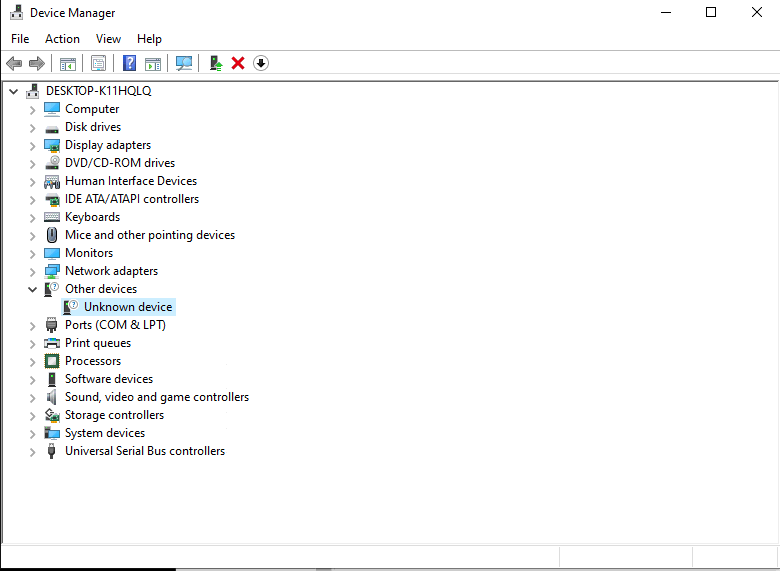
  2. I had the same problem. Glad I found your post. FYI its under (Standard system devices) from the left tab. So how do you know it's ACPI Processor container device??? After I did what you've suggested, the device remains in the Other devices -> Unknown device
  3. That's rough. From what I understand, you're "tricking" it by using another card, but then you'd have to have another card to use. I dont really know what I'm talking about, but I can confirm that passing through RX580 (only GPU) is working on my setup. I left detail notes in the other thread
  4. hello, any resolutions to passing through the RX580? I'm stuck at there too. Watched SpaceinvaderOne's video, still stuck on black screen...
Account

Navigation

Search

Search

Configure browser push notifications

Chrome (Android)
  1. Tap the lock icon next to the address bar.
  2. Tap Permissions → Notifications.
  3. Adjust your preference.
Chrome (Desktop)
  1. Click the padlock icon in the address bar.
  2. Select Site settings.
  3. Find Notifications and adjust your preference.