





daveo132
Members
-
Joined
-
Last visited
Everything posted by daveo132
-
Sorry I think I removed some of the text I had in there. I've set everything back to the default gateway (normal web / not VPN) I can access via my phone.
-
Well I like to bury these issues! I was going to say I didn't think it worked but I think it took a little while for things to update. Works like a charm now. Thank you and sorry about that.
-
Its the VPN IP
-
@ljm42 Tried turning it off and on again 😆 that didn't work Check fails as you expected. Ping: yes this matches (i made sure that I put my laptop on the same gateway)
-
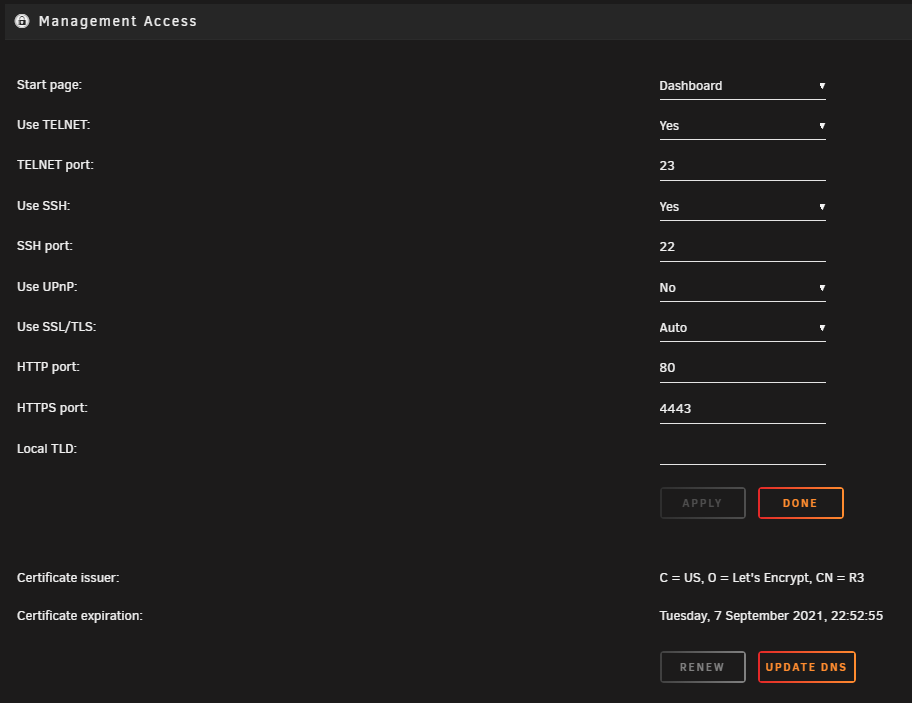
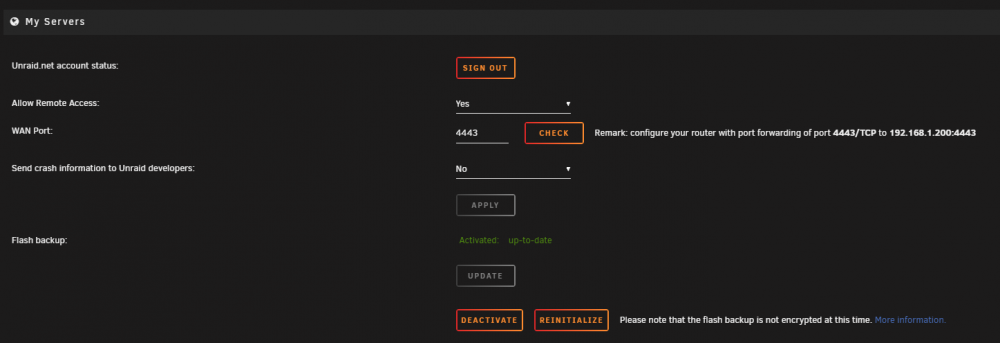
Sure thing What works and what doesn't? * Local access to the webgui via https://hash.unraid.net:4443 ? * Nextcloud via nextcloud.mysite.etc ? * Remote Access to the webgui via https://www.hash.unraid.net:[WAN PORT] ? Local access works fine at https://hash.unraid.net:4443/dasboard Nextcloud all fine No remote access, tried on phone on 4G, same result.

-
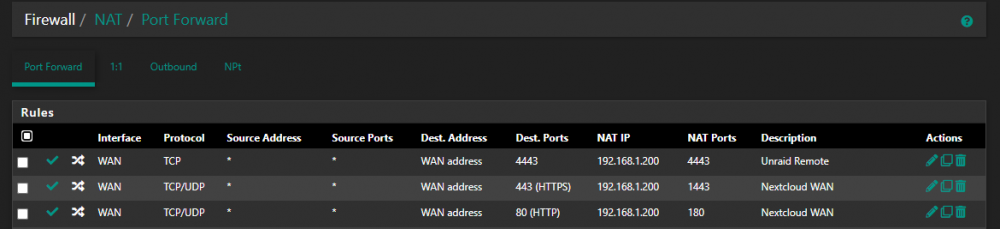
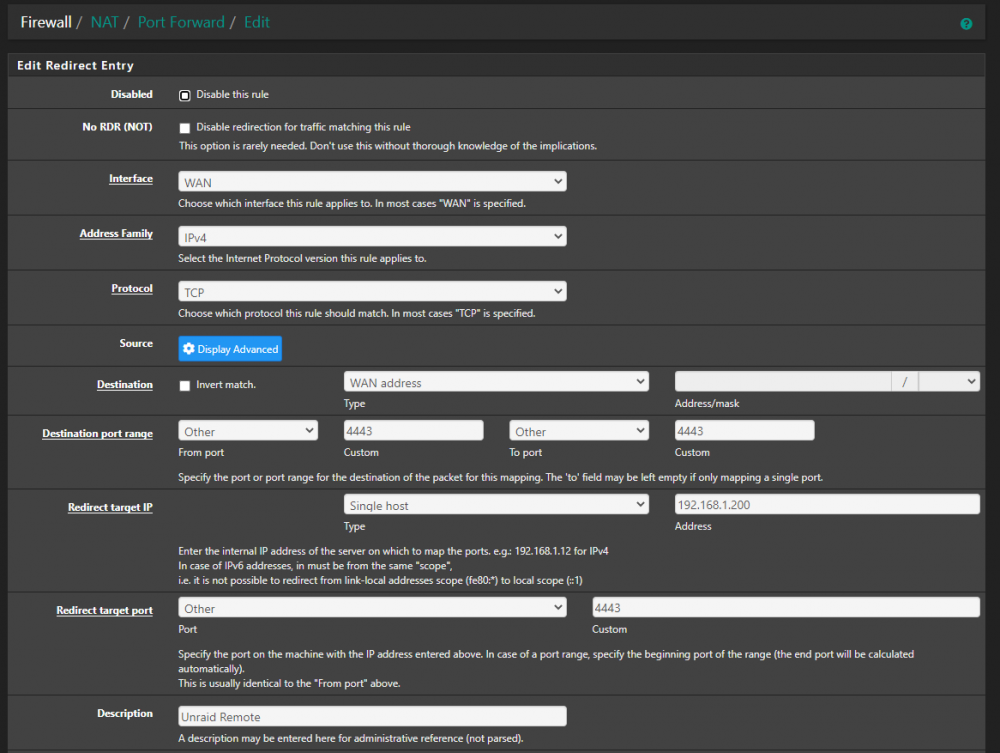
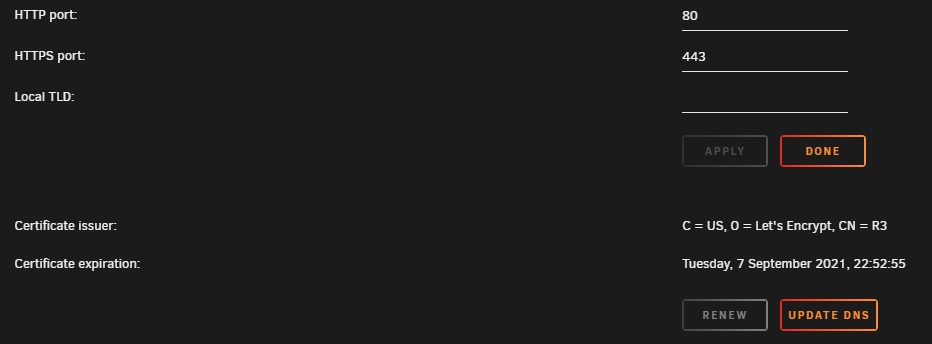
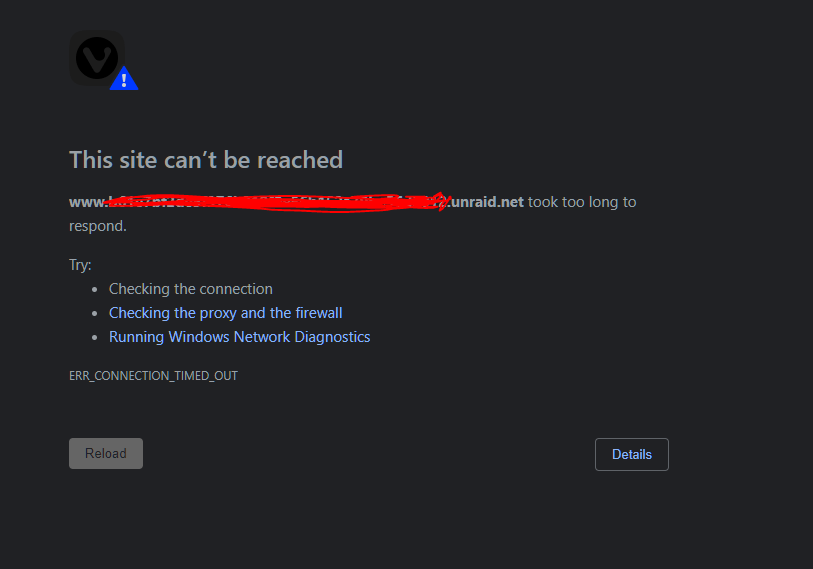
So.... I made everything 4443. Both options in management access and the port forward is 4443 to 4443. The port is open, checked. Still no joy. Just says "took too long to respond."
-
Ok, I think I do have a conflict on 443. I left everything overnight to ensure what I had working was working correctly (lots of test yesterday and it was late). When I turned the Port Forward back on for My Server on 443 I could no longer access my nextcloud, turned that rule off and it works again.
-
Hi, Thanks for the reply. This is the url for the screen shots https://PERSONALHASH.unraid.net/Dashboard If I type in the IP address of my server, this is where it sends me, note the missing port number. Nextcloud is working perfectly and I am accessing it using its Web Address (ie. nextcloud.mysite.etc) Sorry, What I mean is that I use 2 gateways on my network. I've set the default as the VPN Gateway and have rules setup that things like my desktop and laptop get routed directly to the WAN Gateway. It allows me to run NordVPN on those machines (sometimes vpn connections cause more issues etc) so I can choose if I'm on a VPN or not. Otherwise everything is on the same LAN, I don't use VLANs or multiple LANs at all. I have tried setting all of that back to default (ie everything using the same Gateway) but it made no difference. Hope that helps.
-
That being said. Do I have a conflict here? Nexcloud also uses these ports and was it just luck that it was working yesterday? I'm no expert in Networking, learning as I go.
-
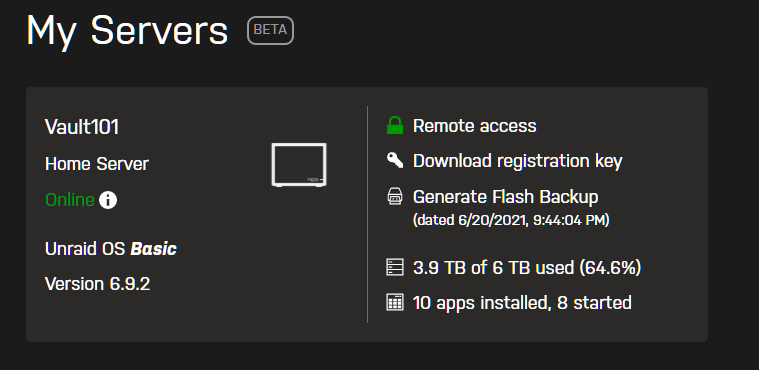
Hi, I'm not sure if this is a bug or an issue on my side. Yesterday this all worked fine for me but today not so. Only change on my network was an update to my Pfsense but this was to fix the broken routing issues on the current release. I can confirm that other forwarded ports (ie Nextcloud) work just fine but My Servers wont. It is showing as Online in Myservers with Remote Access shown in green but will not connect. Checking the port from the settings page in unraid also shows that is isn't reachable. Any ideas? My server sits behind an Open VPN connection while my PC has direct access to the net if that help? I have also tried the api restart that has been mentioned to no effect. and yes, I'm a follower of SpaceInvaderOne

-
that was it! I didn't quite realize where I needed to add that custom option but I go there in the end. Fingers crossed thats it now
-
ok that makes sense. I tried adding the domain in pfsense but it didn't seem to take. Disabling rebinding fixed the issue but that isn't a solution of course. Saying that, I did re-enable the dns rebinding and i could still access the page. Not sure if I was too quick to try accessing the page again or something else. I will keep playing with this throughout the day but at least I now know where the issue is! Thanks for the help
-
Even a reset to factory defaults of pfsense hasn't fixed it so I'm thinking it must be something on the Unraid machine itself.
-
Thank you, I didn't realize!
-
Hi, I've done some searching but not had much luck. I've recently moved over to PFsense and have had some issues with accessing my WebUI (Unraid) When I try to access it at the IP address I get an error: This site can’t be reached Check if there is a typo in xxxxxxxxxxxxxxxxxxxxxxxxxxxxxxxxx.unraid.net. If spelling is correct, try running Windows Network Diagnostics. DNS_PROBE_FINISHED_NXDOMAIN This seemed to happen after I tried to set a static IP address for it in PfSense. Since then I've not been able to access it. I've removed the Static IP addition in the DHCP server and rebooted both my Unraid and Pfsense. Few other bits of details I can access my shares over the network. I have full internet access and can access my old router which I now use as a switch and WAP. (This has its DHCP server turned off.) I can access the UI at the machine itself, all appears in order. I've tried multiple browsers with no effect. I use an OpenVPN on pfsense (with its own DNS Server from NordVPN), I'm at a bit of a loss.
-
Hi, I've got as far as being able to get to the admin page via my domain. When trying to send a test email, I get the following error; Error sending SMTP test email SMTP IO error: incomplete Anyone know what this means? There seem to be some boxes which were not on the original video, SMTP Auth mechanism Server name sent during HELO Not sure if these need something? To add, If I use; Port for SSL: 465 it times out Port for TLS: 587 it errors out saying my credentials are bad. The other error message I seem to get with Force TLS and port 587 is; Error sending SMTP test email SMTP IO error: error:1408F10B:SSLroutine:ssl3_get-record:wrong version number:../ssl/record/ssl3_record.c:332:
-
Could you point me in the direction I need to go? I get what your trying to say and where to go to add this, but I don't know what I should be typing. I've done searching but the info comes back as permissions for shares and not inside the app data folder. I have read/write permission as far as this location; Y:\appdata\nextcloud\www If I try to make any modifications in; Y:\appdata\nextcloud\www\nextcloud This is where I lose the permission.
-
How do I do that? As far as i can tell I am set to be able to do so in unraid? [rootshare] path = /mnt/user comment = browseable = yes valid users = **** write list = **** vfs objects =
-
Rightly or wrongly I decided to re-do my install now that it works on the proper mariaDB. That's all installed fine. My issue is I can't amend the config file. I have rootshare and I can write to the base of the drive but, when I drill down to the config locations for next cloud I lose write permissions. I have no idea why and Windows can't update the permissions to allow me to. What have I done wrong?
-
So next problem - though I don't think this is an issue with Nextcloud.... I can't set up my Gmail for IMAP, just get an error saying it couldn't be authorised.
-
@Jessie Hmm, This PC is wired and fast for everything else. Now that you mention it I think I did see something in the logs about just that! I'll leave it for a while and see if it sorts itself out EDIT: So I took a look in the logs. Login failed: 'Dave' (Remote IP: 'My Router IP Address') There is a lot of that......
-
Ok, I will get around to that. I did see there is a command I can use to transfer.
-
Hi @Jessie So, if I use any other PC in my house it loads fine. It just seems to be this one PC in any browser. I use chrome but I have Internet Explorer on here for Legacy site (I need it for work) and also tried edge. All the same result.
-
Ok so regarding the slow loading of my login page. If I try to do it off my network, say my parents or my phone on mobile it loads instantly. If I use my PC on the same network as my Nextcloud server it never loads properly. Not a big problem as I can access across my LAN, but not helpful for testing. Any ideas what I've done? I just get greeted with this

-
EDIT, OK fixed some issues with permissins in my root share and I've finally got there... but... its very slow over the web access. It loads the login page but never the login boxes and takes several minutes to get that far. Within my network its fast. No other user are on my server and the load is <5% on the CPU and <10% on RAM. I did however set it up with the My SQL database as I am the only planned user. Would this be causing this slow performance?



