





bigmak
Members
-
Joined
-
Last visited
-
OK I think I figured it out; had to install My Servers to get that page to load properly. Now it's saying I already replaced my key in the past 12 months which isn't true...
-
Note this is showing up on multiple browsers (Chrome/Firefox/Edge) and multiple devices (Windows/Android). It is also happening when accessing the server from both the IP and the hostname. I've also verified that the server can reach the internet (Terminal -> ping).
-
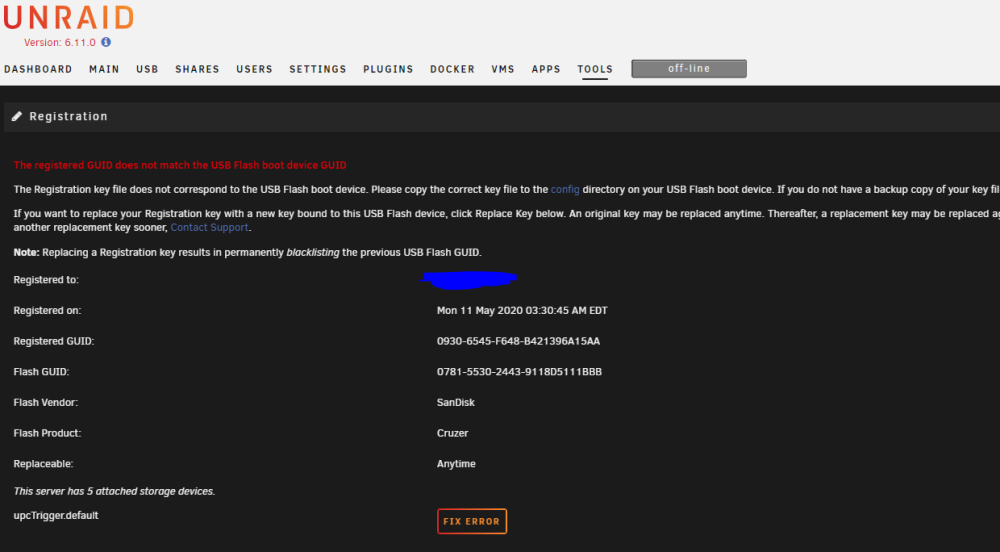
Hello all. Shut down my Unraid server in preparation for Hurricane Ian and then it would not reboot. Examined logs, saw kernel panics, figured out USB drive was on the fritz. Was able to get the /config folder off prior to it dying. The issue is with my new USB drive, the replace the registration key button does not show up. I tried 6.9.2 and 6.11.0 with the same issue; just says upcTrigger.default. Any tips or help?
-
I'm having trouble getting this container to use anything other than port 5005. Any tips on how to make it work on port 80? I have tried a ton of things including manually installing the docker container, not using the template, with no luck...
-
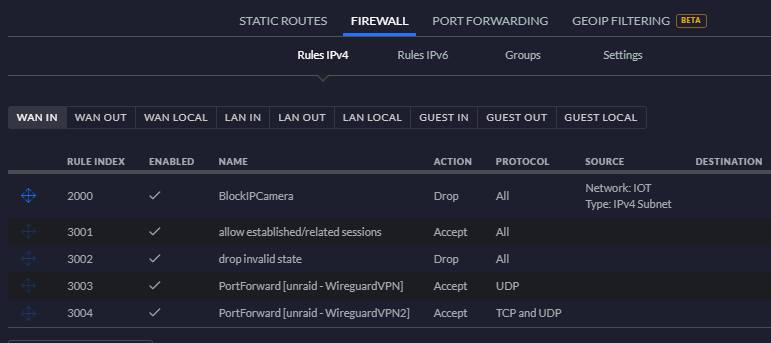
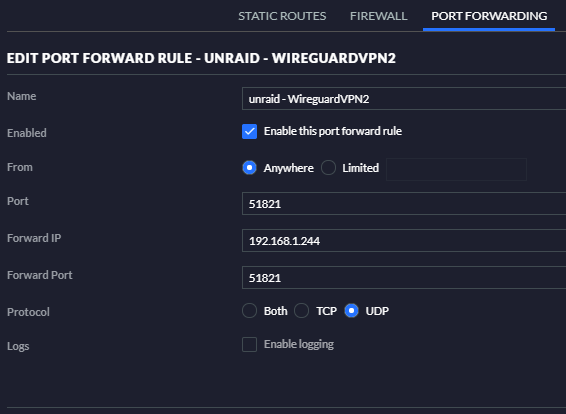
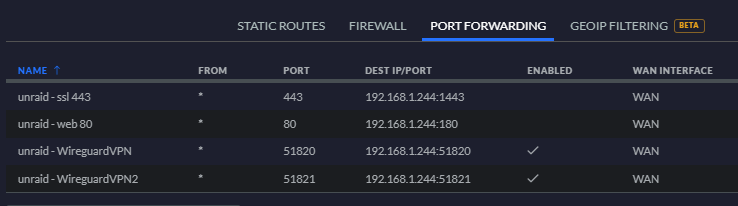
I've been trying for way too long to get a split tunnel VPN working... I've searched this post repeatedly but still am a bit confused. My goal: I want to use my home DNS (dual piholes), have access to local IPs, with all external network data skipping the tunnel (limited upload at site). I have a fully working remote tunneled access setup, wg0. This works perfectly on numerous clients. [Interface] #wg0 PrivateKey=deleted= Address=10.253.0.1 ListenPort=51820 PostUp=logger -t wireguard 'Tunnel WireGuard-wg0 started' PostDown=logger -t wireguard 'Tunnel WireGuard-wg0 stopped' [Peer] #01 PublicKey=deleted= PresharedKey=deleted= AllowedIPs=10.253.0.2 ===================================== [Interface] #01 PrivateKey=deleted= Address=10.253.0.2/32 DNS=192.168.1.112,192.168.1.111 [Peer] #rehoboam PresharedKey=deleted= PublicKey=deleted= Endpoint=deleted.com:51820 AllowedIPs=0.0.0.0/0 I have been trying (unsuccessfully) to get a split tunnel up. Here's my current not working config for wg1. [Interface] #wg1 PrivateKey=deleted= Address=10.253.1.1 ListenPort=51821 PostUp=logger -t wireguard 'Tunnel WireGuard-wg1 started' PostDown=logger -t wireguard 'Tunnel WireGuard-wg1 stopped' [Peer] #01 PublicKey=deleted= PresharedKey=deleted= AllowedIPs=10.253.1.2,192.168.0.0/21 ====================================== [Interface] #01 PrivateKey=deleted= Address=10.253.1.2/32 DNS=192.168.1.112,192.168.1.111 [Peer] #rehoboamsplit PresharedKey=deleted= PublicKey=deleted= Endpoint=deleted.com:51821 AllowedIPs=10.253.1.1/32, 192.168.1.0/24 I have repeated all configuration changes for the new tunnel including adding static routes and port forwarding. Static routes Port forwarding overview Detail of the new wg1 address, matches 51820 Resulting WAN in firewall Any tips what I'm doing wrong?

-
Upgraded 6.9.1 to 6.9.2 successfully. Only issue I'm seeing is that all help sections are starting expanded and some can't be minimized.
-
Static, non pi-hole DNS lookup on main network settings seems to have cleared it up. I'll look through the pihole logs to see if I can see what is being blocked to add to a whitelist. Thanks for the help @Squid, all you do is appreciated.
-
Shutting array down to change to static public DNS addresses. One question: will changing this make all docker containers on the server now use these for DNS and bypass my piholes? I know this isn't necessarily the right section to ask this question...
-
I'm currently experiencing problems as well. I assumed it was DNS, made some changes, then came here and saw others are having issues as well. Do you know what specific domain it's trying to reach? Maybe pihole is blocking it on accident? Download of appfeed failed. Community Applications requires your server to have internet access. The most common cause of this failure is a failure to resolve DNS addresses. You can try and reset your modem and router to fix this issue, or set static DNS addresses (Settings - Network Settings) of 208.67.222.222 and 208.67.220.220 and try again. Alternatively, there is also a chance that the server handling the application feed is temporarily down. Last JSON error Recorded: Syntax error
-
Are you proxying through cloudflare by chance? Cuz you can't proxy wireguard, has to be set to dns only.
-
Server is .244, pihole is .32 set through br0. I can see on my router (unifi) something at .32 has reached out to the router.
-
bigmak changed their profile photo
-
Having trouble getting this to start. I have experience both with docker containers on Unraid as well as pihole running on other systems (pis, hyper-v). On startup, it's getting stuck at the following point in the log shown below. I can't get the web console to work. Starting crond Starting pihole-FTL (no-daemon) as root Starting lighttpd Here's what I've tried so far: chmod 777 on the appdata folder Tried both latest version and v4.3.4 Privileged and unprivileged levels Verified that the IP shows up on my network (I can see the client in Unifi) Removed the default extra parameters from the template Here's my full docker run command. root@localhost:# /usr/local/emhttp/plugins/dynamix.docker.manager/scripts/docker run -d --name='pihole' --net='br0' --ip='192.168.1.32' -e TZ="America/New_York" -e HOST_OS="Unraid" -e 'TCP_PORT_53'='53' -e 'UDP_PORT_53'='53' -e 'UDP_PORT_67'='67' -e 'TCP_PORT_80'='80' -e 'TCP_PORT_443'='443' -e 'DNS1'='1.1.1.1' -e 'DNS2'='1.0.0.1' -e 'TZ'='America/New_York' -e 'WEBPASSWORD'='supersecret' -e 'INTERFACE'='br0' -e 'ServerIP'='192.168.1.32' -e 'ServerIPv6'='' -e 'IPv6'='False' -e 'DNSMASQ_LISTENING'='all' -v '/mnt/disk1/appdata/pihole1/pihole/':'/etc/pihole/':'rw' -v '/mnt/disk1/appdata/pihole1/dnsmasq.d/':'/etc/dnsmasq.d/':'rw' --cap-add=NET_ADMIN --dns 1.1.1.1 --dns 1.0.0.1 --restart=unless-stopped 'pihole/pihole:latest' Any tips on what to try?
-
Did you try dropping the slash after esphome? Also, why do you have :443 after proxy_set_header Host? My configuration is otherwise the same except I do not have the proxy_set_header x-forwarded... set. See mine below. Note that /endpoint/ui is for Node-RED. # make sure that your dns has a cname set for homeassistant and that your homeassistant container is not using a base url server { listen 443 ssl; listen [::]:443 ssl; server_name homeassistant.*; include /config/nginx/ssl.conf; client_max_body_size 0; location / { include /config/nginx/proxy.conf; resolver 127.0.0.11 valid=30s; set $upstream_app 192.168.1.31; set $upstream_port 8123; set $upstream_proto http; proxy_pass $upstream_proto://$upstream_app:$upstream_port; } location /api/websocket { resolver 127.0.0.11 valid=30s; set $upstream_app 192.168.1.31; set $upstream_port 8123; set $upstream_proto http; proxy_pass $upstream_proto://$upstream_app:$upstream_port; proxy_set_header Host $host; proxy_http_version 1.1; proxy_set_header Upgrade $http_upgrade; proxy_set_header Connection "upgrade"; } location /api/hassio_ingress { resolver 127.0.0.11 valid=30s; set $upstream_app 192.168.1.31; set $upstream_port 8123; set $upstream_proto http; proxy_pass $upstream_proto://$upstream_app:$upstream_port; proxy_set_header Host $host; proxy_http_version 1.1; proxy_set_header Upgrade $http_upgrade; proxy_set_header Connection "upgrade"; } location /endpoint/ui { resolver 127.0.0.11 valid=30s; set $upstream_app 192.168.1.31; set $upstream_port 1880; set $upstream_proto http; proxy_pass $upstream_proto://$upstream_app:$upstream_port; proxy_set_header Host $host; proxy_http_version 1.1; proxy_set_header Upgrade $http_upgrade; proxy_set_header Connection "upgrade"; } }
-
SWAG shouldn't be on bridge, it should be on a network just for your containers that you're procuring.
-
For those that haven't heard, this container is being renamed. https://blog.linuxserver.io/2020/08/21/introducing-swag/


