





deanpelton
Members
-
Joined
-
Last visited
Everything posted by deanpelton
-
Following this I was able to get this configured to my Kingston M.2 ssd as well, however my cache is an crucial mx500. Poking about with the query, by setting the Serial# to the SSD, then AND Name, it appears none of the metrics appear for my SSD. The Smart Attribute is Total_LBAs_Written, yet querying the db for that appears to have no data for the serial number of my SSD. Looking at the smart attributes table, looks like the Serial# for my ssd is missing and in infinity symbol appears instead. How curious. Edit - Managed to get it working by looking at ID 246 instead of name. However it's reporting 360pb, so something still not quite right. Not sure these MX500's have a value for total reads in Smart stats.
-
I have set this up but haven't got any images for my VM's or my Dockers. Is there some specific that looks at these that I can check out?
-
I hadn't considered that the location could be causing the problem!! Will try moving it to usr/ does this directoy persist after reboot? Will poke around today. Have also upgraded both Mover plugin and unraid OS, so a lot of variables have changed.
-
Happy to provide any telemetry / logs I can. I've turned off smart inputs for now in the meantime. P.S. Love the reads / disk spindown on UDs! Favourite new feature so far.
-
It's just the [[Inputs.smart]] that are keeping the drives alive. If you comment it out of the Telegraf file you can keep using your dashboard, don't forget to comment out any others within that section. Does look to be an unraid issue, given the reads for the drives increment from this even though most of them are spun down.
-
Also having this issue on upgrade. I have 7 disks, and I can see the read counts incrementing every 10 seconds even though the drives are spun down. Appears to not wake up drives, but it does stop them from spinning down. Should we submit a bug report?
-
Nevermind all! I figured it out by re-reading this post by DBJordan. It didn't occur to me that the script would honor the container paths and not the host paths! Crazy. I also had to fix the operator from || to && for my exclusions. This is a great way to manage automatic encoding with Handbrake if anyone finds this, basically I automatically encode using x265 from qbittorrent, with sonnar grabbing the output. IF the file is already h.265 format, this process will give it straight to sonnar from Qbittorrent skipping the encoding process!! #!/bin/bash %F=$1 %L=$2 %N=$3 if { [[ $2 == 'tv-sonarr' || $2 == 'Movies' ]] ;} && { [[ $3 != *H265* && $3 != *x265* ]] ;}; then cp -r $1 "/Downloads/Downloaded/Copied" #this is my watch folder for handbrake elif [[ $2 == 'tv-sonarr' || $2 == 'Movies' ]]; then cp -r $1 "/Transcodes" #this is my output folder for handbrake, and watch folder for sonarr. fi #the above are all container paths.
-
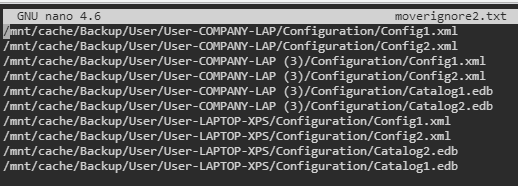
So I ran the script to remove any ^M, (double checked in nano and couldn't see any anyway), ran the find with grep exclusion and still got the following result: root@User-HTPC:~# find "/mnt/cache/Backup/" -depth | grep -vFf '/boot/config/plugins/ca.mover.tuning/moverignore2.txt' /mnt/cache/Backup/User/User-COMPANY-LAP/Configuration/Config1.xml /mnt/cache/Backup/User/User-COMPANY-LAP/Configuration/Config2.xml /mnt/cache/Backup/User/User-COMPANY-LAP/Configuration /mnt/cache/Backup/User/User-COMPANY-LAP /mnt/cache/Backup/User/User-COMPANY-LAP (3)/Configuration/Config1.xml /mnt/cache/Backup/User/User-COMPANY-LAP (3)/Configuration/Config2.xml /mnt/cache/Backup/User/User-COMPANY-LAP (3)/Configuration /mnt/cache/Backup/User/User-COMPANY-LAP (3) /mnt/cache/Backup/User/User-LAPTOP-XPS/Configuration/Catalog1.edb /mnt/cache/Backup/User/User-LAPTOP-XPS/Configuration/Catalog2.edb /mnt/cache/Backup/User/User-LAPTOP-XPS/Configuration/Config1.xml /mnt/cache/Backup/User/User-LAPTOP-XPS/Configuration/Config2.xml /mnt/cache/Backup/User/User-LAPTOP-XPS/Configuration /mnt/cache/Backup/User/User-LAPTOP-XPS /mnt/cache/Backup/ The moverignore file contains the following: Can't figure out why? The Grep command should ignore all of these right, given the -v flag inverts matching?
-
Hi All! I am trying to do a sneaky little script to assist with automated transcoding after torrent completion here. Basically I want to copy files using the "Run on torrent completion" command, I want to copy files within a category and without HEVC flags to folder for transcoding (below), and I want files that contain HEVC flags to go into a folder that avoids transcoding (I have left the elif statement out due to the below script not working anyway). Unfortunately my below script isn't working, and I can't figure out where the logs go for this to find out why. Command in Qbittorrent: /config/TorrentMovev2.bash %F %L %N Script (TorrentMovev2.bash: #!/bin/bash %F=$1 %L=$2 %N=$3 if [[ $2 == 'tv-sonarr' || $2 == 'Movies' ]] && [[ $3 != *H265* || $3 != *x265* ]]; then cp -r $1 "/mnt/user/Downloads/Downloaded/Copied" fi Now this script DOES work, so I know I am onto something, just can't figure out what about the above addition is breaking it. #!/bin/bash %F=$1 %L=$2 if [[ $2 == 'tv-sonarr' || $2 == 'Movies' ]]; then cp -r $1 "/mnt/user/Downloads/Downloaded/Copied" fi
-
Hi people, I seem to be having issue getting the 'Ignore files listed inside of a text file' process to work. My moverignore file is on /boot/moverignore.txt and contains the following: /mnt/cache/Backup/User/User-COMPANY-LAP/Configuration/Config1.xml /mnt/cache/Backup/User/User-COMPANY-LAP/Configuration/Config2.xml /mnt/cache/Backup/User/User-COMPANY-LAP (3)/Configuration/Config1.xml /mnt/cache/Backup/User/User-COMPANY-LAP (3)/Configuration/Config2.xml /mnt/cache/Backup/User/User-COMPANY-LAP (3)/Configuration/Catalog1.edb /mnt/cache/Backup/User/User-COMPANY-LAP (3)/Configuration/Catalog2.edb /mnt/cache/Backup/User/User-LAPTOP-XPS/Configuration/Config1.xml /mnt/cache/Backup/User/User-LAPTOP-XPS/Configuration/Config2.xml /mnt/cache/Backup/User/User-LAPTOP-XPS/Configuration/Catalog2.edb /mnt/cache/Backup/User/User-LAPTOP-XPS/Configuration/Catalog1.edb However, invoking mover moves all those files, with the following log: Feb 4 10:11:12 User-HTPC root: Complete Mover Command: find "/mnt/cache/Backup/" -depth | grep -vFf '/boot/moverignore.txt' | /usr/local/sbin/move -d 1 Feb 4 10:11:12 User-HTPC move: move: file /mnt/cache/Backup/User/User-LAPTOP-XPS/Configuration/Catalog2.edb Feb 4 10:11:12 User-HTPC move: move: file /mnt/cache/Backup/User/User-LAPTOP-XPS/Configuration/Config1.xml Feb 4 10:11:12 User-HTPC move: move: file /mnt/cache/Backup/User/User-LAPTOP-XPS/Configuration/Config2.xml Feb 4 10:11:13 User-HTPC move: move: file /mnt/cache/Backup/User/User-COMPANY-LAP/Configuration/Config1.xml Feb 4 10:11:13 User-HTPC move: move: file /mnt/cache/Backup/User/User-COMPANY-LAP/Configuration/Config2.xml Feb 4 10:11:13 User-HTPC move: move: file /mnt/cache/Backup/User/User-COMPANY-LAP (3)/Configuration/Catalog1.edb Feb 4 10:11:13 User-HTPC move: move: file /mnt/cache/Backup/User/User-COMPANY-LAP (3)/Configuration/Catalog2.edb Feb 4 10:11:13 User-HTPC move: move: file /mnt/cache/Backup/User/User-COMPANY-LAP (3)/Configuration/Config1.xml Feb 4 10:11:13 User-HTPC move: move: file /mnt/cache/Backup/User/User-COMPANY-LAP (3)/Configuration/Config2.xml Feb 4 10:11:13 User-HTPC root: mover: finished Anything obvious I am doing wrong?
-
Thanks alturismo, I saw your previous comments on this topic but I couldn't load the stream module into my swag container. Any other methods of doing this with a IP address whitelisting for safety?
-
I am wondering if anyone has any idea how to use SWAG with a SQL docker to reverse proxy a MSSQL server for remote access through SSMS? I have spent most of a couple of days looking into it, and I know that I need to use a stream process, however I can't get it to work with the nginx within SWAG docker. Anyone have this working and could give me some guidance on how to setup the subdomain conf file?
