





ecnal.magnus
Members
-
Joined
-
Last visited
Everything posted by ecnal.magnus
-
I marked this resolved, because I got my server back to the state it was in before I enabled ipv6. But it isn't really resolved, as ipv6 isn't enabled on the interface that was giving me issues.
-
I sort of figured this out. If I have ipv4+ipv6 enabled on eth1, then eth1 isn't available to Docker. I have it enabled on eth0 and that works just fine. But I put eth1 back to just ipv4 and it is now working again. Hopefully someone has an answer to this as I would love to have ipv6 working on eth1, as well.
-
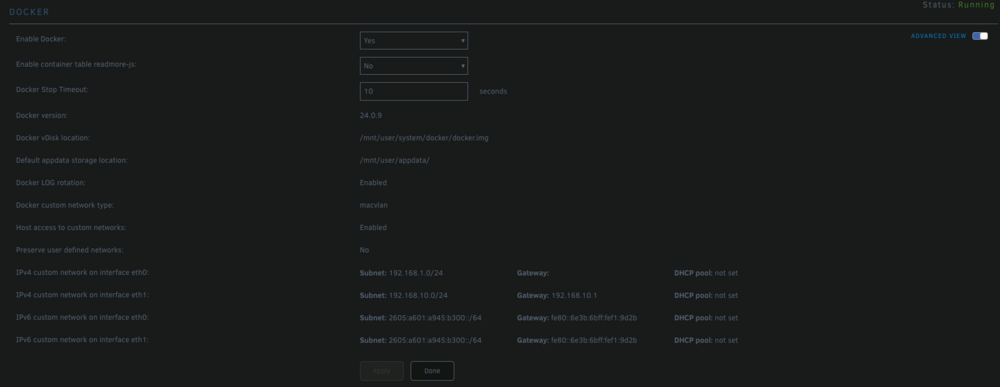
I have two network cards in my machine. One is set to 192.168.1.0/24 (eth0) and the other is set to 192.168.10.0/24 (eth1). I have myriad Docker containers split between the two NICs. After rebooting my server yesterday eth1 disappeared from my containers it was assigned to. Those containers wouldn't start. The error message I got was "container doesn't exist" or something along those lines. When I went into their configuration page the Network Type on each container that was previously assigned to eth1 was set to None and eth1 was no longer an available option. As you can see from the attached screen shot, eth1 still exists in the Advanced View of the general Docker settings, but it did not exist when I did a "docker network ls" from the terminal. I re-added it using "docker network create --driver=macvlan --subnet=192.168.10.0/24 --gateway=192.168.10.1 eth1," which then made it available again for assignment in the Docker containers configuration page, but nothing assigned to that NIC will even ping, so it still doesn't work even though it now looks like it did prior to the reboot. Also, if I reboot the machine, the NIC will disappear from the Docker container configuration page and also from "docker network ls." I can then recreate it but, like I said, it doesn't actually work. I have since moved the broken containers over to eth0 so they are up and running, but I would really like to put them back on eth1, as that is the subnet I have set aside for particular applications. Please let me know if there is any other information I can provide. It really was working prior to, and then not working after, a simple reboot of the machine.
-
I had a corrupt share. I couldn't even bring up the share's configuration page. It would just hang like it was trying to load. Luckily I didn't have any data on the share that was important, so I just deleted it all, deleted the share, and everything went back to normal. It might be possible to move data off of a corrupt share, but I didn't try that. I can't even say that is the issue you are having, only that it ended up being my issue. Hope that helps.
-
What ended up fixing it for me was deleting the corrupted share. Read my last response before this one. I don't know what corrupted the share. I wish I did. But as soon as that share was gone everything went back to functioning normally. Hope that helps.
-
Thank you for the insight. I really appreciate all the help.
-
I could never get it to stop, even in safe mode. I finally completely blew away and reformatted both of my cache pools and now it stops. I suspected corruption in the cache pools, as there were some files that, when I tried to delete them, gave me the error "Invalid or incomplete multibyte or wide character" and the file names had backslashes in them for some reason, but I had no idea that would keep the array from stopping. They are now freshly formatted ZFS and everything appears to be running correctly. I have both of those pools backed up, but I think I might just rebuild all my Docker containers from scratch, because I don't trust that data anymore. It will be a pain, but I didn't lose any data that was integral, only the stuff in appdata. What do you think?
-
I just went ahead and reinstalled Unraid on my flash drive and moved over my key. It booted up just fine and the Docker and VM services started just fine. But, even with a fresh install, I am still having issues stopping the array. This is an issue I have experienced almost since I started using Unraid a couple of years ago, and I think may be leading to at least some of my issues since, ultimately, I am having to do a hard shutdown to get the array stopped. It is currently sitting in "Array stopping - stopping services..." and when I tail the syslog it shows the paste below. I don't know if there is some hardware that is causing this, since this is a completely fresh install, but it has been in this state for more than 30 minutes now. root@ecnal:~# tail -f /var/log/syslog Dec 10 10:47:16 ecnal emhttpd: Stopping services... Dec 10 10:47:16 ecnal emhttpd: shcmd (1520): /etc/rc.d/rc.libvirt stop Dec 10 10:47:16 ecnal root: Stopping libvirtd... Dec 10 10:47:16 ecnal dnsmasq[12132]: exiting on receipt of SIGTERM Dec 10 10:47:16 ecnal root: Network 2214f59d-018d-4270-9f9c-550be516a722 destroyed Dec 10 10:47:16 ecnal root: Dec 10 10:47:17 ecnal root: Stopping virtlogd... Dec 10 10:47:18 ecnal root: Stopping virtlockd... Dec 10 10:47:19 ecnal emhttpd: shcmd (1521): umount /etc/libvirt Dec 10 10:50:15 ecnal nginx: 2023/12/10 10:50:15 [error] 6821#6821: *8357 upstream timed out (110: Connection timed out) while reading upstream, client: 192.168.1.99, server: , request: "POST /update.htm HTTP/1.1", upstream: "http://unix:/var/run/emhttpd.socket:/update.htm", host: "192.168.1.222", referrer: "http://192.168.1.222/Main"
-
Two days ago I logged into my server and realized the multiple Docker containers were stopped. When I tried to start them they wouldn't. A couple of the containers were still running, and would stop and start and run just fine, which was odd to me. I tried to rollback to multiple ZFS snapshots but nothing worked. Eventually I found a thread that talked about deleting the Docker image, so I did that and now I can't get the Docker service to start at all. Interestingly enough, the VM service also won't start, but I don't use any VMs, I just tried that to see what would happen. I have rebooted the server multiple times over the last couple of days, but right as everything was going really wrong I downloaded the diagnostics files prior to a reboot. I also have syslog running to an external server, so I have all my syslog files, as well. I am wondering if there is any saving my install at this point, or if I am just better off starting with a fresh install of the OS itself? I believe that is possible without losing any of the data, is it not? Currently I have an Unraid server that will start, and as log as I don't have VMs or Docker enabled the array will start, but I cannot get it to stop and the only way I can rebooted it is to kill the power. I would like to get started on rebuilding the OS as soon as possible if that turns out to be my best approach? I still have all my ZFS snapshots and replication, but I don't know that they aren't completely corrupt at this point. I just upgraded to 6.12.6 a day or so prior to these issues showing up. That I can tell all my data is still intact. I have 2 cache pools with ZFS replication going on between them. I have a 15 drive array with dual parity. I have the good portion of my data (and ALL of my media files) backed up to an external server, but there is still quite a bit of odds-and-ends data that resides ONLY on my Unraid array. I have done a lot of modification of the OS over the last 3 years since I moved to Unraid. I am genuinely wondering if just starting fresh (while retaining my data, of course) is my best option? Any and all input would be greatly appreciated. ecnal-diagnostics-20231208-1721.zip
-
So, a few months back I moved the parity drives from the SAS controller to a standard PCIe SATA controller, thinking that would solve the sync errors issue, but those same 5 errors have continued. I think I will move both parity drives to motherboard connectors and see if that eliminates the errors. Thank you for your input. I am going to mark this as solved.
-
Three checks in a row were multiple hundreds of errors. But then the there were none, and now I rebooted and ran another one and it had 5 errors again. I don't know what to do about the 5 errors. Do you think that over time getting those 5 errors constantly will cause me problems?
-
The latest parity check completed with no errors. It has not done that in a month. I don't know what the difference is except MAYBE the others had all been after a reboot? I attached the diagnostics. Consequently, after any reboot, I have always had 5 parity errors the next check that ran. I found some forum posts discussing a certain SAS controller or something that might cause such a thing. I have moved my parity disks off of my SAS controller, to just a PCIe x4 SATA expansion card, and those 5 errors always show up after a boot. Just thought it couldn't hurt to include that information. Anyway, hopefully this is nothing, but if the diagnostics show something wrong, I would be interested in knowing exactly what it is you look for in such things? Thanks in advance. ecnal-diagnostics-20230709-2007.zip
-
I have rebooted since the one with 595 errors. I will start another check now. The last one's duration was "2 days, 20 hours, 37 minutes, 52 seconds. Average speed: 64.8 MB/s" so it will be a few days before I can report back.
-
I am continually getting errors during a parity check. One just finished with 150 errors, and the one I ran a week ago had 595 errors. I send all logging to a syslog server, but I don't really know which log to look in or what to look for. I don't see anything wrong when I look at the S.M.A.R.T. information of each disk. I have a 15 drive array with dual parity. I am happy to provide any further information you guys might need. I have been running Unraid for about two years now. I am relatively technologically proficient. I can certainly follow directions well. Any insight would be appreciated.
-
That worked. Thank you.
-
Last weekend I shut down my Docker service, moved all the data off of my 1TB cache array (2 1TB NVMe drives), replaced the drives with 2 new 2TB NVMe drives, spun the array back up, moved the appdata and system shares back to the cache array, reenabled Docker service, and everything was working fine. Today I wanted to add a couple of external USB C NVMe drives. When I added them they wouldn't mount, so I rebooted the server. When the server came back the cache array was indicating that the new 2TB drives were wrong, and it said it was expecting the old 1TB drives still. But the new ones had detected and worked just fine until the reboot. Just for fun I started the array anyway with the new drives in place of the old drives (as they had been working since Sunday) and the cache drive came up and Docker is working and I can write to the cache array, but the cache drives both have a red X by them, and they are both saying they are being emulated. I don't believe that isn't possible, considering there is nothing to emulate them from, and considering my Docker is working just fine at my new NVMe drive speeds. I mostly wanted to bring it to the forums attention to see if anyone else had experienced this or had any ideas as to why the old drives would have showed back up logically? Everything seems to be working just fine, but I don't really want to leave it like this. Any insight would be appreciated. Also, I have remote syslog enabled, so if there is anything from syslog that might help I can grab it and share it.

-
I knew I was missing something, I just couldn't remember what it was. That did the trick. I am back up and fully functional. Thank you for all the help. I really appreciate it.
-
I have it back up and operational. Funny what having access to DNS will do for you, huh? Anyway, the only thing I notice out of place, now, is that, on my dashboard, I used to have under where it reports my motherboard, CPU, memory, and that stuff, a place for the GPU, where it told what GPU it was and some realtime statistics. That is no longer there. Is there someway I can get that back, or has that been removed in this version?
-
This is all my fault. I forgot that I was running my primary DNS through a Docker container. When I rebooted there was no DNS available. I am trying to straighten things out right now. But, it is all my fault for overlooking the DNS settings.
-
I rebooted and I couldn't start Plex. The GPU wasn't showing up. I downgraded back to 6.9.2 and now Apps doesn't work, my GPU isn't there. Nvidia plugin isn't there. And I can't upgrade again because it doesn't give me that option. My system is basically unusable for what I use it for, now.
-
Thank you.
-
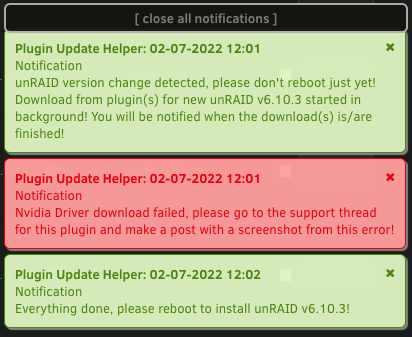
Unraid instructed me to make this post. I received this error after installing the newest Unraid build. I have not rebooted my machine yet. Is this going to mess things up if I reboot?
-
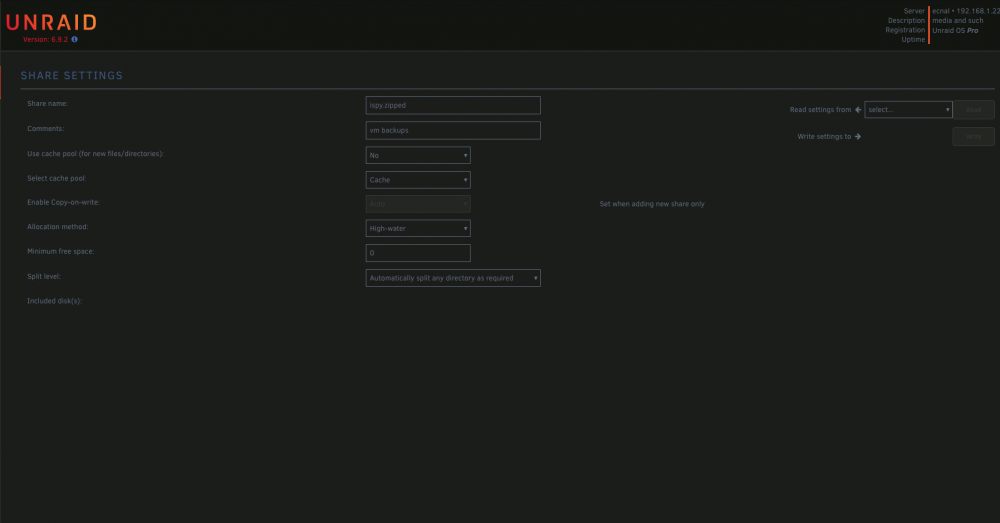
I discovered the attached posts from 2020 and they put me on the right path. I currently have SMB disabled and everything is working fine (other than I don't have SMB access, that is). In the process of scouring my shares and disabling SMB on all of them, I discovered a share whose "Share settings" page won't fully populate. It is the only one that behaves this way (screenshot attached). It only loads the top portion of the page, and then the loading indicator on the browser tab just spins until it eventually stops and all that is displayed is this much of the page. I truly don't care about the data on this share. Does anyone know the implications if I just delete this share from the config file? Is there a better way of going about getting access to this shares setting page? Is there a config file where this Share Settings page can be altered by hand in a text editor? Thanks, ecnal
-
Never mind, I found your other thread. Stopping SMB right now to see if it helps.
-
I am having this exact problem, and I started the attached thread in hopes of figuring it out. Did you ever get this corrected? Did it just go away on its own? Is there anything you can tell me that you haven't already posted here? Any help or insight would be greatly appreciated.



