jwiener3
Members
-
Joined
-
Last visited
Everything posted by jwiener3
-
Checking on this to see if anyone has a suggestion on how can I troubleshoot the credentials the backup is using. I do not have any issues creating files and folders from the CLI of UNRAID.
-
I am having an issue where I am getting an error about destination being unavailable or not writeable when running the backup to a NFS share. This was working before and stopped and if I go to the CLI I can go to the destination directory and create folders and files. I have tried re-entering both the source and destination directories and it hasn't helped. Does this process run under different privileges? I have submitted the debug with the following ID, 05996226-dd22-42e0-b7e1-5ff3453cd482, but it looks empty. How can I troubleshoot this? [19.08.2024 08:59:19][ℹ️][Main] 👋 WELCOME TO APPDATA.BACKUP!! :D [19.08.2024 08:59:19][❌][Main] Destination is unavailable or not writeable! [19.08.2024 08:59:19][ℹ️][Main] Checking retention... [19.08.2024 08:59:19][ℹ️][Main] DONE! Thanks for using this plugin and have a safe day ;)
-
Maybe only 3 of us care at this point, but I wanted to let everyone know this is still working in PAN-OS version 11, on UNRAID version 6.11.5
-
Thank you! That helped me figure out the issue. I had copied and pasted my exclusion statement from the old version cfg file and had included an extra " at the end. So it was the exclusion statement that was erroring out the commands. Thanks again for the quick support.
-
Nope, that is what I have been testing with. also here is an example of the tar command backing up one of the folders and it seems to work. I am not sure of the exact command the script runs. root@unraid:/# mkdir /mnt/remotes/192.168.20.25_Net-Backup/UNRAID/JSW-UNRAID-NUC/AppData/[email protected]/ root@unraid:/# tar -cvf /mnt/remotes/192.168.20.25_Net-Backup/UNRAID/JSW-UNRAID-NUC/AppData/2023-01-02\@13.48/dashy.tar /mnt/user/appdata/dashy tar: Removing leading `/' from member names /mnt/user/appdata/dashy/ /mnt/user/appdata/dashy/icons/ /mnt/user/appdata/dashy/conf.yml root@unraid:/# ls -la /mnt/remotes/192.168.20.25_Net-Backup/UNRAID/JSW-UNRAID-NUC/AppData/2023-01-02\@13.48/ total 20 drwxrwxrwx 2 nobody users 0 Jan 2 13:49 ./ drwxrwxrwx 2 nobody users 0 Jan 2 13:48 ../ -rwxrwxrwx 1 nobody users 20480 Jan 2 13:49 dashy.tar* root@unraid:/#
-
It is root@unraid:~# touch /mnt/remotes/192.168.20.25_Net-Backup/UNRAID/JSW-UNRAID-NUC/AppData/test root@unraid:~# ls -la /mnt/remotes/192.168.20.25_Net-Backup/UNRAID/JSW-UNRAID-NUC/AppData/ total 0 drwxrwxrwx 2 nobody users 0 Jan 2 13:35 ./ drwxrwxrwx 2 nobody users 0 Jan 2 12:49 ../ drwxrwxrwx 2 nobody users 0 Jan 2 08:31 2023-01-02\@03.00-error/ drwxrwxrwx 2 nobody users 0 Jan 2 08:38 2023-01-02\@08.33/ drwxrwxrwx 2 nobody users 0 Jan 2 12:49 2023-01-02\@12.44-error/ drwxrwxrwx 2 nobody users 0 Jan 2 13:31 2023-01-02\@13.29-error/ -rwxrwxrwx 1 nobody users 0 Jan 2 13:35 test*
-
I am having issues since moving to v3. Seems like it is having trouble creating the tar file. It can create the directory and backup.log without issue, and I can create it manually using "tar -cvf". Any advice on what to check? [02.01.2023 12:44:03] Backup of appData starting. This may take awhile [02.01.2023 12:44:03] Stopping AdGuard-Home... done! (took 0 seconds) [02.01.2023 12:44:03] Not stopping ApacheGuacamole: Not started! [ / Exited (0) 4 hours ago] [02.01.2023 12:44:03] Not stopping binhex-krusader: Not started! [ / Exited (0) 4 hours ago] [02.01.2023 12:44:03] Not stopping cadvisor: Not started! [ / Exited (0) 4 hours ago] [02.01.2023 12:44:03] Stopping cloudflareddns... done! (took 5 seconds) [02.01.2023 12:44:08] Stopping CrashPlanPRO... done! (took 7 seconds) [02.01.2023 12:44:15] Stopping CrushFTP10... done! (took 20 seconds) [02.01.2023 12:44:35] Not stopping dashy: Not started! [ / Exited (1) 4 hours ago] [02.01.2023 12:44:35] Not stopping Debian-Bullseye: Not started! [ / Exited (143) 2 hours ago] [02.01.2023 12:44:35] Not stopping DiskSpeed: Not started! [ / Exited (143) 2 hours ago] [02.01.2023 12:44:35] Stopping docker-dns... done! (took 0 seconds) [02.01.2023 12:44:35] Stopping FileFlows... done! (took 20 seconds) [02.01.2023 12:44:55] Not stopping idrac6: Not started! [ / Exited (2) 4 days ago] [02.01.2023 12:44:55] Not stopping MeTube: Not started! [ / Exited (137) 2 hours ago] [02.01.2023 12:44:55] Stopping nzbhydra2... done! (took 11 seconds) [02.01.2023 12:45:06] Stopping ombi... done! (took 4 seconds) [02.01.2023 12:45:10] Stopping plex... done! (took 4 seconds) [02.01.2023 12:45:14] Stopping radarr... done! (took 6 seconds) [02.01.2023 12:45:20] Stopping sabnzbd... done! (took 4 seconds) [02.01.2023 12:45:24] Not stopping SearXNG: Not started! [ / Exited (137) 2 hours ago] [02.01.2023 12:45:24] Stopping senseai-server... done! (took 8 seconds) [02.01.2023 12:45:32] Stopping smokeping-speedtest... done! (took 5 seconds) [02.01.2023 12:45:37] Stopping sonarr... done! (took 4 seconds) [02.01.2023 12:45:41] Stopping speedtest... done! (took 20 seconds) [02.01.2023 12:46:01] Stopping tautulli... done! (took 4 seconds) [02.01.2023 12:46:05] Stopping unifi-controller... done! (took 8 seconds) [02.01.2023 12:46:13] Not stopping Virt-Manager: Not started! [ / Exited (0) 2 hours ago] [02.01.2023 12:46:13] Not stopping Vnstat: Not started! [ / Exited (1) 4 days ago] [02.01.2023 12:46:13] Backing Up appData from /mnt/user/appdata/ to /mnt/remotes/192.168.20.25_Net-Backup/UNRAID/JSW-UNRAID-NUC/AppData/[email protected] [02.01.2023 12:46:13] Separate archives enabled! [02.01.2023 12:46:13] Ignoring: . [02.01.2023 12:46:13] Ignoring: .. [02.01.2023 12:46:13] Ignoring: binhex-krusader [02.01.2023 12:46:13] Ignoring: debian-bullseye [02.01.2023 12:46:13] Ignoring: DiskSpeed [02.01.2023 12:46:13] Ignoring: idrac [02.01.2023 12:46:13] Ignoring: searxng [02.01.2023 12:46:13] Ignoring: vman [02.01.2023 12:46:13] Backing Up: adguard_home [02.01.2023 12:46:13] tar creation/extraction failed! [02.01.2023 12:46:13] Backing Up: ApacheGuacamole [02.01.2023 12:46:13] tar creation/extraction failed! [02.01.2023 12:46:13] Backing Up: cloudflared [02.01.2023 12:46:13] tar creation/extraction failed! [02.01.2023 12:46:13] Backing Up: cloudflareddns [02.01.2023 12:46:13] tar creation/extraction failed! [02.01.2023 12:46:13] Backing Up: CrashPlanPRO [02.01.2023 12:46:13] tar creation/extraction failed! [02.01.2023 12:46:13] Backing Up: crushftp [02.01.2023 12:46:13] tar creation/extraction failed! [02.01.2023 12:46:13] Backing Up: dashy [02.01.2023 12:46:13] tar creation/extraction failed! [02.01.2023 12:46:13] Backing Up: fileflows [02.01.2023 12:46:13] tar creation/extraction failed! [02.01.2023 12:46:13] Backing Up: fileflows2 [02.01.2023 12:46:13] tar creation/extraction failed! [02.01.2023 12:46:13] Backing Up: jwigley-smokeping [02.01.2023 12:46:13] tar creation/extraction failed! [02.01.2023 12:46:13] Backing Up: nzbhydra2 [02.01.2023 12:46:13] tar creation/extraction failed! [02.01.2023 12:46:13] Backing Up: ombi [02.01.2023 12:46:13] tar creation/extraction failed! [02.01.2023 12:46:13] Backing Up: plex [02.01.2023 12:46:13] tar creation/extraction failed! [02.01.2023 12:46:13] Backing Up: radarr [02.01.2023 12:46:13] tar creation/extraction failed! [02.01.2023 12:46:13] Backing Up: sabnzbd [02.01.2023 12:46:13] tar creation/extraction failed! [02.01.2023 12:46:13] Backing Up: SenseAIContainer [02.01.2023 12:46:13] tar creation/extraction failed! [02.01.2023 12:46:13] Backing Up: sonarr [02.01.2023 12:46:13] tar creation/extraction failed! [02.01.2023 12:46:13] Backing Up: tautulli [02.01.2023 12:46:13] tar creation/extraction failed! [02.01.2023 12:46:13] Backing Up: tautulli.old [02.01.2023 12:46:13] tar creation/extraction failed! [02.01.2023 12:46:13] Backing Up: unifi-controller [02.01.2023 12:46:13] tar creation/extraction failed! [02.01.2023 12:46:13] Backing Up: vnstat [02.01.2023 12:46:13] tar creation/extraction failed! [02.01.2023 12:46:13] Backing Up: webgrabplus [02.01.2023 12:46:13] tar creation/extraction failed! [02.01.2023 12:46:13] Backing Up: whoogle-search [02.01.2023 12:46:13] tar creation/extraction failed! [02.01.2023 12:46:13] done [02.01.2023 12:46:13] Starting AdGuard-Home... (try #1) done! [02.01.2023 12:46:15] Starting cloudflareddns... (try #1) done! [02.01.2023 12:46:17] Starting CrashPlanPRO... (try #1) done! [02.01.2023 12:46:19] Starting CrushFTP10... (try #1) done! [02.01.2023 12:46:22] Starting docker-dns... (try #1) done! [02.01.2023 12:46:24] Starting FileFlows... (try #1) done! [02.01.2023 12:46:26] Starting nzbhydra2... (try #1) done! [02.01.2023 12:46:29] Starting ombi... (try #1) done! [02.01.2023 12:46:31] Starting plex... (try #1) done! [02.01.2023 12:46:31] Waiting 45 seconds before carrying on [02.01.2023 12:47:16] Starting radarr... (try #1) done! [02.01.2023 12:47:19] Starting sabnzbd... (try #1) done! [02.01.2023 12:47:22] Starting senseai-server... (try #1) done! [02.01.2023 12:47:24] Starting smokeping-speedtest... (try #1) done! [02.01.2023 12:47:26] Starting sonarr... (try #1) done! [02.01.2023 12:47:29] Starting speedtest... (try #1) done! [02.01.2023 12:47:31] Starting tautulli... (try #1) done! [02.01.2023 12:47:33] Starting unifi-controller... (try #1) done! [02.01.2023 12:47:35] A error occurred somewhere. Not deleting old backup sets of appdata [02.01.2023 12:47:35] Backup / Restore Completed
-
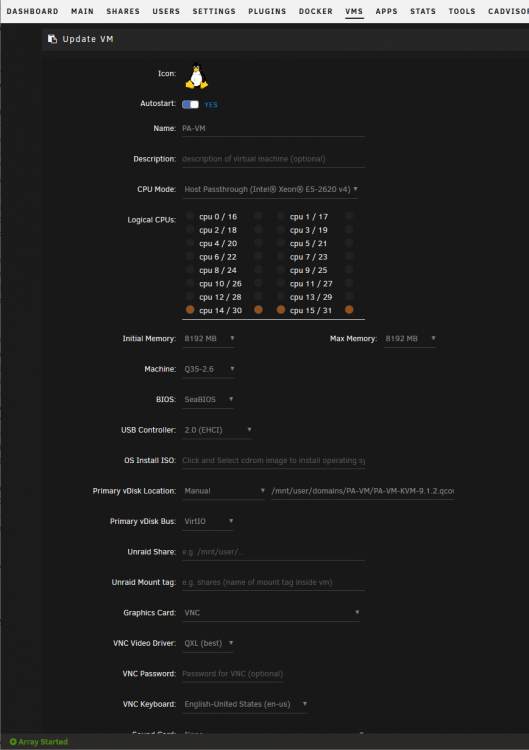
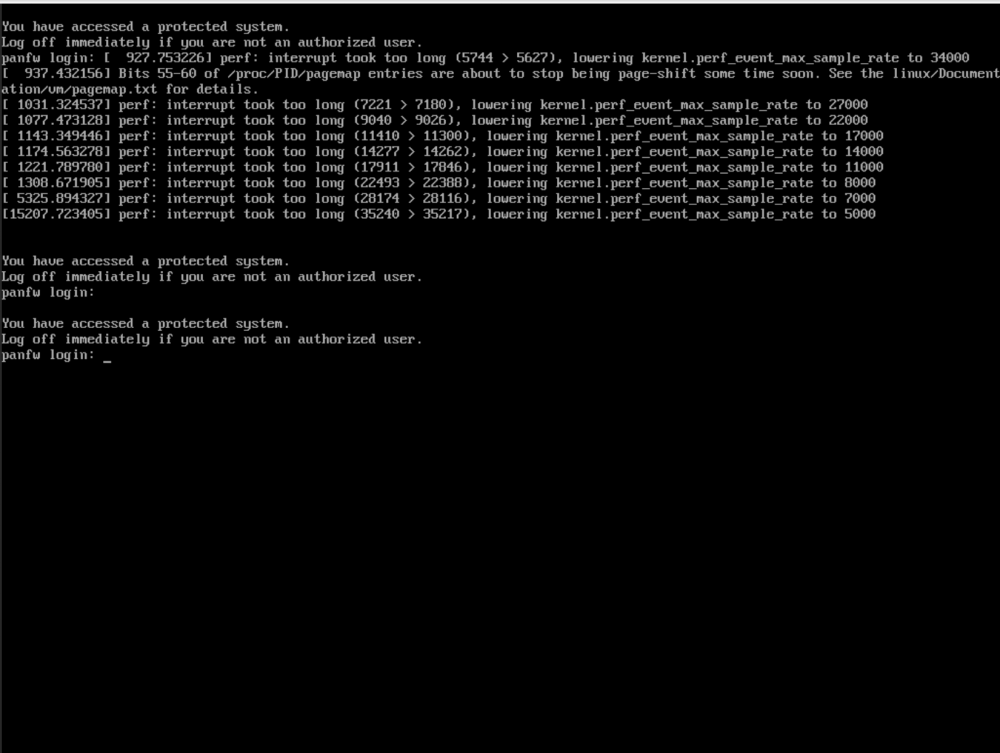
I know this is an old thread, but for anyone that stumbles across it looking for advice. I did get this working on 6.8.3 with the PAN os 9.1.2 qcow image (I did not try any other version). See below for my setting and I added 8 NICs the first being the management NIC. It takes a while to startup and I do get some errors (see screen shot), but it works well and I get the performance I need (500mbps down and 20mbps up).