





clarsen
Members
-
Joined
-
Last visited
-
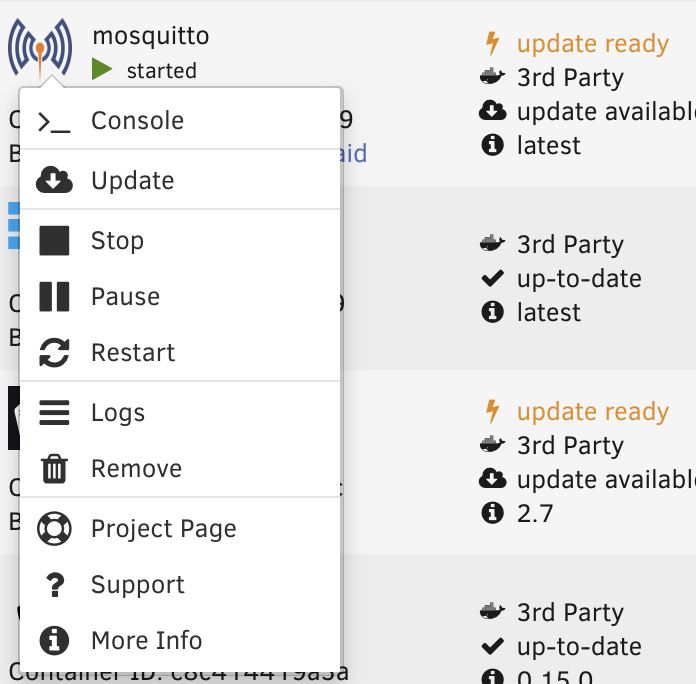
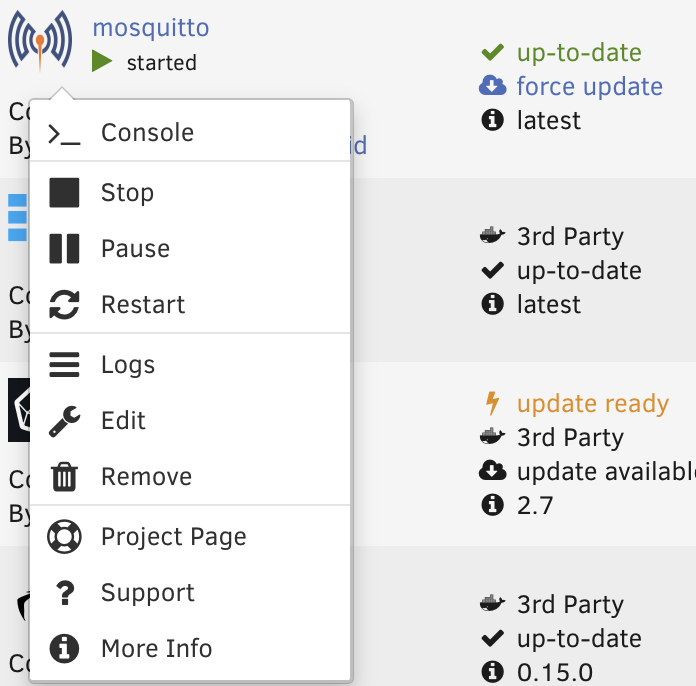
I had the same issue when upgrading from 6.9.2 to 7.0.0 today. I can confirm that *if* the "update" option is available in the container menu (example screenshot below), doing the update via the UI will result in a container that is no longer considered third party and is editable. before update: after update: The difference in container state before update/after update where unraid no longer thinks it's 3rd party (aside from state like PIDs, container image hashes) as from comparing the output of "docker inspect <container_name>" before and after updating does seem mainly the addition of the labels: + "net.unraid.docker.icon": "<URL of icon of app>", + "net.unraid.docker.managed": "dockerman", + "net.unraid.docker.webui": "http://[IP]:[PORT:<port of web UI configured in template>]", When no update operation is available, invoking the script suggested "/usr/bin/php -q /usr/local/emhttp/plugins/dynamix.docker.manager/scripts/update_container $CONTAINER_NAME" results in the restarted container no longer being considered 3rd party and being editable once again. The difference in docker state by comparing "docker inspect" before and after running the script is the same as above - so the existing template and (non-updated) image can be reused in restarting the container with the necessary labels expected by Unraid.
-
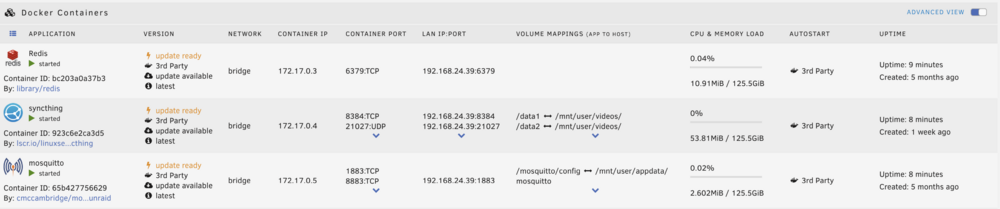
I upgraded from 6.9.2 to 7.0 today and docker containers restarted fine, but can't be edited and show "3rd party" for version and autostart The templates do exist in /boot/config/plugins/dockerMan, so not sure where in the bootup sequence the system is failing to see the containers as being managed by Unraid...: # ls -la /boot/config/plugins/dockerMan/* -rw------- 1 root root 44 May 17 2022 /boot/config/plugins/dockerMan/template-repos -rw------- 1 root root 223 Jan 20 13:04 /boot/config/plugins/dockerMan/userprefs.cfg /boot/config/plugins/dockerMan/templates: total 12 drwx------ 3 root root 4096 Sep 1 2022 ./ drwx------ 4 root root 4096 Jan 14 2023 ../ drwx------ 2 root root 4096 Mar 16 2024 limetech/ /boot/config/plugins/dockerMan/templates-user: total 164 drwx------ 2 root root 4096 Feb 22 11:50 ./ drwx------ 4 root root 4096 Jan 14 2023 ../ -rw------- 1 root root 3675 Feb 22 11:50 my-AppDaemon.xml -rw------- 1 root root 3716 Feb 22 11:50 my-AppDaemon.xml.bak -rw------- 1 root root 8367 Feb 22 11:50 my-Grafana-Unraid-Stack.xml -rw------- 1 root root 8891 Feb 22 11:50 my-Grafana-Unraid-Stack.xml.bak -rw------- 1 root root 2593 Feb 22 11:50 my-Grafana.xml -rw------- 1 root root 2729 Feb 22 11:50 my-Grafana.xml.bak -rw------- 1 root root 1889 Jan 18 11:51 my-Home-Assistant-Core.xml -rw------- 1 root root 2017 Apr 25 2023 my-Influxdb2.xml -rw------- 1 root root 1630 Mar 16 2024 my-Redis.xml -rw------- 1 root root 5174 Feb 22 11:50 my-birdcage_backend.xml -rw------- 1 root root 5509 Feb 22 11:50 my-birdcage_backend.xml.bak -rw------- 1 root root 1562 Feb 22 11:50 my-birdcage_frontend.xml -rw------- 1 root root 1612 Feb 22 11:50 my-birdcage_frontend.xml.bak -rw------- 1 root root 901 Feb 22 11:50 my-birdnetserver.xml -rw------- 1 root root 921 Feb 22 11:50 my-birdnetserver.xml.bak -rw------- 1 root root 7858 Feb 22 11:50 my-frigate.xml -rw------- 1 root root 8083 Feb 22 11:50 my-frigate.xml.bak -rw------- 1 root root 5482 Feb 22 11:50 my-jellyfin.xml -rw------- 1 root root 5555 Feb 22 11:50 my-jellyfin.xml.bak -rw------- 1 root root 6568 Sep 1 2022 my-mosquitto.xml -rw------- 1 root root 4668 Feb 22 11:50 my-syncthing.xml -rw------- 1 root root 4741 Feb 22 11:50 my-syncthing.xml.bak -rw------- 1 root root 6396 Feb 22 11:50 my-unifi-controller.xml -rw------- 1 root root 6469 Feb 22 11:50 my-unifi-controller.xml.bak
-
I use a USB extension cable with a Zwave dongle to get better antenna placement and separation from the (noisy) motherboard electronics. There is the same recommendation for Zigbee: https://www.zigbee2mqtt.io/advanced/zigbee/02_improve_network_range_and_stability.html#usb-based-adapter
-
i have a similar issue. I have both eth0 and eth1 configured because my host is attempting to provide service to a VLAN that is otherwise not visible to other parts of my network. The address I wish myservers to use is the local address of eth1 but instead, it's putting the local address of eth0 in the DNS entry at unraid.net. I have IPv4 default gateway metrics set so that eth1 is a higher priority (lower) metric (metric 1) than eth0 (metric 2). route table confirms this too. traceroute on the unraid host shell shows traffic exiting eth1 confirming that the default route is going via eth1. not sure how the plugin decide what interface's address to use. does it just always pick eth0?

