





xaositek
Members
-
Joined
-
Last visited
Everything posted by xaositek
-
Update - rebooting the server actually did fix it.
-
root@PiperMobile:~# unraid-api plugins install unraid-api-plugin-connect Archiving node_modules from '/usr/local/unraid-api/node_modules' to '/boot/config/plugins/dynamix.my.servers/node_modules-for-v4.32.1.tar.xz' node_modules archive created successfully. Added plugin unraid-api-plugin-connect Restarting the Unraid API... [PM2] Applying action restartProcessId on app [unraid-api](ids: [ 0 ]) [PM2] [unraid-api](0) ✓ +--- unraid-api namespace : default version : 4.32.1+5c297da1 pid : 82734 pm2 id : 0 status : online mode : fork restarted : 1 uptime : 1s memory usage : 221.8mb error log : /var/log/graphql-api.log watching : no PID file : /var/log/.pm2/pids/unraid-api-0.pid
-
On one of my unRAID 7.3 beta 2 servers I see this: Same screen on my other unRAID 7.3 beta 2 server I see this: I also notice the upper right corner one of them has the orange unRAID logo and more options and seems a bit more "connected". It used to work but trying to uninstall and re-install the unRAID Connect plug-in didn't fix it.


-
... --- --- -. -....- -.. .- -.-- / -.-- --- ..- / ... .- -.-- ..--.. -.-.--
-
Long story short I've converted a Beelink Sei12 Mini PC into a 8TB all flash (1 NVMe, 1 SATA SSD) array unRAID server. The surrounding setup is a UniFi Dream Router, NetGear NightHawk M6 Pro (AT&T), and BLUETTI EB3A Power Station - all packaged into a neat milk crate so the all setup is ultra portable. Currently whenever I am home, I plug in a USB NIC to the front USB-C port to allow it to get a local IP on the network which then I can rsync the latest library updates across. Problem Statement: unRAID gets a little cranky when network adapters are added or removed while Docker is running; frankly the whole thing gets a bit finicky as even if up force the interface online (ifconfig eth1 up), the Web UI won't load. Presently I've written a bash script that queries the number of current network devices when the system boots, and if it changes, reboot. Question: Is there a better way? (Below is my script) #!/bin/bash if test -f "/tmp/current_nics.log"; then current_nic_count=$(ifconfig -a | grep -i eth | grep -i mtu | wc -l) previous_nic_count=$(cat /tmp/current_nics.log) if [ "$current_nic_count" == "$previous_nic_count" ]; then echo "No Change In Network" else echo "Network Changed; Rebooting" /sbin/reboot fi else ifconfig -a | grep -i eth | grep -i mtu | wc -l > /tmp/current_nics.log echo "Default Network Count Being Set" fi
-
I identified that if you rename your Cache Pool (maybe any pool?) it will lose it's mapping, oddly enough naming it back will fix it. Edit: This is a bit concerning because an exclusive share (See "nextcloud" user share) has reverted directly to "Array" and therefore may end up with some broken configs or missing data. Before Any Changes: Renamed "Cache" to "Speedy":
-
Did you see?! UNRAID OS VERSION 6.12.0-RC5!!!
-
For anyone curious - test/beta builds are still happening - 6.12.0-rc2.11 just came out
-
Dashboard Updates, AutoTrim for xfs and btrfs, Linux Multi-Gen LRU, Release bz file restructure - all kinds of stuff!It took about 3-5 minutes for it to recognize the backup had stopped. I did edit my post but it fixed itself. Great update to this app also!Confirmed working now! Found an interesting issue though - I clicked Abort but it appears the gzip stuck in the middle of running so I killed the gzip command at the CLI level. It's now stuck thinking the backup is in running mode; but it isn't as you can see on the screen. Edit: it did finally recognize the backup had finished; I just jumped the gun.
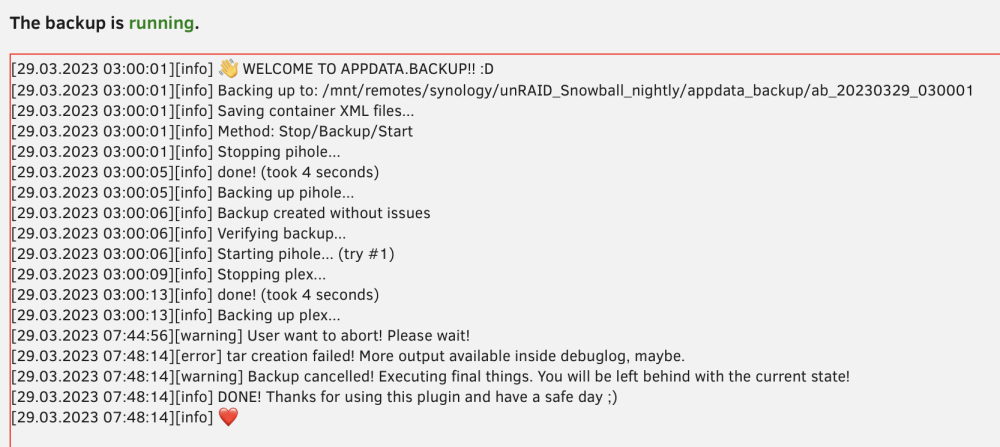 Sorry yes it is Safari Version 16.4 (18615.1.26.11.22) on macOS Ventura 13.3 - omitted an important word, apologies.Just tested in Chrome Version 111.0.5563.146 (Official Build) (64-bit) on Windows 11 and it appears that OS/browser did work
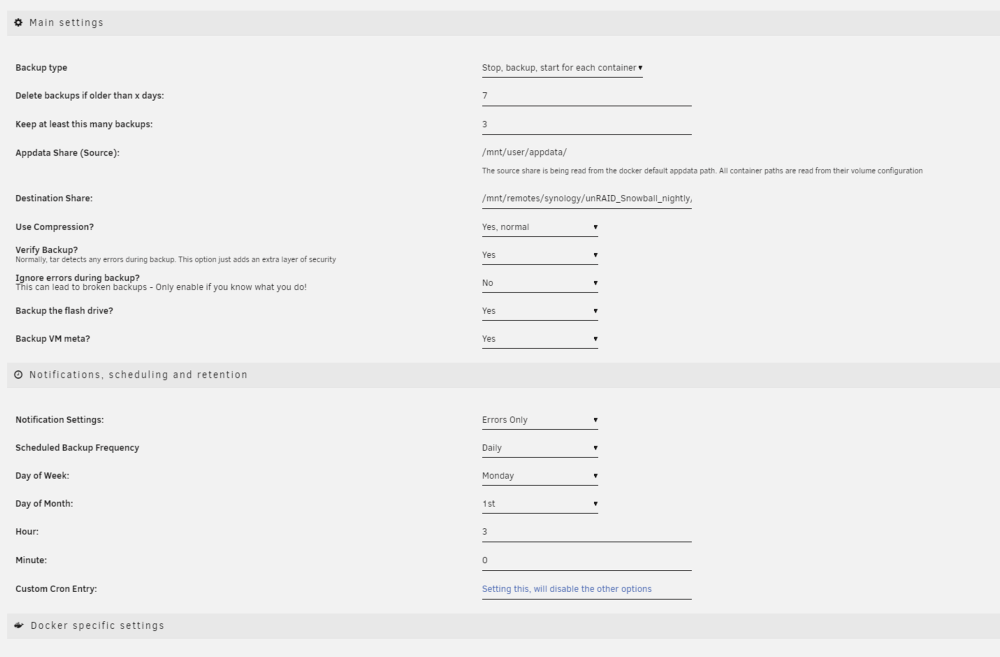 Operating System: macOS Ventura 13.3 Browser: Version 16.4 (18615.1.26.11.22)
 You can also see in the config.json I have "Skip" to "No" but yet the Web Interface says Yes
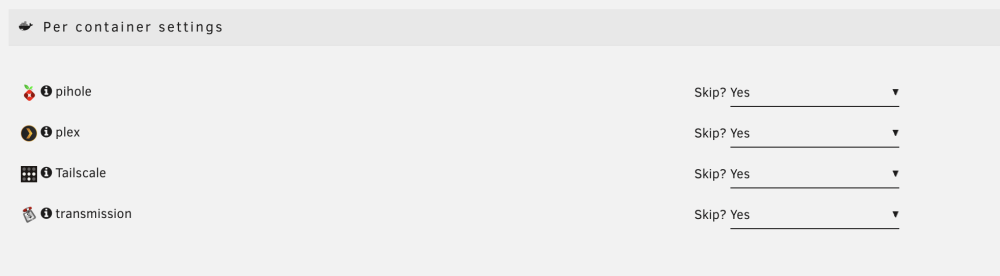 Nuked config.json, updated to Beta 2 and reconfigured. Scheduling still looks bugged in the Web Interface but is saved properly to config.json config.json
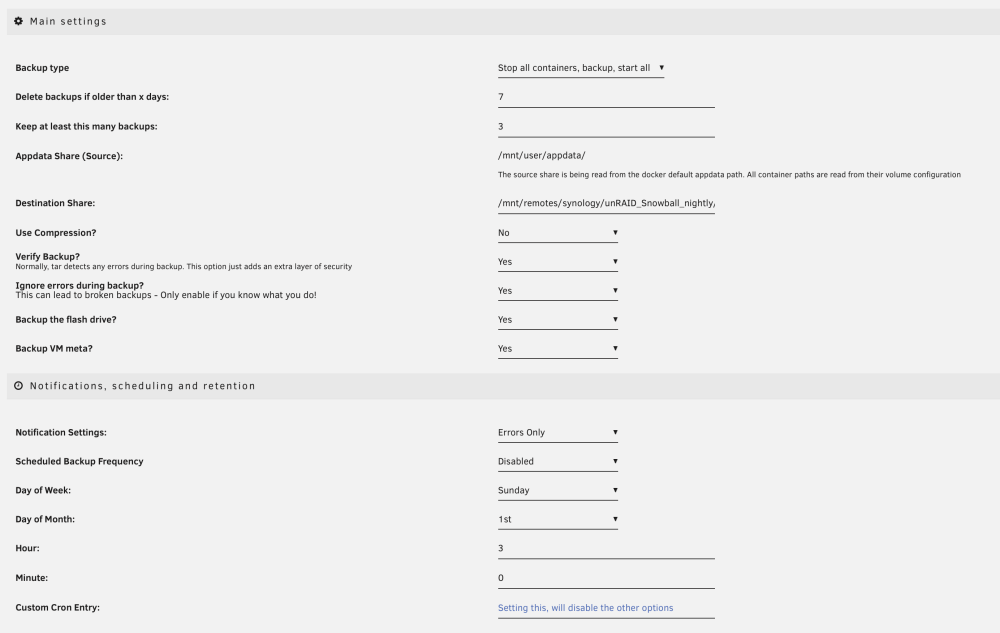 I just installed the beta version - when clicking the "Save" button under "Some Extra Settings" -> "Done?", the "Scheduled Backup Frequency" reverts to "Disabled" (I selected Daily) and also the "Skip?" defaults to "Yes" for each Docker container. Downloading the logs results in a 19 byte file that says no log found. Able to help any way I can to troubleshoot. Finally decommissioning the v2.5 version to jump to a beta version that doesn't appear to migrate any data automatically is a bit rough - wish there was an export/import or something.Reported this officially but for anyone else - you'll find Disk Information is not available when viewing a drive - no Self-Test, Attributes, Capabilities, or Identify tabs. It does show errors in the source code if you enable them. <dd><input type="number" min="0" max="300" name="hotTemp" class="narrow" value="<br /> <b>Fatal error</b>: Uncaught TypeError: Unsupported operand types: string * int in /usr/local/emhttp/plugins/dynamix/include/DefaultPageLayout.php(705) : eval()'d code:45 Stack trace: #0 /usr/local/emhttp/plugins/dynamix/include/DefaultPageLayout.php(705) : eval()'d code(1295): displayTemp('') #1 /usr/local/emhttp/plugins/dynamix/include/DefaultPageLayout.php(705): eval() #2 /usr/local/emhttp/plugins/dynamix/template.php(82): require_once('/usr/local/emht...') #3 {main} thrown in <b>/usr/local/emhttp/plugins/dynamix/include/DefaultPageLayout.php(705) : eval()'d code</b> on line <b>45</b><br /> @ManuelR asked I open this here also; bug report number is #4225You're not wrong, just.... 6.12.0-beta19!!!!I'm building a small mobile network out of an MR6500 and Beelink SEi12 mini PC connected via Ethernet. I'm running unRAID 6.11.5 and TailScale/Plex in Docker; I set the whole thing up on my home network (UniFi Dream Machine SE) and everything works flawlessly. I plug the unRAID box into the Ethernet port of my MR6500 and it works great UNTIL the Docker containers start and then the box goes offline. I've toggled macvlan/ipvlan and no difference. MR6500 is on latest firmware and the unRAID box can be stable for HOURS on the Ethernet connection but will drop the moment a Docker container is started. Anyone else gone down this path? Easier to just toss in a dedicated router and quit fighting Netgear's rather basic interface?Telegram gave me a cool notification! Snowball: Notice [SNOWBALL] - Version update 6.12.0-beta18 A new version of unRAIDServer is availableAs mentioned these aren't really for public consumption, RC builds for the public will come.... soon™️Nothing like a Monday surprise! 6.12.0-beta17!!I'm pretty sure the unRAID staff takes a break around December 25 because they are giving gifts like Santa! 6.12.0-beta16!






