





xaositek
Members
-
Joined
-
Last visited
Everything posted by xaositek
-
Fixed up my issues - great work sir!
-
I have attached my diagnostics file to this post, but I found the same issue in 6.9.2, but in 6.10, none of my drives will spin down. This server is non-critical so willing to jump through whatever troubleshooting is needed. cobblednas-diagnostics-20210807-2137.zip
-
As of Wireguard App version: 1.0.13 (24) - iOS/iPadOS 15 and macOS Monterey now work properly. If you did NOT remove your configuration, it's an in place update and things will work. Otherwise import your tunnels from QR Code or Archive and you'll be good to go!
-
Warning for those of you who live on the edge of iOS updates and loaded the iOS 15 beta. From what I can tell, WireGuard VPNs don't presently work. I was able to get my backup VPN, which is a simple L2TP connection, working - but WireGuard is dead in the water. I did attempt to reprovision via QR code, but I think this is an issue outside of all of us.
-
Just a heads up - this isn't the first time we've been bitten by this issue. I personally always pop-open the GitHub page and check what the commits were to ensure it isn't this type of revert. GitHub: https://github.com/linuxserver/docker-unifi-controller You can see it happen here when it reverted from 6.2 to 6.1: https://github.com/linuxserver/docker-unifi-controller/commit/6eff0f3d19534437a2b3a823d47e94e8487f93cf
-
Looks like something in unRAID 6.9.2 is resulting in drives not spinning down. Even trying to manually spin down doesn't help. Here's the Tools > System Log Apr 8 08:12:12 cobblednas emhttpd: spinning down /dev/sde Apr 8 08:12:12 cobblednas emhttpd: spinning down /dev/sdi Apr 8 08:12:12 cobblednas SAS Assist v0.85: Spinning down device /dev/sde Apr 8 08:12:12 cobblednas SAS Assist v0.85: Spinning down device /dev/sdi Apr 8 08:12:33 cobblednas emhttpd: read SMART /dev/sde Apr 8 08:12:33 cobblednas emhttpd: read SMART /dev/sdi Apr 8 08:15:15 cobblednas emhttpd: spinning down /dev/sdd Apr 8 08:15:15 cobblednas SAS Assist v0.85: Spinning down device /dev/sdd Apr 8 08:15:35 cobblednas emhttpd: read SMART /dev/sdd Apr 8 08:15:50 cobblednas emhttpd: spinning down /dev/sdg Apr 8 08:15:50 cobblednas SAS Assist v0.85: Spinning down device /dev/sdg Apr 8 08:15:56 cobblednas emhttpd: read SMART /dev/sdg Apr 8 08:18:26 cobblednas emhttpd: spinning down /dev/sdh Apr 8 08:18:26 cobblednas SAS Assist v0.85: Spinning down device /dev/sdh Apr 8 08:18:33 cobblednas emhttpd: read SMART /dev/sdh Apr 8 08:19:51 cobblednas emhttpd: spinning down /dev/sdf Apr 8 08:19:51 cobblednas emhttpd: spinning down /dev/sdc Apr 8 08:19:51 cobblednas SAS Assist v0.85: Spinning down device /dev/sdc Apr 8 08:19:51 cobblednas SAS Assist v0.85: Spinning down device /dev/sdf Apr 8 08:20:13 cobblednas emhttpd: read SMART /dev/sdf Apr 8 08:20:13 cobblednas emhttpd: read SMART /dev/sdc Apr 8 08:31:55 cobblednas emhttpd: spinning down /dev/sdi Apr 8 08:31:55 cobblednas SAS Assist v0.85: Spinning down device /dev/sdi Apr 8 08:32:18 cobblednas emhttpd: read SMART /dev/sdi Apr 8 08:42:14 cobblednas emhttpd: spinning down /dev/sde Apr 8 08:42:14 cobblednas SAS Assist v0.85: Spinning down device /dev/sde Apr 8 08:42:35 cobblednas emhttpd: read SMART /dev/sde Apr 8 08:45:17 cobblednas emhttpd: spinning down /dev/sdd Apr 8 08:45:17 cobblednas SAS Assist v0.85: Spinning down device /dev/sdd Apr 8 08:45:21 cobblednas emhttpd: read SMART /dev/sdd Apr 8 08:45:52 cobblednas emhttpd: spinning down /dev/sdg Apr 8 08:45:52 cobblednas SAS Assist v0.85: Spinning down device /dev/sdg Apr 8 08:46:13 cobblednas emhttpd: read SMART /dev/sdg Apr 8 08:48:28 cobblednas emhttpd: spinning down /dev/sdh Apr 8 08:48:28 cobblednas SAS Assist v0.85: Spinning down device /dev/sdh Apr 8 08:48:50 cobblednas emhttpd: read SMART /dev/sdh Apr 8 08:49:53 cobblednas emhttpd: spinning down /dev/sdf Apr 8 08:49:53 cobblednas emhttpd: spinning down /dev/sdc Apr 8 08:49:53 cobblednas SAS Assist v0.85: Spinning down device /dev/sdf Apr 8 08:49:53 cobblednas SAS Assist v0.85: Spinning down device /dev/sdc Apr 8 08:50:27 cobblednas emhttpd: read SMART /dev/sdf Apr 8 08:50:27 cobblednas emhttpd: read SMART /dev/sdc Edit: I did privately send Doron all diagnostic information to troubleshoot this.
-
Take the glory!! It's awesome work and thank you to @ljm42 for calling it out! I've been using this daily since I stood up my second unRAID server and the craftsmanship is great. I updated and was able to reissue keys for my four devices in less than 10 minutes.
-
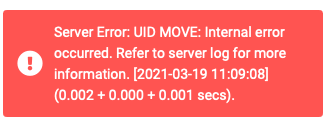
Noticed I can view messages but I can not longer delete messages. Here's the log files (logs on a recreation so time stamps are a bit off) and a screenshot. ==> mail.log <== Mar 19 11:10:22 ce466793ae2b dovecot: imap-login: Login: user=<[email protected]>, method=PLAIN, rip=192.168.55.11, lip=127.0.0.1, mpid=14851, TLS, session=<LugE9OW9toLAqDcL> Mar 19 11:10:22 ce466793ae2b dovecot: imap([email protected])<14851><LugE9OW9toLAqDcL>: Error: Mailbox INBOX: link(/data/domains/mymailserver.info/xaositek/Maildir/cur/1615003435.M382342P32606.3b20f19fac1b,S=6950,W=7251:2,S, /data/domains/mymailserver.info/xaositek/Maildir/.Trash/tmp/1616170222.M693717P14851.ce466793ae2b) failed: Function not implemented Mar 19 11:10:22 ce466793ae2b dovecot: imap([email protected])<14851><LugE9OW9toLAqDcL>: Logged out in=155 out=1173 deleted=0 expunged=0 trashed=0 hdr_count=0 hdr_bytes=0 body_count=0 body_bytes=0 Mar 19 11:10:22 ce466793ae2b dovecot: imap-login: Login: user=<[email protected]>, method=PLAIN, rip=192.168.55.11, lip=127.0.0.1, mpid=14856, TLS, session=<It0F9OW9uILAqDcL> Mar 19 11:10:22 ce466793ae2b dovecot: imap([email protected])<14856><It0F9OW9uILAqDcL>: Logged out in=318 out=4258 deleted=0 expunged=0 trashed=0 hdr_count=6 hdr_bytes=1802 body_count=0 body_bytes=0 ==> mail.warn <== Mar 19 11:10:22 ce466793ae2b dovecot: imap([email protected])<14851><LugE9OW9toLAqDcL>: Error: Mailbox INBOX: link(/data/domains/mymailserver.info/xaositek/Maildir/cur/1615003435.M382342P32606.3b20f19fac1b,S=6950,W=7251:2,S, /data/domains/mymailserver.info/xaositek/Maildir/.Trash/tmp/1616170222.M693717P14851.ce466793ae2b) failed: Function not implemented ==> syslog <== Mar 19 11:10:22 ce466793ae2b dovecot: imap-login: Login: user=<[email protected]>, method=PLAIN, rip=192.168.55.11, lip=127.0.0.1, mpid=14851, TLS, session=<LugE9OW9toLAqDcL> Mar 19 11:10:22 ce466793ae2b dovecot: imap([email protected])<14851><LugE9OW9toLAqDcL>: Error: Mailbox INBOX: link(/data/domains/mymailserver.info/xaositek/Maildir/cur/1615003435.M382342P32606.3b20f19fac1b,S=6950,W=7251:2,S, /data/domains/mymailserver.info/xaositek/Maildir/.Trash/tmp/1616170222.M693717P14851.ce466793ae2b) failed: Function not implemented Mar 19 11:10:22 ce466793ae2b dovecot: imap([email protected])<14851><LugE9OW9toLAqDcL>: Logged out in=155 out=1173 deleted=0 expunged=0 trashed=0 hdr_count=0 hdr_bytes=0 body_count=0 body_bytes=0 Mar 19 11:10:22 ce466793ae2b dovecot: imap-login: Login: user=<[email protected]>, method=PLAIN, rip=192.168.55.11, lip=127.0.0.1, mpid=14856, TLS, session=<It0F9OW9uILAqDcL> Mar 19 11:10:22 ce466793ae2b dovecot: imap([email protected])<14856><It0F9OW9uILAqDcL>: Logged out in=318 out=4258 deleted=0 expunged=0 trashed=0 hdr_count=6 hdr_bytes=1802 body_count=0 body_bytes=0
-
unRAID is Slackware based, not FreeBSD. Anyone feel free to correct me if I'm wrong, but I don't believe this changes it for us.
-
Mistakenly attempted to add a new peer yesterday and the whole thing came crumbing down. I removed the entire /boot/config/wireguard folder, uninstalled the plug-in and tried again. Now when I try to create my initial tunnel, the page just refreshes but no settings are saved. The /boot/config/wireguard folder is not made either. What (and where) are the logs that would be relevant to troubleshooting this issue? I can post them pretty quick. Edit: Figured out that some remaining iptables entries in the FORWARD rule and also the WIREGUARD chain all together was still lingering after the uninstall. So I deleted those two items and rebooted. Now it's working!!
-
I saw someone else comment on the new Git directory on /boot/ ... If we uninstalled the plug-in, can we remove /boot/.git/ and /boot/.gitattributes ? Are there any other new files that are created we should consider removing? Shouldn't the plug-in clean up after itself?
-
Hmm well I tried this and didn't really care for the need to expose port forwarding... Now I'm stuck with the cryptic Unraid.net DNS hostname even when I've signed out and remove the plugin. How can I go back to local hostname and that's sufficient? Edit: Figured it I could go into Management Access and set Use SSL / TLS to No and it set local DNS names back into effect.
-
Confirmed I swapped from v5.6 to v5.7 and it worked. To get "latest" to work I did have to remove and re-add but all is working now!
-
Thank you! This fixed it up immediately.
-
Hey @spants - just wanted to bring attention here in case a rollback if necessary. Can we do anything to assist in troubleshooting?
-
Thank you for confirming it wasn't just my bad luck or a misconfig.
-
Anyone else have their PiHole break with the update that came out today? Was humming along great and now it's broken. I even did a complete removal, delete the template, remove all AppData, and restore from Teleporter function backup. Ideas? I'm not sure where logs get stored but along the header of the homepage I see "Lost Connection to API" and all DNS resolution stopped.
-
@saarg - was curious it looks like Alpine 3.13.1 is out at this point. I know LinuxServer.IO tends to rebase everything across the board in a rolling fashion, but I apologize I don't know where to look for the status on that, if it has even began in any packages. Thanks in advance!
-
I have two certs and four separate proxy hosts defined, but today I noticed that I started getting the following error when I try to create a new cert. I have redacted my email address and domain utilized. Error: Command failed: /usr/bin/certbot certonly --non-interactive --config "/etc/letsencrypt.ini" --cert-name "npm-8" --agree-tos --email "[email protected]" --preferred-challenges "dns,http" --domains "SUB.DOMAIN.COM" Traceback (most recent call last): File "/usr/bin/certbot", line 11, in load_entry_point('certbot==1.4.0', 'console_scripts', 'certbot')() File "/usr/lib/python3.8/site-packages/pkg_resources/__init__.py", line 490, in load_entry_point return get_distribution(dist).load_entry_point(group, name) File "/usr/lib/python3.8/site-packages/pkg_resources/__init__.py", line 2862, in load_entry_point return ep.load() File "/usr/lib/python3.8/site-packages/pkg_resources/__init__.py", line 2462, in load return self.resolve() File "/usr/lib/python3.8/site-packages/pkg_resources/__init__.py", line 2468, in resolve module = __import__(self.module_name, fromlist=['__name__'], level=0) File "/usr/lib/python3.8/site-packages/certbot/main.py", line 2, in from certbot._internal import main as internal_main File "/usr/lib/python3.8/site-packages/certbot/_internal/main.py", line 9, in import configobj File "", line 991, in _find_and_load File "", line 975, in _find_and_load_unlocked File "", line 671, in _load_unlocked File "", line 779, in exec_module File "", line 911, in get_code File "", line 580, in _compile_bytecode ValueError: bad marshal data (unknown type code) at ChildProcess.exithandler (child_process.js:303:12) at ChildProcess.emit (events.js:315:20) at maybeClose (internal/child_process.js:1021:16) at Process.ChildProcess._handle.onexit (internal/child_process.js:286:5)
-
root@cobblednas:~# /usr/local/emhttp/plugins/sas-spindown/sas-util SAS Spindown Utility (v20201217.01) sdc | ST31000424SS | 1000:0072:1028:1f1e | n/a | sdd | ST1000NM0023 | 1000:0072:1028:1f1e | n/a | sde | ST31000424SS | 1000:0072:1028:1f1e | n/a | sdf | ST1000NM0023 | 1000:0072:1028:1f1e | n/a | sdg | ST31000424SS | 1000:0072:1028:1f1e | n/a | sdh | ST31000424SS | 1000:0072:1028:1f1e | n/a | sdi | MBF2300RC | 1000:0072:1028:1f1e | n/a | sdb | MBF2300RC | 1000:0072:1028:1f1e | n/a | Run completed. The output is at /tmp/sas-util-out. I will PM you the text file.
-
Just letting you all know I installed this plugin on my Dell R510 chassis with an Broadcom / LSI SAS2008 PCI-Express Fusion-MPT SAS-2 [Falcon] (rev 03) controller. It worked 100% on my system and spun down all six SAS drives immediately. I am attaching my diagnostics file in case any other information would be handy. cobblednas-diagnostics-20201221-1206_BEFOREPLUGIN.zip cobblednas-diagnostics-20201221-1606_AFTERPLUGIN.zip
-
I had a Dell R510 laying around with 8 drive bays and it seemed like a great NAS. Packed it full with two 300gb 10k drives and six 1TB drives that I had laying around. I've been updating regularly through the betas and now RCs but noticed that overall my main array doesn't spin down, even if I click "Spin Down". Serial Attached SCSI controller: Broadcom / LSI SAS2008 PCI-Express Fusion-MPT SAS-2 [Falcon] (rev 03) I did submit a "Hardware Profile" if this helps Limetech. cobblednas-diagnostics-20201221-1206.zip
-
Confirmed that took care of it!
-
I am on the 2020.12.10a release and the issue remains on both my unRAID 6.9 RC1 servers.
-
I'm seeing this error text at the bottom of my screen with 6.9RC1. Warning: Illegal string offset 'mountpoint' in /usr/local/emhttp/plugins/unassigned.devices/include/lib.php on line 176 nyx-diagnostics-20201210-1433.zip



