





nerv
Members
-
Joined
-
Last visited
Everything posted by nerv
-
Hey folks, I was wondering if it's possible to allow some access around docker isolation? I created a wireguard tunnel for docker which works great, except I can't access the dockers unless the source IP is on my main network (that unraid runs on) or the docker wireguard network. It looks like this is caused by the iptable rules below, but adding rules to allow access to the wireguard subnet doesn't seem to work (or I'm doing it wrong) I inserted the first two rules below to try and allow traffic in/out of 172.31.201.7, but no dice. Is this possible to accomplish? -A DOCKER-ISOLATION-STAGE-1 -i 172.31.201.7 -j ACCEPT -A DOCKER-ISOLATION-STAGE-1 -d 172.31.201.7/32 -j ACCEPT -A DOCKER-ISOLATION-STAGE-1 -i docker0 ! -o docker0 -j DOCKER-ISOLATION-STAGE-2 -A DOCKER-ISOLATION-STAGE-1 -i br-baf8ebd07571 ! -o br-baf8ebd07571 -j DOCKER-ISOLATION-STAGE-2 -A DOCKER-ISOLATION-STAGE-1 -i br-3df3529e5e0f ! -o br-3df3529e5e0f -j DOCKER-ISOLATION-STAGE-2 -A DOCKER-ISOLATION-STAGE-1 -j RETURN -A DOCKER-ISOLATION-STAGE-2 -o docker0 -j DROP -A DOCKER-ISOLATION-STAGE-2 -o br-baf8ebd07571 -j DROP -A DOCKER-ISOLATION-STAGE-2 -o br-3df3529e5e0f -j DROP -A DOCKER-ISOLATION-STAGE-2 -j RETURN
-
I rely on the VMs for several things and the crashes have been ~2 weeks apart, so not really an option for me. If it's a VM issue, sounds like a problem with unraid?
-
I updated to 6.11.5 in the last few weeks and have had two overnight crashes since (maybe unrelated as I added some drives and such as well). I enabled storing syslogs after the first crash, and got these logs last night. I've truncated the logs to the last few hours where the server crashed and before I rebooted. Is this a hardware issue on my side? Or is there something going wrong with unraid? Help appreciated! crash_logs.rtf media-diagnostics-20230113-0703.zip
-
Bumping this. I've now realized I can't any URLs served by SWAG unless I'm on my private network (192,.168,86.0/24) as well. Basically it seems like any docker on the wireguard network is somehow only able to receive traffic from the wireguard network or 192.168.86.0/24. Do I need to change something in Unraid's settings?
-
I recently created a wireguard tunnel of the type "tunneled access for dockers" using mullvad. Took some doing, but I got dockers on it with portforwarding etc working. The issue I'm having is any docker running on the wireguard docker network (172.31.201.0/24) can only access other dockers on that network, or local address on my main network (192.168.86.0/24). Unfortunately though, I run a couple of VLANs and I'd like the wireguard docker network to be able to access those as well (ping/traceroute can't find routes right now). My understanding of wireguard is pretty basic at this point, so perhaps there's something simple I'm missing? Here's my wireguard config, but let me know what else I can post. [Interface] PrivateKey=REMOVED Address=10.65.30.79 PostUp=logger -t wireguard 'Tunnel WireGuard-wg1 started' PostDown=logger -t wireguard 'Tunnel WireGuard-wg1 stopped' PostUp=ip -4 route flush table 201 PostUp=ip -4 route add default via 10.65.30.79 dev wg1 table 201 PostUp=ip -4 route add 192.168.86.0/24 via 192.168.86.1 dev br0 table 201 PostUp=ip -4 route add 192.168.84.0/24 via 192.168.86.1 dev br0 table 201 PostDown=ip -4 route flush table 201 PostDown=ip -4 route add unreachable default table 201 PostDown=ip -4 route add 192.168.86.0/24 via 192.168.86.1 dev br0 table 201 PostDown=ip -4 route add 192.168.84.0/24 via 192.168.86.1 dev br0 table 201 [Peer] PublicKey=REMOVED Endpoint=REMOVED AllowedIPs=0.0.0.0/0 This is essentially Mullvad's default config, but I added the kill switch lines from here, then I added the PostUp/Down for 192.168.84.0/24 hoping that would work. Any ideas what I'm doing wrong? Thanks for the help.
-
I rebooted, and it started but my VMs were gone. I think I must have accidentally deleted/corruputed by libvert.img.
-
VMs been running for a couple years or so, not sure what changed. I did move from the deprecated CA backup to v2 this morning, but not sure why that would have messed this up. I've tried moving my libvert.img to allow it to create a new one, but that didn't seem to work. Diagnostics attached. Thanks and let me know if I can provide more. media-diagnostics-20221220-1130.zip
-
Everything seems to be working fine, but fix common problems detected a hardware error and suggested I post my diagnostics for help. I installed mcelog via nerdpack as it instructed, but note I installed mcelog after I got the error. I'm not sure if that means I need to wait for another error to occur for it to be in the logs, let me know. Thanks! media-diagnostics-20211201-0656.zip
-
I don't know enough about the plugin to know if it's possibly a plugin issue, or an underlying issue with the unraid filesystem that the plugin is using. Any thoughts? If it's the latter I can try and follow up more with generic unraid help (long shot), but at least something to try.
-
Unfortunately that's already set to yes.
-
No. Here are the two hard links (move title replaced). Movie.2020.REPACK.1080p.WEB.h264-WATCHER.mkv Movie (2020) WEBDL-1080p Proper.mkv
-
Nothing special, just movie titles. So things like (, numbers etc, but nothing crazy. e.g. "Movie X (2007) BluRay.mkv"
-
Copying from above. Basically unraid can only access one of the two hard linked files, and fails the other. I guess it's not necessarily a permission issue, it just presents that way in Plex. Are hard linked files expected to work when they exist in a mounted SMB? I'm getting "head: cannot open 'file' for reading: Invalid argument" on one of the hard links, but not the other.
-
Yes. Remote mounted Freenas share via SMB. Works fine in MacOS finder, but I have the permission issues described above in unraid.
-
Are hard linked files expected to work when they exist in a mounted SMB? I'm getting "head: cannot open 'file' for reading: Invalid argument" on one of the hard links, but not the other.
-
I have not, think that may be the issue? Can give it a try if you think it's worth a shot.
-
I'm getting preclear errors that zeroing the disk failed during the post read (log attached). I read somewhere it could be indicative of bad RAM, but I've run a memtest for ~36 hours with no errors and have seen this same error probably 5 times now. Is the disk bad? Any other explanation? I attached smart info for the disk as well. thanks! preclear_disk_S2H7J1CZA01988_7991.txt SAMSUNG_HD204UI_S2H7J1CZA01988-20191229-0818.txt
-
Ack. I picked up a bunch of drives today with the absurd amazon sales. If not cancelled, I'll likely do this. I think I'll hold on to them to play with in a ZFS array someday.
-
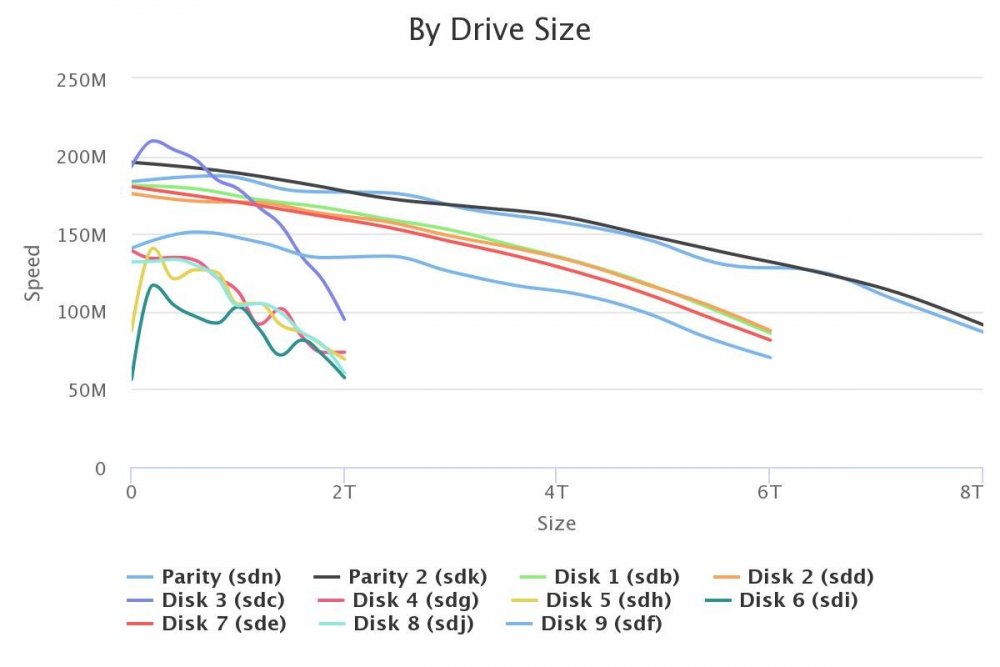
My older 2TB drives seem to be pretty all over the place. The one higher 2TB is a different brand and seems fine. Something to consider replacing or normal?
.thumb.jpeg.99df9c6c53704417a0252e49e0b44e19.jpeg)
-
On second thought, I think this is fine. I think this was masking another error as I forgot to give docker access to the script and necessary folders. Will update if that's not the case. Thanks!
-
Yes, whenever I try and trigger a script to execute on torrent completion to trigger post processing this error gets hit.
-
I'm seeing the following error in my logs: http://dev.deluge-torrent.org/ticket/2953 Looks like this was fixed recently in deluge. Does this docker need to update the deluge version it runs to fix this? [ERROR ] 10:50:08 rpcserver:304 Exception calling RPC request: global name 'ex' is not defined Traceback (most recent call last): File "/usr/lib/python2.7/site-packages/deluge/core/rpcserver.py", line 299, in dispatch ret = self.factory.methods[method](*args, **kwargs) File "/usr/lib/python2.7/site-packages/deluge/core/core.py", line 411, in move_storage if not self.torrentmanager[torrent_id].move_storage(dest): File "/usr/lib/python2.7/site-packages/deluge/core/torrent.py", line 913, in move_storage self.torrent_id, dest, ex) NameError: global name 'ex' is not defined

.jpeg.de9d102a5f0b15a1614a0488d228b4e2.jpeg)