Neejrow
Members
-
Joined
-
Last visited
-
Looks like I jumped the gun a little on thinking the drive was not detecting at all, as I could clearly still monitor temps and do self-SMART tests. Steps taken so far. STOP array, Power down system. Check cable connection to disabled drive. Power on system. Remove disk from array and START array in maintenance mode to "purge" the disabled disk. STOP array, add removed disk back into the array again. START array in normal mode to rebuild disk. Assuming the drive doesn't fail/disable during the rebuild, then I will not need to post again. If the drive does fail the rebuild then I will be putting in my spare 8TB drive and rebuild again on that.
-
Hello, today my server emailed me to say that one of my drives was disabled. I have had drives fail in the past and so am not too unfamiliar with the process but just wanting to make sure I am following the proper protocols to do things right. From what I can tell the drive has lost communication entirely, so it could be simply a cable issue etc although the drive has been running for almost 5 years now so I'm more leaning towards just a straight up failure. I'm attaching the server diagnostic file, but here is the part which I guess is most important in regards to what happened. Sep 18 00:33:23 Tower kernel: sd 7:0:2:0: attempting task abort!scmd(0x00000000f8267ac8), outstanding for 15363 ms & timeout 15000 ms Sep 18 00:33:23 Tower kernel: sd 7:0:2:0: [sdf] tag#3176 CDB: opcode=0x85 85 06 20 00 00 00 00 00 00 00 00 00 00 40 e5 00 Sep 18 00:33:23 Tower kernel: scsi target7:0:2: handle(0x000b), sas_address(0x4433221101000000), phy(1) Sep 18 00:33:23 Tower kernel: scsi target7:0:2: enclosure logical id(0x500605b009db1330), slot(2) Sep 18 00:33:27 Tower kernel: sd 7:0:2:0: task abort: SUCCESS scmd(0x00000000f8267ac8) Sep 18 00:33:27 Tower kernel: sd 7:0:2:0: [sdf] tag#3178 UNKNOWN(0x2003) Result: hostbyte=0x00 driverbyte=DRIVER_OK cmd_age=0s Sep 18 00:33:27 Tower kernel: sd 7:0:2:0: [sdf] tag#3178 Sense Key : 0x2 [current] Sep 18 00:33:27 Tower kernel: sd 7:0:2:0: [sdf] tag#3178 ASC=0x4 ASCQ=0x0 Sep 18 00:33:27 Tower kernel: sd 7:0:2:0: [sdf] tag#3178 CDB: opcode=0x8a 8a 08 00 00 00 02 00 0a 50 38 00 00 00 08 00 00 Sep 18 00:33:27 Tower kernel: I/O error, dev sdf, sector 8590610488 op 0x1:(WRITE) flags 0x20800 phys_seg 1 prio class 0 Sep 18 00:33:27 Tower kernel: md: disk6 write error, sector=8590610424 Sep 18 00:33:27 Tower emhttpd: read SMART /dev/sdf Sep 18 00:33:27 Tower emhttpd: read SMART /dev/sdc Sep 18 00:33:39 Tower emhttpd: read SMART /dev/sdj Sep 18 00:33:39 Tower emhttpd: read SMART /dev/sdh Sep 18 00:33:39 Tower emhttpd: read SMART /dev/sdg Sep 18 00:33:39 Tower emhttpd: read SMART /dev/sdd Sep 18 00:33:39 Tower emhttpd: read SMART /dev/sdb Sep 18 00:33:39 Tower emhttpd: read SMART /dev/sdi Sep 18 01:33:31 Tower emhttpd: spinning down /dev/sdf Sep 18 01:34:10 Tower emhttpd: spinning down /dev/sdj Sep 18 01:34:10 Tower emhttpd: spinning down /dev/sdh Sep 18 01:34:10 Tower emhttpd: spinning down /dev/sdg Sep 18 01:34:10 Tower emhttpd: spinning down /dev/sdd Sep 18 01:34:10 Tower emhttpd: spinning down /dev/sdb Sep 18 01:34:10 Tower emhttpd: spinning down /dev/sdi Sep 18 02:19:19 Tower emhttpd: read SMART /dev/sdd Sep 18 02:19:33 Tower emhttpd: read SMART /dev/sdj Sep 18 02:19:52 Tower emhttpd: read SMART /dev/sdh Sep 18 02:19:52 Tower emhttpd: read SMART /dev/sdg Sep 18 02:19:52 Tower emhttpd: read SMART /dev/sdb Sep 18 02:19:52 Tower emhttpd: read SMART /dev/sdi Sep 18 03:19:53 Tower emhttpd: spinning down /dev/sdh Sep 18 03:19:53 Tower emhttpd: spinning down /dev/sdd Sep 18 03:20:20 Tower emhttpd: spinning down /dev/sdj Sep 18 03:21:02 Tower emhttpd: spinning down /dev/sdi Sep 18 03:34:57 Tower emhttpd: spinning down /dev/sdg Sep 18 04:08:53 Tower emhttpd: spinning down /dev/sdb Sep 18 04:57:14 Tower emhttpd: read SMART /dev/sdj Sep 18 04:57:14 Tower emhttpd: read SMART /dev/sdh Sep 18 04:57:14 Tower emhttpd: read SMART /dev/sdg Sep 18 04:57:14 Tower emhttpd: read SMART /dev/sdd Sep 18 04:57:14 Tower emhttpd: read SMART /dev/sdb Sep 18 04:57:14 Tower emhttpd: read SMART /dev/sdi Sep 18 06:22:39 Tower emhttpd: spinning down /dev/sdj Sep 18 06:22:39 Tower emhttpd: spinning down /dev/sdg Sep 18 06:22:39 Tower emhttpd: spinning down /dev/sdd Sep 18 06:23:05 Tower emhttpd: spinning down /dev/sdh Sep 18 06:37:40 Tower emhttpd: spinning down /dev/sdi Sep 18 06:38:45 Tower emhttpd: spinning down /dev/sdb Sep 18 09:38:45 Tower emhttpd: spinning down /dev/sdc Sep 18 11:12:05 Tower emhttpd: read SMART /dev/sdi Sep 18 11:12:26 Tower emhttpd: read SMART /dev/sdc Sep 18 12:13:57 Tower emhttpd: spinning down /dev/sdi Sep 18 12:42:30 Tower root: Fix Common Problems Version 2025.08.07 Sep 18 12:42:31 Tower root: Fix Common Problems: Error: disk6 (ST8000VN004-2M2101_WKD3BKZK) is disabled Sep 18 12:42:31 Tower root: Fix Common Problems: Error: disk3 (ST8000VN004-2M2101_WKD0NSWM) has read errors Sep 18 12:42:31 Tower root: Fix Common Problems: Error: disk6 (ST8000VN004-2M2101_WKD3BKZK) has read errors So my question is, what should be my next steps? Am I safe to turn off the server now that I have provided the server diagnostic file? Ideally I want to power it down so I can check the cable is seated, or try a different cable. Likely this one is connected to my SAS card but I can try a regular SATA port if not and power back on and see if it will detect. I also do have a spare 8TB replacement drive for just this exact scenario in case a drive fails. Thanks in advance! tower-diagnostics-20250918-1242.zip
-
Thank you so much for this post. I just picked up a couple of these drives myself and couldn't get them working until I came across this thread of yours. Taping over the pin worked a treat!
-
tower-diagnostics-20230625-0200.ziptower-smart-20230625-0159.zip Finally finished the SMART extended self test. Looks fine I guess?
-
So there was a power outage last night while I let the full SMART extended self test run. So my unraid server was shutdown via the UPS. So I will have to do another test. Will update once it's done.
-
Unraid Version: 6.11.5 Motherboard: MSI B550 Mortar Wifi CPU: AMD Ryzen 3900X MEMORY: 32GB @ 3000mhz (mismatched kits of 2x8) Hello, I noticed this morning some errors were listed when my parity drive span up at 5:00am to run MOVER. Also, then recieved two follow up emails with; Subject: Warning [TOWER] - reallocated sector ct is 216 Description: ST8000VN004-2M2101_WKD0TW3W (sdc) Subject: Warning [TOWER] - reported uncorrect is 2 Description: ST8000VN004-2M2101_WKD0TW3W (sdc) I have had errors on drives before and taken certain measures to fix the issue (replace cables etc) or replace the drive itself, but I have never had any errors show up on the parity drive. So I am wondering if I need to do anything differently in this situation? Also just as a side note, is my spin-down delay of 1 hour on my drives too low? They don't get access too often maybe once or twice a day. I do not want to run the drives 24/7 due to the increased noise and electricity costs. I have uploaded the diagnostics to this post and will await for further instruction, thank you. tower-diagnostics-20230623-1623.zip
-
Just wanted to post and say I also am getting this error. I have no idea what an 'addons' folder is nor how to even access it. What are you doing to find the folder?
-
Okay thanks for the suggestions. I will turn the server off tomorrow and check what cable it's on. (Mobo / SAS card) I thought I was being smart last time with putting labels on all my drives. Now I realise I'm an idiot for not labelling which end of the system they go to. Edit: Can see in devices which drives are on LSI card / Motherboard ports.
-
Unraid 6.11.5 Ryzen 3900X B550M Mortar Wifi Hello, Last night I recieved an email that my server encounter some errors on a disk. This concerned me greatly because just recently (2~ weeks ago) I went through a whole ordeal with a drive seemingly failing, and then the replacement drive I bought failed, so had to buy a 2nd replacement drive to fix. (Context here) Immediately upon seeing this error I began a SMART extended self test on the drive, and it has just completed. It returned without error. I'm attaching the diagnostics to this post. Do I simply disregard this small error of 64 as a one off random thing maybe caused by a memory failure etc, or is this something I should take more seriously? I have had my unRAID server running great for 3 years, up until a couple of weeks ago. The previous incident clearly seemed that the drive itself had failed (under warranty) but now with these errors coming up randomly on a different drive, perhaps something else is also happening that needs to be addressed? I can't really recall ever having errors on drives before outside of a failed drive and faulty SATA cable. What are the next steps I should take? Thanks. tower-diagnostics-20230222-1826.zip
-
Thank you for the help once again! You're a life saver. I have started the array, things appear to be working fine. I have taken a flash backup and am attaching the diagnostics file. About to start running a non-correcting parity check now also. tower-diagnostics-20230211-1356.zip
-
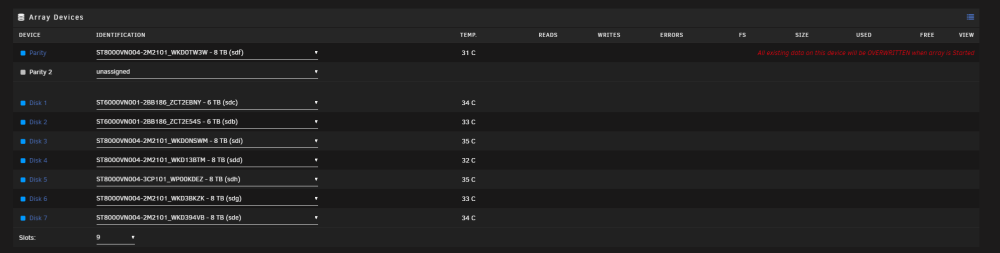
I did the new config > Preserve current assignments = All > Apply. Now when I am about to start the array, it is claiming my parity drive will be overwritten (I have selected parity valid box) Is this what it normally says or has something else gone wrong now? I am scared to start the array with that warning message there. As it still stays there even with the parity is valid check mark ticked.

-
Yes I did the rebuild in maintenance mode. Because I was afraid it might write data from things and screw up the data-rebuild. After it completed I then stopped the array, and restarted the array in normal? mode. Is this the only option?
-
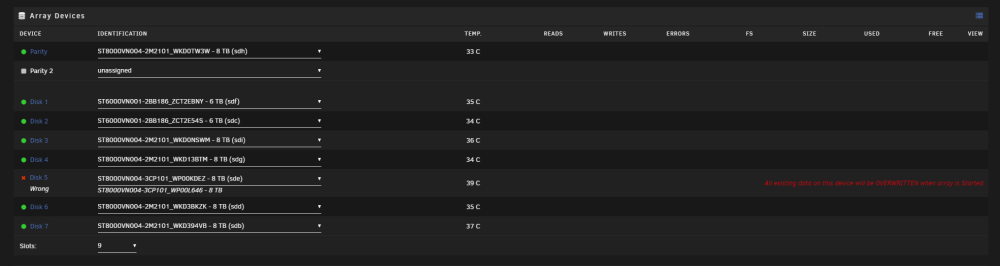
No I do not have diagnostics from after the rebuild because it all went fine so I didn't see a need to. I haven't touched anything regarding flash drive or anything else. PC Has been on permanently since I did that successful data rebuild onto WP00KDEZ. Then today, I did a proper shutdown from Unraid UI (clicking shutdown button) and now I get this. Is there any way for me to edit the super.dat file to think the correct drive is in (which it...is?) or am I now royally screwed.
-
Sorry forgot to add the diagnostics. Not sure how much use it will be. tower-diagnostics-20230211-1307.zip
-
@JorgeB @trurl New issue.... I turned off the PC to load into BIOS to enable CPU Virtualisation so I can run a VM. When I loaded back into unRAID it is claiming my Disk 5 was missing, and the option to select it claims is the incorrect one. It thinks that the correct disk is WP00L646 for Disk 5. Which is that failed new drive I bought last weekend which immediately had errors so I cancelled the rebuild at 19%. The full data rebuild was performed on WP00KDEZ which is the drive I still have in now. How can I get unRAID to recognise this is the correct drive? Or am I now screwed.... I just returned both those 2 failed drives for RMA yesterday.