montery
Members
-
Joined
-
Last visited
-
I have been using Unraid for 10+ years now, and I have a spare pro key.backup file on my currently installed flash drive. I've been upgrading drives, ram, CPUs, and versions of Unraid since. But I've never actually upgraded the motherboard. This means that my trusty Supermicro X8DT3 motherboard, while still capable for the limited NAS functions I run on it, is time to retire it to "backup server" status, and to embark on a new server (I'm probably going to pull the trigger on a H12SSL-i motherboard + EPYC 7313P CPU which will serve me well for another 10+ years, hopefully!). Over these 10 years, a certain amount of "cruft" has built up, and I'd like to do a fresh "all-new" install of the Unraid OS, but still keep my drives and (most importantly) the plugin + docker settings. I regularly run appdata backup. So, my two question are: 1) What are the steps I should follow to use my 10 yr old spare pro key on a new thumbdrive? Just rename it Pro.key? 2) Assuming I want to keep my existing disk assignments and plugin/docker settings, what to do? Just copy the plugins directory and docker.cfg from the current USB?
-
I'd like to request a couple of feature adds: Mobile friendly UX Intel ARC support Thanks!
-
Hi everyone, I'm hoping I can tap into the collective wisdom here for a upgrade project! My existing server is rock-solid wonderful, extremely happy with it and it does nearly everything I need it to do. Except... It's getting a little old, and upgraditis is starting to set in. I'd like to play with adding a GPU or two, and give it some oompf for transcoding the occasional film that the CPUs can't easily do by themselves. That's my primary use case, with maybe some remote rendering for blender eventually. I'm okay with spending money on this beast, and I'd like to be conscious about power consumption when idle (when under load, I don't care, I want it all baby!!). I'm happy to look at hardware 2 - 3 years old -- in fact, I kinda prefer it as it makes troubleshooting easier. I'd also like to upgrade the HBA + Backplane to get it up full SATA speed (currently the HBA is a LSISAS3081E-R, limited to 3 gbit/s). So suggestions on a HBA would be a bonus. I'm looking to upgrade motherboard + CPU + ram, and possibly powersupply (currently a R1000-TQ) so that may limit my options. Thanks in advance!
-
Hi team! I've been a long time Headless Kodi+Mysql guy, but it seems the Headless Kodi hack effort has died off. So, I'm looking at Emby and Jellyfin, but Jellyfin feels a little raw at the moment (have to build my own code? Yah, I'm just a lazy end-user...) With Emby, I seem to be in the minority use case - I don't plan on doing any transcoding. So, I'm not sure if I can use Emby just for raw passthrough of all my media? I have one (maybe two) Shield devices on which I watch my media, so I just really want a centralized library that can be updated automatically when Sonarr and Radarr pull something new down. What's the scoop my friends? Thanks!
-
Just following up on my MariaDB woes. It looks like the entire docker container died after logs filled it up (which, in turn appears to be caused after all my shares disappeared). So, following Squid's advice, I deleted my docker image, re-installed all my containers, and MariaDB is happy again. Hope this helps someone else in future!
-
Hi there, I was getting the endless loop of 200507 18:44:16 mysqld_safe Logging to syslog. 200507 18:44:16 mysqld_safe Starting mysqld daemon with databases from /config/databases So I stopped the container, removed the appdata file(s) and removed (including image) the docker. Downloaded new docker, configured it, and went to check the logs before doing anything else. This is what I found: ErrorWarningSystemArrayLogin [s6-init] making user provided files available at /var/run/s6/etc...exited 0. [s6-init] ensuring user provided files have correct perms...exited 0. [fix-attrs.d] applying ownership & permissions fixes... [fix-attrs.d] done. [cont-init.d] executing container initialization scripts... [cont-init.d] 01-envfile: executing... [cont-init.d] 01-envfile: exited 0. [cont-init.d] 10-adduser: executing... ------------------------------------- _ () | | ___ _ __ | | / __| | | / \ | | \__ \ | | | () | |_| |___/ |_| \__/ Brought to you by linuxserver.io ------------------------------------- To support LSIO projects visit: https://www.linuxserver.io/donate/ ------------------------------------- GID/UID ------------------------------------- User uid: 99 User gid: 100 ------------------------------------- [cont-init.d] 10-adduser: exited 0. [cont-init.d] 30-config: executing... [cont-init.d] 30-config: exited 0. [cont-init.d] 40-initialise-db: executing... Setting Up Initial Databases Installing MariaDB/MySQL system tables in '/config/databases' ... 2020-05-09 15:52:48 0 [ERROR] InnoDB: Operating system error number 103 in a file operation. 2020-05-09 15:52:48 0 [ERROR] InnoDB: Error number 103 means 'Software caused connection abort' 2020-05-09 15:52:48 0 [ERROR] InnoDB: Cannot rename file './ib_logfile101' to './ib_logfile0' 2020-05-09 15:52:48 0 [ERROR] InnoDB: Database creation was aborted with error Generic error. You may need to delete the ibdata1 file before trying to start up again. 2020-05-09 15:52:49 0 [ERROR] InnoDB: Operating system error number 107 in a file operation. 2020-05-09 15:52:49 0 [ERROR] InnoDB: Error number 107 means 'Transport endpoint is not connected' 2020-05-09 15:52:49 0 [ERROR] InnoDB: File (unknown): 'close' returned OS error 307. Cannot continue operation 200509 15:52:49 [ERROR] mysqld got signal 6 ; This could be because you hit a bug. It is also possible that this binary or one of the libraries it was linked against is corrupt, improperly built, or misconfigured. This error can also be caused by malfunctioning hardware. To report this bug, see https://mariadb.com/kb/en/reporting-bugs We will try our best to scrape up some info that will hopefully help diagnose the problem, but since we have already crashed, something is definitely wrong and this may fail. Server version: 10.4.12-MariaDB-1:10.4.12+maria~bionic-log key_buffer_size=134217728 read_buffer_size=2097152 max_used_connections=0 max_threads=102 thread_count=0 It is possible that mysqld could use up to key_buffer_size + (read_buffer_size + sort_buffer_size)*max_threads = 760255 K bytes of memory Hope that's ok; if not, decrease some variables in the equation. Thread pointer: 0x0 Attempting backtrace. You can use the following information to find out where mysqld died. If you see no messages after this, something went terribly wrong... stack_bottom = 0x0 thread_stack 0x49000 /usr/sbin/mysqld(my_print_stacktrace+0x2e)[0x5608d960cc3e] /usr/sbin/mysqld(handle_fatal_signal+0x515)[0x5608d9080cf5] /lib/x86_64-linux-gnu/libpthread.so.0(+0x12890)[0x1492f4425890] /lib/x86_64-linux-gnu/libc.so.6(gsignal+0xc7)[0x1492f2d59e97] /lib/x86_64-linux-gnu/libc.so.6(abort+0x141)[0x1492f2d5b801] /usr/sbin/mysqld(+0xa890e7)[0x5608d92950e7] /usr/sbin/mysqld(+0xa8c125)[0x5608d9298125] /usr/sbin/mysqld(+0xc0b858)[0x5608d9417858] /usr/sbin/mysqld(+0xc0d9b6)[0x5608d94199b6] /usr/sbin/mysqld(+0xa72587)[0x5608d927e587] /usr/sbin/mysqld(+0xb26e9d)[0x5608d9332e9d] /usr/sbin/mysqld(+0xa1664d)[0x5608d922264d] /usr/sbin/mysqld(_Z24ha_initialize_handlertonP13st_plugin_int+0x62)[0x5608d9083d52] /usr/sbin/mysqld(+0x674c09)[0x5608d8e80c09] /usr/sbin/mysqld(_Z11plugin_initPiPPci+0x84a)[0x5608d8e81dea] /usr/sbin/mysqld(+0x59e3f9)[0x5608d8daa3f9] /usr/sbin/mysqld(_Z11mysqld_mainiPPc+0x566)[0x5608d8db08d6] /lib/x86_64-linux-gnu/libc.so.6(__libc_start_main+0xe7)[0x1492f2d3cb97] /usr/sbin/mysqld(_start+0x2a)[0x5608d8da44ea] The manual page at http://dev.mysql.com/doc/mysql/en/crashing.html contains information that should help you find out what is causing the crash. Writing a core file... Working directory at /config/databases Resource Limits: Limit Soft Limit Hard Limit Units Max cpu time unlimited unlimited seconds Max file size unlimited unlimited bytes Max data size unlimited unlimited bytes Max stack size unlimited unlimited bytes Max core file size 0 0 bytes Max resident set unlimited unlimited bytes Max processes 386184 386184 processes Max open files 40960 40960 files Max locked memory unlimited unlimited bytes Max address space unlimited unlimited bytes Max file locks unlimited unlimited locks Max pending signals 386184 386184 signals Max msgqueue size 819200 819200 bytes Max nice priority 0 0 Max realtime priority 0 0 Max realtime timeout unlimited unlimited us Core pattern: core Aborted Installation of system tables failed! Examine the logs in /config/databases for more information. The problem could be conflicting information in an external my.cnf files. You can ignore these by doing: shell> /usr/bin/mysql_install_db --defaults-file=~/.my.cnf You can also try to start the mysqld daemon with: shell> /usr/sbin/mysqld --skip-grant-tables --general-log & and use the command line tool /usr/bin/mysql to connect to the mysql database and look at the grant tables: shell> /usr/bin/mysql -u root mysql mysql> show tables; Try 'mysqld --help' if you have problems with paths. Using --general-log gives you a log in /config/databases that may be helpful. The latest information about mysql_install_db is available at https://mariadb.com/kb/en/installing-system-tables-mysql_install_db You can find the latest source at https://downloads.mariadb.org and the maria-discuss email list at https://launchpad.net/~maria-discuss Please check all of the above before submitting a bug report at http://mariadb.org/jira 2020-05-09 15:52:49 0 [Note] mysqld (mysqld 10.4.12-MariaDB-1:10.4.12+maria~bionic-log) starting as process 306 ... 2020-05-09 15:52:49 0 [Warning] Can't create test file /config/databases/3695b5df793a.lower-test mysqld: Can't change dir to '/config/databases/' (Errcode: 107 "Transport endpoint is not connected") 2020-05-09 15:52:49 0 [ERROR] Aborting Did I do the uninstall-re-install process incorrectly? Has anyone seen this before? Thanks in advance for your help!
-
Thanks... The issue was entirely my set up. The problem had to do with some oddities in the Cache drive with a cd: user: Transport endpoint is not connected error. I deleted the appdata\unifi-controller folder. A reboot later and a re-install of the docker, and I can assign my user name and password.
-
Nope... reading the controller manual, it's supposed to ask me for a admin username and password... but it didn't. So I thought the docker had a default username/password for first time setup. Would it be the username/password of the AP's?
-
Hey everyone... Ok, I'm really embarrassed to be asking this, but, is there a default Username/Password once you have the docker installed?
-
96 gb of ecc ddr3
-
Ok, this is probably a really stupid question, and I apologize in advance for it, but does this docker require the LetsEncrypt docker in addition, or does it include it?
-
Nope, I ended up removing the app and upgraded to 6.4. Haven't had the opportunity yet to try again. I'm hoping a new guide will be written with 6.4 in mind.
-
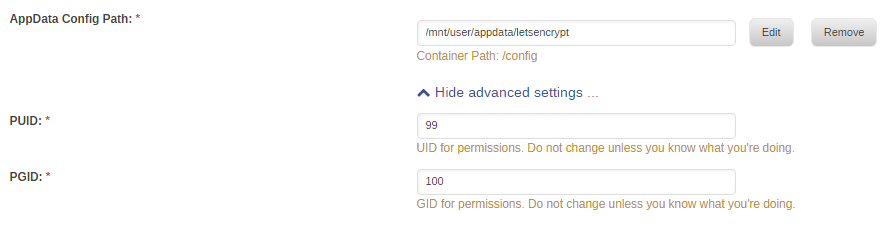
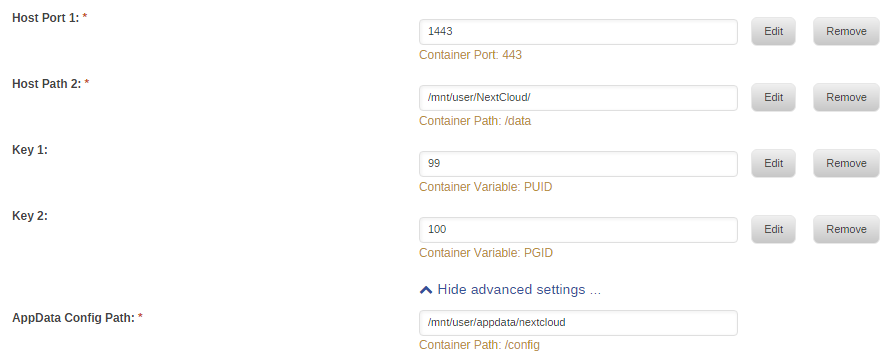
First, I would like to thank CHBMB for posting his guide, very well written and informative. My only problem seems to be the nextcloud container logs show this error: nginx: [emerg] open() "/config/nginx/proxy.conf" failed (2: No such file or directory) in /config/nginx/site-confs/nextcloud:31 Sure enough, I go into the appdata folder for nextcloud and the proxy.conf file is not there. (Instructions didn't say I should put it there....) My appdata config path for nextcloud points to /mnt/user/appdata/nextcloud I'm wondering if it should instead point to /mnt/user/appdata/letsencrypt? When I put a copy of the proxy.conf file from the letsencrypt container into the nextcloud container, I got nginx: [emerg] BIO_new_file("/config/keys/letsencrypt/fullchain.pem") failed (SSL: error:02FFF002:system library:func(4095):No such file or directory:fopen('/config/keys/letsencrypt/fullchain.pem', 'r') error:20FFF080:BIO routines:CRYPTO_internal:no such file) Should I do this? Or have I missed a step in my letsencrypt configuration?
-
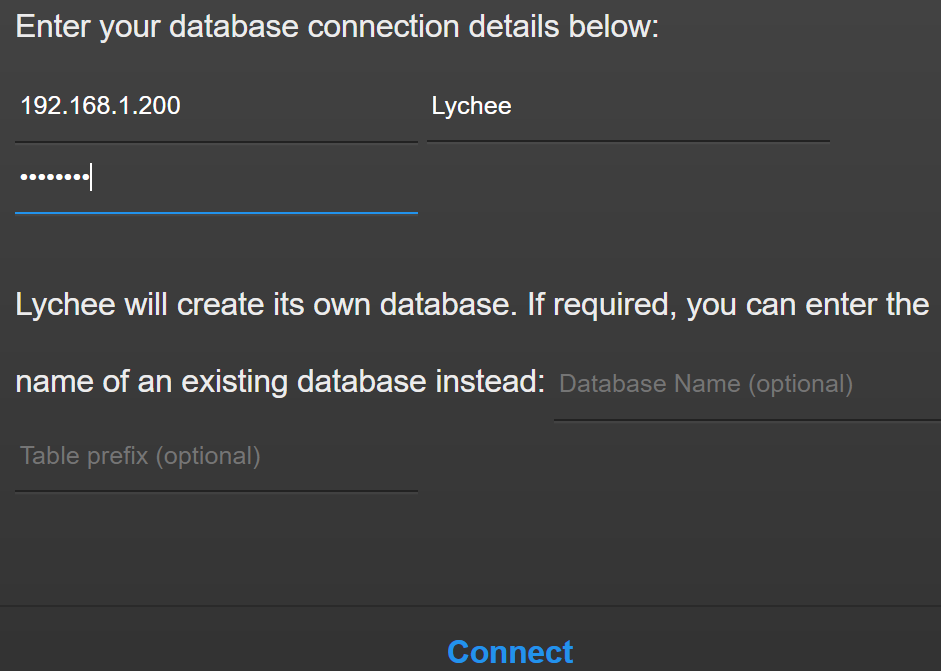
Ah, ok, actually my port is 3306, so I tried specifying that as well. I also dropped the user and created it manually: CREATE USER 'lychee'@'%' identified by 'pictures'; Grant all on *.* to 'lychee'; Flush privileges; /* Affected rows: 0 Found rows: 0 Warnings: 0 Duration for 3 queries: 0.062 sec. */ I then verified that lychee didn't have an expired password: select user, password_expired from mysql.user ..and I verified my host was set to '%' -- so it should accept a connection from anywhere. I log into Lychee using 192.168.1.200:3306, username/password, and I get the error message above. I check both Lychee and MariaDB logs - clean, even after a shutdown and restart of the services on both. I'm sure I'm doing something elementary that is wrong, but I can't tell what it might be. Thanks again in advance for the help, I do appreciate it. Update: I tried logging into the MariaDB through HeidiSQL using the username/password that I setup for Lychee, and I was able to login successfully through Heidi. I don't know what the issue is with Lychee, but I'm guessing there is something not quite right with Lychee!
-
The actual error I'm getting is"Unable to connect to host because access was denied, double check host, user-name & password, and check that access from your location is permitted" I opted to let Lychee create the database.