





paulmorabi
Members
-
Joined
-
Last visited
Everything posted by paulmorabi
-
Sorry for the late reply, I didn’t get a notification. Sadly, I didn’t get anywhere with this. I tried pinning and assigning CPU cores to VM’s and that has possibly reduced the instances of this occurring but it still happens every 1-2 days. It seems to be harmless or have no long lasting effect but am also curious what is behind this and the cause of it.
-
Sent!
-
Thank you so much for this. Normally I read the release notes and look at the section for breaking changes but otherwise leave as is (I thought, mistakenly, this would be OK). I have replaced the entire EFI with the one you sent me. It's still freezing on startup.
-
Oh I thought the second message was for @ab5g. I'm running Big Sur but have sent you a PM with a link to the EFI backup. Thanks again.
-
I actually have custom/SSDT-EC-USBX.aml already and still freezing on boot. Anything else I should try?
-
Thanks for this. I replaced the config.plist and also added the kext. System froze on Apple logo and loading screen. Is there anything I can do to test further? EDIT just noticed in config.plist it is referring to custom/SSDT-EC-USBX.aml. Do I need this file? I made the other change to the XML also. Thanks.
-
I've just sent over both to you via private message. Thank you!
-
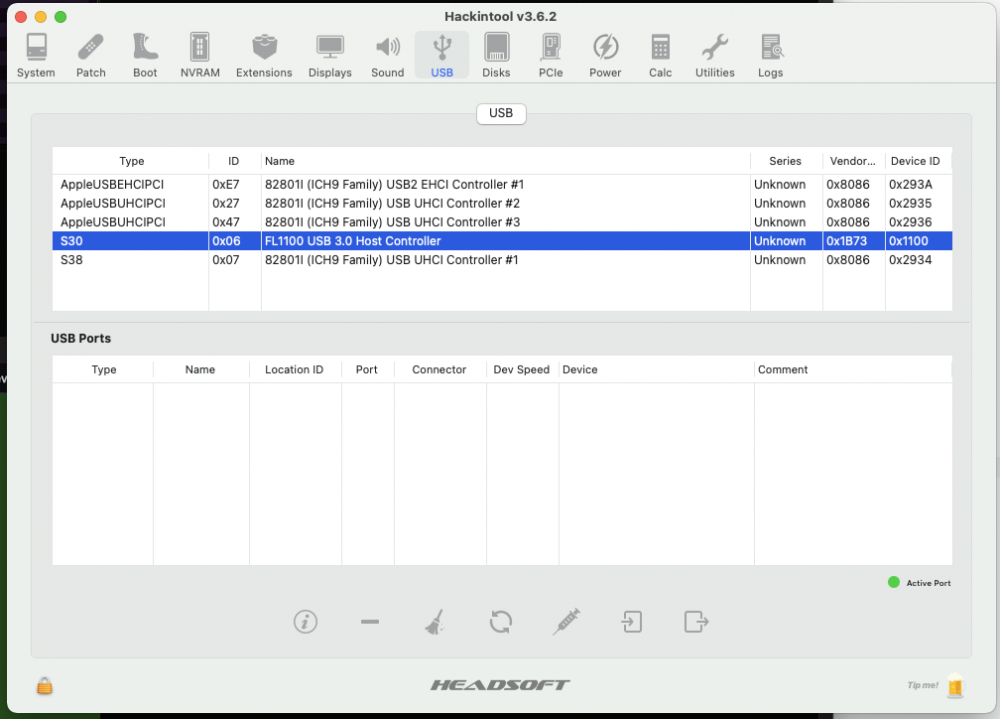
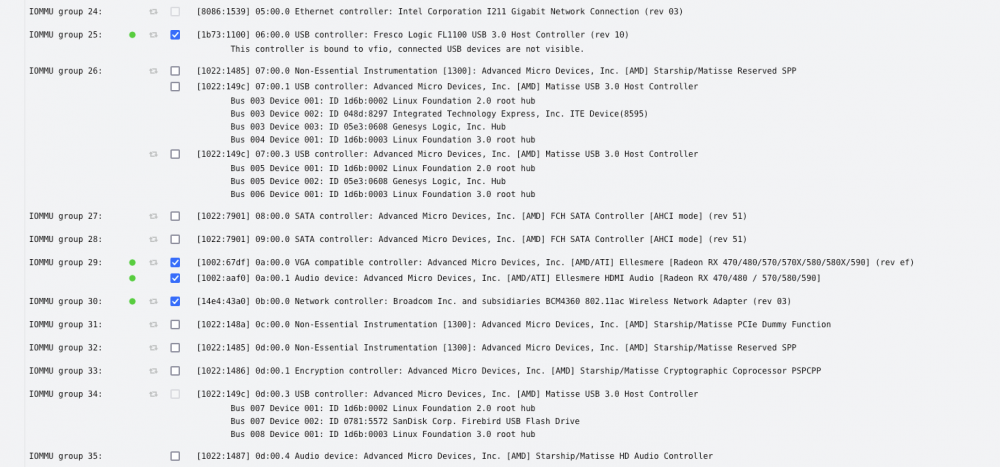
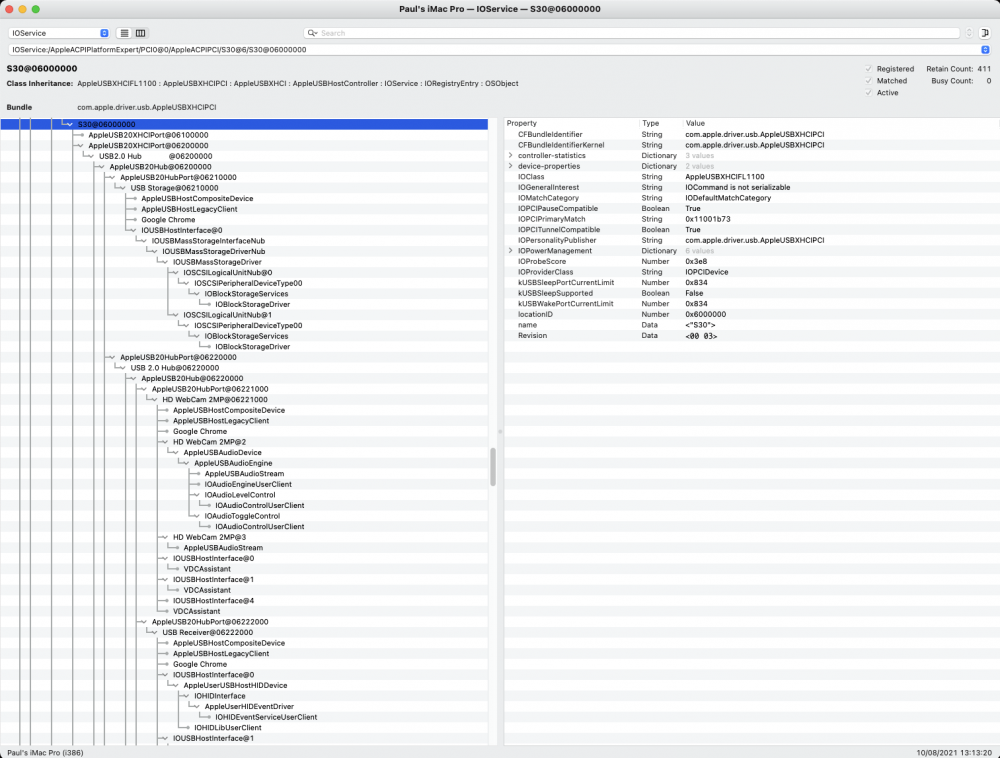
Issues are minor but mostly with USB devices which go to sleep and then not wake unless disconnected and reconnected. Also, when I reboot with my webcam plugged in, boot hangs on BIOS screen. Hand-off is also not working (blank screen) but doubt this is related. And more generally, also want to learn how to inject kexts and get this working properly. Am running Unraid 6.9.2 on Gigabyte Aorus Pro X570 with AMD 3600XT. I'm passing through an RX570, Fenvi T919 and an FL1100 cards. Running Open OpenCore 0.7.1 and Big Sur 11.5.1 in the VM. The XML config is: <?xml version='1.0' encoding='UTF-8'?> <domain type='kvm' id='5' xmlns:qemu='http://libvirt.org/schemas/domain/qemu/1.0'> <name>OSX</name> <uuid>c1cad360-c374-42a3-5160-db74ac775f67</uuid> <metadata> <vmtemplate xmlns="unraid" name="Linux" icon="BigSur.png" os="linux"/> </metadata> <memory unit='KiB'>16777216</memory> <currentMemory unit='KiB'>16777216</currentMemory> <memoryBacking> <nosharepages/> </memoryBacking> <vcpu placement='static'>6</vcpu> <cputune> <vcpupin vcpu='0' cpuset='1'/> <vcpupin vcpu='1' cpuset='7'/> <vcpupin vcpu='2' cpuset='2'/> <vcpupin vcpu='3' cpuset='8'/> <vcpupin vcpu='4' cpuset='3'/> <vcpupin vcpu='5' cpuset='9'/> </cputune> <resource> <partition>/machine</partition> </resource> <os> <type arch='x86_64' machine='pc-q35-5.0'>hvm</type> <loader readonly='yes' type='pflash'>/usr/share/qemu/ovmf-x64/OVMF_CODE-pure-efi.fd</loader> <nvram>/etc/libvirt/qemu/nvram/c1cad360-c374-42a3-5160-db74ac775f67_VARS-pure-efi.fd</nvram> </os> <features> <acpi/> <apic/> </features> <cpu mode='host-passthrough' check='none' migratable='on'> <cache mode='passthrough'/> <feature policy='require' name='topoext'/> </cpu> <clock offset='utc'> <timer name='rtc' tickpolicy='catchup'/> <timer name='pit' tickpolicy='delay'/> <timer name='hpet' present='no'/> </clock> <on_poweroff>destroy</on_poweroff> <on_reboot>restart</on_reboot> <on_crash>restart</on_crash> <devices> <emulator>/usr/local/sbin/qemu</emulator> <disk type='file' device='disk'> <driver name='qemu' type='raw' cache='writeback'/> <source file='/mnt/user/domains/OSX Catalina/BigSur.img' index='2'/> <backingStore/> <target dev='hdc' bus='sata'/> <alias name='sata0-0-2'/> <address type='drive' controller='0' bus='0' target='0' unit='2'/> </disk> <disk type='file' device='disk'> <driver name='qemu' type='qcow2' cache='writeback'/> <source file='/mnt/user/domains/OSX Catalina/opencorebasicbigsur.qcow2' index='1'/> <backingStore/> <target dev='hde' bus='sata'/> <boot order='1'/> <alias name='sata0-0-4'/> <address type='drive' controller='0' bus='0' target='0' unit='4'/> </disk> <controller type='usb' index='0' model='ich9-ehci1'> <alias name='usb'/> <address type='pci' domain='0x0000' bus='0x00' slot='0x07' function='0x7'/> </controller> <controller type='usb' index='0' model='ich9-uhci1'> <alias name='usb'/> <master startport='0'/> <address type='pci' domain='0x0000' bus='0x00' slot='0x07' function='0x0' multifunction='on'/> </controller> <controller type='usb' index='0' model='ich9-uhci2'> <alias name='usb'/> <master startport='2'/> <address type='pci' domain='0x0000' bus='0x00' slot='0x07' function='0x1'/> </controller> <controller type='usb' index='0' model='ich9-uhci3'> <alias name='usb'/> <master startport='4'/> <address type='pci' domain='0x0000' bus='0x00' slot='0x07' function='0x2'/> </controller> <controller type='pci' index='0' model='pcie-root'> <alias name='pcie.0'/> </controller> <controller type='pci' index='1' model='pcie-root-port'> <model name='pcie-root-port'/> <target chassis='1' port='0x10'/> <alias name='pci.1'/> <address type='pci' domain='0x0000' bus='0x00' slot='0x02' function='0x0' multifunction='on'/> </controller> <controller type='pci' index='2' model='pcie-root-port'> <model name='pcie-root-port'/> <target chassis='2' port='0x11'/> <alias name='pci.2'/> <address type='pci' domain='0x0000' bus='0x00' slot='0x02' function='0x1'/> </controller> <controller type='pci' index='3' model='pcie-root-port'> <model name='pcie-root-port'/> <target chassis='3' port='0x14'/> <alias name='pci.3'/> <address type='pci' domain='0x0000' bus='0x00' slot='0x02' function='0x4'/> </controller> <controller type='pci' index='4' model='pcie-root-port'> <model name='pcie-root-port'/> <target chassis='4' port='0x12'/> <alias name='pci.4'/> <address type='pci' domain='0x0000' bus='0x00' slot='0x02' function='0x2'/> </controller> <controller type='pci' index='5' model='pcie-root-port'> <model name='pcie-root-port'/> <target chassis='5' port='0x13'/> <alias name='pci.5'/> <address type='pci' domain='0x0000' bus='0x00' slot='0x02' function='0x3'/> </controller> <controller type='pci' index='6' model='pcie-root-port'> <model name='pcie-root-port'/> <target chassis='6' port='0x15'/> <alias name='pci.6'/> <address type='pci' domain='0x0000' bus='0x00' slot='0x02' function='0x5'/> </controller> <controller type='pci' index='7' model='pcie-to-pci-bridge'> <model name='pcie-pci-bridge'/> <alias name='pci.7'/> <address type='pci' domain='0x0000' bus='0x01' slot='0x00' function='0x0'/> </controller> <controller type='virtio-serial' index='0'> <alias name='virtio-serial0'/> <address type='pci' domain='0x0000' bus='0x03' slot='0x00' function='0x0'/> </controller> <controller type='sata' index='0'> <alias name='ide'/> <address type='pci' domain='0x0000' bus='0x00' slot='0x1f' function='0x2'/> </controller> <serial type='pty'> <source path='/dev/pts/1'/> <target type='isa-serial' port='0'> <model name='isa-serial'/> </target> <alias name='serial0'/> </serial> <console type='pty' tty='/dev/pts/1'> <source path='/dev/pts/1'/> <target type='serial' port='0'/> <alias name='serial0'/> </console> <channel type='unix'> <source mode='bind' path='/var/lib/libvirt/qemu/channel/target/domain-5-OSX/org.qemu.guest_agent.0'/> <target type='virtio' name='org.qemu.guest_agent.0' state='connected'/> <alias name='channel0'/> <address type='virtio-serial' controller='0' bus='0' port='1'/> </channel> <input type='tablet' bus='usb'> <alias name='input0'/> <address type='usb' bus='0' port='1'/> </input> <input type='mouse' bus='ps2'> <alias name='input1'/> </input> <input type='keyboard' bus='ps2'> <alias name='input2'/> </input> <input type='keyboard' bus='usb'> <alias name='input3'/> <address type='usb' bus='0' port='3'/> </input> <hostdev mode='subsystem' type='pci' managed='yes'> <driver name='vfio'/> <source> <address domain='0x0000' bus='0x0a' slot='0x00' function='0x0'/> </source> <alias name='hostdev0'/> <rom file='/mnt/user/domains/OSX Catalina/Ellesmere.rom'/> <address type='pci' domain='0x0000' bus='0x02' slot='0x00' function='0x0'/> </hostdev> <hostdev mode='subsystem' type='pci' managed='yes'> <driver name='vfio'/> <source> <address domain='0x0000' bus='0x0a' slot='0x00' function='0x1'/> </source> <alias name='hostdev1'/> <address type='pci' domain='0x0000' bus='0x04' slot='0x00' function='0x0'/> </hostdev> <hostdev mode='subsystem' type='pci' managed='yes'> <driver name='vfio'/> <source> <address domain='0x0000' bus='0x06' slot='0x00' function='0x0'/> </source> <alias name='hostdev2'/> <address type='pci' domain='0x0000' bus='0x00' slot='0x06' function='0x0'/> </hostdev> <hostdev mode='subsystem' type='pci' managed='yes'> <driver name='vfio'/> <source> <address domain='0x0000' bus='0x0b' slot='0x00' function='0x0'/> </source> <alias name='hostdev3'/> <address type='pci' domain='0x0000' bus='0x00' slot='0x08' function='0x0'/> </hostdev> <memballoon model='none'/> </devices> <seclabel type='dynamic' model='dac' relabel='yes'> <label>+0:+100</label> <imagelabel>+0:+100</imagelabel> </seclabel> <qemu:commandline> <qemu:arg value='-device'/> <qemu:arg value='isa-applesmc,osk=xxxxxx(c)AppleComputerInc'/> <qemu:arg value='-smbios'/> <qemu:arg value='type=2'/> <qemu:arg value='-cpu'/> <qemu:arg value='Penryn,kvm=on,vendor=GenuineIntel,+invtsc,vmware-cpuid-freq=on,+pcid,+ssse3,+sse4.2,+popcnt,+avx,+aes,+xsave,+xsaveopt,check'/> </qemu:commandline> </domain> IOMMU groups on Unraid: Hackintool shows the FL1100 but says nothing about the ports: ioreg shows this for the FL1100: I know I need to update the config.plist, add SSDT and load some kexts but not sure which kexts and what to put in each of the files. From reading page 32, I need to copy the kexts, and then update the config.plist with the attached text and good to go?
-
I'm having a few small issues with USB devices also. Am using an FL1100 but not doing anything with kexts etc. Everything works fine 99% of the time but occasionally have a few minor issues. Is there any intro or how to on what kexts and other config needs to be configured?
-
Hi, I recently moved across a Linux Debian VM to my Unraid that was previously running on Proxmox. Usually, after a few days (7+) of uptime, I begin to get errors on the terminal like this: These occur maybe 1-2 times per day until I shut down the VM, restart and then everything goes well for several days before beginning again. I don't notice anything else resulting from these errors. I've searched through the forums and have done the following to try and avoid these without success: CPU cores 0 and 1 are not assigned to any VM. Remaining cores are assigned to different VMs but no VM's are assigned the same core. Am not passing through any other hardware to the VM and system is stable and working otherwise. No issues with memtest. I'm running latest Unraid on a Ryzen 3600XT with 32GB Ram and a Gigabyte X570 Aorus Pro motherboard. Should I be worried about these and is there anything I can do further to avoid them?
-
Have removed the add-on from HA completely. I also removed config and container and started again with same results. There is nothing really in the error logs: READY Server listening on http://0.0.0.0:80 Failed to retrieve config file, creating new. ERROR ENOENT: no such file or directory, open 'config/mqttKeys' at Object.openSync (node:fs:492:3) at Proxy.readFileSync (node:fs:393:35) at default (api/getServers.js:27:36) at call (node_modules/connect/index.js:239:7) at next (node_modules/connect/index.js:183:5) at next (node_modules/connect/index.js:161:14) at next (node_modules/connect/index.js:161:14) at SendStream.error (node_modules/serve-static/index.js:121:7) at SendStream.emit (node:events:378:20) at SendStream.EventEmitter.emit (node:domain:470:12) ERROR ENOENT: no such file or directory, open 'config/mqttKeys' at Object.openSync (node:fs:492:3) at Proxy.readFileSync (node:fs:393:35) at default (api/getServers.js:27:36) at call (node_modules/connect/index.js:239:7) at next (node_modules/connect/index.js:183:5) at next (node_modules/connect/index.js:161:14) at next (node_modules/connect/index.js:161:14) at SendStream.error (node_modules/serve-static/index.js:121:7) at SendStream.emit (node:events:378:20) at SendStream.EventEmitter.emit (node:domain:470:12) ERROR ENOENT: no such file or directory, open 'config/mqttKeys' at Object.openSync (node:fs:492:3) at Proxy.readFileSync (node:fs:393:35) at default (api/getServers.js:27:36) at call (node_modules/connect/index.js:239:7) at next (node_modules/connect/index.js:183:5) at next (node_modules/connect/index.js:161:14) at next (node_modules/connect/index.js:161:14) at SendStream.error (node_modules/serve-static/index.js:121:7) at SendStream.emit (node:events:378:20) at SendStream.EventEmitter.emit (node:domain:470:12) Error: ENOENT: no such file or directory, open 'config/mqttKeys' at Object.openSync (node:fs:492:3) at Proxy.readFileSync (node:fs:393:35) at updateMQTT (/app/mqtt/index.js:272:30) at Timeout._onTimeout (/app/mqtt/index.js:304:5) at listOnTimeout (node:internal/timers:556:17) at processTimers (node:internal/timers:499:7) { errno: -2, syscall: 'open', code: 'ENOENT', path: 'config/mqttKeys' } The secure keys for mqtt may have not been generated, you need to make 1 authenticated request via the API first for this to work ERROR ENOENT: no such file or directory, open 'config/mqttKeys' at Object.openSync (node:fs:492:3) at Proxy.readFileSync (node:fs:393:35) at default (api/getServers.js:27:36) at call (node_modules/connect/index.js:239:7) at next (node_modules/connect/index.js:183:5) at next (node_modules/connect/index.js:161:14) at next (node_modules/connect/index.js:161:14) at SendStream.error (node_modules/serve-static/index.js:121:7) at SendStream.emit (node:events:378:20) at SendStream.EventEmitter.emit (node:domain:470:12) ERROR ENOENT: no such file or directory, open 'config/mqttKeys' at Object.openSync (node:fs:492:3) at Proxy.readFileSync (node:fs:393:35) at default (api/getServers.js:27:36) at call (node_modules/connect/index.js:239:7) at next (node_modules/connect/index.js:183:5) at next (node_modules/connect/index.js:161:14) at next (node_modules/connect/index.js:161:14) at SendStream.error (node_modules/serve-static/index.js:121:7) at SendStream.emit (node:events:378:20) at SendStream.EventEmitter.emit (node:domain:470:12) Get Docker Details for ip: 192.168.1.66 Failed Request failed with status code 503 Get Main Details for ip: 192.168.1.66 Failed Request failed with status code 503
-
Thanks for replying. Yes, something is very odd and this is after months of there being no issues. The only thing that changed is I moved my Home Assistant to a different VM and restored from backup. Even then, it seemed to work afterwards but die later. I've tried with one container, alternatively on the HA VM and the Unraid box and each gives the same result, albeit, slighttly different behavior: * On the Unraid box, after logging in, it does not show a second pop up window to log in again. It loads the details of the VM but only very partiually, no containers, vm's or anything. * On the HA VM, the container asks me to login again after the first auth and then does similar to above, only displaying a few details. Then the logs begin filling with 503 errors.
-
I've suddenly started noticing these errors: Get VM Details for ip: 192.168.1.66 Failed Request failed with status code 503 There's nothing else I can see in the logs. When I access the WebUI, I can log in and the details for the VM momentarily appear before disappearing (and VM/docker sections are empty). Also, just to confirm, do I need to have the Unraid API running on both the homeassistant VM and Unraid?
-
An update for anyone who is interested in trying this. I ended up going with the 2 port Inateck USB 3 card (with an internal port also). I connected the internal USB port to the Fenvi card to enable Bluetooth. As I passed through both cards, it "just worked". I removed the virtual Ethernet port and reset network settings so en0 is wifi. Overall, it's working much, much better than passing through USB from my x570 and using a Bluetooth dongle. The only thing I've noticed is that when under heavy network activity, Bluetooth audio can jitter momentarily. I haven't tried continuity, hand-off etc. yet. I also haven't had any reset issues with either card, both resetting within the VM and powering it on and off also.
-
Hi everyone, I'm considering to add a USB card and WiFi/BT card to my Big Sur VM. I'm currently passing through an RX570 without issue and USB from the motherboard which is a bit flakey. After much research, I've been looking at the following items which seem to have good reviews in terms of Hackintosh usage: Fenvi T919 Inateck 4 port USB 3.0 Has anyone used these with unraid and had any issues with passthrough? My current Gigabyte X570 Aorus Pro has the slots so technically it should be possible but curious to hear other experiences or recommended cards. Thanks in advance.
-
Fixed! Simple error. Missed a file (EFI/OC/Bootstrap/Bootstrap.efi) with the opencore upgrade. Doing the 11.1 upgrade now. Thanks again for the offer to help.
-
Has anyone completed an upgrade to OpenCore 0.64? I'm getting errors loading OpenCore after updating from 0.63. I guess because of the BootProtect changes. I've followed the instructions and set it to None as well as ensuring RequestBootVarRouting is enabled. "sudo nvram -c" fails with a not permitted error so I was relying on clearing NVRAM via the boot menu but never get to it. Have I missed something? Also, has anyone upgraded to 11.1? Any issues?
-
I'm using the latest version of Unraid API and I used to have a binary_sensor for each of my VM's. Since moving to 6.90RC1 these seem have vanished. They appear as entities with status as "restored". I now only have a sensor for each VM (this shows VM as "started" rather than "On" for example). It's not a big issue but also unexpected. Is there any way to get these back? I'm a little HomeAssistant so if I've missed something obvious then apologies in advance.
-
Hmm I don't know then. I am not sure what version of WhateverGreen and other kexts are in the GitHub repo but as you are using a newer card then mine, you may need more recent versions. But the whole OpenCore area is one I am also still learning.
-
I used the EFI folder from here. The only changes I made to the config.plist were to language and remove timeout on the boot menu. Did you try with your own vbios? What motherboard are you using? Does GPU work if passing through to Linux or windows VMs?
-
I have a TP-Link UB400 which has this chipset and which I am trying to pass through to a VM. dmesg reports: [ 168.179282] usb 1-6.4: new full-speed USB device number 6 using xhci_hcd [ 168.245355] usb 1-6.4: device descriptor read/64, error -32 [ 168.420556] usb 1-6.4: device descriptor read/64, error -32 [ 168.594490] usb 1-6.4: new full-speed USB device number 7 using xhci_hcd [ 168.770460] Bluetooth: hci0: unexpected event for opcode 0x0000 When I select to pass it through to my VM and click to save, Unraid hangs on the saving and no changes are made. I'm trying also to pass through the USB bus as a whole but having similar freezing issues so if I can pass this directly, it might be an easier option. Is there anyway to force pass this through to the VM?
-
@mSedek I had a similar issue to you, albeit with the RX570. The error messages were the same but symptoms a little different. Did you rip your own vbios or get it from TechPowerUp? Based on the filename, it looks like you downloaded it? If you did, I really recommend dumping your card's own vbios and trying with that. It fixed the reset issue and OSX for me.
-
I finally got it working. SUCCESS!! I downloaded a copy of Hiren's recovery disk and flashed to a USB. This boots into Windows and includes GPU-Z. I ripped the BIOS from here and added to the VM config. Gone are the errors in dmesg and libvirt and there is thus far, no indication of the reset issue also. Most importantly, OSX is working fine with the RX570 (graphics and sound). @david279 & @ghost82 sincerely, thank you so much for all of your help. I'm going to start looking into tweaking open core now!
-
I tried this and got the same result. I'm also not sure its CPU or only CPU because the exact same config but with VNC works fine.


