





What's_a_Computer?
Members
-
Joined
-
Last visited
Everything posted by What's_a_Computer?
-
Checking and repairing each disk seems to have done the trick. Thank you so much!
-
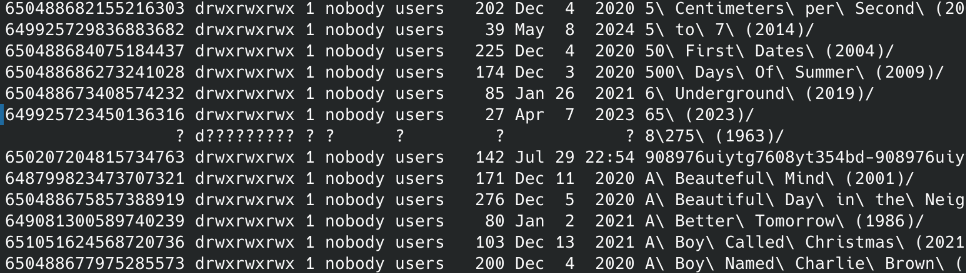
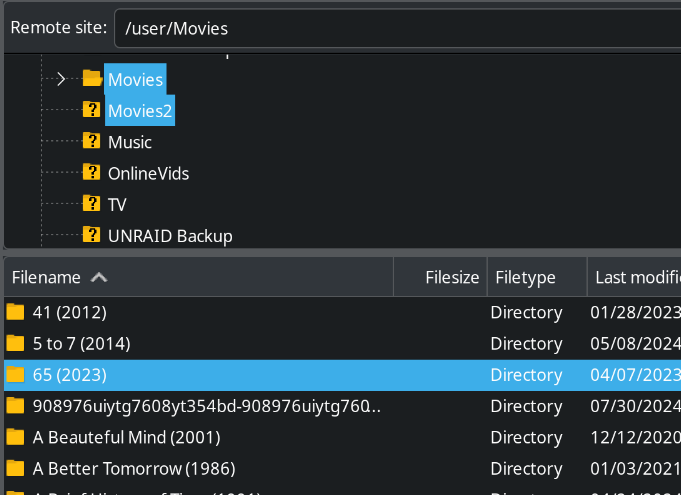
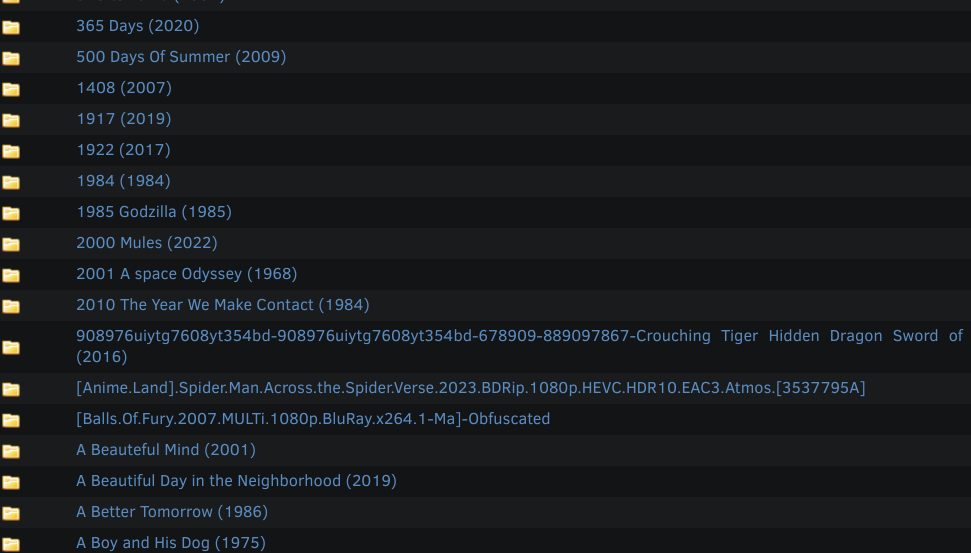
This file is really stubborn. Or I'm really stupid. First I tried solution 3, wildcards: rm -rf 8* deleted anything that started with an 8 and didn't give that same error but that file still seems to be there. Second I tried solution 2, using the Inode Number: But -li | less shows the file has no lnode number: Next option 4, rmdir with tab completion; Typing rmdir 8 + tab does not auto complete anything. It's like the file isn't there at all. Option 1 I also tried but the escape commands as shown by ls -b 8* make it seem like the file doesn't exist. Your 5th recomendation (use mc) would that be midnight commander? I've tried to delete it with FileZilla which seems to be somewhat similar. But this method shows the file isn't there at all: Since none of those worked I went to do a Filesystem Integrity check but the file doesn't seem to be on the share at all. Browsing the index through the Unraid GUI shows the file not there: Any other suggestions or idea what I'm doing wrong?

-
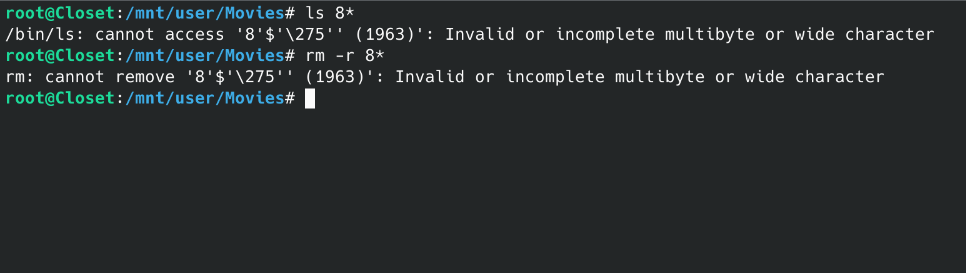
I have a folder on my Unraid server for the movie 8 1/2. Except I it's seemed to be named something strange because whenever I do anything to modify that folder through the terminal I get the error "Invalid or incomplete multibyte or wide character". How can I delete this folder and all the contents?
-
That's actually the solution I have now as well. I also recommend for anyone not able to get the occ command running from SSH like myself. The biggest problem is swapping to the admin account every time I want to run an occ command disrupts my workflow.
-
Awesome, that helps me understand way more than trying to read manuals. When I run: docker exec -u www-data Nextcloud php occ It tells me: Cannot write into "config" directory! This can usually be fixed by giving the web server write access to the config directory. But, if you prefer to keep config.php file read only, set the option "config_is_read_only" to true in it. See https://docs.nextcloud.com/server/29/go.php?to=admin-config {"reqId":"D5aMQwP3cxwQUDQY5zHd","level":3,"time":"2024-07-18T10:33:00+00:00","remoteAddr":"","user":"--","app":"PHP","method":"","url":"--","message":"fopen(/var/www/html/config/config.php): Failed to open stream: Permission denied at /var/www/html/lib/private/Config.php#221","userAgent":"--","version":"","data":{"app":"PHP"}} My config file looks like it's owned by nobody and users: root@Closet:/mnt/user/appdata/nextcloud/config# ls -l total 122 -rw-r--r-- 1 nobody users 60 Sep 3 2023 apache-pretty-urls.config.php -rw-r--r-- 1 nobody users 70 Sep 3 2023 apcu.config.php -rw-r--r-- 1 nobody users 377 Sep 3 2023 apps.config.php -rw-r----- 1 nobody users 1351 Jul 1 01:46 config.php -rw-r--r-- 1 nobody users 75166 Sep 3 2023 config.sample.php -rw-r--r-- 1 nobody users 484 Sep 3 2023 redis.config.php -rw-r--r-- 1 nobody users 798 Sep 3 2023 reverse-proxy.config.php -rw-r--r-- 1 nobody users 2030 Sep 3 2023 s3.config.php -rw-r--r-- 1 nobody users 1025 Sep 3 2023 smtp.config.php -rw-r--r-- 1 nobody users 1103 Sep 3 2023 swift.config.php and my available groups are: root@Closet:/mnt/user/appdata/nextcloud/config# groups root bin daemon sys adm disk wheel audio docker Some of the forms online say I want to give the webserver user ownership of the config file but none of of those look like a webserver user to me. Should I give docker ownership of config.php in order to run occ from ssh? Will this mess anything else up or am I on the wrong path entirely? Edit: I tried to change the ownership to docker and it gave the same error.
-
Is there a way to run an occ command through an ssh connection into unraid? I've been searching for a while but I guess my question is too simple because all the answers are way over my head.
-
Scanning the library seems to have fixed my above problem
-
Audiobookshelf crashes every time I try to play anything. It's extra strange because it was working a few hours ago and I didn't change anything. I've tried this on multiple devices and restart the docker container many time. I also tried to downgrade to advplyr/audiobookshelf:2.11.0 Each time I get the same result. When I try to play any file the GUI says Socket failed to connect Then the docker container crashes. My log file pulled with "docker logs audiobookshelf" from the unraid terminal is attached. I can't really make heads or tails of this log file. Maybe it's a database error? errorLogs.txt
-
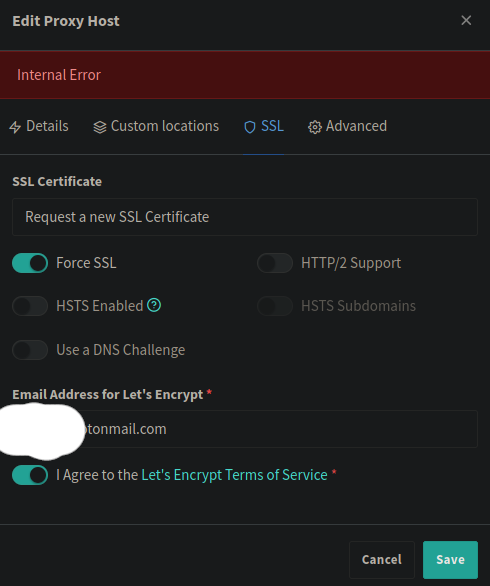
I also tried to delete certificates are re-create them and get this error: When I try to 'Test Server Reachability' from the SSL page of NPMPM I get the error 'Communication with the API failed, is NPM running correctly?' and it also causes the NPMPM Docker container to stop. I would be happy to share whatever logs I have but I'm not sure what I can share to help diagnose this. NPMPM was working fine for at least a month and has only had issues recently.
-
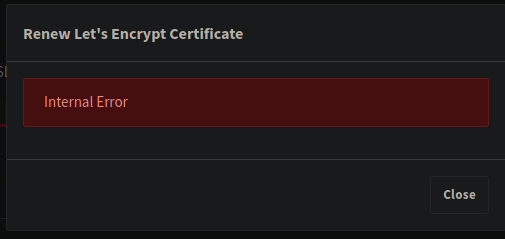
Did you have to do something special to get them to renew? When I try to manually renew them I still get the attached error.
-
I think our issue has to do with this bug in Github: https://github.com/jlesage/docker-nginx-proxy-manager/issues/306 @nxtiak For you was NPM working fine before the last update/ this issue? For me everything was working 100% and then around last month it stopped. I also tried to install the official NPM docker container and seem to be getting the exact same error.
-
+1 for NPM certificate issues. Is there a way to downgrade to an earlier version of NPM?
-
The disks have been synced since I got the new H310 card. Looks like the issue was related to the SATA ports on the motherboard.
-
I bought a H310 and moved the parity drives to that instead of the SATA ports on the motherboard pictured above. If they stay synced for three weeks I'll mark this as solved. Thanks for your help @JorgeB! Your posts in other threads helped me a ton too.
-
For anyone else having trouble finding the mover logging. Mover settings are in the scheduler settings. I set this to enable, disabled Docker, and ran the mover again a couple times at 06:34-06:35 local time. The shares that the files are called 'appdata' and 'Movies'. closet-diagnostics-20230905-0635.zip
-
One thing I'm not sure of is where the mover logs are. Another thread I read said make sure the move logs are enabled but I don't see anywhere to turn that on and couldn't find anything in searching.
-
There's a few forms I read through and tired what was recommended, mainly setting shares with cache as primary storage and the array as the secondary to make sure the mover knew to move the files over. However, there are still some files that refuse to move to the array, a single movie in my movies share and some appdata. I did shut down the Docker and VMs so the only thing I can think is that the files are duplicates. How can I tell whats a duplicate and how were these duplicates created in the first place? How can I best resolve this? Attached is the diagnostics. I ran the mover a few times just before downloading this. Thanks! closet-diagnostics-20230904-2112.zip
-
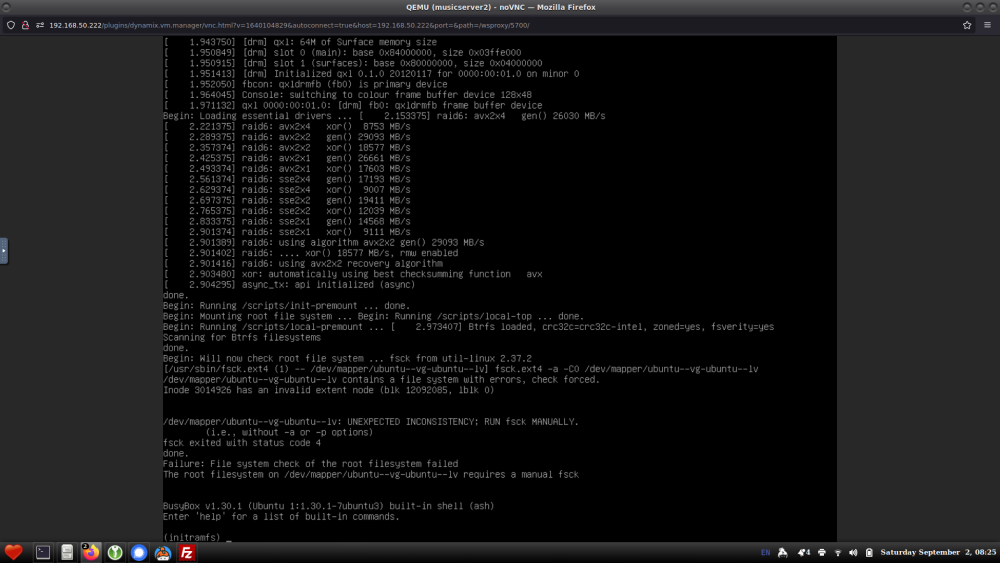
Crap. Well I went ahead and unmounted the parity disks at this point. It would take a week or so to rebuild the parity disks and wait for them to come out of sync again so I feel like it's best to just go unprotected till the new HBAs come in next Saturday. I'm having a problem with the Ubuntu VMs now though and I'm wondering if this is an indication of a bigger overall problem with the system. They work for a few days then one day I try to log into them and get this the attached error. Between my surface level understanding of Unraid and searching the errors in the attached error I think whats happening is the VM doesn't see the mounted disks anymore but the only thing I changed was removing the parity disks from the array. Questions: Does the error long 'full of disk related errors' indicate inevitable system failure if nothing is done? Is the VM error related to me unmounting the parity disks or does it have something to do with the other disk related errors? I've also attached a more fresh diagnostics. Thanks for the help. closet-diagnostics-20230902-0834.zip
-
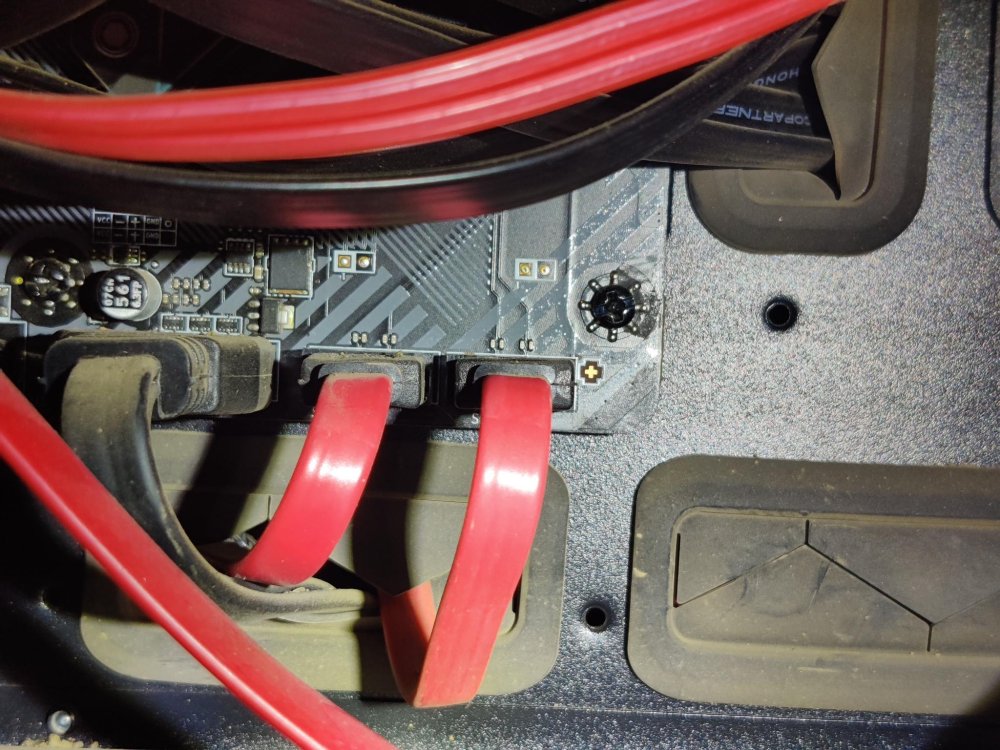
I just confirmed that both parity disks are plugged directly into the motherboard (attached image) instead of the SATA cards. I'm guessing those SATA ports on the motherboard are failing which explains why both drives go out of sync simultaneously. I really should have used HBAs to begin with instead of these cheap-o SATA expansion cards. I just purchased a single Dell H310 from theartofserver on ebay and will be swapping out one of the SATA expansion cards for it so I don't have to use the motherboard SATA ports.
-
Both my parity disks keep falling into an error state simultaneously. This has happened 3-4 times now and it feels like it's getting more frequent. I'm thinking it may be that their both plugged directly into the motherboard and those SATA ports are failing. The server is at my Mom's house across the continent so I'll walk her through making sure all the cables are secure and checking where the parity disks are plugged into. In the meantime I really have no idea how to interpret this diagnostics file like at all. If anyone can put me on the right path to getting this fixed it would be hugely appreciated. closet-diagnostics-20230830-2115.zip



