





Goobaroo
Members
-
Joined
-
Last visited
Everything posted by Goobaroo
-
@MVLP In a console, change the ownership of the files in /mnt/user/appdata/ftbdirewolf20_118. chown -R nobody:users /mnt/user/appdata/ftbdirewolf20_118 @Z-Server I don't know which container you're running but try fixing the ownership like above, but the directory that is configured for which ever container you're running. Longer explanation. All the original containers were running the server inside using a user running under UID 1001. For anyone who created a new account on their unraid server this would have matched up with a user on the unraid host. Containers should be running as the nobody user (UID 99). So all the containers now map to the correct user on the unraid server when running in the containers. This is really only an issue when you have to write out persistent files like the Minecraft files.
-
@MVLP You upgraded docker itself? What container are you trying to run? @galdor709 Which server are you trying to launch? How much memory do you have, it looks like 32GB. You may be out of memory, that server is trying to allocate 4GB on startup.
-
Hi @diogotr7, that is precisely what I'm doing when building the containers, using the APIs both through modpacks.ch and from Curseforge. While the FTB modpacks do come with that universal installer, there have been bugs that I've fixed on my end when installing the servers. You also have to take into account the Java version that the container is based on and that could change between modpack versions. I think I've found the issue with the permissions I'm in the process of republishing all the current versions of the modpacks to apply the fix. From my tests it now correctly writes out the files as nobody:users
-
@DarthLlama This may help with your TED talk. It is a good overview how networking works in docker. https://earthly.dev/blog/docker-networking/#:~:text=Docker handles communication between containers,the only option you have. For what it's worth. I use the br0 network to allow my Minecraft containers to get their own IP from my main network, and address them all by IP rather than port.
-
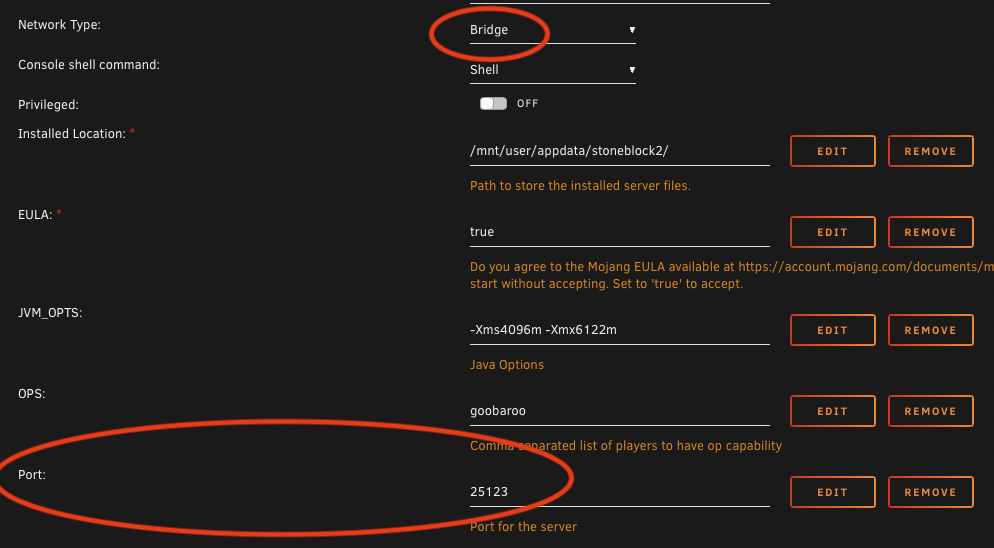
The solution is to change the network to bridge instead of host and set the Port value in the config. Bridge network is the default for docker. I had inadvertently changed the default networking to host when it should have been bridge in the unraid template for the containers. When the network is set to host it will use the IP of the Unraid server and try to attach the port and that is where you get collisions and can be blocked. When the network is set to bridge, docker will port forward from the internal docker network from 25565 inside the docker container to the Port defined in the config also to the IP of the Unraid server. This is the correct method for running a docker instance on another port.
-
No worries. Usually those minor mod pack updates are not as critical, but I strive to keep them as up to date as possible.
-
Should be there now as the latest version. If you ever want to pin to a particular version of a mod pack, you can check the versions available on at https://hub.docker.com/u/goobaroo
-
@DarthLlama change the network from host to bridge and the port setting will apply. Or use the br0 network and assign your Minecraft server another IP entirely.
-
@DarthLlama You should be setting the PORT in the config for the application under Unraid. The port that the server runs on inside the container is static at 25565. When docker containers start up, they map the port defined in the config from docker to the containers internal port. That is configurable in the docker container settings.
-
@GonjaTThat is because they release pretty much daily, and there was a nation wide internet outage that prevented me from doing anything. But it should be caught up now.
-
@DarthLlama It seems to be an upgrade issue. Just delete the start.sh and the install should upgrade correctly. This was due to a bug in the FTB installer, the serverinstall_4_2115 file that is pulled down from FTB.
-
@DarthLlama The start.sh is generated by the forge install that is run as part of the container. If it is running behind by 4000ms it seems like it may be starved for resources. The Stone Block 2 container requires 6GB of memory. I will take a look at the install again tonight and see if I can find any issues in the install script. @RedRobo The permissions need to be set on that directory under appdata. 777 means that owner, group and all users will have read, write and execute on that directory. You need execute on a directory in linux in order to change to that directory, otherwise you will not be able to. Opening a terminal and running chmod 777 /mnt/user/appdata/sevtechages will set the permission on that directory. There is nothing extra to be installed, the container downloads and installs the appropriate files for that modpack on startup. Provided it can actually write to the required directory
-
Java only. There are bedrock containers available in the Unraid App Store. But I’m not aware of modded bedrock. Sent from my iPhone using Tapatalk
-
Same solution, check the settings for the server and make sure that the path assigned to `/data` is set to 777 permissions. That should allow the container to write to that space.
-
I've been managing any console commands by putting myself in the OPS list and that allows me to run any server commands. That should work for any of the existing containers. I'll see about adding the whitelist to the server config though, just like the Ops list. It should be pretty straight forward. For the RCON, I'll see if I can add config management for it. Enable/Disable and setting a password, & port.
-
@racingsquirrel The pack versions are available on Docker Hub. But DireWolf 20 1.8 is the latest 1.4.1, put up about a week ago. The first post lags behind a bit as the rest of the server version updates is for the most part automated.
-
@ItsNotNick I can't verify Pixelmon 9.0.2 because I can't get it to launch on my M1 Mac. But if you want to give it a try, it should work. If not, I'll pull it down. FYI: @ptchernegovski @Maxi531 FTB Infinity Evolved 1.7 should be there now, enjoy.
-
Yep, it's the permissions on the directory that is mapped to /data inside the container. You can try giving `/mnt/user/appdata/plexiglassmountain` 777 and it should be able to install. I'm not sure why some users have permission issues and others don't. I'm going to look into that.
-
Can you provide some logs, I'll see if I can help out. I found it took a while to start up for me and to get fully running.
-
Done.
-
I'm not sure I follow what you were fixing?
-
@Garden I pushed an update that should fix it if you follow these steps.
-
You can also switch to the "Advanced" view (top right corner of the docker tab in Unraid) and force an update. I've put in a patch to make sure the server is running on 25565. The container is expecting that port either way, so it always needs to be set to that port number.
-
@Garden Looks like they shipped a bad port config in their server.properties file. You can edit the servers.properties file and change the port value from `server-port=25569` to `server-port=25565` That should fix it. The error you found can be ignored, I get that too.
-
Try setting run.sh with 755 permissions. I'll push a fix that does it in the script. chmod 755 /mnt/user/appdata/ftbdirewolf20_118/run.sh


