





flyize
Members
-
Joined
-
Last visited
Everything posted by flyize
-
Probably not, but if you have issues that should be the first thing you add.
-
Yes. Use the latest version of Unraid and follow the multiple guides for setting up Plex transcoding. There's no special sauce here.
-
I see no mention if you adding /dev/dri. Did you?
-
Nope. But you might be able to keep track of any updates here. Chuck hasn't posted recently, but I would expect him to either update this thread or close it and create a new one with Alder Lake updates. https://forums.plex.tv/t/pms-packaging-07-2022-update-forum-preview-testing/799912
-
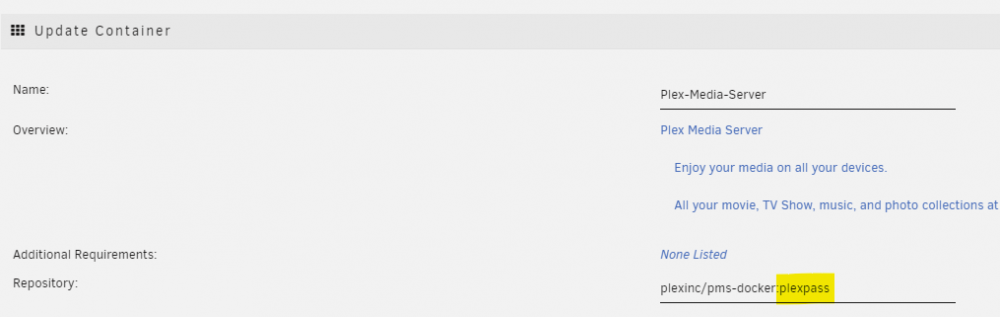
Or if you're using the official Plex container, you can also do this:
-
I don't think you need that anymore. Take it out, install intel_gpu_top, reboot, and try again. Also, make sure you're on Plex 1.28.2.
-
Yeah, I saw that. Pretty neat!
-
Correct.
-
Interesting. When I did that, mine said that it had to updated manually.
-
Then you wait.
-
Assuming you have a Plex Pass, switch to the official (or binhex-plexpass). If you don't have a Plex Pass, none of this matters.
-
1.28.1 is the Plex Pass beta version.
-
Technically you could also be transcoding because the Plex client says it cannot handle whatever format the source media is in. But if it can't handle the source file, HDR is probably the least of the problems. 😅
-
My Spanish (that's a guess?) is terrible, but yes - those version numbers are correct.
-
Yeah, I feel pretty confident that this issue is now fixed. Now to wait for tone mapping to get fixed. After that, I think I'll have a fully functioning system! edit: But technically mine *is* fully functioning. I don't run any 4k content, which is where you're most likely to find HDR.
-
I would get crashes in <20 minutes. It's been running all day.
-
Yay, I can also confirm that RC3 + Plexpass beta is working with the iGPU!!!
-
Are you using binhex-plexpass, or is there some way to switch the official container to beta?
-
Apologies, I was offline for a while. You're correct that I did not see that screen. However, I just updated to RC3 and it shows installed, so we can consider this fixed. Thanks for the replies.
-
I don't get a popup. Are there logs somewhere? edit: FWIW, I am able to install other apps. Only GPU Statistics goes to 'pending'.
-
Even with just the first one checked, the container crashes for me.
-
Oh duh. Sorry 6.11 RC2.
-
I've been trying to install the GPU Statistics plugin and it keeps getting stuck on 'pending'. I've even rebooted the server. Is this a CA problem or a GPU Statistics problem?
-
Ah ha, we've found the difference.
-
So far I've tried: Vanilla RC2 GUC Removing intel_gpu_top Removing blacklist All result in a Plex crash. The best result was Vanilla with the GUC setting. It lasted about 20 minutes transcoding a movie to download.



