nametaken_thisonetoo
Members
-
Joined
Everything posted by nametaken_thisonetoo
-
Apologies but posting this here because no one ever responds to container specific threads anymore. I guess AI has most of the answers. Have twice tried to use this container to run a test for number of x265 to x264 transcodes my i7-7700 iGPU can handle. Using the default test clips included. The test runs without issue until the CPU appears to hit its limit of simultaneous streams (4). At that point everything hangs, and I mean everything. The test stops working and can't be stopped, no pages on the Unraid GUI will load nor will any other containers GUI. I am also unable to SSH in to the terminal. I can't access my shares on the local network. It's a full blown hang. Have been able to enact a graceful shutdown via a quick push of the physical power button on the server, but otherwise would have been looking at a hard shutdown.themagiceye-diagnostics-20260902-1243.zip Given that @SpaceInvaderOne now works for UnRaid directly, perhaps consider more extensive testing from him or the team before publishing containers to the app store and videos to YT. This one is a great idea, but seems there might be some real issues for some with the implementation. Here are the container logs I grabbed after the reboot, and have attached diagnostics as well. Hope it helps to find the issue. ERROR: driverInitFileInfo 578 result=11ERROR: init 664 result=11ERROR: init 250 result=11---------------------------------------- Exception occurred during processing of request from ('192.168.10.122', 54262) Traceback (most recent call last): File "/usr/lib/python3.13/socketserver.py", line 697, in process_request_thread self.finish_request(request, client_address) ~~~~~~~~~~~~~~~~~~~^^^^^^^^^^^^^^^^^^^^^^^^^ File "/usr/lib/python3.13/socketserver.py", line 362, in finish_request self.RequestHandlerClass(request, client_address, self) ~~~~~~~~~~~~~~~~~~~~~~~~^^^^^^^^^^^^^^^^^^^^^^^^^^^^^^^ File "/usr/lib/python3.13/socketserver.py", line 766, in init self.handle() ~~~~~~~~~~~^^ File "/usr/lib/python3.13/http/server.py", line 436, in handle self.handle_one_request() ~~~~~~~~~~~~~~~~~~~~~~~^^ File "/usr/lib/python3.13/http/server.py", line 424, in handle_one_request method() ~~~~~~^^ File "/app/benchmark.py", line 4118, in do_POST self._send(json.dumps({"ok": ok, "ui": ui}).encode(), "application/json") ~~~~~~~~~~^^^^^^^^^^^^^^^^^^^^^^^^^^^^^^^^^^^^^^^^^^^^^^^^^^^^^^^^^^^^^^^ File "/app/benchmark.py", line 4032, in _send self.end_headers() ~~~~~~~~~~~~~~~~^^ File "/usr/lib/python3.13/http/server.py", line 538, in end_headers self.flush_headers() ~~~~~~~~~~~~~~~~~~^^ File "/usr/lib/python3.13/http/server.py", line 542, in flush_headers self.wfile.write(b"".join(self._headers_buffer)) ~~~~~~~~~~~~~~~~^^^^^^^^^^^^^^^^^^^^^^^^^^^^^^^^ File "/usr/lib/python3.13/socketserver.py", line 845, in write self._sock.sendall(b) [scoreboard] serving on :8088 (detected GPUs: HD Graphics 630, NVIDIA GeForce GTX 1050 Ti, Intel(R) Core(TM) i7-7700 CPU @ 3.60GHz) [ramp] single-stream speed = 4.259x [ramp] N=1 PASS worst-mean=4.259x combined=4.26x power=7.8 [ramp] N=2 PASS worst-mean=2.123x combined=4.25x power=6.8 [ramp] N=3 PASS worst-mean=1.383x combined=4.17x power=6.6 [ramp] N=4 PASS worst-mean=1.071x combined=4.32x power=6.9 ~~~~~~~~~~~~~~~~~~^^^ BrokenPipeError: [Errno 32] Broken pipe ---------------------------------------- [ramp] single-stream speed = 4.247x [ramp] N=1 PASS worst-mean=4.247x combined=4.25x power=7.9 [ramp] N=2 PASS worst-mean=2.113x combined=4.23x power=6.9 [ramp] N=3 PASS worst-mean=1.381x combined=4.16x power=6.7 [ramp] N=4 FAIL worst-mean=0.000x -> MAX SUSTAINED = 3
-
Thanks for the explanation. Are there any particular pro's and con's to either option?
-
Recently nuked my server and started again with a clean install, setting up all my containers again. Can't remember which guide I followed to get the server basics up and running, but am noticing now I don't seem to have a vDisk for docker containers. What am I not understanding here? themagiceye-diagnostics-20260613-1656.zip
-
Sorry for delay - hectic week. This is what I get: root@TheMagicEye:~# cat /etc/cron.d/root # Generated docker monitoring schedule: 10 0 * * * /usr/local/emhttp/plugins/dynamix.docker.manager/scripts/dockerupdate check &> /dev/null # Generated system monitoring schedule: */1 * * * * /usr/local/emhttp/plugins/dynamix/scripts/monitor &> /dev/null # Generated mover schedule: 0 3 * * * /usr/local/sbin/mover start > /dev/null 2> >(logger -t move) # Generated plugins version check schedule: 10 0 * * * /usr/local/emhttp/plugins/dynamix.plugin.manager/scripts/plugincheck &> /dev/null # Generated Unraid OS update check schedule: 11 0 * * * /usr/local/emhttp/plugins/dynamix.plugin.manager/scripts/unraidcheck &> /dev/null # Appdata.Backup cron settings 30 2 * * 2 php /usr/local/emhttp/plugins/appdata.backup/scripts/backup.php > /dev/null 2>&1 # CRON for CA background scanning of applications 0 * * * * php /usr/local/emhttp/plugins/community.applications/scripts/notices.php > /dev/null 2>&1 # Crontab for Disk Location plugin to retrieve SMART data, power status and run backup in the background. 56 */12 * * * php -f /usr/local/emhttp/plugins/disklocation/pages/cronjob.php start silent &> /dev/null */5 * * * * php -f /usr/local/emhttp/plugins/disklocation/pages/cronjob.php start status silent &> /dev/null */5 * * * * php -f /usr/local/emhttp/plugins/disklocation/pages/cronjob.php start syslogread silent &> /dev/null 0 0 * * * php -f /usr/local/emhttp/plugins/disklocation/pages/page_system.php backup auto silent &> /dev/null 0 5 1 * * php -f /usr/local/emhttp/plugins/disklocation/pages/benchmark.php auto silent &> /dev/null
-
Sorry @JorgeB I think I misunderstood your question. I pretty sure it's not the same day and time that this is happening. This time was Tuesday at 10pm ish so I'll report back if the same happens next week. Have a feeling last time it was over the weekend. FWIW I don't have any background tasks scheduled to operate as early as 10pm.
-
2:30am on a Tuesday. This happened about 10pm, also on Tuesday
-
HI all, Strange Gremlin on my server has occurred three or four times now over the last month or so. All of my docker containers just randomly stop sometimes. The docker service doesn't turn off, just the containers are stopping. If manually turn them all back on everything just works fine and carries on. Hoping someone might be able to provide some insights as this is not ideal. Have attached diagnostics. themagiceye-diagnostics-20260303-2221.zip
-
Hi all, just wondering if I'm missing something obvious, but there doesn't appear to be a container for running the Joplin self hosted server in the App store. Is there a reason for this? I've never done docker compose stuff before so looking for how I might get this up and running, Also noticed that I can get sync up and running without the server using WebDav and Tailscale. Any thoughts on the robustness of such a setup?
-
Hi there, just trying to get my Nvidia GPU transcoding but there appears to be no NVIDIA_VISIBLE_DEVICES parameter in the container template as described in the instructions at the top of this thread. How am I meant to go about this in 2025?
-
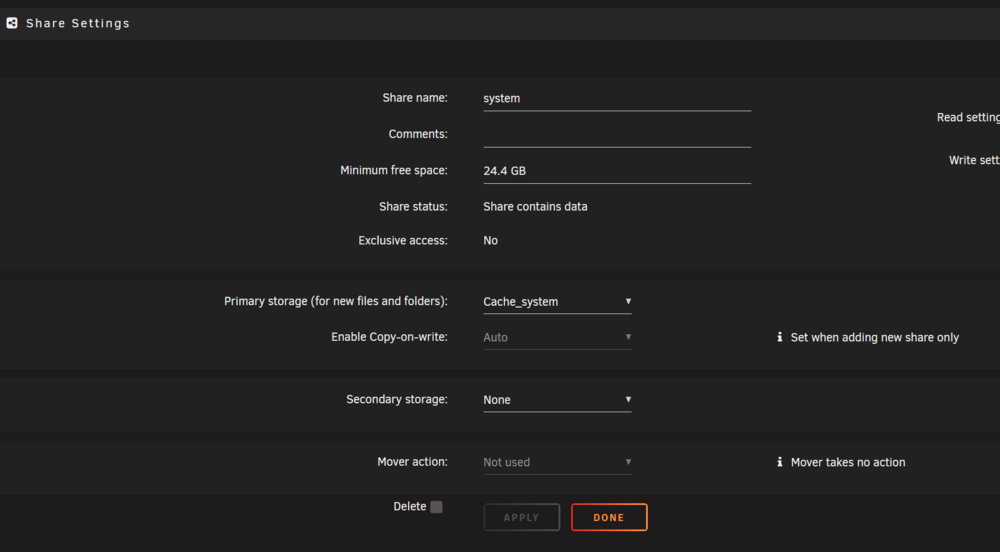
Just coming back to this after some non-unraid life distractions @JorgeB @itimpi @MowMdown All of my Docker container config pages have a path /mnt/user Docker directory in Docker settings is /mnt/user/system/docker Default appdata storage location in Docker settings is /mnt/user/appdata The System share has a primary storage drive of Cache_system (which is the drive I want system files to be stored), and no secondary storage set The appdata share also has a primary storage drive of Cache_system and no secondary storage set All of these setting remain unchanged from my initial config of this new server a few weeks ago The test file @JorgeB had me create in the terminal has written to the correct Cache_system drive. But somehow despite all of this a "docker" folder in the system share continues to write new files to my other cache drive (Cache_data). See screenshots below sorted by last modified If I move the docker folder from the cache_data drive to cache_system where it should be it appears that future writes will just continue to land on cache_data despite all my correct settings. I'm also concerned that moving this folder might screw with my config, so wanted to check in again before I so anything. Have also attached diagnostics. Any thoughts on what I should do from here? Thanks! themagiceye-diagnostics-20251103-1917.zip
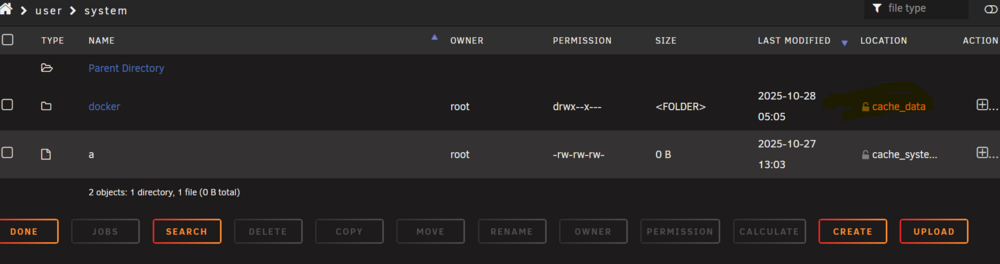
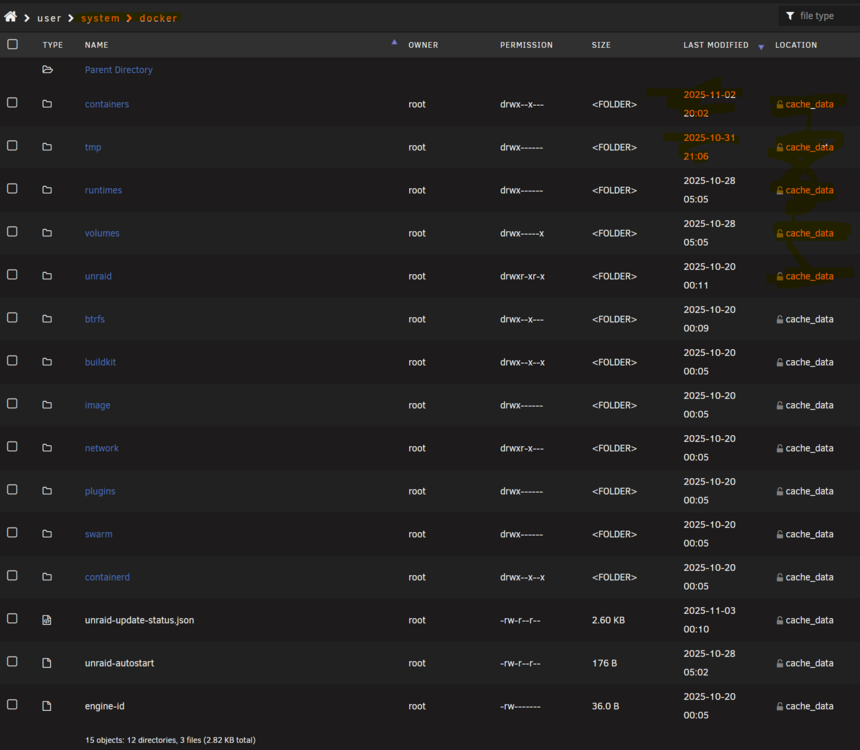
-
This is a new install of UnRaid and afaik Unraid automatically creates a system share and in my case put it on a cache drive not planned for this purpose. The files ending up there are system folder and then the docker subfolder with. New writes are happening there all the time despite now setting the system share to my preferred cache drive.
-
I realised this myself and was wondering how I was going to do it. Didn't know about the buttons at the bottom of the share you mentioned so thanks for the heads up @JorgeB . There are still files being written to the wrong cache disk, so also just wondering if I do this move to the other cache will that mean future writes will be made to the new location?
-
OK will do, thanks @JorgeB. Is it OK to just move them with Krusader as a cut and paste?
-
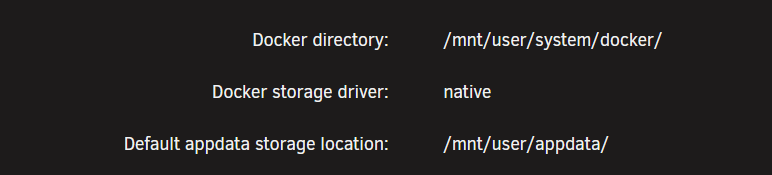
Thanks so much @JorgeB , I've just done that and posted the updated diags. Also, taking a closer look it appears the system folder on my cache_system drive is empty But then on the cache_data drive there is also a system folder populated with a single sub-folder called 'docker'. This has lots of folders/files within it and seems to be regularly updated. My Docker settings have the following paths, so I really don't understand how I got myself to this point haha themagiceye-diagnostics-20251028-0704.zip
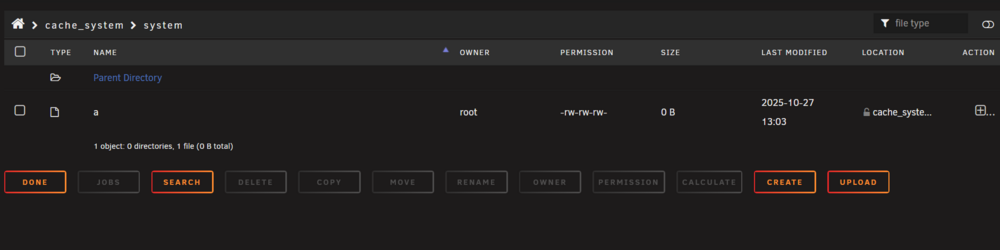
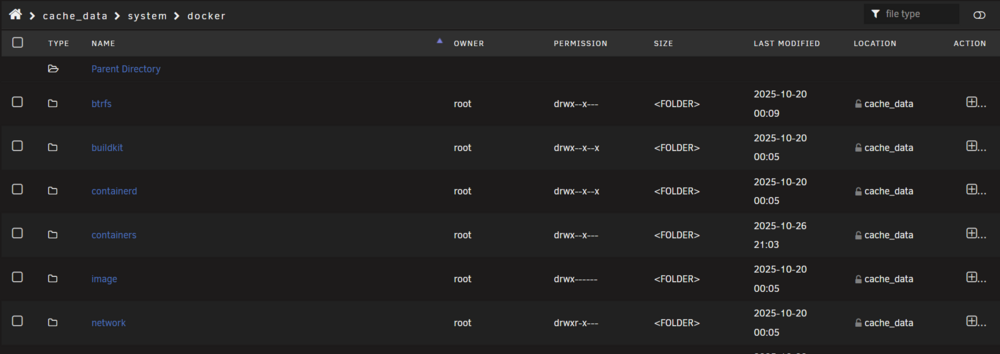
-
Hi there, I have two cache drives on my new setup. Despite setting the system share being set to operate off of my cache_system drive, it instead appears to be storing all of the files on my cache_data drive instead. I can't work out why this would be happening and any insights would be great. Diagnostics attached themagiceye-diagnostics-20251027-1850.zip
-
Watching Ibracorps recent zero to hero video for basic setup of the arr stack, he recommends a single Media share with TV Shows, Movies etc all as subfolders within it. Apparently this makes things easier to setup including hardlinks and some other bits and bobs. Last time around I had each of the different media types in their own unique Share, which was done largely following spaceinvader guides (no hardlinks setup fwiw). Is there an accepted best practice for this in terms of making the arrs work as smoothly as possible? Keen to get it all as right as possible this time around. Thanks!
-
I've plugged them into both the onboard mono sata ports and the ports on my add in pcie sata card. Both configs have both drives still not showing up which I'm guessing is not a good sign? This just makes no sense to me though, all that happened was a system rebuild in a new case
-
Hi @JorgeB - I've replaced all cables to all drives as part of moving the system to a better case. I'm now having various issues with some disks not being picked up by the system. I've played around with things hardware wise - Disk 6 and Parity 2 are consistently a problem, although last night only Parity 2 was not available, but now back to Disk 6 also dropping out again. Have attached updated diagnostics and would appreciate you taking a look. Getting concerned that these drives might be a serious issue and really can't afford to replace them. themagiceye-diagnostics-20250217-2252.zip
-
Whoops completely forgot. DIagnostics attached, many thanks themagiceye-diagnostics-20250212-1236.zip
-
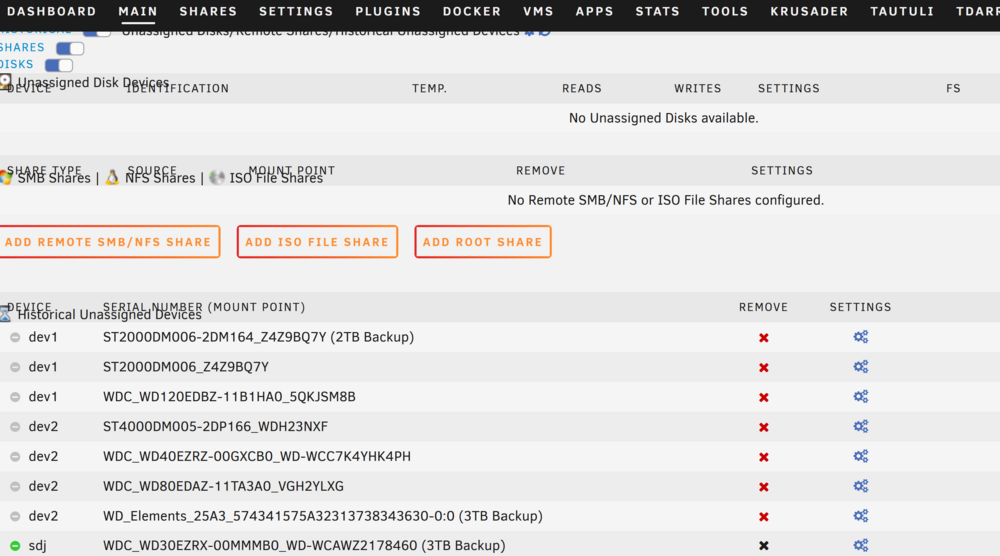
As you can see from the screenshot below the drive is now listed in the historial unassigned devices with a black X. It is still connected to my system as normal. Then when I click into the settings for the drive and click attach it just hangs. Any suggestions?
-
Hey all, about a month ago I was no longer able to access the unraid GUI. Everything else was ticking along and I was too busy to do anything about it (poor form I know). This is what I see when trying to reach the GUI. After a few weeks I took the time to connect via Putty and try to enact a graceful restart/shutdown. I was able to connect to the command line, enter the shutdown command and get the prompt confirming shutdown would occur...but then nothing happened, the machine kept running. After that no joy getting anywhere on the command line. And then slowly over the last few weeks different dockers have been dropping offline, tonight the final straw with Plex. What are my options for getting a graceful shutdown? The server is connected to a UPS - should I just disconnect this and hope this triggers a proper shutdown the same way a power cut would? Or is there a better way? Cheers for any help.

-
Thanks for the explanation. Can I just confirm then that if my Version of Nextcloud software is 23 but the container itself is up to date, then I can just update the software manually one version at a time as per the instructions from Linuxserver?
-
Trying really hard to understand all the info on how to update - have only relatively recently realised that when I update the container in Unraid this does not actually upgrade Nextcloud itself. Now I also understand that this is changing which is great, but I would like to be sure of what steps I should be taking given that I am currently running Nextcloud 23.0.12 within a fully updated container done via the Unraid GUI. The linuxsever notification https://info.linuxserver.io/issues/2023-06-25-nextcloud/ talks about "pinning a specific tagged version like lscr.io/linuxserver/nextcloud:version-27.0.0 and manually changing your image version when you are ready to upgrade." Apologies but I don't know what this means, or how I would actually go about doing this? The next section talks about only upgrading one version at a time which is fine, but I'm not clear if running the updater.phar will take me straight to version 27 and cause loads of problems? From there I'm pretty lost trying to follow the rest of the doc, so wanted to come here and seek advice from the pro's. Apolgies in advance for not being all that advanced!
-
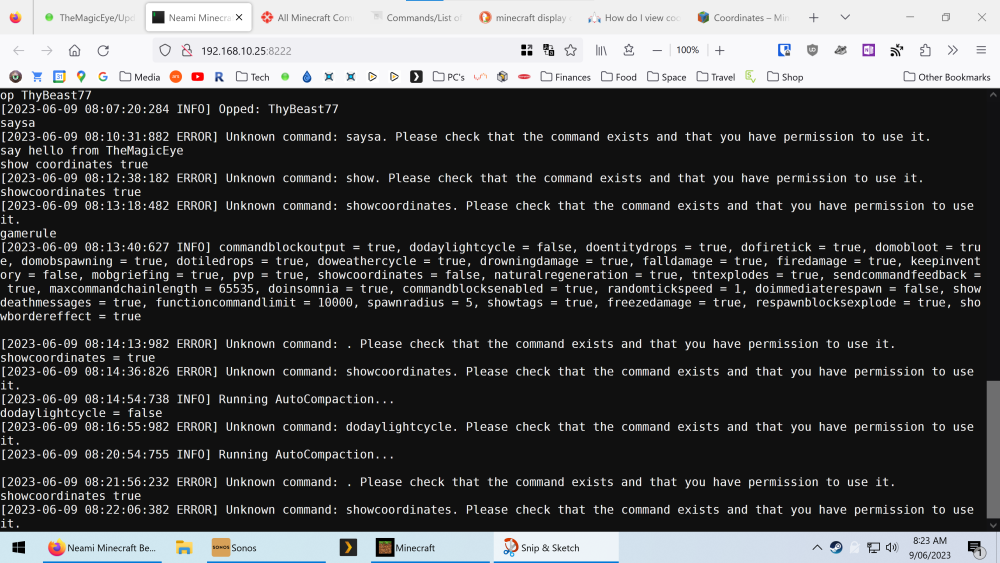
Hi there, new to Minecraft and struggling with console commands. I'm sure I am getting the syntax wrong or something equally stoopid, but as you can see in the screenshot below I am typing commands in the WebGUI interface and getting errors sometimes and not other times. If somone could point me in the right direct I would be very greatful
-
Forgot the diagnostics lol themagiceye-diagnostics-20230527-0837.zip