





BKS
Members
-
Joined
-
Last visited
Everything posted by BKS
-
Any plans to add support for the firefly plaid connector? https://gitlab.com/GeorgeHahn/firefly-plaid-connector Thanks for the work you've done already!
-
Thanks for the reply! I did follow those instructions and successfully got the test notification working. My problem is that although the test is working, no other notifications are being sent to telegram. All agents boxes are checked at the top.
-
I enabled and setup the telegram notification option and the test button successfully delivers a message. However, I am not getting any notifications beyond the test notification delivered. I still get the web UI popup notifications. Toward the top of the settings page, all options (Unraid OS, Notices, Warnings, Alerts) are selected to deliver via Browser, Email, and Agents. (I assume telegrame is an agent in this case?). What else do I have to do to get notifications delivered via telegram? Cross posted from reddit: https://www.reddit.com/r/unRAID/comments/oralp9/notifications_not_working_as_expected?sort=confidence
-
Documentation seems to reference a master password reset function, but I'm not seeing it. How do I reset if I locked myself out of Cloudberry Web UI?
-
When I open up my dashboard I'm able to login but it's not showing any of my hosts, nothing shown in the main dashboard tab, just blank white below. Functionally all of the hosts are working. I tried restarting the container and clearing cache without luck. I did a few docker container updates so not sure if this was one that upgrading to the latest version has caused it. Any ideas on fixing it? Also, could I get a reminder on how to set a version tag for unraid/docker to revert to? Edit: Nevermind, changed browser and it appears to be a browser related issue. However, still curious the best way to revert container versions based on the tag. I tried adding :v1.16.1 and it didn't work..
-
1. Enable dockerhub search results in CA 2. search for protonmail bridge; install the version by shenxn 3. Try the following network settings: Network type: Host, imap: 1143, smtp: 1025. 4. Open docker container in console mode 5. Open protonmail bridge in CLI mode by running "protonmail-bridge --cli" 6. Authenticate with "login" command, follow prompts. 7. Copy those credentials into your mail client, replacing the 127.0.0.1 IP address with that of your unraid server.
-
Yes I did, but the only way I was successful was using the host networking interface setting. You're running the bridge in CLI mode right? I never had an issue with the docker itself having an internet connection.
-
I don't necessarily need a separate IP. That's just the only way I've gotten it working. It seems like I should be able to enable bridge mode and from the client connect the unraid server's IP, right?
-
An update: If I set the network type for the container to custom / br0 and give it a fixed IP, I can connect to the bridge as expected from within the LAN. However, when I try the same thing from a client connected through wireguard, it does not work. When I ping the docker's local IP address from the remote wireguard client, I get destination host unreachable. Could this be solved with a static route? VLAN?
-
I'd like to run protonmail bridge as a docker container on my unraid 6.8.3 box. Nothing is available in CA, so I was able to load a container from dockerhub (currently using shenxn/protonmail-bridge). It loads successfully and I'm able to spin up the protonmail-bridge application, but having trouble with getting network connections to work after that. My goals are to have the IMAP and SMTP ports via that application open to both network clients as well as clients connected through a "remote tunnel" on wireguard. I've tried all sorts of variations of the networking configurations in VPN settings as well as docker container (bridge, host, custom) but I haven't been successful. Any tips? This is what I'm currently working with:
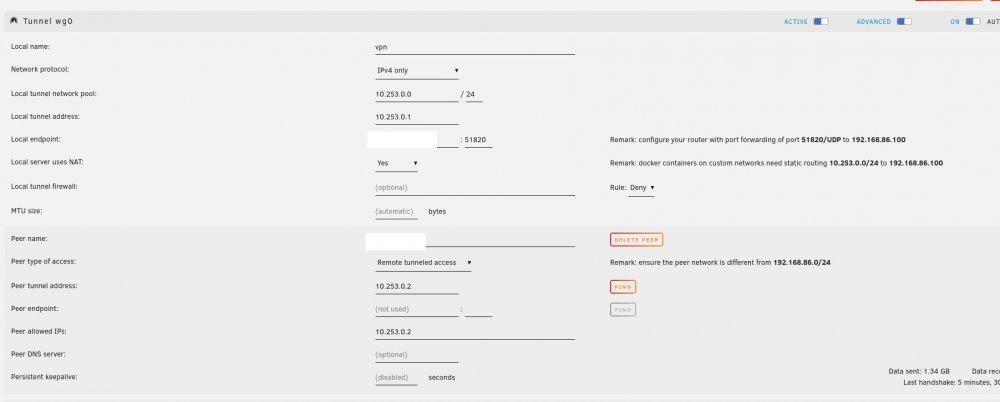
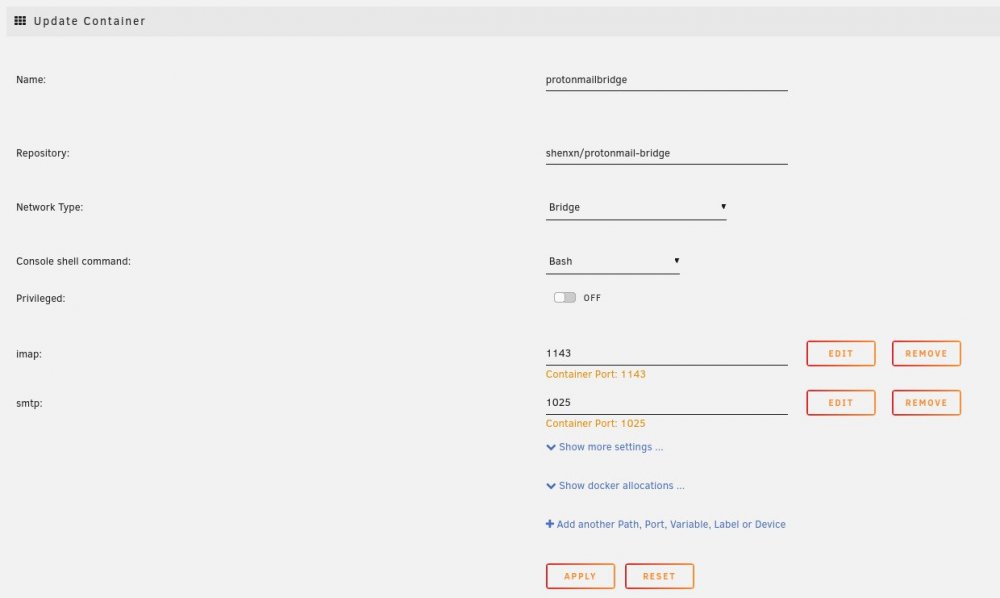
-
I installed this plugin via CA on my new unraid install. I set it up based on the blog post here. I create a peer with remote tunneled access and import it into a android client. I then enable the connection but on the logs it shows handshake initiation timeouts and I'm unable to ping from unraid. The port is appropriately forwarded to the VPN endpoint from my router side of things. Not sure where to go from here for troubleshooting.


