





DeNiX
Members
-
Joined
-
Last visited
Everything posted by DeNiX
-
I can acces the GUI indeed, but now it came to my attention that all the default icons in settings as in tools don't show up, but the pluggins i downloaded from community apps do show up. As for the diagnostics, i tried several times with several browsers and different machines, but it doesnt download the log file. There is a pop up showing that it is downloading with an orange close button but nothing downloads.
-
I have no other issues upgrading to 6.10.3 except that i'm also having troubles with the myservers plugin. Since the upgrade it doesnt provision aan CA cert file. Resulting in the plugin become useless. Infact now i have an unsecured connection while connected to the Unraid GUI. Any helps with this ??
-
Dude, always blank out your Wan ip adres[emoji1751] Came along the thread, and saw it in the pictures Verstuurd vanaf mijn AC2003 met Tapatalk
-
I can't see your attached log file but mine is also unreachable since last update.. Mine hangs on following line: 2022-06-10 21:22:23,734 DEBG 'watchdog-script' stdout output: [info] SABnzbd process started [info] Waiting for SABnzbd process to start listening on port 8080... After this nothing happens. Now reverting back 1 version see if it is coming back up. ** EDIT: Reverting back 1 version does fix it 2022-06-10 21:36:25,946 DEBG 'watchdog-script' stdout output: [info] Attempting to start SABnzbd... 2022-06-10 21:36:27,561 DEBG 'watchdog-script' stdout output: [info] SABnzbd process started [info] Waiting for SABnzbd process to start listening on port 8080... 2022-06-10 21:36:31,186 DEBG 'watchdog-script' stdout output: [info] SABnzbd process is listening on port 8080 (just add: "binhex/arch-sabnzbdvpn:3.5.3-1-03" to your repository line in your docker template if you don't know how to revert back to older version)
-
Like i said earlier, my issue went back almost a year now, doesnt matter what version, already tried that. i can replicate it by hard resetting the server, or disconnect the power supply. It reset it self to the state i just install the docker container. thats why i asked if i can hardcode it to the container in some how. *edit* it just annoyed me right now, as i just finished putting 70+ torrents in the list and it came blank after unraid hung and i had to reset.
-
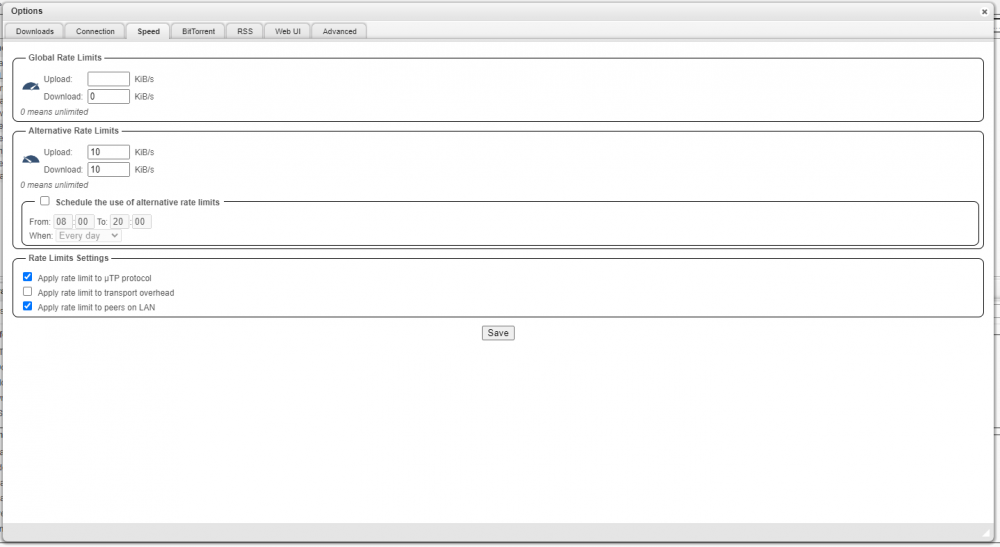
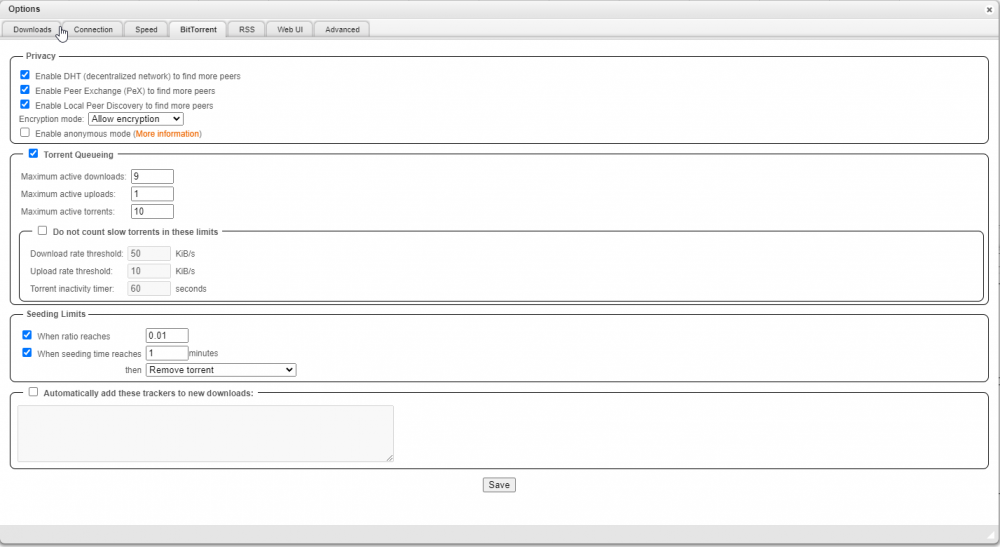
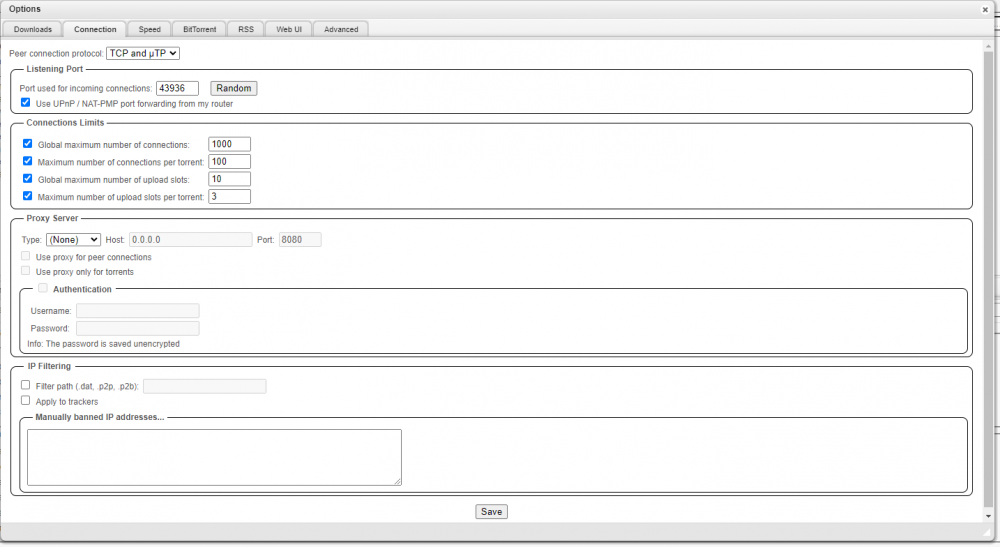
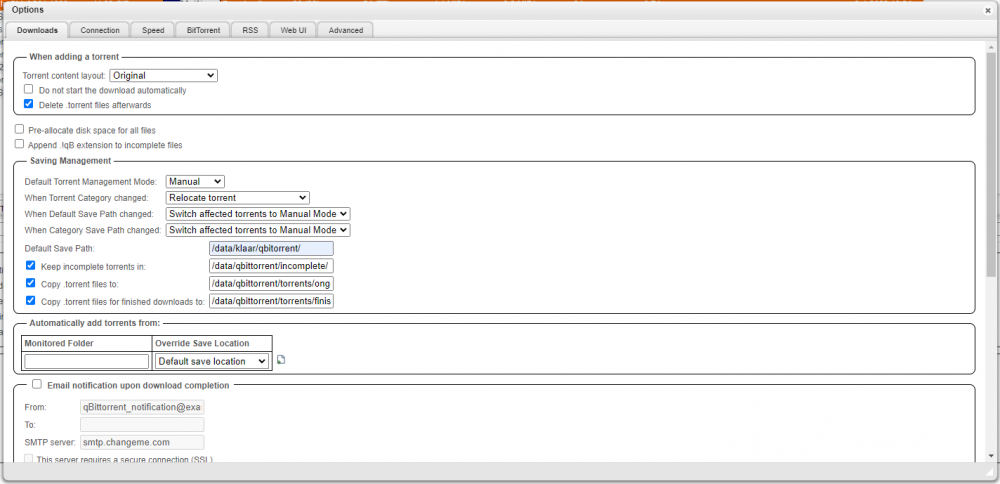
Hi there Binhex, Still lovin the work you do for the community. Config settings get lost and have to setup again after power loss, or hard reset of the server. Either way, before using qBittorrent I was using Deluge and my settings would never wipe like this. The reason i switched from deluge is that it stalls to often and works very slow. Basically Qbittorrent gets fully reset, but keeps the list of torrents, but they end up being moved to different folder as the categories get messed up and I have to reconfigure and they then are relocated. My setup is as follows: Running via docker container on unRAID 6.10.0-rc2 Using binhex/arch-qbittorrentvpn *edit* I have this problem like for more than a year now its not like its since the last update or so. Also on the older versions this happens. *edit* See attached picture. So basically my question is: what am I doing wrong and how to I get it so that my config is permanently saved, so that I don't have to setup webui login info, categories, saving management, etc. up every time I lose power. On clean exit of the docker i have no issues and everything loads up as setup. So is there some file in the docker or appdata i can change so the settings wil stay. Make it persistent. Thanks in advance, Denix
-
yes me too, without any changes it started to work again with wireguard
-
Well we have to wait for binhex to update this container. Hope he does soon.
-
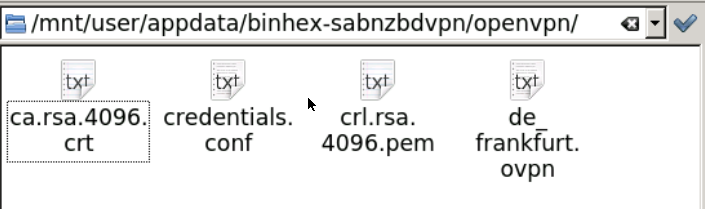
Did you also supply ovpn files to the openvpn folder in appdata? i used these files from pia: https://www.privateinternetaccess.com/openvpn/openvpn-strong.zip dont forget the *.pem and *.crt file should look like this: this works with sabnzbd, qbittorent and deluge, but the last 2 dont portforward this way. 18.27 edited: credentials.conf is auto generated after first run. 18:41 edited: it appears that it doesnt work in torrenting, after it brings up the openvpn tunnel (tun0) and finishing initialization proces, where it is supposed to proceed to starting qbittorent it is starting the initialization proces of the wireguard service and same error returns: 2021-11-15 18:44:22,462 DEBG 'start-script' stdout output: parse error: Invalid numeric literal at line 2, column 0 2021-11-15 18:44:22,463 DEBG 'start-script' stdout output: [warn] Unable to successfully download PIA json to generate token from URL 'https://privateinternetaccess.com/gtoken/generateToken' [info] 10 retries left [info] Retrying in 10 secs...
-
Hi All, After a server hung up, i needed to restart my server, after restarting i noticed that all dockers i use from binhex (sabnzbdvpn, qbittorentvpn, delugevpn) do not work anymore. After 11 or so tries they all stop with messages in the logs. (See Below:) It seems like somethings changed in PIA wireguard protocol. I did change sabnzbd to ovpn files from wireguard, and that one started to work. The other 2 containers i can manage to start, but the port forwarding doesnt work anymore. Never the less, i want to keep em all 3 on wireguard, openvpn uses more resources i noticed. I deleting and pulling the dockers again, but doesnt resolve the issue. Tried same account, with same server on anther machine with linux os, and PIA app and that does work. Anyway or work around available for this issue ? ** I changed my credentials in the logs ** 2021-11-15 17:05:31.887802 [info] Host is running unRAID 2021-11-15 17:05:32.315240 [info] System information Linux 99e19a753277 5.14.15-Unraid #1 SMP Thu Oct 28 09:56:33 PDT 2021 x86_64 GNU/Linux 2021-11-15 17:05:32.801394 [info] OS_ARCH defined as 'x86-64' 2021-11-15 17:05:33.331078 [info] PUID defined as '99' 2021-11-15 17:05:34.065528 [info] PGID defined as '100' 2021-11-15 17:05:37.538704 [info] UMASK defined as '000' 2021-11-15 17:05:37.626182 [info] Permissions already set for '/config' 2021-11-15 17:05:37.948121 [info] Deleting files in /tmp (non recursive)... 2021-11-15 17:05:38.487755 [info] VPN_ENABLED defined as 'yes' 2021-11-15 17:05:38.535149 [info] VPN_CLIENT defined as 'wireguard' 2021-11-15 17:05:38.574366 [info] VPN_PROV defined as 'pia' 2021-11-15 17:05:40.816486 [info] VPN_CONFIG not defined (wireguard config doesnt file exists), defaulting to '/config/wireguard/wg0.conf' 2021-11-15 17:05:40.857466 [info] VPN_REMOTE_SERVER not defined (wireguard config doesnt file exists), defaulting to 'nl-amsterdam.privacy.network' 2021-11-15 17:05:41.203294 [info] VPN_REMOTE_PORT not defined (wireguard config file doesnt exists), identified port as '1337' 2021-11-15 17:05:41.229735 [info] VPN_DEVICE_TYPE defined as 'wg0' 2021-11-15 17:05:41.256505 [info] VPN_REMOTE_PROTOCOL defined as 'udp' 2021-11-15 17:05:41.287434 [info] LAN_NETWORK defined as '10.10.10.0/24' 2021-11-15 17:05:41.317083 [info] NAME_SERVERS defined as '84.200.69.80,37.235.1.174,1.1.1.1,37.235.1.177,84.200.70.40,1.0.0.1' 2021-11-15 17:05:41.350871 [info] VPN_USER defined as 'p1234567' 2021-11-15 17:05:41.380340 [info] VPN_PASS defined as '0123456789' 2021-11-15 17:05:41.409707 [info] STRICT_PORT_FORWARD defined as 'yes' 2021-11-15 17:05:41.438380 [info] ENABLE_PRIVOXY defined as 'no' 2021-11-15 17:05:41.469922 [info] VPN_INPUT_PORTS not defined (via -e VPN_INPUT_PORTS), skipping allow for custom incoming ports 2021-11-15 17:05:41.499164 [info] VPN_OUTPUT_PORTS not defined (via -e VPN_OUTPUT_PORTS), skipping allow for custom outgoing ports 2021-11-15 17:05:41.527689 [info] WEBUI_PORT defined as '8080' 2021-11-15 17:05:41.557794 [info] Starting Supervisor... 2021-11-15 17:05:50,710 INFO Included extra file "/etc/supervisor/conf.d/qbittorrent.conf" during parsing 2021-11-15 17:05:50,710 INFO Set uid to user 0 succeeded 2021-11-15 17:05:50,722 INFO supervisord started with pid 7 2021-11-15 17:05:51,724 INFO spawned: 'shutdown-script' with pid 144 2021-11-15 17:05:51,726 INFO spawned: 'start-script' with pid 145 2021-11-15 17:05:51,729 INFO spawned: 'watchdog-script' with pid 146 2021-11-15 17:05:51,729 INFO reaped unknown pid 8 (exit status 0) 2021-11-15 17:05:51,760 DEBG 'start-script' stdout output: [info] VPN is enabled, beginning configuration of VPN 2021-11-15 17:05:51,761 INFO success: shutdown-script entered RUNNING state, process has stayed up for > than 0 seconds (startsecs) 2021-11-15 17:05:51,761 INFO success: start-script entered RUNNING state, process has stayed up for > than 0 seconds (startsecs) 2021-11-15 17:05:51,761 INFO success: watchdog-script entered RUNNING state, process has stayed up for > than 0 seconds (startsecs) 2021-11-15 17:05:51,763 DEBG 'start-script' stdout output: [info] Adding 84.200.69.80 to /etc/resolv.conf 2021-11-15 17:05:51,766 DEBG 'start-script' stdout output: [info] Adding 37.235.1.174 to /etc/resolv.conf 2021-11-15 17:05:51,769 DEBG 'start-script' stdout output: [info] Adding 1.1.1.1 to /etc/resolv.conf 2021-11-15 17:05:51,773 DEBG 'start-script' stdout output: [info] Adding 37.235.1.177 to /etc/resolv.conf 2021-11-15 17:05:51,776 DEBG 'start-script' stdout output: [info] Adding 84.200.70.40 to /etc/resolv.conf 2021-11-15 17:05:51,778 DEBG 'start-script' stdout output: [info] Adding 1.0.0.1 to /etc/resolv.conf 2021-11-15 17:05:52,099 DEBG 'watchdog-script' stdout output: [info] qBittorrent config file already exists, skipping copy [info] Removing session lock file (if it exists)... 2021-11-15 17:05:53,196 DEBG 'start-script' stderr output: parse error: Invalid numeric literal at line 2, column 0 2021-11-15 17:05:53,197 DEBG 'start-script' stdout output: [warn] Unable to successfully download PIA json to generate token for wireguard from URL 'https://privateinternetaccess.com/gtoken/generateToken' [info] 12 retries left [info] Retrying in 10 secs... 2021-11-15 17:06:03,372 DEBG 'start-script' stderr output: parse error: Invalid numeric literal at line 2, column 0 2021-11-15 17:06:03,372 DEBG 'start-script' stdout output: [warn] Unable to successfully download PIA json to generate token for wireguard from URL 'https://privateinternetaccess.com/gtoken/generateToken' 2021-11-15 17:06:03,372 DEBG 'start-script' stdout output: [info] 11 retries left [info] Retrying in 10 secs... 2021-11-15 17:06:13,832 DEBG 'start-script' stderr output: parse error: Invalid numeric literal at line 2, column 0 2021-11-15 17:06:13,833 DEBG 'start-script' stdout output: [warn] Unable to successfully download PIA json to generate token for wireguard from URL 'https://privateinternetaccess.com/gtoken/generateToken' [info] 10 retries left 2021-11-15 17:06:13,833 DEBG 'start-script' stdout output: [info] Retrying in 10 secs... 2021-11-15 17:06:24,267 DEBG 'start-script' stderr output: parse error: Invalid numeric literal at line 2, column 0 2021-11-15 17:06:24,268 DEBG 'start-script' stdout output: [warn] Unable to successfully download PIA json to generate token for wireguard from URL 'https://privateinternetaccess.com/gtoken/generateToken' 2021-11-15 17:06:24,268 DEBG 'start-script' stdout output: [info] 9 retries left [info] Retrying in 10 secs... 2021-11-15 17:06:34,705 DEBG 'start-script' stderr output: parse error: Invalid numeric literal at line 2, column 0 2021-11-15 17:06:34,706 DEBG 'start-script' stdout output: [warn] Unable to successfully download PIA json to generate token for wireguard from URL 'https://privateinternetaccess.com/gtoken/generateToken' [info] 8 retries left 2021-11-15 17:06:34,706 DEBG 'start-script' stdout output: [info] Retrying in 10 secs... 2021-11-15 17:06:45,142 DEBG 'start-script' stderr output: parse error: Invalid numeric literal at line 2, column 0 2021-11-15 17:06:45,143 DEBG 'start-script' stdout output: [warn] Unable to successfully download PIA json to generate token for wireguard from URL 'https://privateinternetaccess.com/gtoken/generateToken' [info] 7 retries left [info] Retrying in 10 secs... 2021-11-15 17:06:55,316 DEBG 'start-script' stderr output: parse error: Invalid numeric literal at line 2, column 0 2021-11-15 17:06:55,317 DEBG 'start-script' stdout output: [warn] Unable to successfully download PIA json to generate token for wireguard from URL 'https://privateinternetaccess.com/gtoken/generateToken' [info] 6 retries left 2021-11-15 17:06:55,317 DEBG 'start-script' stdout output: [info] Retrying in 10 secs... 2021-11-15 17:07:05,761 DEBG 'start-script' stderr output: parse error: Invalid numeric literal at line 2, column 0 2021-11-15 17:07:05,762 DEBG 'start-script' stdout output: [warn] Unable to successfully download PIA json to generate token for wireguard from URL 'https://privateinternetaccess.com/gtoken/generateToken' 2021-11-15 17:07:05,762 DEBG 'start-script' stdout output: [info] 5 retries left [info] Retrying in 10 secs... 2021-11-15 17:07:16,209 DEBG 'start-script' stderr output: parse error: Invalid numeric literal at line 2, column 0 2021-11-15 17:07:16,209 DEBG 'start-script' stdout output: [warn] Unable to successfully download PIA json to generate token for wireguard from URL 'https://privateinternetaccess.com/gtoken/generateToken' [info] 4 retries left 2021-11-15 17:07:16,209 DEBG 'start-script' stdout output: [info] Retrying in 10 secs... 2021-11-15 17:07:26,643 DEBG 'start-script' stderr output: parse error: Invalid numeric literal at line 2, column 0 2021-11-15 17:07:26,643 DEBG 'start-script' stdout output: [warn] Unable to successfully download PIA json to generate token for wireguard from URL 'https://privateinternetaccess.com/gtoken/generateToken' 2021-11-15 17:07:26,643 DEBG 'start-script' stdout output: [info] 3 retries left [info] Retrying in 10 secs... 2021-11-15 17:07:37,094 DEBG 'start-script' stderr output: parse error: Invalid numeric literal at line 2, column 0 2021-11-15 17:07:37,095 DEBG 'start-script' stdout output: [warn] Unable to successfully download PIA json to generate token for wireguard from URL 'https://privateinternetaccess.com/gtoken/generateToken' [info] 2 retries left [info] Retrying in 10 secs... 2021-11-15 17:07:47,534 DEBG 'start-script' stderr output: parse error: Invalid numeric literal at line 2, column 0 2021-11-15 17:07:47,535 DEBG 'start-script' stdout output: [warn] Unable to successfully download PIA json to generate token for wireguard from URL 'https://privateinternetaccess.com/gtoken/generateToken' [info] 1 retries left [info] Retrying in 10 secs... 2021-11-15 17:07:57,537 DEBG 'start-script' stdout output: [crit] Unable to successfully download PIA json to generate token for wireguard, exiting script... 2021-11-15 17:07:57,538 DEBG fd 11 closed, stopped monitoring <POutputDispatcher at 22950811937136 for <Subprocess at 22950811936464 with name start-script in state RUNNING> (stdout)> 2021-11-15 17:07:57,538 DEBG fd 15 closed, stopped monitoring <POutputDispatcher at 22950812057904 for <Subprocess at 22950811936464 with name start-script in state RUNNING> (stderr)> 2021-11-15 17:07:57,538 INFO exited: start-script (exit status 1; not expected) 2021-11-15 17:07:57,538 DEBG received SIGCHLD indicating a child quit
-
no need to generate just follow this: Q19. I see that PIA has a new network called 'Next-Gen', does *VPN Docker Images that you produce support this, and if so how do i switch over to it? A19. Yes, it's now fully supported including port forwarding, if you want to switch from PIA's current network to the 'next-gen' network then please generate a new ovpn file using the following procedure:- Please make sure you have the latest Docker Image by issuing a docker pull. Download next-gen ovpn config file - Click on the following link and then click on 'View OpenVPN Configurations' , please download a ovpn file for next-gen:- https://www.privateinternetaccess.com/pages/download# Extract the zip and copy ONE of the ovpn files and any other certs etc to /config/openvpn/, ensuring you either rename the extension or delete the old current-gen network ovpn file. Restart the container and monitor /config/supervisord.log file for any issues.)
-
I have had the same issues on clean installed unraid server, it blocks the webui when using old vpn technology when using PIA, even if you add the line from earlier post. Switch over to the new technology copy new ovpn file, delete everything else in ovpn folder, restart sabnzbd, and it will work like charm. download link described at the support page of deluge vpn. ( Q19. I see that PIA has a new network called 'Next-Gen', does *VPN Docker Images that you produce support this, and if so how do i switch over to it? A19. Yes, it's now fully supported including port forwarding, if you want to switch from PIA's current network to the 'next-gen' network then please generate a new ovpn file using the following procedure:- Please make sure you have the latest Docker Image by issuing a docker pull. Download next-gen ovpn config file - Click on the following link and then click on 'View OpenVPN Configurations' , please download a ovpn file for next-gen:- https://www.privateinternetaccess.com/pages/download# Extract the zip and copy ONE of the ovpn files and any other certs etc to /config/openvpn/, ensuring you either rename the extension or delete the old current-gen network ovpn file. Restart the container and monitor /config/supervisord.log file for any issues.) thnx for all your hard works, Binhex.



