





Rysz
Community Developer
-
Joined
Everything posted by Rysz
-
As far as I remember the HA integration does not actually log into the NUT server and just passively polls the data. It doesn't make a big difference for Unraid, the login functionality is mostly for more complex setups where the NUT server has to coordinate shutdown with the clients before battery runs out. For typical Unraid setups you shutdown well before battery is near running out, and as long as the HA integration sees the "FSD" flag from the NUT server it should be fine.
-
If nothing else helps and the UPS works otherwise, you can redirect all NUT logs to a rate limited file: This will ensure that these logs do not fill up your system log and you can still check them if something is wrong.

-
Strange... the (new) Python plugin shouldn't even let you install it if an old installation was detected. Also, any reboot should've cleared everything, especially if you don't have NerdTools installed anymore. Well... in any case, glad things are working for you now! 🙂
-
It works for me, perhaps you have some conflicting packages installed via NerdTools or /boot/extra? root@TowerOLD:~# pip --version pip 24.3.1 from /usr/lib/python3.11/site-packages/pip (python 3.11)
-
What version of the OS are you on?
-
Please check out this post regarding connection instabilities, not much I can do I'm afraid: Looks good on the Unraid side, please check if Windows Firewall is not blocking outgoing connections somehow.
-
Sure - PRs are always welcome: https://github.com/desertwitch/NUT-unRAID/
-
Please post the NUT Debug Package found in the NUT Settings page. I'm afraid that managing multiple UPS devices isn't planned for the near future. When I took over as maintainer, I inherited a codebase that wasn't designed for this functionality, and implementing it would require a major rewrite that I realistically won't have time for soon. The feature hasn't been frequently requested either - I only recall it being mentioned twice, suggesting it's not a high priority for most users. However, if an Unraid Web GUI update ever necessitates a plugin GUI rewrite, this is definitely a feature I'd want to include.
-
Yes, please take this to a separate topic, if anything. 👍
-
https://github.com/nutdotnet/WinNUT-Client/releases/tag/v2.3.8988 This seemed to work for the majority of people, although I don't use it myself. You also need to make sure that NUT is in netserver mode and not in standalone mode in GUI settings.
-
Yes, this is a dependency issue and not one of the plugin. In general on Unraid you'd use Python libraries not depending on anything not existing on the OS or pre-built wheels.
-
It doesn't seem to detect any UPS at all, maybe your USB cable or port is dead. I'd try with another USB port or USB cable first, see if that does anything... 🙂
-
Unfortunately not, as that would require a kernel module that is not part of Unraid OS.
-
Please post here:
-
Understandable, although if the previous backend does not restore that functionality for you, it's almost certainly a kernel-related behaviour change unrelated to the NUT plugin and/or underlying NUT software package (backend).
-
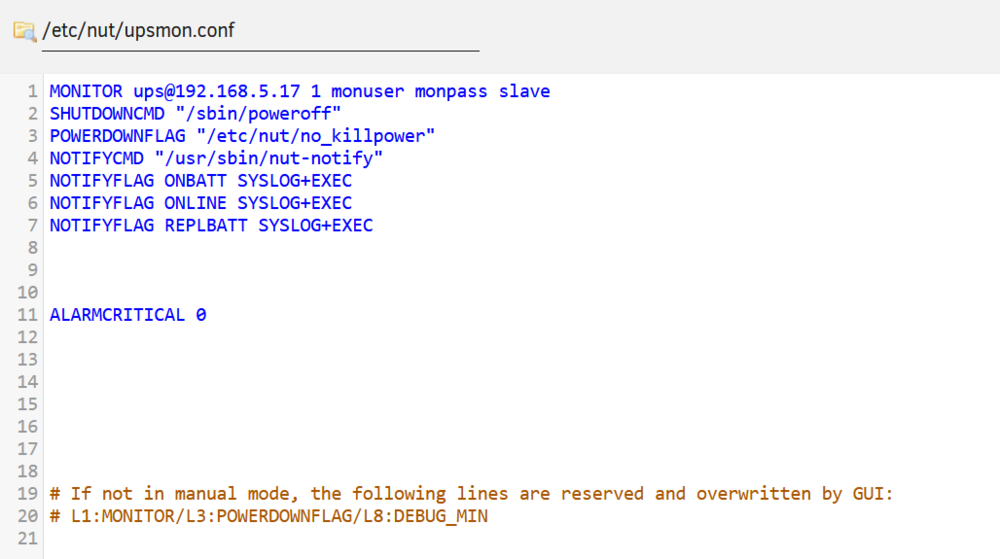
Did you put "ALARMCRITICAL 0" on line 9 or later in upsmon.conf? The lines before that are overwritten by GUI settings (even if seeming empty). Then you need to "Save" and "Restart NUT" for the setting to become effective. The logs imply that the setting is not in effect there, so please double check that. 🙂
-
Please post the NUT Debug Package found in the NUT Settings page. If it worked before, you might have better luck changing the backend to "previous" in the NUT Settings page and rebooting your system afterwards. In any case, sleep mode is highly dependent on the kernel and this may as well be a behavioural change between kernels. In general, the support for sleep mode in NUT is rudimentary at best, it's just not something the tool or any UPS really is designed to handle well (see various issues on the official project's GitHub). Glad it works for you now. It seems the driver is still in its early stages and possibly that's why these values are still missing. In any case, UPS load is not a metric that is crucial for NUT, and all the really important metrics are there to safely shutdown your system in case of a power outage. The rest of the metrics are mostly for "eye-candy" in the dashboards.
-
Just to follow up here, NUT 2.8.3 stable was just released and I am waiting for it to pass CI tests. I'll hopefully be able to update the default and preview branches today or tomorrow at the latest. 🙂
-
I'll update the plugin today, but please don't create new accounts to bump your requests.
-
Please post the NUT Debug Package that can be found on the NUT Settings page.
-
Hab's mal geändert.
-
I added Reptyr to the TTM (Tmux Terminal Manager) plugin, if you install that, you'll have it. 🙂
-
Do not put a space between the number and unit, write 5G.
-
Apologies for the late response, driver spam is a common problem and can be mitigated with these settings: Enable Rule-Based Syslog Filters (in NUT Settings) Redirection for NUT Service Logs (in NUT Settings) Generally if you don't have any problems with your UPS, these things can be filtered out / ignored safely. 🙂 It's possible your UPS does not report this value and it's calculated in the dashboards from other variables. In this case it's not possible to show this in a graph as only actually reported variables can be shown in graphs. You can hide the non-functioning graph though or change it to another (reported) variable of interest:

-
That does sound like a RAM issue to me still, maybe the RAM is not compatible with the motherboard?





