





Rysz
Community Developer
-
Joined
Everything posted by Rysz
-
This mostly looks like a broken cable to me, do you have another one to test it with?
-
I don't really see the potential for complaints here, and some people will always be angry. It's just a choice users will have to make, as with everything in life. It's like choosing if you want iOS or Android, can't have everything at the same time. I don't have 100% the same opinion about Python on Unraid as @ich777 has, but I also think that it should not be used for intensive things and rather help with very specific file-storage related tasks (the less, the better). The reason I made this plugin is because users honestly came up with stupid and outright dangerous solutions to install Python on Unraid, so this provides a safe and low maintenance alternative for that (even offering various versions just so everyone can be satisfied). "Safe" is checking against double package installation. How is preventing a double package installation not keeping the system clean or without interference? It's doing just that... iSCSI needs specific packages that this plugin can and will not provide (for various reasons). I have no interest taking into consideration iSCSI during the development of this plugin (as I'm sure @ich777 has no special interest in this plugin's direction either), so the respectful solution from my side was to not overestimate the importance of my own plugin and put in the appropriate safeguard so it does not mess with the stability of user's systems e.g. by installing on top of an existing Python installation.
-
Well, to be fair, @ich777 explained in the post above yours that iSCSI requires special packages (which I won't be shipping for all users). It's not really blocking anything either, the point of this plugin is to be able to use Python at all, and you can use Python with iSCSI also... 🙂
-
I'd recommend not to use my plugin then, as installing multiple versions of Python may introduce problems on an OS that is not primarily intended for such applications. Ideally you should use the version bundled with that plugin for your Python needs, or switch to alternatives using Docker containers or VMs.
-
It could be part of the iSCSI plugin too, I think.
-
I'm not sure how/if pfSense handles client registration, but this is (if anything) an issue on the client side (e.g. wrong credentials, used "NUT Monitor Username" instead of "NUT Slave Username"). Note: For an Unraid-type setup it won't make a huge difference (unless something fails), this is mostly relevant on NUT setups which don't have scripted shutdown thresholds (as on Unraid) and rely on default NUT behaviour of shutting down when the UPS says so (and not primarily the server). Such setups would first wait HOSTSYNC (configurable) seconds for a logged in slave to disconnect, before shutting down themselves. If - however - the slave is not logged in, the master server would not wait and potentially kill the outlet power before the slave has finished shutting down (hence this "registration"). I implemented this because there is an option to disable all shutdown thresholds and rely on this default NUT behaviour on Unraid too (so this would be needed for verification in such cases), and it also has some additional minor benefits regarding communication and logging to be fully "logged in". In any case, it's not mandatory, and NUT slaves can still act on the information from the NUT server without slave registration and/or authorization (so it's just an additional safeguard). Please try uninstalling and installing the plugin again (instead of updating). If that also fails, uninstall the plugin => reboot the server => install the plugin again. 🙂
-
It works with this configuration. If that driver doesn't provide more information, which I don't think it will, I would recommend to use "blazer_usb" as all important NUT functions will still work without "Runtime Left" - except the "Runtime Left" shutdown mode (which I don't recommend personally anyway) - so I'd just use "Time on Battery" or "Battery Level" instead. 🙂

-
I completely agree and there is currently no way, unfortunately, but I've proposed a change to the upstream NUT software package (backend) a few days ago that would allow for such alarm-based notifications, so hopefully in future versions (as this is dependent on the backend) this will be possible: https://github.com/networkupstools/nut/pull/2658
-
This is how the header of one of my plugin's primary pages looks: Menu="OtherSettings" Type="xmenu" Title="NUT Settings" Icon="battery-three-quarters" Tag="cog" Markdown="false" --- The page you're using is a sub-page of another page, which probably inherits the `Markdown` property. If you change out the values and it becomes a primary page, you might be missing that property (as an example).
-
I agree that this looks like the battery is degraded, the Eaton alarms are usually accurate.
-
You have to use the "NUT Slave Username" (by default: slaveuser), not the "NUT Monitor Username" (by default: monuser), on the NUT Slaves (other Unraid servers). In "upsd.users" it's the user which has the property "upsmon slave" or "upsmon secondary".
-
Make sure that you use the correct slave username & password (as in upsd.users). We tested WinNUT today with another user on Discord and ours show as logged in: with version WinNUT_Client-v2.3.8988.


-
Yes, this only shows actually logged in NUT secondaries/slaves. The idea of the function is to make sure that NUT slaves are actually logged in correctly and able to receive "FSD" (emergency shutdown) flags set by the NUT master. NUT does not keep track of clients that are only querying for information but are not in fact also logged in as NUT slave. Sorry, this is not really clear right now, but I added some more help description for the next update... 🙂
-
Let's be respectful to each other please and not hijack the support topic with such discussions. 🙂 The posts after this one were hidden as they only further added fuel to the fire. Please do not make new posts regarding this misunderstanding and stick to the topic.
-
Took a couple months but I reconsidered this and TRIM, BOOST are now green (again) with the latest update.
-
I already prepared code for the GUI to show "ECO" as "Eco Mode" etc. As soon as the PR gets merged, will update the "preview" backend and GUI. 🙂
-
Please attach your diagnostics to your next post in this thread.
-
The initial question in this topic has been answered (NSIS = Nullsoft Scriptable Install System). If anyone continues to have issues, please open a new topic specific to your concern - thank you! 🙂 For the latter part of the discussion in this thread, the following forums are more suitable: https://forums.unraid.net/forum/37-pre-sales-support/ https://forums.unraid.net/forum/55-general-support/
-
-
-
-
-
Plugins are already pretty strongly tested and vetted by @Squid as the maintainer of Community Applications. 🧐
-
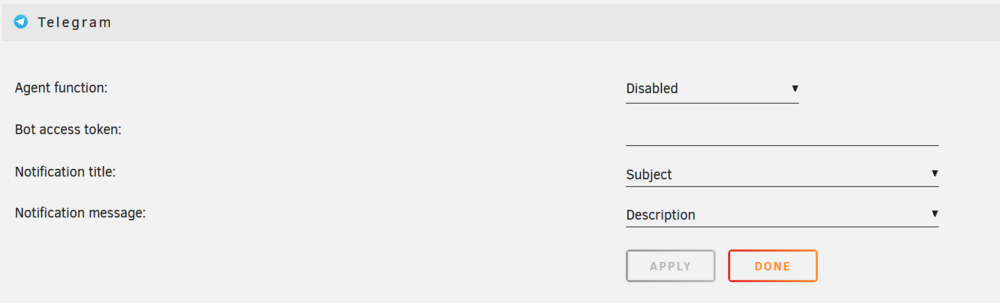
Let me know how the recovery goes, I've done 2 or 3 disk replacements without problems so far. Notifications are handled through Unraid's OS-wide notification settings (Settings => Notification Settings). SnapRAID and SnapRAID maintenance will send Telegram notifications, if configured so in the OS-wide settings:
-
They offered an "environmentally friendly" (/s) variant with non-replaceable batteries for a (short) while.




