





Rysz
Community Developer
-
Joined
Everything posted by Rysz
-
What manufacturer and model is your UPS? Please post the NUT Debug Package that can be found in NUT Settings.
-
Settings Tab ==> User Utilities (at the bottom of the page) ==> Data Volume Monitor Start DVM service: "Yes" ==> Apply (and wait 1-2 minutes for interface data to come in) 🙂

-
The most recent update introduces a new setting that allows redirecting all NUT output to a separate logfile. This can be helpful for users where the SYSLOG is continuously spammed and rule based filters did not help. But please make sure to read the help-text to understand the implications of this setting before activating it. 🙂
-
Sorry for the late replies, I've been a bit tied up with real life. If the UPS are working fine aside from the log spamming, I suggest using the "Enable Rule-Based Syslog Filters" setting in "NUT Settings" to define which messages need filtering out. There's no other way around this, as these connection instabilities usually stem not from NUT itself, but a combination of factors of hardware and OS/kernel-side USB implementation. Users suffering from the I/O and pipe-related errors can add to their xnut-nospam.conf (in GUI configuration editor): :msg, regex, "nut_libusb.*rror" -/var/log/nut-spam :msg, regex, "nut_libusb.*rror" stop Users suffering from the SNMP type errors can add to their xnut-nospam.conf (in GUI configuration editor): :msg, regex, "type error.*OID" -/var/log/nut-spam :msg, regex, "type error.*OID" stop Afterwards, make sure to "Restart NUT" to have these changes applied to your SYSLOG configuration.
-
Took longer than I planned for, but now updated to netatalk 4.0.7, alongside some overall refactors to the rest of the plugin. 🙂
-
No problems for me, thanks a lot. 🙂
-
The modules you listed are in-built with Python, you can't install them with "pip" - hence the error message.
-
Great, I can help you fill the missing variables - set your settings like this: Please let me know if that worked for you and filled in the rest of the fields 🙂

-
No problem, I'm glad that it works for you - can you do me a favour and post a screenshot of the GUI dashboard? I mean this part, at least how it looks for you: I just saw your UPS reports some values as floating point, so I might need to fix the display for the next NUT version. Ideally, if you can - please also attach the NUT Debug Package (fetch a new one from the NUT Settings). 🙂

-
NUT didn't detect the UPS, but you can try setting "UPS Port" to "/dev/ttyUSB0" (without quotes). Please let me know if you had any luck with that, if not - please also post the logs again. 🙂
-
Please post the NUT Debug Package that can be found in NUT Settings.
-
Choose "custom (not listed)" for UPS Driver and put "apcsmart" in the textbox appearing to the right. For UPS Port, put the path to the serial device. By clicking on the magnifying glass icon next to UPS Driver you can scan for devices.
-
If your UPS or the UPS driver doesn't report it, there's no real way to do it - I'm afraid.
-
Yes, that should be possible without problem. 🙂 Since it's not real-time parity, connection type doesn't really matter with SnapRAID.
-
If you are using SnapRAID on top of Unraid parity (for integrity; meaning on Unraid parity-protected array disks): I'd rebuild the disk using Unraid parity first and then do a check operation on the replaced disk using SnapRAID. If you are using SnapRAID only, meaning without Unraid parity: I'd pull the old disk, install the new disk, and then run a fix operation on the replaced disk using SnapRAID.
-
There's nothing I can see here that indicates your USB-connected UPS is detected by NUT. You can try the "optiups" driver with "UPS Driver Port" set to "/dev/ttyUSB0" (without the quotes). If that doesn't work you can still try these drivers: "usbhid-ups" driver with "UPS Driver Port" set to "auto". "nutdrv_qx" driver with "UPS Driver Port" set to "auto". "blazer_usb" driver with "UPS Driver Port" set to "auto". It's not really a common UPS, so apart from that I'm not sure what else you could try. I think your best bet is the "optiups" driver with either "/dev/ttyUSB0" or an actual serial cable.
-
Please post the NUT Debug Package that can be found inside NUT Settings page.
-
Just choose "custom (not listed)" and write the driver name in the field appearing to the right. 🙂

-
You'd have to use `screen` or `tmux` or otherwise keep your Putty window open all the time. You will later find the PDF in the folder that you ran the `nwipe` command from... 🙂
-
These options are not available in manual configuration mode (which is just "bare NUT" without extras). If you are in manual configuration mode because your UPS needs special settings within UPS.CONF, you can switch to "Enable Manual Configuration": "For UPS Driver", where you can keep a custom UPS.CONF, but still have the rest controlled via the GUI (and those options also available).
-
The `vnstat` database is located at: /var/lib/vnstat/vnstat.db ... and backed up/restored before and after reboot to/from: /boot/config/plugins/dwdvm/vnstat.db I don't think (but not sure) it is in a commonly readable format. Perhaps better to use the `vnstat --xml` and `vnstat --json` commands to pull in data in a readable format.
-
Thanks a lot for getting back to us with the solution, I never even knew about this. This'll be very helpful to know in the future, thanks again and glad you got it resolved.
-
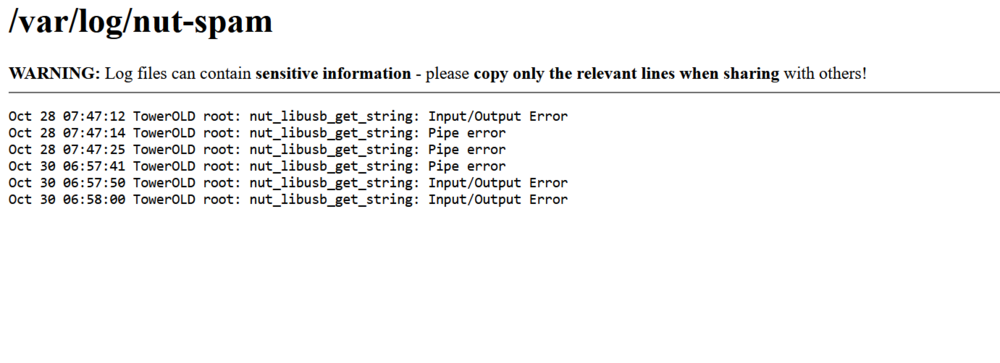
That's very strange, it all seems correctly set, and it works for me with the exact same configuration file: But there's a lot of rsyslogd-related networking errors in your SYSLOG, do you use a remote SYSLOG server? Did you maybe manually edit the rsyslogd configuration and perhaps put the remote line above the filter includes? Apart from the logs situation, I saw you have some power saving features enabled (powertop, also /power/control settings inside /boot/config/go) - these can cause such connection instabilities, so might be worth a try to remove those (temporarily) and see if the situation improves.
-
Hm, that's really weird, because I tested those lines and they worked for me. Can you post the NUT Debug Package that's located in "NUT Settings"?
-
Sure, add these lines to your xnut-nospam.conf using the GUI configuration editor: :msg, regex, "nut_libusb.*rror" -/var/log/nut-spam :msg, regex, "nut_libusb.*rror" stop Enable Rule-Based Syslog Filters: "Yes" => Restart NUT.






