





bigdan1190
Members
-
Joined
-
Last visited
Everything posted by bigdan1190
-
Is it possible to run this with the iGPU on an i5 10400? Its a UHD 630. I can't find a way to enable it.
-
Noticed an issue today, searched but can only find guides from 2 years ago. When searching for a TV show it flashes up briefly but then disappears showing no results. This is for any TV show. Movies list is not affected. What can I check? Shows as up to date in unRaid but on the Ombi page it shows Version3.0.5223 (New Update Available)
-
yeah i was being an idiot, its been a while since i set it up and infact i was already using NGINX for https on my No-ip URLs haha.
-
I don't think you can, but do you know if you can use https with duckdns?
-
Please can you clarify this? I went to page 1 and saw no instructions. I've got mine registering to the group on my no-ip, but it doesn't set it an IP; Process 52, started as noip2-x86_64 -c /config/no-ip2.generated.conf, (version 2.1.9) Using configuration from /config/no-ip2.generated.conf Last IP Address set 0.0.0.0 Account [email protected] configured for: group NETGEAR-xxxxxxxxx-xxxxxxxxxxxxx Updating every 30 minutes via /dev/eth0 with NAT enabled. [May 08 23:37:39] Current status 1 noip2-x86_64 process active.
-
I came here with this problem, your reply solved it for me. Thanks very much
-
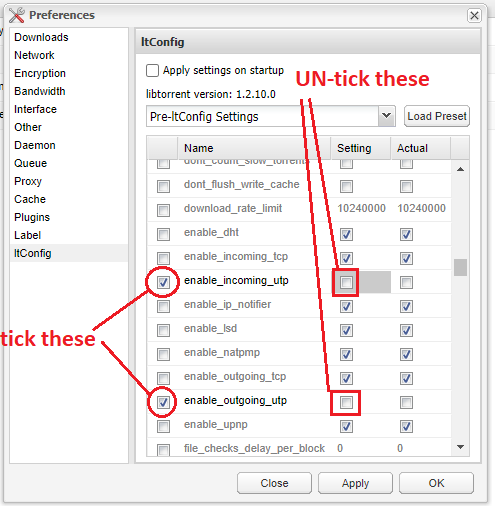
Yeeessssssssssss thank you so much, this did the trick! Yup, just sorted I got the ITconfig installed as per the above instruction from wgstarks, disabled UTP and now i'm getting the correct speeds. The settings are in the pic below - just tick the box on the far left to enable those 2 settings and then untick the boxes in the 'settings' column.
-
Hi all - first time poster here, just setting up my first unRaid system but i have previously used Plex / sonarr / radarr and transmission to run a similar NAS/server on a ras pi 4. I am having download speed issues with binhex-DelugeVPN using PIA connected to the Sweden server next gen. My ISP is Virgin Media here in the UK and i get 200Mb download speeds but on DelugeVPN i'm unable to download any faster than 1.2MB/s. I have had this problem previous with Virgin Media / PIA and the fix is to disable uTP however this is not an option on DelugeVPN. I see that i should be able to install the plugin ITconfig (https://github.com/ratanakvlun/deluge-ltconfig/releases) but when i try to install this it pops up with "uploading plugin" for a split second and then disappears it never seems to get anywhere. Has anyone had any luck with this? I'm wondering if its just a compatibility issue with the binhex version of DelugeVPN. Any help much appreciated.
