





pervel
Members
-
Joined
Everything posted by pervel
-
Does this mean I can now remove the vbios from my gaming VM? Is there a performance benefit? Does it perhaps pass the GPU "more directly" through or something like that?
-
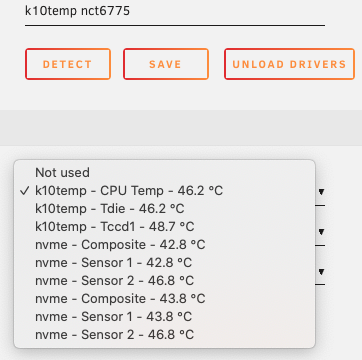
Is there something I can do to get all temperature monitors for my ASUS ROG STRIX B550-E GAMING motherboard? This is the only thing I am getting: I think the three k10temp are all CPU temperature but I'm not sure. They are almost always exactly the same. I would really like to also get motherboard temperature.
-
Aha! Thanks. Good thing it refused my deletion attempts then. 🤭
-
Thank you. The /mnt/disks folder is still there and it says Device or resource busy if I try to delete it manually. What's the best way to delete it completely?
-
Maybe add an option to not create the symlink for those that don't need the backwards compatibility. Not a big deal but it bothers my OCD seeing redundant folders. 🤪
-
After investigating a bit more I have figured out that a better way to access the Unraid docker host is via SSH. This requires no extra docker configuration on the Unraid side. You just need to use SSH key-based authentication and then connect either using the -H option to the docker command or setting the DOCKER_HOST environment variable in your local shell. For example: docker -H ssh://your-unraid-server ps Or using DOCKER_HOST: export DOCKER_HOST=ssh://your-unraid-server docker ps
-
Is this still the right way to do it? I haven't been able to find any other information about it and this thread is 5 years old. So I'm worried the solution is outdated. The description above seems to suggest that DOCKER_OPTS is already defined in docker.cfg. However, my docker.cfg for Unraid version 6.9.0-beta35 does not define it. So I figured it was best to define it with only the two -H options: DOCKER_OPTS="-H unix:///var/run/docker.sock -H tcp://0.0.0.0:2375" Is this the right approach today? Also, are these kinds of edits to the config files preserved when upgrading Unraid?
-
Thanks for the ideas. I made some modifications that seem to work well. This is my /boot/config/go: #!/bin/bash # Start the Management Utility /usr/local/sbin/emhttp & echo "test -f /boot/config/mybashprofile && source /boot/config/mybashprofile" >> /root/.bash_profile Now you can put whatever you want in /boot/config/mybashprofile. Mine just looks like this right now: #!/bin/bash alias ll='ls -AFlh' This way you don't have to reboot when you make changes to /boot/config/mybashprofile.
-
Yes, it seems so. But I have to wait a few minutes after stopping it before spin down will work. This is the run command (secret key replaced with stars): root@localhost:# /usr/local/emhttp/plugins/dynamix.docker.manager/scripts/docker run -d --name='Minio' --net='bridge' -e TZ="Europe/Paris" -e HOST_OS="Unraid" -e 'MINIO_ACCESS_KEY'='minio' -e 'MINIO_SECRET_KEY'='*********' -p '9768:9000/tcp' -v '/mnt/user/minio/':'/data':'rw' -v '/mnt/user/appdata/minio':'/root/.minio':'rw' 'minio/minio' server /data 687af9711f4163ed72f99c5c5f8357d385f40b0a5edbb693a52dfe4c3a53ea84 I do wonder if maybe the answer is just to never spin down the disks. That seems to be what some people recommend anyway.
-
I've been debugging for hours now. It very much looks like the disk spin up is caused by docker. Disabling docker completely seems to solve the issue. Now the question is if it is docker itself or some container. The weird thing is that even if I start some containers, see the problem, then stop all containers, the problem does not go away. However, if I disable and then enable docker without starting any containers, the problem is not there. Anyway, I do suspect one particular container: Minio. With that container started, I cannot get the array to spin down even though there should be no activity. But as mentioned above, it's quite confusing what's causing the problem. I'm still on a trial version so I have experimented a lot. That also makes it difficult to figure out what changes cause the issue.
-
Thank you. The diagnostics attached was created shortly after I had first forced a spin down and then saw the array spin up. basse-diagnostics-20201114-1903.zip
-
Is there another way to find the information that this plugin provided? Perhaps something manual from the shell? I'm trying to figure out what is spinning up my array disks almost immediately after spinning down.



