





shEiD
Members
-
Joined
-
Last visited
-
@JorgeB The disk is in a NetApp DS4246 disk shelf, so no cables involved (per single disk) and I have already tried changing to another slot - did not help (same result/error and no SMART data).
-
Long story short - I've had a power outage while not adequately prepared. I wasn't able to shutdown my server in time and the UPS ran out of juice. The server and the NetApp DS4246 disk shelf got their power cut. The disk in question was in the disk shelf. When I powered on the server after power outage was over - I found one disk (located in the NetApp disk shelf) was missing from the array. That same disk was showing up in the Disk Devices list with format button. And it was not reporting any SMART data. Here's a snippet from the syslog related to this disk: Jul 25 23:13:01 thePit kernel: sd 8:0:24:0: [sdaa] tag#3393 UNKNOWN(0x2003) Result: hostbyte=0x00 driverbyte=DRIVER_OK cmd_age=0s Jul 25 23:13:01 thePit kernel: sd 8:0:24:0: [sdaa] tag#3393 Sense Key : 0x3 [current] Jul 25 23:13:01 thePit kernel: sd 8:0:24:0: [sdaa] tag#3393 ASC=0x11 ASCQ=0x0 Jul 25 23:13:01 thePit kernel: sd 8:0:24:0: [sdaa] tag#3393 CDB: opcode=0x88 88 00 00 00 00 04 8c 3f ff 80 00 00 00 08 00 00 Jul 25 23:13:01 thePit kernel: blk_update_request: critical medium error, dev sdaa, sector 19532873600 op 0x0:(READ) flags 0x80700 phys_seg 1 prio class 0 Jul 25 23:13:01 thePit kernel: sd 8:0:24:0: [sdaa] tag#3394 UNKNOWN(0x2003) Result: hostbyte=0x00 driverbyte=DRIVER_OK cmd_age=0s Jul 25 23:13:01 thePit kernel: sd 8:0:24:0: [sdaa] tag#3394 Sense Key : 0x3 [current] Jul 25 23:13:01 thePit kernel: sd 8:0:24:0: [sdaa] tag#3394 ASC=0x11 ASCQ=0x0 Jul 25 23:13:01 thePit kernel: sd 8:0:24:0: [sdaa] tag#3394 CDB: opcode=0x88 88 00 00 00 00 04 8c 3f ff 80 00 00 00 08 00 00 Jul 25 23:13:01 thePit kernel: blk_update_request: critical medium error, dev sdaa, sector 19532873600 op 0x0:(READ) flags 0x0 phys_seg 1 prio class 0 Jul 25 23:13:01 thePit kernel: Buffer I/O error on dev sdaa, logical block 2441609200, async page read Jul 25 23:14:02 thePit kernel: sd 8:0:24:0: [sdaa] tag#7063 UNKNOWN(0x2003) Result: hostbyte=0x00 driverbyte=DRIVER_OK cmd_age=0sI tried only a couple of simple things - I restarted both the server and the disk shelf and tried swapping the disk to another slot in the shelf. That did not help. I did nothing else - I powered everything off until I had time to deal with it. I do not have/use parity on the array. I understand I have lost all the files on that disk if it's dead/borked for good. Questions: What happened to that disk? Why is it showing up like it's not dead, while not even reporting SMART data? If its only a borked filesystem problem, is there any XFS magic that can be used recover the files? Here's the diagnostics file: thepit-diagnostics-20260725-2206.zip Thanks in advance for any help.


-
running env $(cat /boot/config/plugins/unbalanced/unbalanced.env | xargs) /usr/local/emhttp/plugins/unbalanced/unbalanced --port 7090 gives /usr/local/emhttp/plugins/unbalanced/unbalanced: /lib64/libc.so.6: version `GLIBC_2.34' not found (required by /usr/local/emhttp/plugins/unbalanced/unbalanced)
-
Running the command above I get this: env: ‘/tmp/unbalanced’: No such file or directory
-
Help, please - unbalanced does not start at all 😢 Is there a minimum OS version, perhaps? I am running unRAID 6.10.3. I am reluctant to uninstall the older unBALANCE plugin (because it works), until I get this new plugin working... Or should I uninstall the older one?

-
@dlandon thank You, it worked.
-
Getting an error, when trying to update the plugin. plugin: updating: unassigned.devices.plg plugin: downloading: "https://raw.githubusercontent.com/dlandon/unassigned.devices/master/unassigned.devices-2023.08.17.tgz" ... done plugin: bad file MD5: /boot/config/plugins/unassigned.devices/unassigned.devices-2023.08.17.tgz
-
Nice and simple - love it. Never used reiserfs before 😀 I thought I'd mention me not using parity, because with parity you would need to zero out the disk?
-
I am using unRAID v6.10.3 My array is data disks only - NO PARITY. What would be the correct procedure to re-format array disks? I would love to be able to do it fast and simple: - stop the array - remove the disk from an array slot (it appears in the Unassigned Devices) - delete the partition with UD - put the disk back in it's array slot - start the array and hopefully the disk gets formatted 🤞 without zeroing out? Or do I need to do it long way round: - new config - remove disk - pre-clear - new config - add disk back - auto-format on array start (the usual unraid behavior when adding a new disk to the array)
-
How can I find out which array disks are actually formatted the "old" and "new" way? I mean, can I get that info without emptying the disks to see how much free space they take up "on empty". Also, what would be the easiest and fastest way to re-format the array disks using the "new" xfs format? I am constantly using hardlinks - I probably have tens of thousands of them on my array, and I am not 100% sure, but it seems, like I am getting way faster results when searching for hardlinks on the "newer" disks, than older ones. or am I just imagining this?
-
Just wanted to confirm, that this explains some pretty huge difference in used space on empty array disks. I emptied 3 identical 10 TB disks on my array and - 2 older ones have ~10GB used space, while the newest one has ~70GB. I assume, the 3rd disk was formatted with the newer version of xfs? Same with the newest 18TB drives, I guess? They all have 126GB used space freshly formatted, instead of ~18GB... Would very much appreciate, if anyone could confirm, that I'm understanding this correctly.
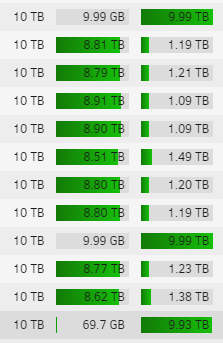
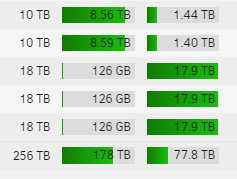
-
@trurl Thank You.
-
Does doing a New Config mean that all the settings, Docker containers and VMs will be gone? I mean, does New Config reset ONLY the disks (array/cache/pools), or does it reset everything? I need to replace 1 failing drive with a new one, and I do NOT have parity. Everything from the failing drive is already copied over to the new drive (rsync). And, no parity means there's nothing to rebuild. Preferably, I would love to simply swap the drives and keep all my setup intact...
-
It seems fio does not work... I only get "Illegal instruction" on any command. unRAID Version: 6.9.2 NerdPack Version: 2021.08.11
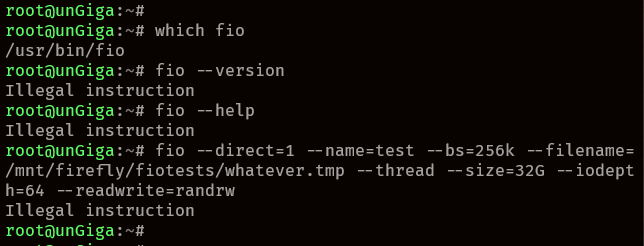
-
Yes, I have jq in my system, but I think I installed it with NerdPack, iirc. Or am I misremembering? I could swear, jq was in NerdPack before 🤔, but maybe I'm wrong... Does this mean, that now jq comes with unRAID as standard, so it was removed from NP?


