





codearoni
Members
-
Joined
-
Last visited
Everything posted by codearoni
-
That makes me feel a lot better! Finger crossed it all pans out. Tyvm
-
Thanks @Frank1940 ! Yea the vendor has a 30day policy, which is why I want to verify it ASAP. The WD box did have the standard anti-shock packing, so hopefully that did the trick. It's a 8TB drive, so I'll run it a few times. Just curious - I've never had a preclear job fail. Will I get a red alert box in the unraid UI if something goes wrong? Figure it'll be obvious if it fails.
-
I recently purchased a new WD Red Pro drive. My plan isn't to stick it in my array right away, rather save it in case an exisiting drive fails a year or two from now. Given price increases recently, it seemed like a good way to hedge against an inevitable future disk failure. When it arrived yesterday, the box it came in wasn't padded/insulated with anything. The OEM WD box was just bouncing around in some cardboard. I wasn't too pleased, but there was no sign of external damage. I was wondering what the best way would be to go about confirming the drive is 100% operational and doesn't have some internal issue. I'd like to confirm it, before re-boxing it up and putting it away. My first thought was: the unassigned devices preclear plugin. Assuming a preclear task completes with 1 pass, would that be enough to validate the disk? Should I do an extendend SMART test too, or something else?
-
I'm running into issues setting up NodeBB in Docker for Unraid. Haven't been able to find any threads on this already on the forum. NodeBB: https://docs.nodebb.org/installing/os/ The Dockerfile: https://github.com/NodeBB/NodeBB/blob/master/Dockerfile My setup steps: 1) Search "nodebb" on Community Apps 2) When nothing is found, click "Click Here for more results from DockerHub". 3) Select the DockerHub link for the "elestio" and click "install" 4) When it asks to "determine configuration" hit "yes" The resulting image set up looks like this: Name: nodebb Repository: elestio/nodebb:latest Registry URL: https://hub.docker.com/r/elestio/nodebb/ Network Type: Bridge Console shell command: Shell Container Port 1: 4567 Container Variable: NODE_VERSION: 22.13.1 Container Variable: YARN_VERSION: 1.22.22 Container Variable: NODE_ENV: production Container Variable: daemon: false Container Variable: silent: false Container Variable: Community_Applications_Conversion: true Container Path: /usr/src/app/: /mnt/user/appdata/nodebb/ However, when I try to spin this up, i get the following error and the container stops text error warn system array login /bin/sh: 1: ./entrypoint.sh: not found node:internal/modules/cjs/loader:1247 throw err; ^ Error: Cannot find module '/usr/src/app/nodebb' at Function._resolveFilename (node:internal/modules/cjs/loader:1244:15) at Function._load (node:internal/modules/cjs/loader:1070:27) at TracingChannel.traceSync (node:diagnostics_channel:322:14) at wrapModuleLoad (node:internal/modules/cjs/loader:217:24) at Function.executeUserEntryPoint [as runMain] (node:internal/modules/run_main:170:5) at node:internal/main/run_main_module:36:49 { code: 'MODULE_NOT_FOUND', requireStack: [] } Node.js v22.13.1 ** Press ANY KEY to close this window ** If anyone has insight on steps I can take to debug, I'd appreciate it. Screenshot of UI attached.
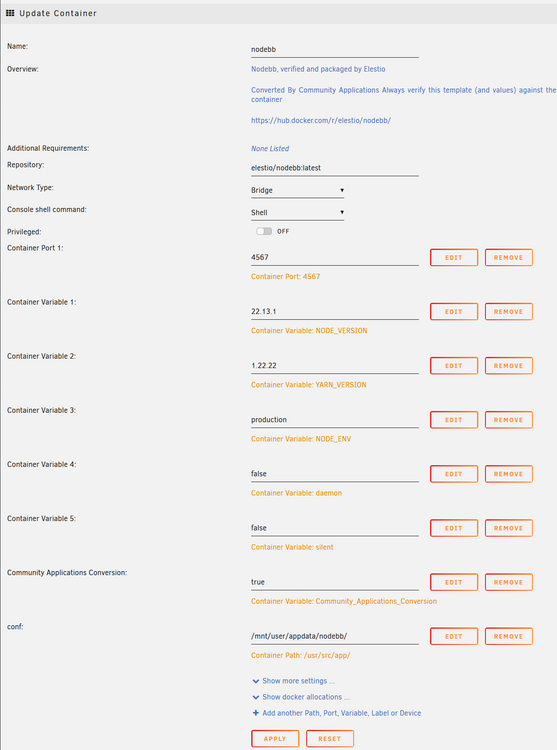
-
Many thanks appreciate all the info!
-
Thank you! What is missing from the unraid docs above is the Two Parity use-case. If was my understanding that two parity's mean two drives can fail without a loss of data, is this incorrect? I think I'm getting tripped up on your statement: "every bit of parity" When you say "every bit of parity" are you referring to both parity drives being fully operational, or a single one? Thanks again I appreciate all your explanations!
-
Ty @trurl, Sorry if I'm being obtuse, I just want to make sure I'm understanding everything. In summary: I should get Parity #2 replaced ASAP while I don't have data drive issues. Assuming Parity #2 is replaced and both parity's are OK - I will be ok in the event of a future data drive failure. In it's current state, if a data drive falls over right now, I might be in trouble during recovery, as Parity #2 is also borked. ?
-
To further clarify: my expectation is that Parity #2 could burst into flames, and I could still recover the array.
-
Thank you @itimpi "which is concerning as any recovery after a data drive failure would require it to be read error free to avoid data loss." Regarding this statement, is it still a concern even though I have two parity drives?
-
I run an array with 2 parity drives and 4 data drives. They're all the same model. Recently, Parity #2 begin having errors. After running a short self-test, I get the result "read error". I am attaching both my diagnostics, and the SMART report for the parity drive in question. What I'm wondering is: what should I do in this situation? If it's a read error, can I simply do a Parity check and write corrections and move on? Or is this something most drastic that needs to be addressed, such as replacing the parity drive. alexandria-diagnostics-20240213-1915.zip alexandria-smart-20240213-1913.zip
-
Was a teachable event all around. Ty for getting the fix in so quickly @TQ
-
This container is seriously flawed. The default path of /opt/minecraft/ is in-memory only. And will be wiped after a reboot/shutdown. At the very least, the default path needs to be a user share like appdata. Use at your own peril.
-
Ty for the fast reply @Squid! I gotta say that is super depressing, but now I know... Here's the container: And yes, out of the box it's configured to use /opt/, which based on your post, seems insane. I should probably just stick with binhex containers moving forward
-
I spun down my unraid device to install a new GPU. When I turned it back on, everything looked good, but I had one docker container configured to point to /opt/my_folder/ that has all it's data missing. I know /opt/ isn't a user share, but I'm curious as to what happened. Does /opt/ get reset after a shutdown? Is there any possibility I can recover data from that location? I've ssh'd into the box and it /opt/my_folder/ seems completely gone.
-
I have dozens of pdf's I need access to (manuals for equipment I own). I've downloaded them all in case the external sites go down, and have a folder with them. While functional, I'd ideally like them to be available on my network, without needing a device to mount a share. I'd like to spin up a web server, so they're available over http. Basically a web server serving static content. Ideally, I could drop in a new pdf, and the index page would update automatically, etc. Is there a plugin/app that does this already? I haven't found anything pdf-specific on the community store, but perhaps there's something similar that would work for my use case. Any advice would be appreciated.
-
Sounds great! Thanks for such a fast reply. I've been using your Valheim container for months and it's been amazing. Ty for all your hard work!
-
Hi @ich777! There was a Valheim update today. I was wondering what the right approach would be to get that update in your gameserver docker?
-
Of course the moment I post this, I find an answer. As I understand it, you cannot achieve this via the Dolphin UI. One must go to System Settings -> Network -> Settings -> Window Shares, and then enter your desired user/ps under "Default Username, Default Password". Seems to work, though only applicable for a single user.
-
I have a new desktop computer connected on my network. It's running Manjaro Linux (v21, KDE Plasma), and uses Dolphin as its default File Manager. On OSX, it's pretty easy to connect to my Unraid shares. I can use the "connect as" feature in Finder to log in with my username/password and get write access to shares. I am struggling to find the equivalent in Linux. I can see my shares in the File Manager (Dolphin), but am unable to connect as a user to said shares. As such, my unraid access is read-only. It seems that by default I connect to Samba as a guest, but how do I connect with my username/ps? I've done some basic forum searching, but haven't found a topic like this. If anyone out there is running a KDE-ish Linux distro, I'd love some input!
-
My appdata directory (user share) is configured to use my cache drive. But they're moved to disk during my nightly mover job. This is a pretty common configuration, as I understand it.
-
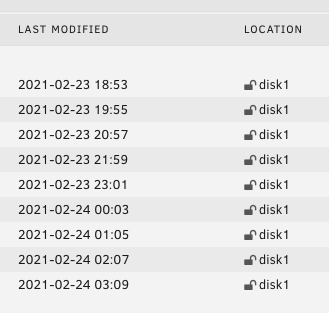
Getting back to you. I think I see the same bug: 1. I updated my Docker container and created a new path for /serverdata/serverfiles, to ensure a "fresh" install. 2. However, after my mover job runs at 03:40, it seems to stop the backups from being generated. Here's a pic of my /Backups/ directory today. The /Backups/ directory is not on my cache drive at all. So these 9 files are the only backups I have for my image. This matches what I saw in my previous image, and they seems to strangely line up with my mover job.
-
Thanks! Updated and will get back to you on how backups work over the coming day(s). I just logged in though, and my save wiped on update (i.e. my world is gone). Is this a known issue?
-
I have a question about backups for my Valheim image. Currently I'm using the defaults (interval = 62, backups to keep = 24). For context, my container has been up for approx 3 days. I would expect 24 tar.gz files to be in my /Backups/ directory, however I only see 9. Additionally, the modified dates on the containers range from 2-20 (19:19) to 2-21 (03:35). I have my mover scheduled for 03:40 daily, so I would expect the latest tar.gz file to have a modified date of approx 3:00-ish this morning (2-23). Am I missing something / misunderstanding how the backup feature works?
-
Couldn't you write a launchd script that runs every night at 2am, etc? One that simply rsync's your photo folder to a share on your unraid nas?



