






b3rrytech
Members
-
Joined
-
Last visited
Everything posted by b3rrytech
-
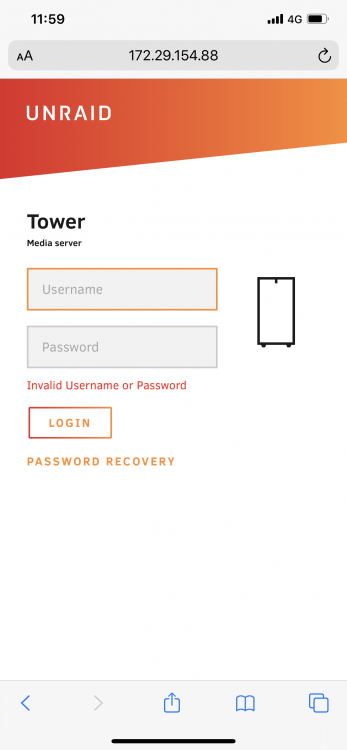
Hi! Thank you for an easy to set-up app. Works a treat to connect my iOS devices to the unraid server shares with apps like Files and VLC. I've encountered a problem though. When using a web browser on my iPhone and trying to open the unraid web UI with the ZeroTier ip adress I can't get past the login screen. It doesn't matter what user I try, It only comes back as invalid. Any idea what's causing this? It would be nice to remote access the server UI as well as just the shares.
-
Nope, now I got the exact same error again. The server freezes and I can only SSH to it. The web GUI can't be reached. This happened around 10 minutes after I started to preclear the disk. The disk is in a IcyBox cabinet connected via eSATA to the extra SATA port on the mobo. Will restart and try doing the preclear using USB 2.0 instead. Any ideas?
-
Did a reboot via SSH and it started again. I'll have to restart the preclear now. We'll see how it goes...
-
I managed to SSH after a while, at first that didn't work either. Should I just reboot it via SSH or wait to gather more data? As I said above, I had a preclear running with the Preclear plugin.
-
Ok I just got this exact problem on my N40L Microserver running 6.8.3. What happened and how do I SSH into my unraid? How do I extract the log now? I was in the midle of a Preclear when it happened. I'm really a beginner in this so please talk to me like I'm a dum dum... 😑

-
Wow! Thank you for your detailed response, and from someone who doesn't use unraid?! 😅 I will definitely look into what you are saying! I'll see if reorganizing drives would be a problem first, I find it unlikely. The evaluate the performance. I don't see myself having those needs but you'll never know.. I'm moving files from some of the disks I'm going to use now and also preclearing. Tidious but feels better to have it done.
-
Thank you for you in depth reply! Much appreciated! I can't even remember where I got the card from. It was probably something I picked up without really reading up on the specs. Good arguments and I will definitely look for another card. What you say about the SATA controller in the N40L, does that mean that the 5th SATA port on the motherboard shouldn't be used either to preserve speed? I'd like to run 6x3,5" drives and 1x2,5" SSD as a cache. My plan was to run the 2x3,5" in the ODD bay with the 5th Internal SATA and one of the ports on the PCIe card. The other port to run the SSD cache, or run it of the eSATA. Is there a 4 port PCIe card that could work instead? If that is better for speed in any way? Edit: is there any problem to build it up and start using it with the equipment I already have (PCIE card, eSATA to SATA) and upgrade it when I tracked down the new stuff? Can unRAID handle disks being moved between SATA ports?
-
Ok so I flashed the BIOS, following the instructions here https://www.nathanielperez.us/blog/hp-proliant-n40l-bios-modification-guide It was easy enough, I borrowed a friends PC. I tried it with TheBay BIOS from AVForums first but it didn't work, but probably it was me who did something wrong. Now the question is, how large capacity drives can this N40L handle? I'm placing an order but I don't want to buy the wrong ones. 😃
-
Hi! Tonight I managed to dig out my N40L from storage. It was tucked away due to work/moving/life... around 2013/2014 and haven't really needed it until now. Great to see that it still seems worthy of keeping and updating. I will only need is as more or less raw storage of media files as i run my Plex Server on the Mac. I obviously had the idea to expand to 6+1 drive since I found both a Nexus DoubleTwin and a PCI-e 2 port SATA adapter (any good?) and a eSATA to SATA cable. Went by the local store and picked up a Molex to 2 SATA and a couple SATA cables so all I'm missing now is some bigger drives and a cache SSD. I followed the upgrade guide since it was running unRAID 5.0 RC8a. Installed 6.8.3 and WOW unRAID really have become so much more user friendly now. Watched some videos and the Docker function seems really nice too. I mounted the disks after upgrading and started parity, unfortunately I forgot to run "New Permissions" before I started the parity build but I hope it won't be a problem doing it after?! Sort of funny to see what media I was collecting in 2012/13. Some of it is worth keeping but also a lot of junk... Reading a lot tonight I've stumbled upon some questions/thoughts that I can't seem to find answers to. - Is it possible to run larger drives now, say 6-12TB, if I run the modded BIOS? - Haven't found a good tutorial (yet) on how to flash the BIOS and most important WHERE to get it? @jens' links unfortunately didn't work. Found some other sites on the web but would like to get first hand experience from this forum. EDIT: - One more question, anyone managed to do the BIOS-mod with a Mac? All I find is the .exe Windows versions... Learning to use unRAID and Linux system the first time was a somewhat bumpy curve but I hope it'll bee easier this time. Feels good to be back...


