






b3rrytech
Members
-
Joined
-
Last visited
Everything posted by b3rrytech
-
I'll give that a go! What is it that points to the USB drive being faulty?
-
Any takers? I’ve also tried booting into safe mode but the webUI still crashes.
-
Hi! Started getting problems with my server the other day. By then I was on 6.12.3 and it all started with some Docker containers acting up. Went into the Unraid WebUI and the Docker page said that Docker was unable to start. Restarted Docker and got it working again. Then today it acted up again, and I also started getting problems with Unraid WebUI crashing on me. Restarted nginx over SSH using /etc/rc.d/rc.nginx restart That got the WebUI up again, but despite restarting the whole server Docker won't restart at all. SSH worked all the time though. In a futile attempt to perhaps fix it, I thought that I would try to upgrade to 6.12.4. So I pulled the USB stick and did a manual update. Everything started up ok, but now I couldn't start the array because the WebUI crashed on me again. Restarted nginx multiple times until it stopped working all together. I SSH:ed into the server and pulled the Diagnostics before shutting everything down. Any ideas on what's causing this? I can't figure it out in the logs. Unfortunately I don't have a remote syslog server. define7-diagnostics-20230926-2316.zip
-
Hmm, I was recommending this Vorta container to someone and they didn’t find it. I can’t either anymore, where did it go?
-
I have relatively little experience with proxmox, but I do like it better as a hypervisor than unraid. And I've run unraid for more than a decade. Not that I'm a power user in the VM area by any means, but I did find proxmox much easier to use for that. So I'd go with alternative nr 2, but that is without having any experience running unraid under proxmox. I just know it've been done. What specific is it you need Mac for, and what is the reason to make it relatively complicated with running macOS as a VM? Just curious.
-
Uninstalled and reinstalled the Mover tuning plugin, and that seem to have done the trick. I reused all the same settings and then manually activated Mover. Must have been some hiccup with the plugin after the upgrade to 6.12.3 that kept it from functioning properly. I'll monitor it the following days to see that it follows the set schedule. Thanks for the help @JorgeB 🙌
-
Mover logging is (was) enabled and Mover was run prior to downloading the diagnostics.
-
I only have one share that is suppose to move from “cache_downloads” to array, it’s named “unraid_data”.
-
Hi! Recently updated to 6.12.3 and ever since I've got this problem that my cache (named "cache_download") is filling up, which is sort of normal, but Mover isn't moving the files accordingly. The cache is 2 TB (1.87 TB used) and the torrent section of it is excluded from moving in Mover Tuning. Have had these settings for probably a year and it works just like I want it to, except now. The torrent section is roughly 800 GB and that means it's around 1 TB of data that Mover isn't moving. I've tried manually activating Mover and the logs just shows it starting and finishing in the same second. Something is prohibiting Mover from moving the files and I can't figure it out, please help! Perhaps it's a permission problem that some of the 'arrs are creating? define7-diagnostics-20230820-2309.zip
-
If you haven't installed it yet, install "Dynamix File Manager" from CA and using that you can view the shares content and it also gives you a Location column where each directory/file is located on your system. You can also use the file manager to move those files into your fastcache pool.
-
OK, seems like Unpackerr is the problem and not my setup. I didn't think it was Unpackerr at first because I have three more instances that is running :latest just fine. Perhaps that's because they have Sonarr connections and the non working ones haven't.. I downgraded to version 0.10.1 for those with "[PANIC] runtime error" and that worked.
-
With Unpackerr or some other container? I have other instances of it still running though..
-
Anyone have any clue here? 🙂
-
Hi! I'm having troubles getting two containers to start. They flat out refuse. It's two separate instances of Unpackerr that has worked flawlessly for a long time. Log output: 2023/01/18 01:07:11 Unpackerr v0.11.1 Starting! PID: 1, UID: 0, GID: 0, Now: 2023-01-18 01:07:11 +0100 CET 2023/01/18 01:07:11 Missing Lidarr URL in one of your configurations, skipped and ignored. 2023/01/18 01:07:11 Missing Sonarr URL in one of your configurations, skipped and ignored. 2023/01/18 01:07:11 ==> GoLift Discord: https://golift.io/discord <== 2023/01/18 01:07:11 ==> Startup Settings <== 2023/01/18 01:07:11 => Sonarr Config: 0 servers 2023/01/18 01:07:11 [PANIC] runtime error: index out of range [0] with length 0 I've tried restarting the server and starting in Safe Mode. No difference unfortunately. Any thoughts? I've recently had problems with getting "Error: filesystem layer verification failed for digest sha256" intermittently when installing or updating containers. That problem isn't really solved, but I can't recall ever getting that problem with these two containers. Don't know if this is relevant in any way but I though I'd mention it. define7-diagnostics-20230118-0118.zip
-
That solved that too! Thanks!
-
I'm sorry, but now you lost me. ELI5... What container should I set to Host or Bridge, and when? No, locally (and remote) everything works fine! THIS IS IT! (I think...) Thank you! I first tried adding a wildcard domain in the PiHole WEB-UI but didn't get that to work. This above seems to be the solution though! I added a "02-wildcard-dns.conf" file to /etc/dynmasq.d/ (host path for my PiHole container: /mnt/user/appdata/pihole/dnsmasq.d/). In that conf I added: address=/mydomain.com/192.168.1.4 Then restarted PiHole. Before I started everything I ran this in the Unraid CLI to see where the URL routes to: nslookup mydomain.com and that pointed to my public IP. Same result running: nslookup servicesubdomain.mydomain.com After restarting PiHole and running the same commands they come back to 192.168.1.4 So I guess it's working. The subdomains I have setup in NPM shows as normal with a guilty SSL cert when surfing to them locally. Only "downside" is that if I only surf to "mydomain.com" I'm routed to Unraid UI since that's the servers IP, insecure no SSL. Same if I surf to any type of subdomain that not proxied in NPM. It's only in the local LAN, so not a major issue. Surfing to Unraid UI through the normal IP is equally "open", just feels more hidden. I guess it's just a feeling... I do have a strong root password. If anyone have any suggestion for this to only work on URLs in NPM I'm all ears. Perhaps wildcard wasn't the right choice.
-
Thank you for the answer! I’m aware of the ToS prohibiting non-HTML content. Don’t use Nextcloud and for Plex I don’t see the need. I’m running my Pihole on the server at the moment, but I’m looking into building/setting up a PFsense or OPNsense router. That would also host the Pihole (or similar service). But that’s some time away, and right now I only have my ASUS router. When setting it up on Pihole, how exactly would that be done? My NPM (and all my services) has the same IP as my server and I don’t see a way to point Local DNS to a specific port, only IP. EDIT: Right now I do have a public IP, but my ISP is finicky about it and looks like they might start charge for it. That was why I wanted to setup CF tunnel to not be dependent of that.
-
Hi! Perhaps this is a question already answered, but I can’t find it and perhaps I’m not searching for the right words. Anyway, thank you for this container! I’ve setup NPM and Cloudflare Tunnel with my own Cloudflare SSL certificate. This now work perfectly for all my different containers, but took some time to troubleshoot (mostly because of my lack of knowledge in the area). Now I was thinking, instead of every time I’m on my local LAN and I go to https://myservicename.mydomain.com all traffic has to outside of my network and out to Cloudflare and then back, I’d like to set it up so when I’m on my LAN that URL points directly to that services local IP without leaving the network. How do I manage this best? Do I use Pihole local DNS and point to NPM somehow? Or can this be handled directly in NPM? Sure, I can use the IPs when I’m at home, but it would be nice to just use the same URLs everywhere. 👍
-
Sorry for reposting, but I fear this question disappeared due to someone posting their whole log file in plain text.
-
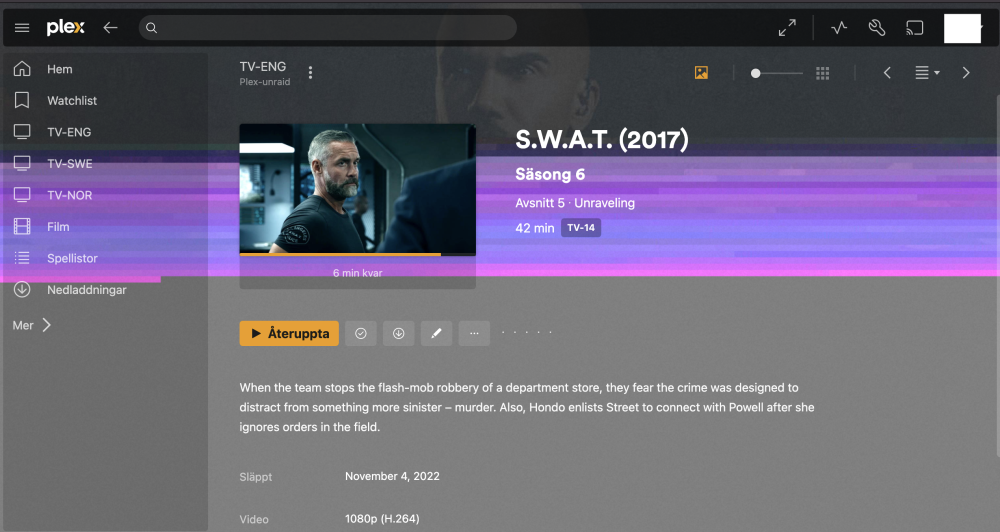
No, sorry! This perhaps should've been two different threads, I just put them in the same because I thought they were (are) related. But I can see how it causes problem following along. 😬 Originally my "only" problem was these weird streaming issues with glitches/freezings/pixelations/errors and artwork being displayed with artifacts in Plex UI. Like this: But it was during my troubleshooting of these issues, and subsequently multiple different Docker container installs, that I got the: Error: filesystem layer verification failed for digest sha256 So to hopefully make it clear: - The streaming issues occur intermittently, no matter what type of device is played on, no matter what type of media is played etc etc. - The sha256 error is occurring intermittently during some, not all, installs/updates of Docker containers. Seems to help to remove unused volumes in Portainer. Since sha256 seems (?) to be a checksum problem, could that point to a network issue?



-
That is what I have done when I've spun up new containers of Plex from different repositories. Tried linuxserver, Binhex, Plex official and a clean Hotio. Just installed them plain and just added a test folder containing a few different videos in various resolution and dynamic range. Same weird streaming issues in all.
-
Yes, I've also tried resetting the appdata from backup. Sorry, I've tried so many things over the past weeks it's hard to keep track of what I've presented as "tried". I also have support threads regarding this going in a few different forums also, since I'm not really sure what is the problem. I could be hardware, it could be Plex, it could be Docker or the created containers, it could be my network and it could be.... I don't know, karma?! 🙄 Do you by any chance have any insight into the "Error: filesystem layer verification failed for digest sha256" problem? I did switch from Docker image to directory last spring, should I try to revert back? I guess it shouldn't matter..
-
Mm, but i have been using Plex for 10+ years and generally speaking been a happy camper. So I’m willing to fight this, as in my opinion, neither Emby nor Jellyfin is even close to compete with the user experience and the WAF.
-
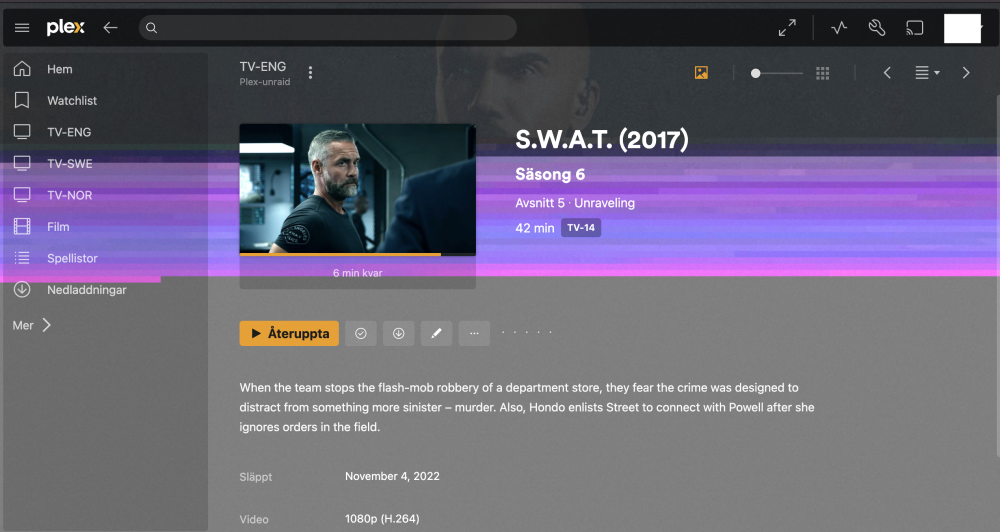
Nobody have any suggestions on the Plex streaming issue? I’ve tried multiple things to solve it without any success… I’ve nuked the docker image on the server and reinstalled Plex. I’ve tried multiple fresh installs of Plex using different Docker repositories (binhex, linuxserver, official Plex). I’ve run a memtest86 to make sure my RAM is good, multiple passes. No errors. I’ve changed wall outlets, a desperate move I know… I’ve also tried installing Jellyfin and tried streaming the same files through that, and that has actually been working. Haven’t been able to produce the same issues with that. So… Plex does seem to be the culprit. Unfortunately. Is there some dependencies that Plex have that isn’t included in the Docker containers? Since all Plex containers I've installed have the same problem I figure it has to be something else?! This is the Plex.app on my Mac. This sort of graphical errors I also get from time to time. I’d say exclusively on the artworks, posters and backgrounds like in this screenshot. Since that’s stored on the server in the appdata library, there must be either something corrupting the file when it’s transferred over the network to the Mac (or any other device I have, all present the same intermittent issues) or some sort of file corruption on the cache that is intermittent?! I really don’t get it... Please help! I’m loosing faith here!
-
Keep getting "Error: filesystem layer verification failed for digest sha256" sometimes when I'm installing or upgrading Docker containers. It has me worried... Any idea what it might be?




