






b3rrytech
Members
-
Joined
-
Last visited
Everything posted by b3rrytech
-
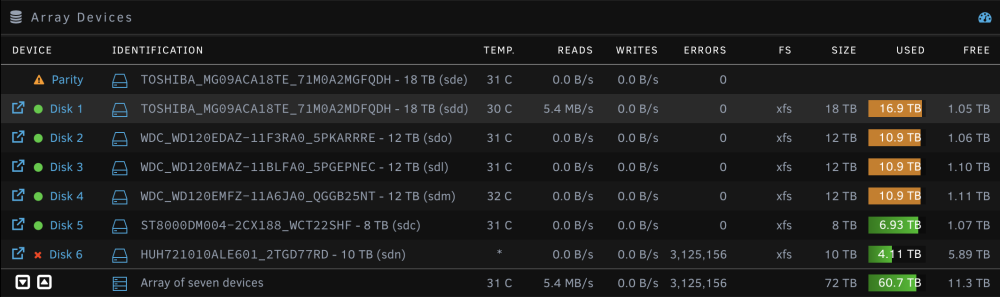
'Evening folks! Been shuffling data around in the array to be able to shrink it and remove three 10+ years old HDDs. Following the tried and true "Remove Drives Then Rebuid Parity" method. Moved what I needed to keep elsewhere in the array, then cleared all the drives of data. Stopped the array Tools --> New Config --> Retain current configuration (All) --> Confirm yes Started the array without checking "Parity is already valid". It started rebuilding the parity After only a few minutes Disk 6 started spitting errors and it just kept rising until I paused the parity re-build after a couple of more minutes. The HGST drive is new in the array since a couple of days and was added as a replacement of a smaller fully functioning data drive. It is however a refurbished drive and newly bought, but dated 2017/2018. Passed pre-clear before I added it to the array. I suspect the SATA cable or power splitter is the culprit but can't be sure. It could be the SATA power splitter, although a bit unlikely, since this new HGST drive is more power demanding than the previous Seagate it replaced. - Can I in this stage of the shrinking process "safely" (I know I no longer have valid parity) power down the server and do some changing of cables? Physically remove the now unassigned old array disks? - When I after this have rebooted the server, should I do a short SMART self-test? Since I no longer have a valid parity I can't start the array without the drive either and conduct another pre-clear on it. So SMART tests is basically what I could do. Any advice for me here? Am I missing something? What is my best course of action at this point forward (other than restoring from backup)? Note: Drives are connected via SAS->SATA breakout cables to an Adaptec ASR-71605 in HBA mode. Since unRAID has disabled the drive I can't see it in the maxView Storage Manager for the Adaptec card either. unRAID OS is 6.12.4 All the best! /Yivey define7-diagnostics-20231207-2209.zip
-
Thanks a lot! Using this with a Tasmota flashed Shelly Plug S. Is there any possibility to add time active field to “Total”? Total is quite useless unless you know when it was reset last. I haven’t seen this on the Tasmota UI either, so perhaps it’s not possible to do.
-
Haven't uploaded it yet. Life got in the way... I'll try and get to it.
-
Did you ever get this working with your X12SCA-5F? I'm thinking of buying this board but I would like to be sure that it'll work with unraid and I can use the all the functions on the MB.
-
Nobody? Im thinking of booting a live-USB of some Linux distro and try to see if I can get the same errors running Docker there. Any suggestions on utilities that I can run to diagnose hardware problems?
-
@wlsn0chrs did you ever solve this? I have very similar issues
-
Anyone have any suggestions on how to proceed in this search for faults? Is there any hardware tests that can be run?
-
Unfortunately this isn’t related to the container Nginx Proxy Manager at all. Nginx is related to the webUI.
-
Also should note that I was able to update the FW on the Adaptec card through the MSI BIOS advance setting where I can access some of the settings. Went very smooth compared to the DOS booting option I saw on YouTube. When I have my server running I’m also using maxView Storage Manager in a Docker container. Gives me access to see the cards temp etc.
-
@kadajawi Did you end up getting this fixed? I started having random other problems with my unRAID server last couple of weeks. Though problems persisted even without the ASR-71605, so that probably wasn’t the culprit. Anyway, trying to solve the above problems I flashed the MB BIOS and forgot to take the Adaptec card out. After that I kept getting the “Controller failed to load utility” error whenever I tried booting with the Adaptec card in. Re-flashed the MB BIOS and after that the Adaptec worked again. But tonight I took out and reseated the CPU in the hunt for the problem, after that the error came back again… Will try re-flashing the BIOS again… Have always had a 40 mm fan on the heatsink so shouldn’t be any heat problem. I was under the expression that these card are very reliable, but maybe they’re not? 🤷♂️
-
I did ran the previous post tests with all Docker directories on the /tmp RAM disk. I believe it’s a network issue, but shouldn’t adjusting MTU have been needed when I tested setting up a NUC also? Yeah, I’ll try and run it from another network if I can. Will even try and setup a new router and run through that. Don’t really understand though how my network could work flawless with same unRAID flash in another machine (NUC)?!
-
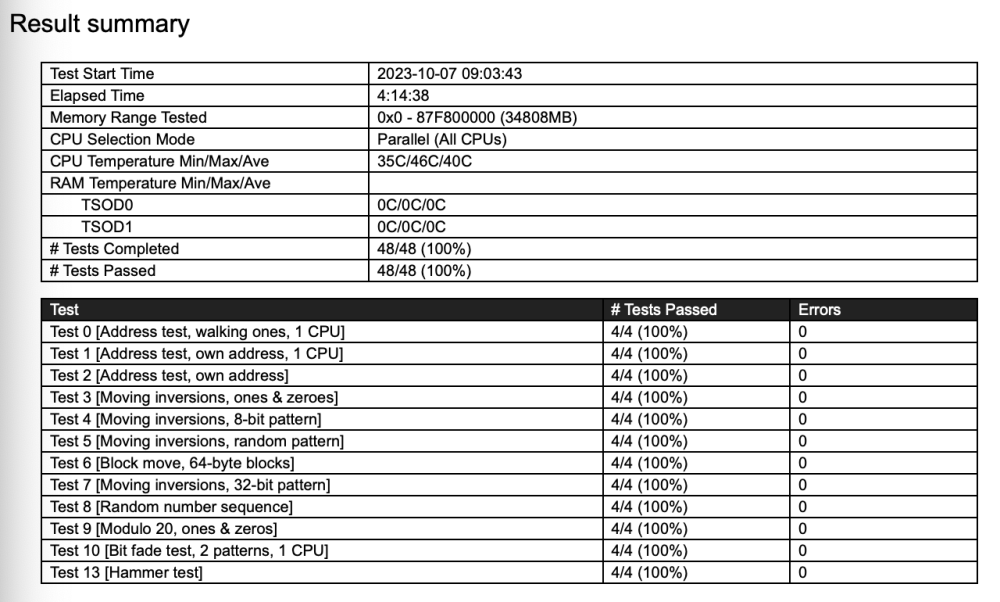
Ran a complete memory test with CPU in parallel. This test was on the newly installed Corsair Vengeance DDR4-3200 2x16GB. No errors. Did a new trial install on a flash drive to eliminate any previous configuration errors. Didn't have the NVMe adapter card nor the HBA card installed since before so they weren't present during this test. Changed all the Docker paths to /tmp. Booted up and got the exact same problems as before. A mix of mostly tls x509 failures and some SHA256 errors. I'd say that SHA256 errors was more frequent before though, now tls takes the lead... docker run -d --name='S-PDF' --net='bridge' -e TZ="America/Los_Angeles" -e HOST_OS="Unraid" -e HOST_HOSTNAME="Tower-test" -e HOST_CONTAINERNAME="S-PDF" -e 'APP_HOME_NAME'='Stirling PDF' -e 'APP_HOME_DESCRIPTION'='Your locally hosted one-stop-shop for all your PDF needs.' -e 'APP_NAVBAR_NAME'='Stirling PDF' -e 'ALLOW_GOOGLE_VISIBILITY'='false' -e 'APP_ROOT_PATH'='/' -e 'APP_LOCALE'='en_GB' -l net.unraid.docker.managed=dockerman -l net.unraid.docker.webui='http://[IP]:[PORT:8080]' -l net.unraid.docker.icon='https://raw.githubusercontent.com/Frooodle/Stirling-PDF/main/src/main/resources/static/favicon.png' -p '8080:8080/tcp' -v '/tmp/Stirling-PDF/OCR':'/usr/share/tesseract-ocr/4.00/tessdata':'rw' 'frooodle/s-pdf' Unable to find image 'frooodle/s-pdf:latest' locally docker: Error response from daemon: Head "https://registry-1.docker.io/v2/frooodle/s-pdf/manifests/latest": Get "https://auth.docker.io/token?scope=repository%3Afrooodle%2Fs-pdf%3Apull&service=registry.docker.io": tls: failed to parse certificate from server: x509: malformed extension OID field. See 'docker run --help'. The command failed. IMAGE ID [182761574]: Pulling from frooodle/s-pdf. IMAGE ID [34df401c391c]: Pulling fs layer. Downloading 100% of 53 MB. Retrying in 5 seconds. Retrying in 4 seconds. Retrying in 3 seconds. Retrying in 2 seconds. Retrying in 1 second. Retrying in 10 seconds. Retrying in 9 seconds. Retrying in 8 seconds. Retrying in 7 seconds. Retrying in 6 seconds. Retrying in 5 seconds. Retrying in 4 seconds. Retrying in 3 seconds. Retrying in 2 seconds. Retrying in 1 second. Retrying in 15 seconds. Retrying in 14 seconds. Retrying in 13 seconds. Retrying in 12 seconds. Retrying in 11 seconds. Retrying in 10 seconds. Retrying in 9 seconds. Retrying in 8 seconds. Retrying in 7 seconds. Retrying in 6 seconds. Retrying in 5 seconds. Retrying in 4 seconds. Retrying in 3 seconds. Retrying in 2 seconds. Retrying in 1 second. Downloading 100% of 53 MB. Retrying in 20 seconds. Retrying in 19 seconds. Retrying in 18 seconds. Retrying in 17 seconds. Retrying in 16 seconds. Retrying in 15 seconds. Retrying in 14 seconds. Retrying in 13 seconds. Retrying in 12 seconds. Retrying in 11 seconds. Retrying in 10 seconds. Retrying in 9 seconds. Retrying in 8 seconds. Retrying in 7 seconds. Retrying in 6 seconds. Retrying in 5 seconds. Retrying in 4 seconds. Retrying in 3 seconds. Retrying in 2 seconds. Retrying in 1 second. Retrying in 25 seconds. Retrying in 24 seconds. Retrying in 23 seconds. Retrying in 22 seconds. Retrying in 21 seconds. Retrying in 20 seconds. Retrying in 19 seconds. Retrying in 18 seconds. Retrying in 17 seconds. Retrying in 16 seconds. Retrying in 15 seconds. Retrying in 14 seconds. Retrying in 13 seconds. Retrying in 12 seconds. Retrying in 11 seconds. Retrying in 10 seconds. Retrying in 9 seconds. Retrying in 8 seconds. Retrying in 7 seconds. Retrying in 6 seconds. Retrying in 5 seconds. Retrying in 4 seconds. Retrying in 3 seconds. Retrying in 2 seconds. Retrying in 1 second. Downloading 0 B. IMAGE ID [8cdc2b53ba57]: Pulling fs layer. Downloading 100% of 15 MB. Verifying Checksum. Download complete. IMAGE ID [c6c65d966457]: Pulling fs layer. Downloading 100% of 82 MB. Retrying in 5 seconds. Retrying in 4 seconds. Retrying in 3 seconds. Retrying in 2 seconds. Retrying in 1 second. Retrying in 10 seconds. Retrying in 9 seconds. Retrying in 8 seconds. Retrying in 7 seconds. Retrying in 6 seconds. Retrying in 5 seconds. Retrying in 4 seconds. Retrying in 3 seconds. Retrying in 2 seconds. Retrying in 1 second. Retrying in 15 seconds. Retrying in 14 seconds. Retrying in 13 seconds. Retrying in 12 seconds. Retrying in 11 seconds. Retrying in 10 seconds. Retrying in 9 seconds. Retrying in 8 seconds. Retrying in 7 seconds. Retrying in 6 seconds. Retrying in 5 seconds. Retrying in 4 seconds. Retrying in 3 seconds. Retrying in 2 seconds. Retrying in 1 second. Retrying in 20 seconds. Retrying in 19 seconds. Retrying in 18 seconds. Retrying in 17 seconds. Retrying in 16 seconds. Retrying in 15 seconds. Retrying in 14 seconds. Retrying in 13 seconds. Retrying in 12 seconds. Retrying in 11 seconds. Retrying in 10 seconds. Retrying in 9 seconds. Retrying in 8 seconds. Retrying in 7 seconds. Retrying in 6 seconds. Retrying in 5 seconds. Retrying in 4 seconds. Retrying in 3 seconds. Retrying in 2 seconds. Retrying in 1 second. Downloading 100% of 82 MB. Retrying in 25 seconds. Retrying in 24 seconds. Retrying in 23 seconds. Retrying in 22 seconds. Retrying in 21 seconds. Retrying in 20 seconds. Retrying in 19 seconds. Retrying in 18 seconds. Retrying in 17 seconds. Retrying in 16 seconds. Retrying in 15 seconds. Retrying in 14 seconds. Retrying in 13 seconds. Retrying in 12 seconds. Retrying in 11 seconds. Retrying in 10 seconds. Retrying in 9 seconds. Retrying in 8 seconds. Retrying in 7 second. Retrying in 6 seconds. Retrying in 5 seconds. Retrying in 4 seconds. Retrying in 3 seconds. Retrying in 2 seconds. Retrying in 1 second. IMAGE ID [13099527500c]: Pulling fs layer. Downloading 100% of 526 KB. Retrying in 5 seconds. Retrying in 4 seconds. Retrying in 3 seconds. Retrying in 2 seconds. Retrying in 1 second. Downloading 100% of 264 MB. Retrying in 10 seconds. Retrying in 9 seconds. Retrying in 8 seconds. Retrying in 7 seconds. Retrying in 6 seconds. Retrying in 5 seconds. Retrying in 4 seconds. Retrying in 3 seconds. Retrying in 2 seconds. Retrying in 1 second. Retrying in 15 seconds. Retrying in 14 seconds. Retrying in 13 seconds. Retrying in 12 seconds. Retrying in 11 seconds. Retrying in 10 seconds. Retrying in 9 seconds. Retrying in 8 seconds. Retrying in 7 seconds. Retrying in 6 seconds. Retrying in 5 seconds. Retrying in 4 seconds. Retrying in 3 seconds. Retrying in 2 seconds. Retrying in 1 second. Downloading 100% of 265 MB. Retrying in 20 seconds. Retrying in 19 seconds. Retrying in 18 seconds. Retrying in 17 seconds. Retrying in 16 seconds. Retrying in 15 seconds. Retrying in 14 seconds. Retrying in 13 seconds. Retrying in 12 seconds. Retrying in 11 seconds. Retrying in 10 seconds. Retrying in 9 seconds. Retrying in 8 seconds. Retrying in 7 seconds. Retrying in 6 seconds. Retrying in 5 seconds. Retrying in 4 seconds. Retrying in 3 seconds. Retrying in 2 seconds. Retrying in 1 second. Retrying in 25 seconds. Retrying in 24 seconds. Retrying in 23 seconds. Retrying in 22 seconds. Retrying in 21 seconds. Retrying in 20 seconds. Retrying in 19 seconds. Retrying in 18 seconds. Retrying in 17 seconds. Retrying in 16 seconds. Retrying in 15 seconds. Retrying in 14 seconds. Retrying in 13 seconds. Retrying in 12 seconds. Retrying in 11 seconds. Retrying in 10 seconds. Retrying in 9 seconds. Retrying in 8 seconds. Retrying in 7 seconds. Retrying in 6 seconds. Retrying in 5 seconds. Retrying in 4 seconds. Retrying in 3 seconds. Retrying in 2 seconds. Retrying in 1 second. Downloading 100% of 265 MB. IMAGE ID [78c116fb88da]: Pulling fs layer. Downloading 100% of 84 MB. Retrying in 5 seconds. Retrying in 4 seconds. Retrying in 3 seconds. Retrying in 2 seconds. Retrying in 1 second. Retrying in 10 seconds. Retrying in 9 seconds. Retrying in 8 seconds. Retrying in 7 seconds. Retrying in 6 seconds. Retrying in 5 seconds. Retrying in 4 seconds. Retrying in 3 seconds. Retrying in 2 seconds. Retrying in 1 second. Downloading 100% of 84 MB. Retrying in 15 seconds. Retrying in 14 seconds. Retrying in 13 seconds. Retrying in 12 seconds. Retrying in 11 seconds. Retrying in 10 seconds. Retrying in 9 seconds. Retrying in 8 seconds. Retrying in 7 seconds. Retrying in 6 seconds. Retrying in 5 seconds. Retrying in 4 seconds. Retrying in 3 seconds. Retrying in 2 seconds. Retrying in 1 second. Downloading 100% of 83 MB. Retrying in 20 seconds. Retrying in 19 seconds. Retrying in 18 seconds. Retrying in 17 seconds. Retrying in 16 seconds. Retrying in 15 seconds. Retrying in 14 seconds. Retrying in 13 seconds. Retrying in 12 seconds. Retrying in 11 seconds. Retrying in 10 seconds. Retrying in 9 seconds. Retrying in 8 seconds. Retrying in 7 seconds. Retrying in 6 seconds. Retrying in 5 seconds. Retrying in 4 seconds. Retrying in 3 seconds. Retrying in 2 seconds. Retrying in 1 second. Retrying in 25 seconds. Retrying in 24 seconds. Retrying in 23 seconds. Retrying in 22 seconds. Retrying in 21 seconds. Retrying in 20 seconds. Retrying in 19 seconds. Retrying in 18 seconds. Retrying in 17 seconds. Retrying in 16 seconds. Retrying in 15 seconds. Retrying in 14 seconds. Retrying in 13 seconds. Retrying in 12 seconds. Retrying in 11 seconds. Retrying in 10 seconds. Retrying in 9 seconds. Retrying in 8 seconds. Retrying in 7 seconds. Retrying in 6 seconds. Retrying in 5 seconds. Retrying in 4 seconds. Retrying in 3 second. Retrying in 2 seconds. Retrying in 1 second. Downloading 100% of 84 MB. IMAGE ID [c8b0cfd16c77]: Pulling fs layer. Downloading 100% of 252 B. Verifying Checksum. Download complete. IMAGE ID [8dba544373b8]: Pulling fs layer. Downloading 0 B. IMAGE ID [0b7bf9f56788]: Pulling fs layer. Downloading 100% of 526 KB. Retrying in 5 seconds. Retrying in 4 seconds. Retrying in 3 seconds. Retrying in 2 seconds. Retrying in 1 second. Downloading 100% of 9 MB. Retrying in 10 seconds. Retrying in 9 seconds. Retrying in 8 seconds. Retrying in 7 seconds. Retrying in 6 seconds. Retrying in 5 seconds. Retrying in 4 seconds. Retrying in 3 seconds. Retrying in 2 seconds. Retrying in 1 second. Downloading 100% of 9 MB. Retrying in 15 seconds. Retrying in 14 seconds. Retrying in 13 seconds. Retrying in 12 seconds. Retrying in 11 seconds. Retrying in 10 seconds. Retrying in 9 seconds. Retrying in 8 seconds. Retrying in 7 seconds. Retrying in 6 seconds. Retrying in 5 seconds. Retrying in 4 seconds. Retrying in 3 seconds. Retrying in 2 seconds. Retrying in 1 second. Downloading 100% of 6 MB. Retrying in 20 seconds. Retrying in 19 seconds. Retrying in 18 seconds. Retrying in 17 seconds. Retrying in 16 seconds. Retrying in 15 seconds. Retrying in 14 seconds. Retrying in 13 seconds. Retrying in 12 seconds. Retrying in 11 seconds. Retrying in 10 seconds. Retrying in 9 seconds. Retrying in 8 seconds. Retrying in 7 seconds. Retrying in 6 seconds. Retrying in 5 seconds. Retrying in 4 seconds. Retrying in 3 seconds. Retrying in 2 seconds. Retrying in 1 second. Retrying in 25 seconds. Retrying in 24 seconds. Retrying in 23 seconds. Retrying in 22 seconds. Retrying in 21 seconds. Retrying in 20 seconds. Retrying in 19 seconds. Retrying in 18 seconds. Retrying in 17 seconds. Retrying in 16 seconds. Retrying in 15 seconds. Retrying in 14 seconds. Retrying in 13 seconds. Retrying in 12 seconds. Retrying in 11 seconds. Retrying in 10 seconds. Retrying in 9 seconds. Retrying in 8 seconds. Retrying in 7 seconds. Retrying in 6 seconds. Retrying in 5 seconds. Retrying in 4 seconds. Retrying in 3 seconds. Retrying in 2 seconds. Retrying in 1 second. Downloading 100% of 15 MB. IMAGE ID [4f4fb700ef54]: Pulling fs layer. Verifying Checksum. Download complete. IMAGE ID [0e1176372572]: Pulling fs layer. Retrying in 5 seconds. Retrying in 4 seconds. Retrying in 3 seconds. Retrying in 2 seconds. Retrying in 1 second. Retrying in 10 seconds. Retrying in 9 seconds. Retrying in 8 seconds. Retrying in 7 seconds. Retrying in 6 seconds. Retrying in 5 seconds. Retrying in 4 seconds. Retrying in 3 seconds. Retrying in 2 seconds. Retrying in 1 second. Downloading 100% of 58 MB. Retrying in 15 seconds. Retrying in 14 seconds. Retrying in 13 seconds. Retrying in 12 seconds. Retrying in 11 seconds. Retrying in 10 seconds. Retrying in 9 seconds. Retrying in 8 seconds. Retrying in 7 seconds. Retrying in 6 seconds. Retrying in 5 seconds. Retrying in 4 seconds. Retrying in 3 seconds. Retrying in 2 seconds. Retrying in 1 second. Retrying in 20 seconds. Retrying in 19 seconds. Retrying in 18 seconds. Retrying in 17 seconds. Retrying in 16 seconds. Retrying in 15 seconds. Retrying in 14 seconds. Retrying in 13 seconds. Retrying in 12 seconds. Retrying in 11 seconds. Retrying in 10 seconds. Retrying in 9 seconds. Retrying in 8 seconds. Retrying in 7 seconds. Retrying in 6 seconds. Retrying in 5 seconds. Retrying in 4 seconds. Retrying in 3 seconds. Retrying in 2 seconds. Retrying in 1 second. Retrying in 25 seconds. Retrying in 24 seconds. Retrying in 23 seconds. Retrying in 22 seconds. Retrying in 21 seconds. Retrying in 20 seconds. Retrying in 19 seconds. Retrying in 18 seconds. Retrying in 17 seconds. Retrying in 16 seconds. Retrying in 15 seconds. Retrying in 14 seconds. Retrying in 13 seconds. Retrying in 12 seconds. Retrying in 11 seconds. Retrying in 10 seconds. Retrying in 9 seconds. Retrying in 8 seconds. Retrying in 7 seconds. Retrying in 6 seconds. Retrying in 5 seconds. Retrying in 4 seconds. Retrying in 3 seconds. Retrying in 2 seconds. Retrying in 1 second. IMAGE ID [a057ccd9dc71]: Pulling fs layer. Retrying in 5 seconds. Retrying in 4 seconds. Retrying in 3 seconds. Retrying in 2 seconds. Retrying in 1 second. Verifying Checksum. Download complete. TOTAL DATA PULLED: 520 MB Error: Get "https://registry-1.docker.io/v2/frooodle/s-pdf/blobs/sha256:0e1176372572ad78ed341fc455897b93e51d90b04f5b41d8a1bb57caad3d3810": tls: failed to parse certificate from server: x509: invalid RDNSequence: invalid attribute value: invalid PrintableString docker run -d --name='adminer' --net='bridge' -e TZ="America/Los_Angeles" -e HOST_OS="Unraid" -e HOST_HOSTNAME="Tower-test" -e HOST_CONTAINERNAME="adminer" -e 'ADMINER_DESIGN'='flat' -e 'ADMINER_PLUGINS'='' -l net.unraid.docker.managed=dockerman -l net.unraid.docker.webui='http://[IP]:[PORT:8080]' -l net.unraid.docker.icon='https://raw.githubusercontent.com/selfhosters/unRAID-CA-templates/master/templates/img/adminer.png' -p '8080:8080/tcp' 'adminer' Unable to find image 'adminer:latest' locally latest: Pulling from library/adminer ddf874abf16c: Pulling fs layer 9d75c017e041: Pulling fs layer 86e22a4c35d4: Pulling fs layer eb4bd38d1031: Pulling fs layer e3bc33b7b683: Pulling fs layer 3d61d710f98a: Pulling fs layer f8441003ca94: Pulling fs layer e3bc33b7b683: Waiting 3d61d710f98a: Waiting f8441003ca94: Waiting eb4bd38d1031: Waiting 86e22a4c35d4: Retrying in 5 seconds 86e22a4c35d4: Retrying in 4 seconds 86e22a4c35d4: Retrying in 3 seconds 86e22a4c35d4: Retrying in 2 seconds 86e22a4c35d4: Retrying in 1 second 9d75c017e041: Retrying in 5 seconds ddf874abf16c: Retrying in 5 seconds 9d75c017e041: Retrying in 4 seconds ddf874abf16c: Retrying in 4 seconds 9d75c017e041: Retrying in 3 seconds ddf874abf16c: Retrying in 3 seconds 9d75c017e041: Retrying in 2 seconds ddf874abf16c: Retrying in 2 seconds 9d75c017e041: Retrying in 1 second ddf874abf16c: Retrying in 1 second 86e22a4c35d4: Retrying in 10 seconds 86e22a4c35d4: Retrying in 9 seconds 86e22a4c35d4: Retrying in 8 seconds 86e22a4c35d4: Retrying in 7 seconds 86e22a4c35d4: Retrying in 6 seconds 86e22a4c35d4: Retrying in 5 seconds 86e22a4c35d4: Retrying in 4 seconds 86e22a4c35d4: Retrying in 3 seconds 86e22a4c35d4: Retrying in 2 seconds 86e22a4c35d4: Retrying in 1 second 9d75c017e041: Retrying in 10 seconds ddf874abf16c: Retrying in 10 seconds 9d75c017e041: Retrying in 9 seconds ddf874abf16c: Retrying in 9 seconds 9d75c017e041: Retrying in 8 seconds ddf874abf16c: Retrying in 8 seconds 9d75c017e041: Retrying in 7 seconds ddf874abf16c: Retrying in 7 seconds 9d75c017e041: Retrying in 6 seconds ddf874abf16c: Retrying in 6 seconds 9d75c017e041: Retrying in 5 seconds ddf874abf16c: Retrying in 5 seconds 9d75c017e041: Retrying in 4 seconds ddf874abf16c: Retrying in 4 seconds 9d75c017e041: Retrying in 3 seconds ddf874abf16c: Retrying in 3 seconds 9d75c017e041: Retrying in 2 seconds ddf874abf16c: Retrying in 2 seconds 9d75c017e041: Retrying in 1 second ddf874abf16c: Retrying in 1 second 86e22a4c35d4: Retrying in 15 seconds 86e22a4c35d4: Retrying in 14 seconds 86e22a4c35d4: Retrying in 13 seconds 86e22a4c35d4: Retrying in 12 seconds 86e22a4c35d4: Retrying in 11 seconds 86e22a4c35d4: Retrying in 10 seconds 86e22a4c35d4: Retrying in 9 seconds 86e22a4c35d4: Retrying in 8 seconds 86e22a4c35d4: Retrying in 7 seconds 86e22a4c35d4: Retrying in 6 seconds 86e22a4c35d4: Retrying in 5 seconds 86e22a4c35d4: Retrying in 4 seconds 86e22a4c35d4: Retrying in 3 seconds 86e22a4c35d4: Retrying in 2 seconds 86e22a4c35d4: Retrying in 1 second docker: error pulling image configuration: download failed after attempts=6: dial tcp: lookup production.cloudflare.docker.com: i/o timeout. See 'docker run --help'. The command failed. I'm not sure, but in some way I do still believe it is network related. I tried using both the internal 1 GbE and the PCIe 1 GbE card. Attached diagnostics. What do you say? tower-test-diagnostics-20231007-1720.zip
-
Created a new thread since the problem has "evolved" so much from the original questioning. Perhaps the original problem will be solved if I can find the potential root problem. If you have any comments or suggestions please follow up in that thread instead. Thank you!
-
Thank you for your answer! Much appreciate any help I can get! I actually went and purchased two new memory sticks, because I was so fed up. Missed that part in the specs list. But I’ll do it anyway, just to try! Is there a need to create a separate bootable flash for MemTest86 when it’s already on the unRAID flash? I see it’s choosable during startup. Never used it that way before though.. 😅 I’ll get back to you when I tested everything! EDIT: Upgraded the specs list with the RAM in the first post.
-
Hi! I have another thread in the forum, but as that started out regarding nginx crashes for the webUI I feel that a new thread was necessary to get proper support in this issue. Hopefully is this the source of the problems I've had.... This is my last post in that thread: Does any one have any ideas on how to solve this? Is my only option to buy a new MB and CPU? How does something like this happen? EDIT: The specs for my system at the moment is: Intel i5-11600 MSI Z590 Torpedo with built-in 2.5 GbE and 1 GbE Corsair Vengeance LPX Black DDR4 3200MHz 32GB (2x16GB) (New RAM since 2023-10-04) G.Skill Aegis DDR4-3200 DIMM CL16 32GB (2x16GB) (Original RAM, now removed from the system) Adaptec ASR-71605 RAID card in HBA mode Dual NVMe PCIe adapter card with ASMedia ASM2812 chipset (problems started long before this was added) 9 x 3.5" HDDs (HBA) 2 x 2.5" SATA SSDs (HBA) 1 x 2.5" SATA SSDs (MB) 2 x M.2 NVMe SSDs (MB) 2 x M.2 NVMe SSDs (ASM) Also tried using a TP-link TG-3468 PCIe 1 GbE card to rule out the onboard NICs
-
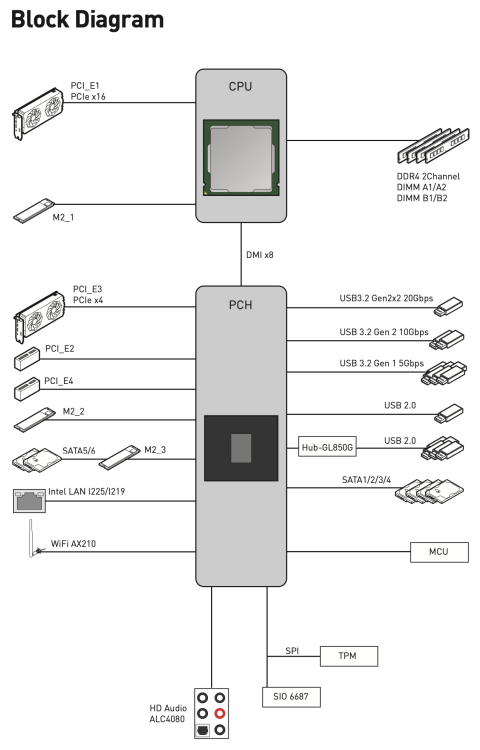
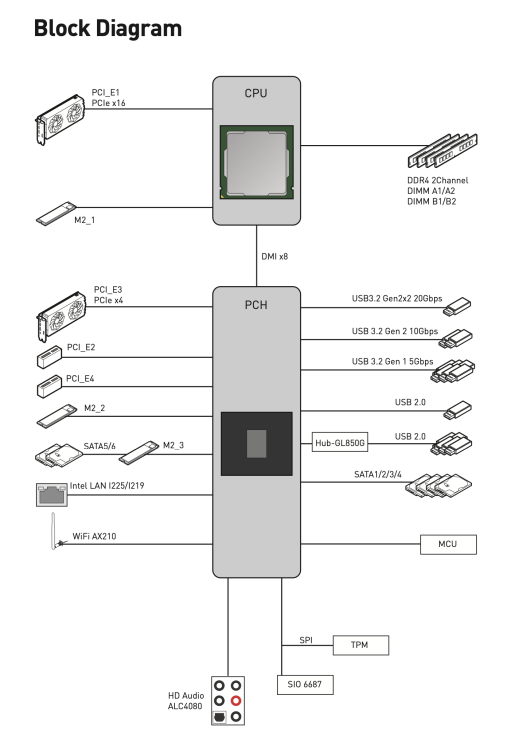
Update again... I found an old NUC that I ran HA on earlier. Connected it to the same switch as my main server and booted the same flash from the previous post that gave errors in my main system. Everything works on this NUC system as far as I can stresstest it just by installing Docker containers, plugins, removing all of them, clearing the Docker image and installing again. As it looks now, I'm pretty certain that it's the main servers hardware that are faulty in some way. As far as I understand SHA256 is a hash crypto function carried out by the CPU, but it could also be . Something is corrupting the data somewhere, or the algorithm isn't working (highly unlikely). I was still not sure that the problem wasn't related to the network parts on the motherboard. Going through the MB manual I found that all networking functionality is going through the chipset in all the ways I've tested. So I tested the PCIe Ethernet card in PCI_E1 socket to rule out that it's the chipset that's faulty. At first I got my hopes up, as it seemed to actually be working, but no bueno. 🙈 I don't know if I can rule the chipset out completely since the USB is still connected via it, and I don't know a way around that short of buying a PCIe card with both ethernet and USB. Now, the only thing I can think of to do further is to disassemble the PC and reseat the CPU in the socket. Don't really see what difference that'll make but I'll give it a try. I'm out of ideas, and buying a new MB and CPU on a hunch is really the last resort... Any other suggestions of what to look for or try out?
-
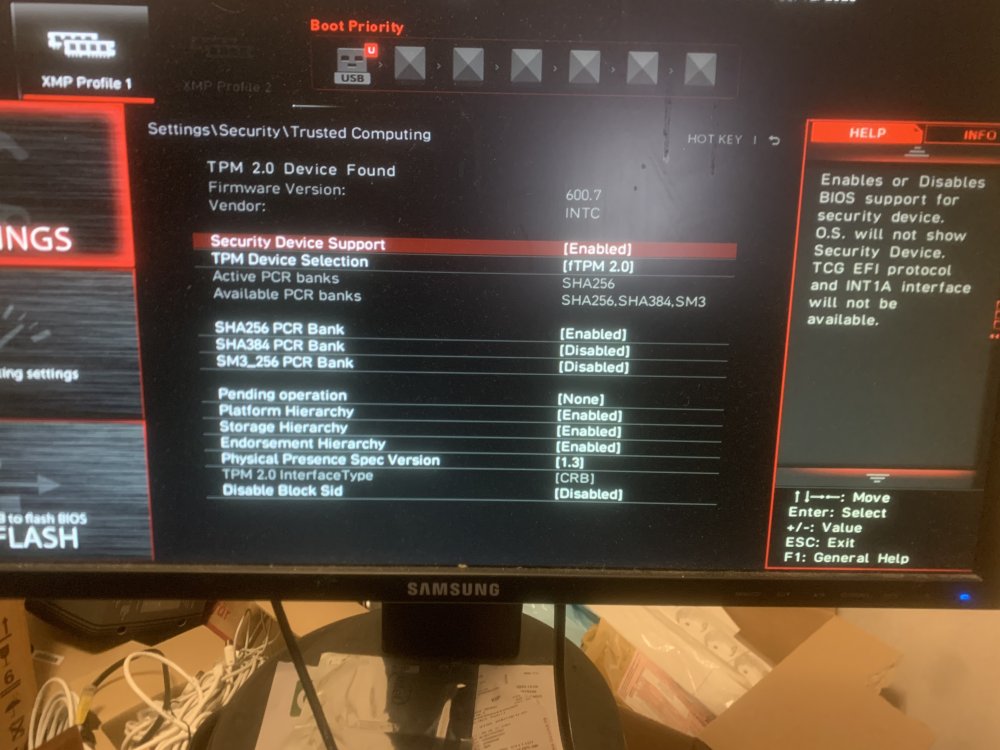
Tried some more. I installed a TP-Link PCIe Ethernet card and tried with a new fresh install of 6.12.4 on a new flash. Still same problem. So either it's a problem in my network, or it's a problem in the MB/CPU. This is the BIOS screen for the security settings on the MB. It does mention SHA256, which is what is erroring most frequently during my tries. Should I have this setup in any other way? This is settings I've never touched before. Should I start a new thread with these problems since my initial questions wasn't really about this SHA256 problem? The initial problem perhaps was caused by this problem though..
-
I will start to try and narrow down what HW is causing the issue. Also maybe move the server and physically try it on another network. Don't really have any other system to try it on, except for my old HP N40L Microserver. That doesn't have room for the HBA etc. But I can give the trial flash a go in it. Would you say I need to recreate the flash every time I do a new HW test? Like in the sense that faulty HW would corrupt the flash in some way so it'll present faults even when run on good HW?
-
Ok, I'm soon about to give up.... 😫 I've tried so many things now without getting it to work properly again. Every time I try something new it creates a new problem. I've done this (I'm sorry if it's not in chronological order, I should've kept a log on all my tests): Started with the bare minimum like @JorgeB suggested on the old flash but with a new fresh install. Started installing stuff back manually. Kept having nginx problems. Started with the bare minimum but on a new flash drive that I bought. Same deal, kept having nginx problems. And often the Docker engine couldn't start. If it started I wasn't able to install any containers due to to various errors but the most common was "docker: error pulling image configuration: image config verification failed for digest sha256". Started a completely new trial version on another new flash drive but kept having the same issues as above, minus the nginx one. Can install most plugins without an error, but no containers at all. Most installs look like this (just picked a random container in CA): During all these trial and error sessions I've deleted the docker directory multiple times, tried switching back to docker image. Moving the image or dir to a different pool with different FS. No luck. Same result. Tried reverting back to not use SSL. nginx still produced these type of errors in the log: Multiple times CA has had problems loading and suggested me to change the DNS settings. I've done that and tried both the suggested DNS settings as well as others. Both setting them static on the server as well as on the router. No change on either the "rebuild" system or the trial. I've tried using both my NIC's on my MB (MSI Z590 Torpedo). Both are Intel, one is 1 GbE and the other is 2.5 GbE. Both in bonding mode and separate. No change. I even changed out my switch to another since I had one laying around. No change. I bought two new 16 GB RAM to test out. No change. I guess I'll have 64 GB now if I ever get this going again... I tried using an USB to ethernet adapter to see if it was the onboard NIC's but couldn't get unraid to see the adapter and trying to boot with it connected to the system failed as I guess it tries to boot from the adapter as it's USB. Changed out the ethernet cable between the switch and the server. No change. I got desperate and updated the FW on both the MB and the HBA (Adaptec ASR-71605). No change. Really starting to suspect it's a hardware issue. Especially since a completely new trial version doesn't work either. I've attached two diagnostics. One is from the last time I ran my "rebuild" flash and one is the trial version. Unfortunately I've done so many restarts but these at least should show the problems I have with the Docker engine and how I'm not able to install any containers. What should I do here?!? I've put 25+ hours into this hunt for a needle in a haystack now. PLEASE HELP! define-7-diagnostics-20231005-2328_pro_version.zip tower-test-diagnostics-20231006-0119_trial_version.zip

-
@JorgeB What is your take on the fact that the problems keep occurring even though I restored the flash from a 1 week old backup? Back then I had no issues at all. Off course something could’ve been problematic in the setup back then already, just not presenting symptoms, but shouldn’t this work like a snapshot? I’ve found this bug report and my symptoms are very similar, but the problem is that I haven’t had IPv6 activated at all, only IPv4. But I tried without any plugins at all earlier, still same issues? I will try this again though. I guess the connect plugin is still named dynamix.my.servers in the plugins folder, because I can’t find any plugin named Connect?
-
nginx: 2023/09/28 20:07:12 [error] 19782#19782: SUB:WEBSOCKET:ws_recv NOT OK when receiving payload This error message is coming up a lot in the logs.
-
Waking up a dead thread here, but did you get anywhere with this?
-
I've tried a bunch of stuff now trying to narrowing it down. I did a fresh install off 6.12.4 on the old flash and copied over the bare minimum that you suggested. Tried to see if I could provoke an nginx failure. Everything seemed to work fine and I couldn't find any faults. Started moving over more stuff and trying. But eventually grew impatient since every try involved starting/stopping the server and handling the USB back and forth. Tried to only remove the plugins from the config folder. That wasn't the problem either since nginx kept crashing. Managed to grab a log from one of the times it was happening. Look around 20:14 in the attached syslog. Don't know if that's something that can point somewhere? After that I restarted nginx but eventually it stopped working all together. Also tried restoring to a week old flash backup, but that was also presenting the exact same issues with nginx crashing the unraid API. Even though I had none of those issues back then? What does that mean? I will keep trying to restore just parts of the config since the first stuff I tried didn't work. Feels like I'm stumbling blind here and looking for a needle in a haystack... define7-diagnostics-20230928-2024.zip
-
Does this approach mean I'll have to reconfigure all the plugins, modprobe.d, go-file, ssh keys, shares, network configs etc etc? Not possible to start with something less "destructive"? Sort of the other way around, and start by removing some parts of the install on the old flash? If so, what parts should I start removing? I appreciate the help!
-
OK, I tried now and started up a completely fresh install on a new flash drive. It work's but I haven't started the array or anything as I don't want to screw anything up. So now you suggest to copy some flies from the old install, make a fresh install on the old flash, then copy back those previous files to the new install? What files should I keep and what will I end up having to reconfigure?






