





jkexbx
Members
-
Joined
-
Last visited
Everything posted by jkexbx
-
The driver is one piece of it. I got it working 100% by installing the driver from Nvidia. But either I changed the configuration, or windows updated and it stopped. I can't seem to get it working again, even on a fresh install of windows. Is hiding hypervisor more than disabling it when you create the VM?
-
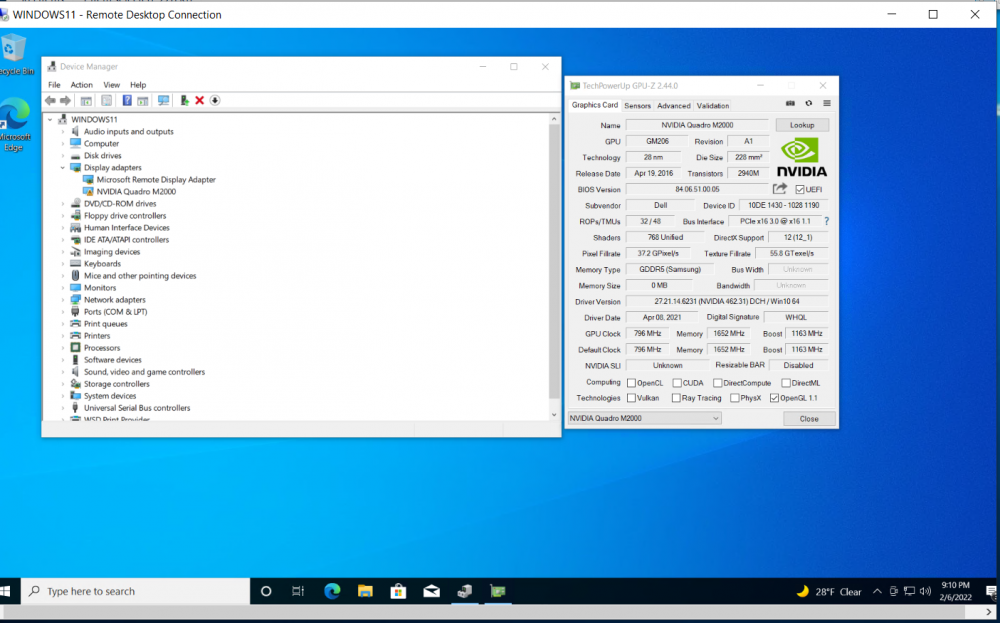
I'm trying to passthrough my Quadro M2000 to a windows VM. I've tried so many settings, but I'm missing the one combination where it all works. I continue to run into Error 43. My VM will boot fine. And I can see the card in device manager. Connecting over RDP works. I can even see it in GPI-Z I've not tried using the cards bios. https://www.techpowerup.com/vgabios/ doesn't have one, and I don't have a second desktop to download it. I've tried following spaceinvaders and https://forums.serverbuilds.net/t/guide-remote-gaming-on-unraid/4248/7 Plus a couple dozen suggestions from various threads. Configuration: HVM: Enabled IOMMU: Enabled PCIe ACS override: Disabled Server Boot Mode: Legacy Both cards are in IOMMU group 84 - both set as Bind Selected to VFIO at Boot I have a headless displayport plug, plugged in Bios: Both OVMF and SeaBios Hyper-V: Both Yes and No Machine: Both Q35-5.1 and i440fx-5.1 Syslinux Configuration default menu.c32 menu title Lime Technology, Inc. prompt 0 timeout 50 label Unraid OS menu default kernel /bzimage append video=efifb:off initrd=/bzroot isolcpus=30-39 pcie_aspm=off label Unraid OS GUI Mode kernel /bzimage append isolcpus=30-39 initrd=/bzroot,/bzroot-gui label Unraid OS Safe Mode (no plugins, no GUI) kernel /bzimage append initrd=/bzroot unraidsafemode label Unraid OS GUI Safe Mode (no plugins) kernel /bzimage append initrd=/bzroot,/bzroot-gui unraidsafemode label Memtest86+ kernel /memtest VM Configuration <?xml version='1.0' encoding='UTF-8'?> <domain type='kvm' id='17'> <name>Windows 10</name> <uuid>a4655624-4d8d-5934-74bf-6dc51def0147</uuid> <metadata> <vmtemplate xmlns="unraid" name="Windows 10" icon="windows.png" os="windows10"/> </metadata> <memory unit='KiB'>8388608</memory> <currentMemory unit='KiB'>8388608</currentMemory> <memoryBacking> <nosharepages/> </memoryBacking> <vcpu placement='static'>5</vcpu> <cputune> <vcpupin vcpu='0' cpuset='21'/> <vcpupin vcpu='1' cpuset='23'/> <vcpupin vcpu='2' cpuset='25'/> <vcpupin vcpu='3' cpuset='27'/> <vcpupin vcpu='4' cpuset='29'/> </cputune> <resource> <partition>/machine</partition> </resource> <os> <type arch='x86_64' machine='pc-i440fx-5.1'>hvm</type> <loader readonly='yes' type='pflash'>/usr/share/qemu/ovmf-x64/OVMF_CODE-pure-efi.fd</loader> <nvram>/etc/libvirt/qemu/nvram/a4655624-4d8d-5934-74bf-6dc51def0147_VARS-pure-efi.fd</nvram> </os> <features> <acpi/> <apic/> </features> <cpu mode='host-passthrough' check='none' migratable='on'> <topology sockets='1' dies='1' cores='5' threads='1'/> <cache mode='passthrough'/> </cpu> <clock offset='localtime'> <timer name='rtc' tickpolicy='catchup'/> <timer name='pit' tickpolicy='delay'/> <timer name='hpet' present='no'/> </clock> <on_poweroff>destroy</on_poweroff> <on_reboot>restart</on_reboot> <on_crash>restart</on_crash> <devices> <emulator>/usr/local/sbin/qemu</emulator> <disk type='file' device='disk'> <driver name='qemu' type='raw' cache='writeback'/> <source file='/mnt/user/domains/Windows 10/vdisk1.img' index='3'/> <backingStore/> <target dev='hdc' bus='virtio'/> <boot order='1'/> <alias name='virtio-disk2'/> <address type='pci' domain='0x0000' bus='0x00' slot='0x04' function='0x0'/> </disk> <disk type='file' device='cdrom'> <driver name='qemu' type='raw'/> <source file='/mnt/user/isos/Windows.iso' index='2'/> <backingStore/> <target dev='hda' bus='ide'/> <readonly/> <boot order='2'/> <alias name='ide0-0-0'/> <address type='drive' controller='0' bus='0' target='0' unit='0'/> </disk> <disk type='file' device='cdrom'> <driver name='qemu' type='raw'/> <source file='/mnt/user/isos/virtio-win-0.1.190-1.iso' index='1'/> <backingStore/> <target dev='hdb' bus='ide'/> <readonly/> <alias name='ide0-0-1'/> <address type='drive' controller='0' bus='0' target='0' unit='1'/> </disk> <controller type='pci' index='0' model='pci-root'> <alias name='pci.0'/> </controller> <controller type='ide' index='0'> <alias name='ide'/> <address type='pci' domain='0x0000' bus='0x00' slot='0x01' function='0x1'/> </controller> <controller type='virtio-serial' index='0'> <alias name='virtio-serial0'/> <address type='pci' domain='0x0000' bus='0x00' slot='0x03' function='0x0'/> </controller> <controller type='usb' index='0' model='ich9-ehci1'> <alias name='usb'/> <address type='pci' domain='0x0000' bus='0x00' slot='0x07' function='0x7'/> </controller> <controller type='usb' index='0' model='ich9-uhci1'> <alias name='usb'/> <master startport='0'/> <address type='pci' domain='0x0000' bus='0x00' slot='0x07' function='0x0' multifunction='on'/> </controller> <controller type='usb' index='0' model='ich9-uhci2'> <alias name='usb'/> <master startport='2'/> <address type='pci' domain='0x0000' bus='0x00' slot='0x07' function='0x1'/> </controller> <controller type='usb' index='0' model='ich9-uhci3'> <alias name='usb'/> <master startport='4'/> <address type='pci' domain='0x0000' bus='0x00' slot='0x07' function='0x2'/> </controller> <interface type='bridge'> <mac address='52:54:00:d9:83:ed'/> <source bridge='br0'/> <target dev='vnet0'/> <model type='virtio-net'/> <alias name='net0'/> <address type='pci' domain='0x0000' bus='0x00' slot='0x02' function='0x0'/> </interface> <serial type='pty'> <source path='/dev/pts/0'/> <target type='isa-serial' port='0'> <model name='isa-serial'/> </target> <alias name='serial0'/> </serial> <console type='pty' tty='/dev/pts/0'> <source path='/dev/pts/0'/> <target type='serial' port='0'/> <alias name='serial0'/> </console> <channel type='unix'> <source mode='bind' path='/var/lib/libvirt/qemu/channel/target/domain-17-Windows 10/org.qemu.guest_agent.0'/> <target type='virtio' name='org.qemu.guest_agent.0' state='disconnected'/> <alias name='channel0'/> <address type='virtio-serial' controller='0' bus='0' port='1'/> </channel> <input type='tablet' bus='usb'> <alias name='input0'/> <address type='usb' bus='0' port='1'/> </input> <input type='mouse' bus='ps2'> <alias name='input1'/> </input> <input type='keyboard' bus='ps2'> <alias name='input2'/> </input> <hostdev mode='subsystem' type='pci' managed='yes'> <driver name='vfio'/> <source> <address domain='0x0000' bus='0x02' slot='0x00' function='0x0'/> </source> <alias name='hostdev0'/> <address type='pci' domain='0x0000' bus='0x00' slot='0x05' function='0x0' multifunction='on'/> </hostdev> <hostdev mode='subsystem' type='pci' managed='yes'> <driver name='vfio'/> <source> <address domain='0x0000' bus='0x02' slot='0x00' function='0x1'/> </source> <alias name='hostdev1'/> <address type='pci' domain='0x0000' bus='0x00' slot='0x05' function='0x1'/> </hostdev> <memballoon model='none'/> </devices> <seclabel type='dynamic' model='dac' relabel='yes'> <label>+0:+100</label> <imagelabel>+0:+100</imagelabel> </seclabel> </domain>
-
Did you ever try passing your m2000 to a Windows VM?
-
Did you end up getting the M2000 working?
-
How did you passthrough the m2000? I'm running into Code 43.
-
I went through all dockers and none of them were using the /tmp directory. I changed the plex one just to be safe too. I still get the following error when I try to uninstall the plugin. plugin: removing: dynamix.local.master.plg Warning: simplexml_load_file(): /boot/config/plugins/dynamix.local.master.plg:1: parser error : Document is empty in /usr/local/emhttp/plugins/dynamix.plugin.manager/scripts/plugin on line 212 Warning: simplexml_load_file(): in /usr/local/emhttp/plugins/dynamix.plugin.manager/scripts/plugin on line 212 Warning: simplexml_load_file(): ^ in /usr/local/emhttp/plugins/dynamix.plugin.manager/scripts/plugin on line 212 plugin: XML file doesn't exist or xml parse error
-
Right now I'm using wireguard(Remote Access to LAN) to control my server. I am getting 2 errors that make it very frustrating. First, when trying to move and copy files around I get a "You need permission to perform this action" error message on Windows 10. Second, when trying to install a plugin, it's not giving me a "Done" prompt. I think the install is being terminated by the window "closing", even though the window remains open and just isn't updated. I tried to install local master to help with the first issue. Now it seems like that install has failed and I can't uninstall or remove it. The same thing happened when I tried to use the docker fix safe permissions. Anyone have any advice for managing an Unraid server remotely? So far it's been extremely disappointing,. plugin: updating: dynamix.local.master.plg Warning: simplexml_load_file(): /var/log/plugins/dynamix.local.master.plg:1: parser error : Document is empty in /usr/local/emhttp/plugins/dynamix.plugin.manager/scripts/plugin on line 212 Warning: simplexml_load_file(): in /usr/local/emhttp/plugins/dynamix.plugin.manager/scripts/plugin on line 212 Warning: simplexml_load_file(): ^ in /usr/local/emhttp/plugins/dynamix.plugin.manager/scripts/plugin on line 212 plugin: /tmp/plugins/dynamix.local.master.plg does not exist, check for updates first
-
Did anyone have issues with HDR tone mapping using a Nvidia GPU. I've got a m2000 that I just installed that is causing HDR content to look oversaturated.
-
I just updated to 6.9.2 and I am unable to spin down my SAS drives. They do not spin down by schedule and if I manually spin them down, the icon changes to the spinning one and then goes back to being green. I have a combination of HUS724030ALS640 and HUS723030ALS640. Before the update (on 6.8.3 I think) I could spin down the HUS723030ALS640 but was unable to for HUS724030ALS640 tower-diagnostics-20210415-2155.zip
