





pltaylor
Members
-
Joined
-
Last visited
-
My main tab currently looks like this My log is filling up w/ the following, which on cursory glance appears to be related. Feb 7 10:56:24 Corezilla nginx: 2025/02/07 10:56:24 [crit] 19565#19565: ngx_slab_alloc() failed: no memory Feb 7 10:56:24 Corezilla nginx: 2025/02/07 10:56:24 [error] 19565#19565: shpool alloc failed Feb 7 10:56:24 Corezilla nginx: 2025/02/07 10:56:24 [error] 19565#19565: nchan: Out of shared memory while allocating message of size 11533. Increase nchan_max_reserved_memory. Feb 7 10:56:24 Corezilla nginx: 2025/02/07 10:56:24 [error] 19565#19565: *1394668 nchan: error publishing message (HTTP status code 500), client: unix:, server: , request: "POST /pub/devices?buffer_length=1 HTTP/1.1", host: "localhost" Feb 7 10:56:24 Corezilla nginx: 2025/02/07 10:56:24 [error] 19565#19565: MEMSTORE:01: can't create shared message for channel /devices Feb 7 10:56:24 Corezilla nginx: 2025/02/07 10:56:24 [crit] 19565#19565: ngx_slab_alloc() failed: no memory Feb 7 10:56:24 Corezilla nginx: 2025/02/07 10:56:24 [error] 19565#19565: shpool alloc failed Feb 7 10:56:24 Corezilla nginx: 2025/02/07 10:56:24 [error] 19565#19565: nchan: Out of shared memory while allocating message of size 7036. Increase nchan_max_reserved_memory. Feb 7 10:56:24 Corezilla nginx: 2025/02/07 10:56:24 [error] 19565#19565: *1394674 nchan: error publishing message (HTTP status code 500), client: unix:, server: , request: "POST /pub/disks?buffer_length=1 HTTP/1.1", host: "localhost" Feb 7 10:56:24 Corezilla nginx: 2025/02/07 10:56:24 [error] 19565#19565: MEMSTORE:01: can't create shared message for channel /disks
-
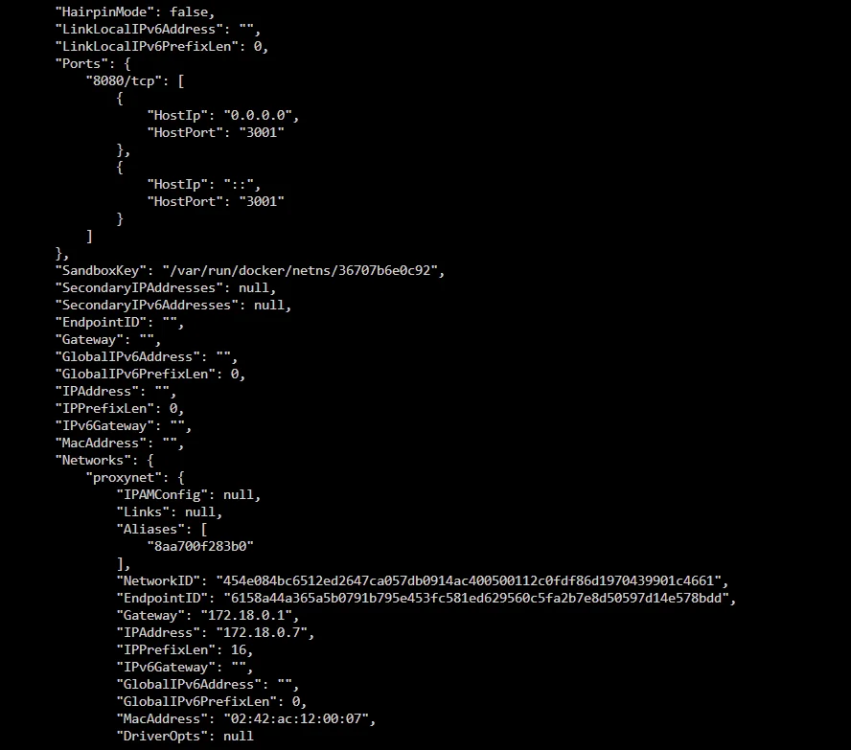
I have gone through everything I can find and can't seem to find my error. I'm sure it's something silly but I can't figure out what it is. When I go to immich.mydomain.com I get a 502 error. Other custom domains work without issue. My nginx error log contains the following 2024/04/05 14:42:43 [error] 709#709: *350 connect() failed (111: Connection refused) while connecting to upstream, client: 192.168.1.1, server: immich.*, request: "GET /favicon.ico HTTP/2.0", upstream: "http://172.18.0.7:3001/favicon.ico", host: "immich.mydomain.com", referrer: "https://immich.mydomain.com/" The docker container that is hosting immich looks like the following and the docker container is on the same custom network as my swag instance. What am I missing?
-
I know this is a really old topic but I'm trying to go through this process now and using a variation of the mv cmd process that @kizer suggested.... i.e. something like this find /mnt/user/Photos/2011/ -name "@eaDir" -exec mv {} /mnt/user/Photos/EAPhotos \; the problem is I have a LOT of @eaDir folders and the mv command fails because more than one folder named /@eaDir is trying to get moved to /mnt/user/Photos/EAPhotos. Does someone with better scripting knowledge than I do have a suggestion for how to make the end directory a little more dynamic so I don't have the folder conflicts and I can do this in one command instead of run, delete, run?
-
Pretty much what the title is. I have multiple time machine backups on a synology NAS currently that I would like to move to my Unraid server and take advantage of the new TimeMachine capabilities. (https://docs.unraid.net/unraid-os/guides/configuring-time-machine/) Ideally I'd just move the existing files so I keep the already existing history. Has anyone done this successfully? Any suggestions?
-
I'll be honest, I've been busy so this server has not had the upkeep it has needed to stay fully healthy. This was one big step in getting it back to where it should be. The reason I say this is, I have 'Fix Common Problems' installed, if there was a note in there about this it was lost in the other notes that I'm actively addressing
-
I've solved this by going to the Connect settings, regenerating a cert and editing my firewall to let a different port through than I had in the past.
-
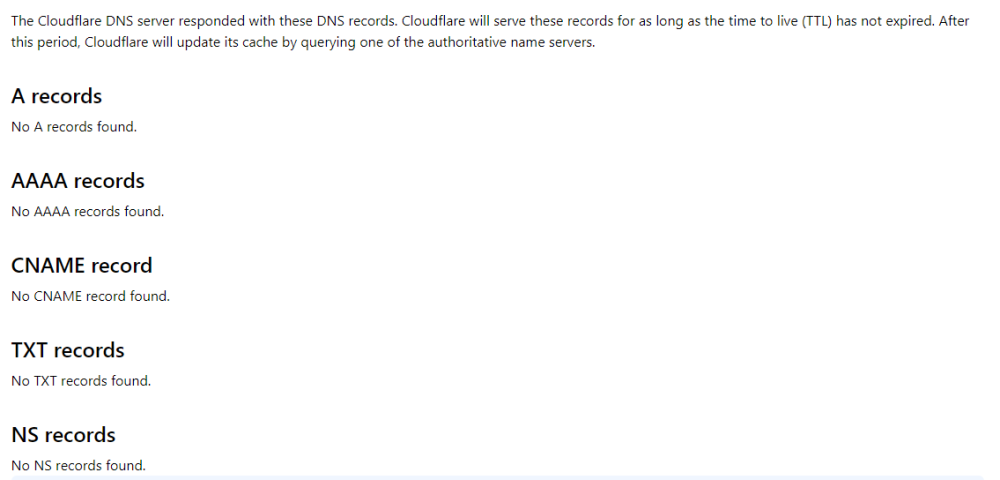
http://knownIPAddress redirects to xxxxxxx.unraid.net which can't be reached. https://www.nslookup.io/domains/xxxxxxx.unraid.net/dns-records/ doesn't look like there are any records
-
Unraid Version: 16.11.5 Docker Containers : Yes... 20 or so of them... including Swag, PiHole and lots of others that SHOULDN'T effect networking My server has stopped being able to be accessed by the FQDN that is provided by Unraid Connect. Connect says it can see my server and it is connected, but my FQDN shows as not being able to access the server which is correct, both locally and away from my network. When I try to connect I get This site can’t be reached xxxxxxx.unraid.net’s DNS address could not be found. Diagnosing the problem. DNS_PROBE_POSSIBLE When I try to access https://knownIPAddress I get a 404 not found. I can access docker containers like krusader via knownIPAddress:Port# without problem. I can boot the server up in web GUI mode and it appears to be working well. I have a unifi network with pihole dns turned off for now, just the default DNS setup (It's probably DNS). Does anyone have any suggestions
-
I apologize if this has been asked already but I've done a quick search and couldn't find the answer.... How do I set up the reverse proxy to point to a server that isn't hosted on the same docker network? i.e. point it to a different server all together w/ a different IP? For instance I tried the following to point to my pihole...but it doesn't seem to work # make sure that your dns has a cname set for pihole and that your pihole container is not using a base url server { listen 443 ssl; listen [::]:443 ssl; server_name pihole.*; include /config/nginx/ssl.conf; client_max_body_size 0; # enable for ldap auth, fill in ldap details in ldap.conf #include /config/nginx/ldap.conf; # enable for Authelia #include /config/nginx/authelia-server.conf; location / { # enable the next two lines for http auth #auth_basic "Restricted"; #auth_basic_user_file /config/nginx/.htpasswd; # enable the next two lines for ldap auth #auth_request /auth; #error_page 401 =200 /ldaplogin; # enable for Authelia #include /config/nginx/authelia-location.conf; include /config/nginx/proxy.conf; resolver 192.168.1.1 valid=30s; set $upstream_app 192.168.1.129; set $upstream_port 80; set $upstream_proto http; proxy_pass $upstream_proto://$upstream_app:$upstream_port; proxy_hide_header X-Frame-Options; } location /admin { # enable the next two lines for http auth #auth_basic "Restricted"; #auth_basic_user_file /config/nginx/.htpasswd; # enable the next two lines for ldap auth #auth_request /auth; #error_page 401 =200 /ldaplogin; # enable for Authelia #include /config/nginx/authelia-location.conf; include /config/nginx/proxy.conf; resolver 192.168.1.1 valid=30s; set $upstream_app 192.168.1.129; set $upstream_port 80; set $upstream_proto http; proxy_pass $upstream_proto://$upstream_app:$upstream_port; proxy_hide_header X-Frame-Options; } }
-
6.9.0-beta 35 uses samba 4.12.9
-
I currently have 2 instances of icloudpd running (one for my iphone and one for my wife's) downloading pictures to my server and using photostructure to serve them out.




