





Anon
Members
-
Joined
-
Last visited
Everything posted by Anon
-
Thanks. Its currently running. I'll report back when its done. Did a short self teast before that and it completed without error. And I also had to set the spin down delay from "2 hours" to "never".
-
Seems diagnostics are already prettya anonymized when looking through them (even emails etc.) so good job. I assumed it just had absolutely everything listed there but when going through it its not that critical. Maybe Syslog but to be fair you need that to troubleshoot. tower-diagnostics-20230426-1513.zip
-
@trurloh I just meant the diagnostic file as a way of transmitting it. I do not plan on conversing via PMs. I want everyone to profit from the solutation but not always (in my opinion) is every bit of information in the diagnostics really needed for the whole wide world to see
-
@JorgeBHi I sent you the diagnostics via PM. Hope thats alright. I am a bit wary of posting it for all to see publically. I am okay with posting parts that are related to the error here afterwards so people in the future can find this thread and figure it out for themselves.
-
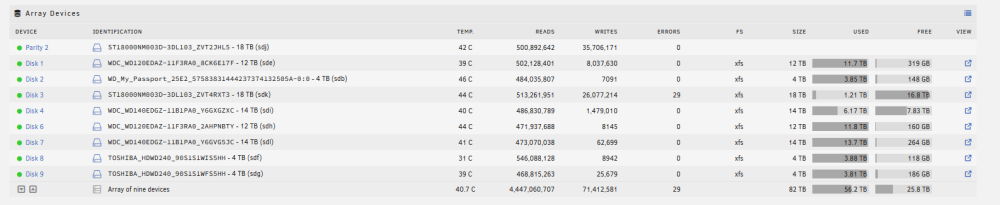
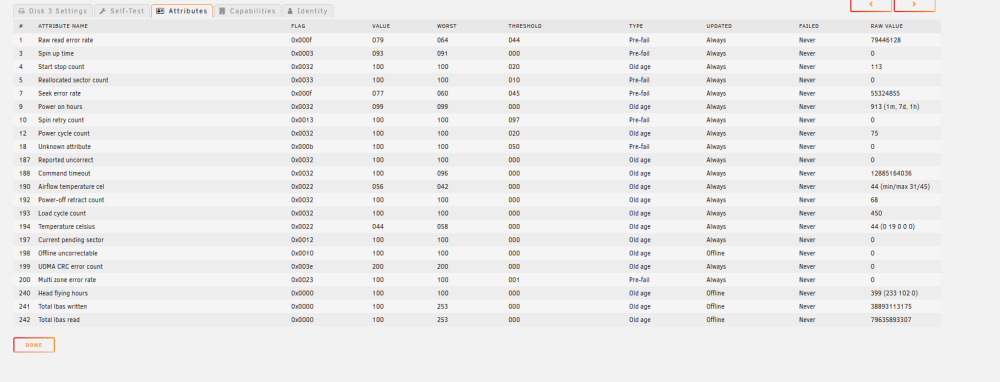
Hi, just a moment ago I got 29 read errors on my drive: I immediately checked the smart data and it looks like this: The Raw read error rate is going crazy and keeps going higher. The same is going up for the "Parity 2". All other drives have Raw Value of Zero. Both Parity2 and the Disk3 are the 2 newest drives (exos) and are different to the rest. I also dowloaded the full diagnostics. If needed I will upload them but for now the syslog entry of that event: [...] Apr 26 06:54:40 Tower move: error: move, 392: No such file or directory (2): lstat: /mnt/cache/StorJ_3/Data/storage/pieceinfo.db-shm Apr 26 07:00:28 Tower move: error: move, 392: No such file or directory (2): lstat: /mnt/cache/StorJ_4/Data/storage/blobs/ukfu6bhbboxilvt7jrwlqk7y2tapb5d2r2tsmj2sjxvw5qaaaaaa/zo/m7zkbhmdwijuxw3qqhtdilyvn44xb6mcgl344kzdpnimlheyka.sj1 Apr 26 07:01:17 Tower kernel: mpt3sas_cm1: log_info(0x31080000): originator(PL), code(0x08), sub_code(0x0000) ### [PREVIOUS LINE REPEATED 20 TIMES] ### Apr 26 07:01:17 Tower kernel: sd 36:0:2:0: [sdk] tag#4429 UNKNOWN(0x2003) Result: hostbyte=0x00 driverbyte=DRIVER_OK cmd_age=2s Apr 26 07:01:17 Tower kernel: sd 36:0:2:0: [sdk] tag#4429 Sense Key : 0x3 [current] Apr 26 07:01:17 Tower kernel: sd 36:0:2:0: [sdk] tag#4429 ASC=0x11 ASCQ=0x0 Apr 26 07:01:17 Tower kernel: sd 36:0:2:0: [sdk] tag#4429 CDB: opcode=0x88 88 00 00 00 00 00 81 13 0a b8 00 00 04 00 00 00 Apr 26 07:01:17 Tower kernel: critical medium error, dev sdk, sector 2165509584 op 0x0:(READ) flags 0x4000 phys_seg 29 prio class 0 Apr 26 07:01:17 Tower kernel: md: disk3 read error, sector=2165509520 Apr 26 07:01:17 Tower kernel: md: disk3 read error, sector=2165509528 Apr 26 07:01:17 Tower kernel: md: disk3 read error, sector=2165509536 Apr 26 07:01:17 Tower kernel: md: disk3 read error, sector=2165509544 Apr 26 07:01:17 Tower kernel: md: disk3 read error, sector=2165509552 Apr 26 07:01:17 Tower kernel: md: disk3 read error, sector=2165509560 Apr 26 07:01:17 Tower kernel: md: disk3 read error, sector=2165509568 Apr 26 07:01:17 Tower kernel: md: disk3 read error, sector=2165509576 Apr 26 07:01:17 Tower kernel: md: disk3 read error, sector=2165509584 Apr 26 07:01:17 Tower kernel: md: disk3 read error, sector=2165509592 Apr 26 07:01:17 Tower kernel: md: disk3 read error, sector=2165509600 Apr 26 07:01:17 Tower kernel: md: disk3 read error, sector=2165509608 Apr 26 07:01:17 Tower kernel: md: disk3 read error, sector=2165509616 Apr 26 07:01:17 Tower kernel: md: disk3 read error, sector=2165509624 Apr 26 07:01:17 Tower kernel: md: disk3 read error, sector=2165509632 Apr 26 07:01:17 Tower kernel: md: disk3 read error, sector=2165509640 Apr 26 07:01:17 Tower kernel: md: disk3 read error, sector=2165509648 Apr 26 07:01:17 Tower kernel: md: disk3 read error, sector=2165509656 Apr 26 07:01:17 Tower kernel: md: disk3 read error, sector=2165509664 Apr 26 07:01:17 Tower kernel: md: disk3 read error, sector=2165509672 Apr 26 07:01:17 Tower kernel: md: disk3 read error, sector=2165509680 Apr 26 07:01:17 Tower kernel: md: disk3 read error, sector=2165509688 Apr 26 07:01:17 Tower kernel: md: disk3 read error, sector=2165509696 Apr 26 07:01:17 Tower kernel: md: disk3 read error, sector=2165509704 Apr 26 07:01:17 Tower kernel: md: disk3 read error, sector=2165509712 Apr 26 07:01:17 Tower kernel: md: disk3 read error, sector=2165509720 Apr 26 07:01:17 Tower kernel: md: disk3 read error, sector=2165509728 Apr 26 07:01:17 Tower kernel: md: disk3 read error, sector=2165509736 Apr 26 07:01:17 Tower kernel: md: disk3 read error, sector=2165509744 Apr 26 07:02:02 Tower sSMTP[18019]: Creating SSL connection to host Apr 26 07:02:02 Tower sSMTP[18019]: SSL connection using TLS_AES_256_GCM_SHA384 Apr 26 07:02:03 Tower sSMTP[18019]: Sent mail for [email protected] (221 2.0.0 closing connection) uid=0 username=xxx outbytes=767 [...] Can anyone advise me what the problem might be? Its a fairly new drive but I had a full preclear running without problems. It does not seem like the sectors themselves are defect (see Smart Values)., Cables I used are new in a Bundle (SAS - 4xSATA) and the others seem to keep working fine.
-
@Pjrezai if you have 2 memory slots used then you could try to just use one and see if it crashes. Then if it does switch out and only use the other. If its the memory I would assume the chances to be low that both are defective at once. As you moved to old hardware you could use the new hardware to run a trial version of unraid so that your main system can stay stable for now.
-
Heyo, after more ressearch on my own I ended up selecting the following Controller: Broadcom LSI 9300-16i (https://docs.broadcom.com/doc/12353308) I got it from ebay where it came preflashed in IT-Mode (https://www.ebay.de/itm/134141912239) LSI 9300-8i was listed here: https://wiki.unraid.net/Hardware_Compatibility and the 16i is technically just 2 8i on one card (also shows up as 2 controller) Also it shows up unter the ESXI 7.0U3 Compataibility list: https://www.vmware.com/resources/compatibility/search.php?deviceCategory=io&details=1&partner=5_bpartner&releases=578&page=1&display_interval=500&sortColumn=Partner&sortOrder=Asc Installing was very simple. I shut down my ESXI, added this controller, booted up. All Drives connected to the SAS Controller where showing. Set both 8i controllers to passthrough (getting an error that basically just meant I have to restart for it to take affect) restarted Gave my Unraid Server access to both controller Booted it and it was happy. Now I finally do not have to work with the tedium of vhd pointers to the physical disk that then get passed to the Unraid Server and those pesky SATA PCIe Cards that caused my server to crash when too many disks where added. Currently server is running strong for 24+ hours and the Disk that used to cause crashes on the server seems to be happily preclearing. If anything does happen I will update this. I hope this follow up helps anyone who comes across this in the future
-
Seems you got a sorta working stable mode now. This means you can try around seeing what exactly causes the error. Its gonna be a lot of effort as you have to wait many hours but you can at least start activating stuff again bit by bit and see how the server reacts. Otherwise: Maybe try to limit every docker & VM to just one CPU core via pinning and check again. Maybe its just one docker going berserk and taking up 100% CPU on all cores causing nothing else to work anymore?
-
What does the Unraid Servers Screen itself show? When I boot my Server I get a lot of Info during the Booting process and then once its done I get the IP Address of the Server and can then navigate to the UI. What is the Display output of your server during the boot process?
-
Also please post a screenshot of the message / error saying "no memory".
-
Hi everyone, TLDR: Anyone have a ESXI 7.0U3 with a SAS Controller they successfully passed through to Unraid and use? Situation: I have been having problems with 2 PCIE Sata Controllers Once I add a disk to a wrong Port on the card it causes the ESXI Host zu Crash once Preclearing / Parity Check starts. Experimenting with switching to the other PCIE Sata Controller caused multiple Errors on the disks connected to the same controller that nearly caused a full loss of a disk as unraid marked the disk defective and couldn't emulate it (Filesystem Error). But again only once preclearing was running for a while on one of those disks. Before that all seemed fine and manual mounting and copying of data ran fine. Because of that I am looking to finally set my ESXI up correctly and use a supported PCIE SAS Controller that I can pass right through to Unraid. I do not mind spending a bit more on the Controller to get a officially supported and tested model that will not cause immediate huge headaches for me. Plan: Pass through a supported PCIE SAS Controller directly to Unraid Have at least 8 Sata Ports / 2 SAS Ports on that Controller (more preferrable) Requirements: Compatability with ESXI 7.0U3 (e.g. https://www.vmware.com/resources/compatibility/search.php?deviceCategory=io&details=1&partner=5_bpartner&releases=578&page=1&display_interval=500&sortColumn=Partner&sortOrder=Asc) Compatibility with Unraid Run in IT Mode / Mode that enabled Unraid to manage them as individual disks without any RAID or the like Info I collected so far: Each SAS Port can be used with a breakout cable that converts it into 4 Sata ports LSI Branded SAS Controllers are preferrable for Unraid There might be problems with needing to flash the Firmware. But I couldn't find a exact example of a card listed in the ESXI 7.0U3 compatibility list and having a Unraid User use it within Unraid without problems. Questions: Is anyone running ESXI 7.0U3 with a SAS Controller? If so which one are you using? If you had to flash your card do you have a link to the Flashing process & Firmware files you used? Anything else I should be wary about?
-
You are a absolute Hero. THANKS! Files seem to be there on first glance. I will go check it a bit more to be sure. Next step would be to stop array again and then rebuild onto my disk.
-
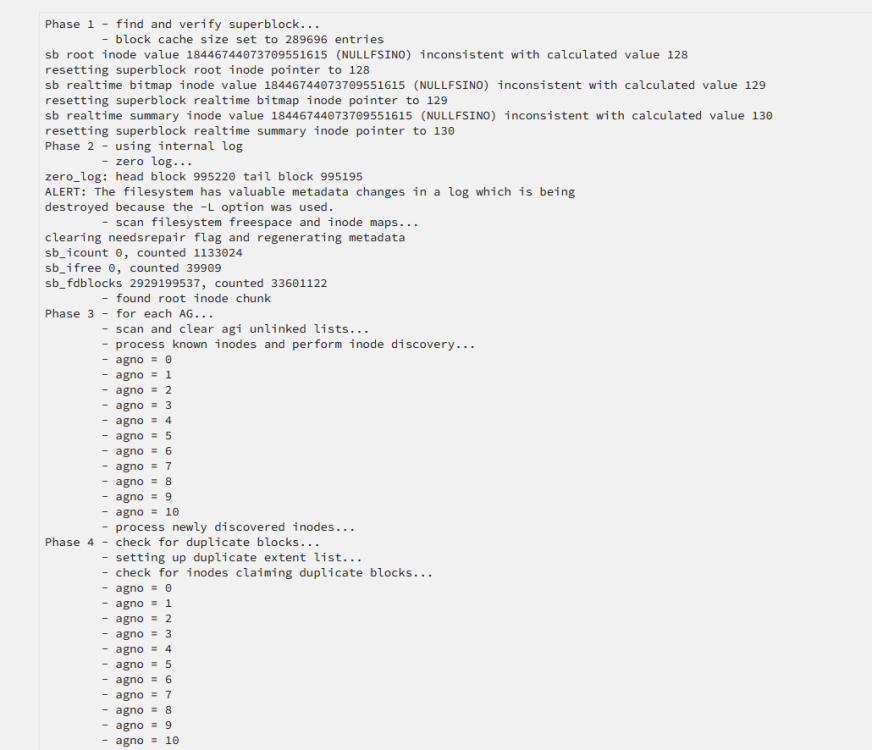
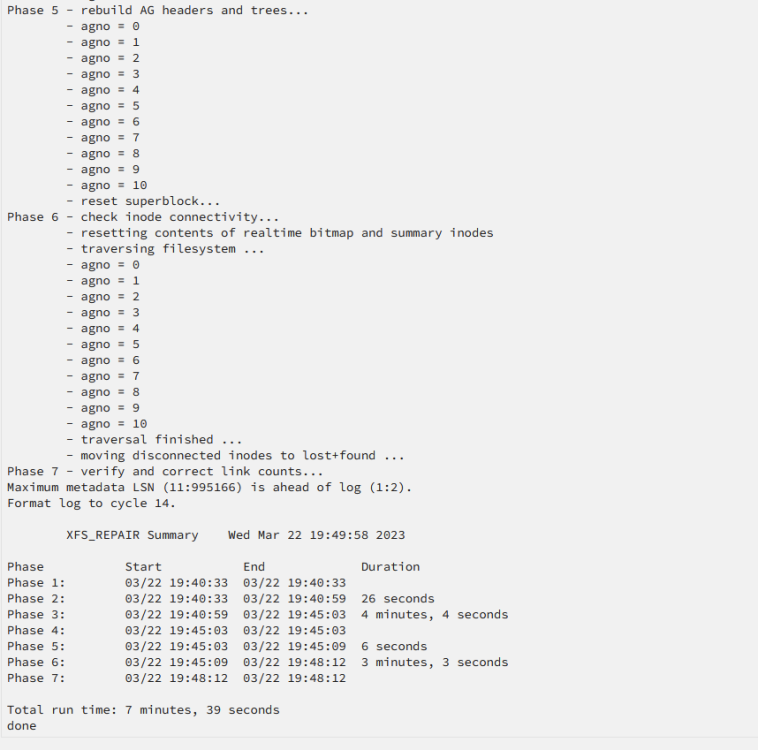
Ran the command sucessfully. For documentation if other users ever need it: However the disk still shows like this: @JorgeBIs this expected? Can i just follow the Guide you sent me and stop the array and start without maintenance?

-
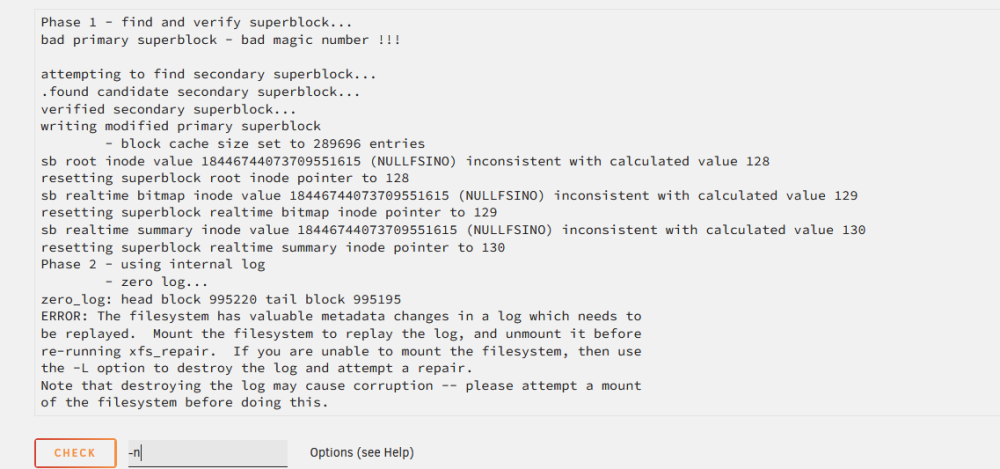
Thanks once again you are awesome. I ran the -v and got this: As you already correctly predicted this message I am now to not follow the advice of the "mount, replay the log, unmount it" but rather run it directly with "-vL" For other people in the future link to a different topic that explains why its okay to run "-L" to delete the log: I am gonna run that now and report back afterwards
-
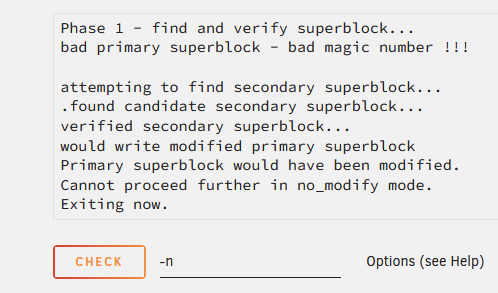
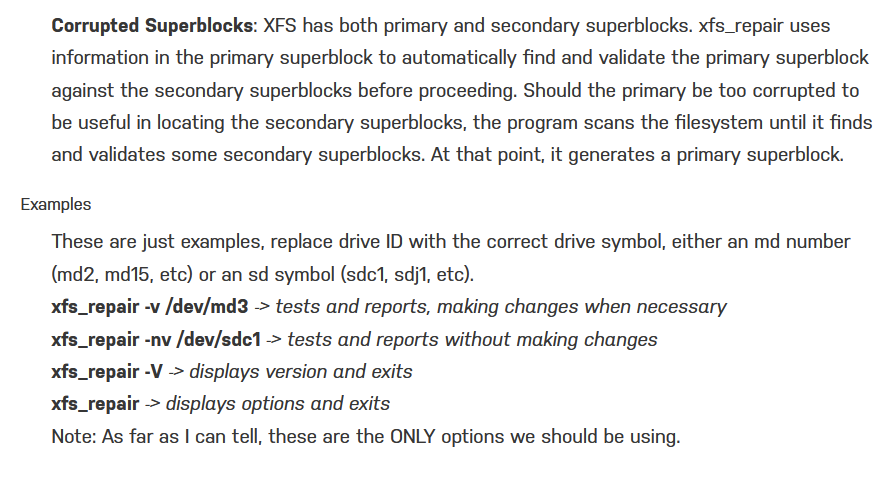
@JorgeBThanks so much for your quick response. I read through the link you sent and due to my File System being XFS I ran the check with the parameters -nv. I got the following output: If I understand this correctly the command says it would write a modified primary superblock. Is it correct that the way to move forward from here is to execute the Check again with the "-v" parameter alone? Information that are linked to the shown error: I apologize in advance for asking any small step but I just want to be absolutely certain I do not damage the files that might still be on the disk.
-
Hi, I have currently lost access to parts of my data and hope you guys can help me save my data. TLDR: Disk should be healthy but parity might have some slight errors resulting in emulated content being unmountable Scenario: I run 2 Unraid Servers via my ESXI Server This morning I wanted to finally add a new 18TB Drive to my Unraid server. For that I added the sata cable to a new PCIE card I inserted together with some other disks to switch from a different PCIE to Sata card that had caused problems in the past when trying to add this 18TB Drive. (Full on Crash of the Host Server) I passed the disk through to my Secondary Test Unraid Server for pre clearing Disk available. To test all is working well I mount it with unassigned devices with a filesystem and copy ~50GB of stuff onto it to be sure its working just fine. All goes well I start the Preclear. All seems well. Suddenly my main Unraid Server is reporting problems and get the following 2 Mails: Event: Unraid Disk 7 SMART health [85] Subject: Warning [TOWER] - unknown attribute (failing now) is 93824992236885 Description: WDC_WD140EDGZ-11B1PA0_Y6GVG5JC (sdg) Event: Unraid array errors Subject: Warning [TOWER] - array has errors Description: Array has 1 disk with read errors Importance: warning Disk 1 - WDC_WD120EDAZ-11F3RA0_8CK6E17F (sdd) (errors 397) While checking Unraid I notice 100% CPU usage. Disk 1 gets disabled. Has around ~800 Errors in Unraid UI, Disk 7 has around 600 Errors I shut the Unraid Server + whole ESXI server down shortly after and do some experimenting while booting my ESXI a few times and decide to go back to my old PCIE Card I disconnect the 18TB fully. I put in the old PCIE to Sata card and connect the drives again. I boot all up again and don't notice that at this moment already the emulated disk was probably not readable I remove the disabled disk, start array, stop it immediately, add it again Now I start the array to start the rebuild on the same disk. After around 1TB of the 12TB rebuild that was happening on the side without any Read or Write Errors I notice the "Unmountable" Error. After reading up on it I verify that this is not good . I also notice all files on the drive are not available due to this.. I stop the array. Restart the Unraid server. Remove the Disk again and just start it with a missing disk to see if it still shows Unmountable. As it still shows unmountable I left it there while making sure no Processes or Dockers were running to further damage anything and wrote this post. My personal interpretation: Both Disk 7 and 1 are totally fine phyiscally and any small smart value change will have been caused by the PCIE to Sata Controller Error As Both Disk 7 and 1 had errors I assume the file system of the emulated disk is getting jumbled. I think 99.9% of Parity and 99.9% of the Disks content should be fine. I want to be sure that anything I do does not make the situation worse so I am waiting on messages here before trying anything further. I have a backup of the most critical data. But there is still a good chunk of data on that drive that would be very bad to loose. I hope I can still get some support on this topic even if I am using a ESXI. I do not expect any help on the problems relating to the ESXI itself but just wanted to be transparent about what happened. Basically just a isolated view on data recovery in this scenario with me figuring out by myself why this was caused in the first place. tower-diagnostics-20230322-1902.zip
-
Hi, thanks for the link @trurl this explains it perfectly (at least at a first quick skim). And somehow I didn't find that when searching earlier. Feel stupid now. Especially since it's a easy to find Wikipedia Link... Thanks a ton!
-
@itimpi -> The confusion is on how exactly it mathematically works. There is no confusion in how it works from a outside perspective and what it means for operating Unraid. For a normal End User this information is completely irrelevant but I personally would like to dive deeper into how it works on a operation by operation level. I don't just want to know that it works I wanna know why and how exactly it works. I spent a few hours trying to find this info but it seems like nobody has ever actually answered in detail and just referred to "generic" algorithms on how a dual parity works in other systems. I'd be willing to put up a small bounty if someone can actually answer me this. (As long as its allowed to offer such a bounty in this forum)
-
Hello, TLDR: I want to know (in broad terms) how exactly Unraids implementation of Parity2 works. the way single parity works is very easy to understand. When it comes to dual parity there are a lot of forum posts, reddit posts, youtube videos, the Unraid Wiki itself talking about "reed Solomon code" or "p+q parity" etc. I understand the practical effects of the second parity that Unraid provides and I generally understand the mentioned parity algorithms. But those concepts don't really work with how Unraid is actually implementing them. Unraid keeps "Parity 1" the same so it still calculates the Odd / Even situation. Parity 2 is somehow able to recreate one disk by itself (if the other parity and one drive fails) and also recreate 2 drives together with the information parity 1 can provide. Is there some sort of Search term for the algorithm used that I can use to find out more? All the "normal" dual parity mathematics always assume both parity drives to work the same with their algorithm and do not work with 2 different types of parity. Or spread the parity data between the drives (Like Raid 6) which is also not what unraid does. Is anyone well versed enough to point me in the right direction? Or is this a totally new algorithm Unraid developed (modified) and is keeping as a "Trade secret"? I am currently finishing up my master degree in this type of topic so I guess its mainly personal interest that is driving me to actually understand how this works mathematically. In a dual failure scenario parity 1 can say if the 2 values of the added disks together should be odd or even. (if even either 0,0 or 1,1, if odd either 0,1 or 1,0). The second parity's "Magic" needs to find out which of those 2 options it is based on what it has stored itself. (I hope this category is correct. Its not really "Support" and more a question about understanding but I just copied the category from this post that also touched upon dual parity (sadly they never explain how its actually done):
-
Hi, just a headsup that caused me some headache if anyone else comes across it: When working with the ignore files list I accidentally had a empty line at the bottom that I didn't notice. This caused no files to be moved.





