





CaptainMorganCrunch
Members
-
Joined
-
Last visited
Everything posted by CaptainMorganCrunch
-
# btrfs fi show Label: none uuid: 9e7e00da-48c5-4dae-9371-25e83b91f33c Total devices 2 FS bytes used 1.09TiB devid 3 size 0 used 0 path MISSING devid 4 size 1.86TiB used 1.38TiB path /dev/nvme2n1p1 Label: none uuid: e6df60ce-29d8-483b-868d-789b591f608e Total devices 1 FS bytes used 72.97GiB devid 1 size 100.00GiB used 82.07GiB path /dev/loop2
-
Oops, didn't include a diagnostics. My bad. I installed the XPG 2TB drive back in and have a "Warning btrfs too many profiles" issue. The array still starts and runs from the Intel 2TB nvme, but based on searches, I'm wondering if I can go to Cache->Convert to Raid1 mode->Balance? unraid-diagnostics-20250216-1923.zip
-
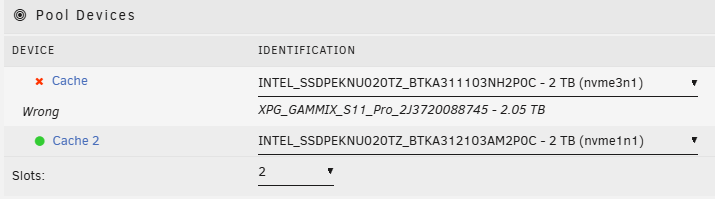
I have been using two 2TB Intel nvme drives as my cache pool. One of the drives started reporting read and write errors, so I removed it, put in a 2TB XPG 2TB NVME. XPG_GAMMIX_S11_Pro_2J3720088745 - 2.05 TB Unfortunately, it reported like 3 writes and then apparently disappeared and stopped reading/writing. In the meanwhile, I did a surface read/write test in HD Sentinel on the supposed bad 2TB drive and it was fine, no issues/errors. So I just went to put back the original Intel 2TB in unraid server, so its the original dual Intel nvme drives, but getting: I'm guessing that the issue is that the XPG is reporting 2.05TB and the Intel drives just 2.0TB and so I need to use a larger drive to get the array to start? Am I able to go to 1 slot using the Intel cache drive with data on it, start the array without formatting the cache drive, stop and re-add the Intel drive back to mirror cache pool? All without losing data? It doesn't look like I can select 1 slot. Another option would be to screenshot the current array, make a new config, set the array as it was, and tell it to start the array without formatting? Thanks in advance!

-
Update: Today, both unraid and my Windows PC upgraded syncthing to 1.27.12 and both sides now appear to be slowly syncing again. The out of sync counts are both decreasing slowly, as opposed to not decreasing at all the previous 24hours+. Sounds like I ran into a bug at 1.27.11 and 1.27.12 corrected it. I'll need to check for release notes at some point and see if I can confirm. Edit: All, a parity check is running (slowly), so that likely isn't helping, either. I've been getting unclean shutdowns from rebooting from webGUI. I've increased the graceful shutdown time from 90 to 120 seconds, hopefully that was my issue with dockers running and so on.
-
That looks like it worked. Though, I got: Thanks!
-
Correct, only using: /media <-> /mnt/user /config <-> /mnt/cache/appdata/binhex-syncthing I can only check now, but time is within a second from my second unraid box. The server was off for like 1-2 days (same motherboard, just different chassis and hdd ports used), I don't think that would have been enough to drift more than a few seconds, but this is probably the best lead I have. It appears that the syncing isn't progressing. I'm going to have to enable more verbose syncthing logging to find out what it is doing. It is stuck on something and not working itself out. Thanks
-
I've had this problem a few times now and probably time to see if I can prevent it. I have about 18TB synced between my unraid server, another unraid server and a Windows PC. I transferred the main unraid server from one chassis to a larger one, which makes all the hard drives change physical ports, but still present and accounted for and unraid sees all disks and can start the array no problem. The previous time I moved hdd's around, unraid's syncthing was saying there was like 10TB of files to be sync'd and it takes days and days to resolve itself. It doesn't appear to be sucking CPU and network speeds are in the Kb/s. But took like 4-5 days to reach 100% sync. Today, after moving the motherboard to the new chassis yesterday, it was saying around 400GB was out of sync with the other unraid server and 4TB was out of sync with the Windows PC and it's been around 77% sync'd since almost 24 hours. Given that the data shouldn't have changed on the Windows PC or on the unraid hard drives, I'm not sure wtf syncthing is doing all this time. Or even why it didn't have the same amount of data showing unsynced between the second unraid server and windows PC. Best case, I figure out what is happening and prevent it. Alternatively, I'd like to see what can be done about speeding up the resyncing. Anyone have any idea why it thinks a bunch of files are out of sync? Thanks
-
I have two unraid servers, both running 6.12.11. My primary unraid server upgraded fine but the second one is having issues. The first time I attempted upgrade, the first pop up window where you need to view release notes to proceed had some sort of coding issue where the expected words at the top didn't appear properly, but I proceeded with viewing release notes to continue the upgrade process. However, it just gets stuck with a popup: Performing actions Please keep this window open while we perform some actions Except it doesn't finish. I rebooted it from SSH and tried the upgrade again. This time the pop up printed words correctly and I again attempted to upgrade, but still stuck on "Performing actions". Any ideas? Thanks in advance.

-
Isn't this solved by leaving your unraid cloud connect credentials to your technically inclined heirs? I mean, in the old days, you had kids to help on the farm and take care of you when you are a senior. Now, you have kids to carry on your digital projects.
-
Is this still currently working in 6.12.9? I had eth0 and eth1 (onboard motherboard) gigabit nics in bond0 already configured. I have eth4 which is a 2.5Gbps NIC. I added it to bond0 and created the bonding.conf file selecting eth4, but on reboot, it still shows eth0 as primary-slave instead of eth4. # cat /proc/net/bonding/bond0 Ethernet Channel Bonding Driver: v6.1.82-Unraid Bonding Mode: fault-tolerance (active-backup) Primary Slave: eth0 (primary_reselect always) Currently Active Slave: eth0 MII Status: up MII Polling Interval (ms): 100 Up Delay (ms): 0 Down Delay (ms): 0 Peer Notification Delay (ms): 0 Slave Interface: eth0 MII Status: up Speed: 1000 Mbps Duplex: full Link Failure Count: 0 Permanent HW addr: ac:1f:6b:e6:f7:8a Slave queue ID: 0 Slave Interface: eth1 MII Status: up Speed: 1000 Mbps Duplex: full Link Failure Count: 0 Permanent HW addr: ac:1f:6b:e6:f7:8b Slave queue ID: 0 Slave Interface: eth4 MII Status: up Speed: 2500 Mbps Duplex: full Link Failure Count: 0 Permanent HW addr: b4:4b:d6:27:26:19 Slave queue ID: 0 # cat /boot/config/modprobe.d/bonding.conf options bonding primary=eth4 Am I doing something wrong, or do I need to make some change to make eth4 become eth0? Thanks in advance! Edit: I just changed the 2.5Gbe nic to eth0 and then discovered my switch's uplink cable was bad, despite showing link. After replacing the bad cable, I've got my desired setup which is 2.5Gbps nic primary, with two failover gigabit nics.
-
This is still a problem in 6.12.4. I had replaced a failed disk on a 2 parity disk array and it failed in the first 20 minutes or so and just before I went to shut it down to swap it out, another disk reported failed. I shut it down and replaced both disks with larger ones. When I restarted unraid, the array was started and both disks just showing as "missing". I went to stop the array and had the problem with docker preventing it from unmounting. I ran the first command, umount /dev/loop2, but it was umount /var/lib/docker that stopped the array. I was then able to select the two replacements and start the array.
-
Sent DM as well.
-
I would suggest ignoring the Jumbo frames MTU issue if the NIC is 10Gbps and not eth0. I would think its a pretty common use case to have a gigabit NIC for Internet access and 10Gbit for local LAN network. My only other feature suggestion is to add white space between the error/warning sections and the ignored sections for improved visual reading.

