





Sandwich
Members
-
Joined
-
Last visited
Everything posted by Sandwich
-
That would suddenly be a problem after years of operation?
-
Yes, but I neither know why it started working, nor do I know if it will stop working again once I disconnect the keyboard/mouse/monitor. Is there any indication in the diagnostics as to what the issue was?
-
In case there's a difference, here's the diagnostics via the GUI, after starting the array (although not before the parity check is complete; that'll take another 28 hours). The diagnostic in my previous post was gathered while attached to the server with a keyboard, mouse, & monitor. cube-diagnostics-20250413-1246.zip
-
🤦♂️ And of course the very act of me connecting a keyboard, mouse, and monitor to the server somehow made it visible on the network again to other machines. 🧐
-
Apologies for taking so long... it's been a heck of a few weeks due to unrelated issues. cube-diagnostics-20250413-1225.zip
-
I can't get a response at the usual IP I have assigned to the server's NIC, nor from http://cube (the name I chose instead of tower) or http://tower. How does one troubleshoot in that situation? The server appears to be booting and functioning, I just can't see proof of its existence on the network.
-
Any takers? :-/
-
How do I roll back to a backup DB?
-
Nope. I mean, I have a Facebook account, but I don't think anything on the Unraid box is aware of or using it.
-
The Unraid logs for the Plex docker show this message looping over and over: The dump file and related log are attached. Basically, do I pursue this issue here, or with Plex directly? 2ab81281-b060-4aea-59da27ae-8905a399.dmp 2ab81281-b060-4aea-59da27ae-8905a399.log
-
Ok, that's odd! I had assumed that my PC, via a WiFi connection to my router, wouldn't be able to see the Unraid box via the `http://cube/` URL, but it can! The reason I assumed that was because my Android smartphone, connected to my router via Wifi, was never able to access the Unraid box via that URL—I've always had to type in the internal IP of 10.0.0.10. I'd always assumed it was some sort of Wifi issue, but I see now it's not. Why would my PC be able to connect via that URL, but my phone not?
-
For years, I've had an Unraid box and my main PC wired up to the same switch, and from the switch, a network cable connects both to the router. The Unraid box was accessible via the name I gave it, "Cube", at http://cube/. I just relocated my PC to another floor entirely, and I don't want to run a cable for it if I don't have to, so I'm trying Wifi. The Unraid box will be connected directly to the router now as well, in case that makes a difference. So, how can I go about connecting to a machine on the wired network of the router, from the wireless network of the router?
-
How exactly would I do that? I don't see an IP configuration field anywhere...
-
Hi all, I'd love some help in getting two Bedrock servers to run simultaneously. Below is the configuration I have: The top Creative world is the "default" - it has the normal ports, is visible on the LAN, etc. But the kids want a survival-only world, so I'm trying to set that up now that 1.18 is out. With the above configuration, on the same home network, in Minecraft under "Play" -> "Friends" tab -> "LAN Games" heading, it shows the Creative server, but not the Survival one. To see the Survival server, I have to click over to the "Servers" tab, click on "Add Server" at the bottom and fill in the details (IP 10.0.0.10, port 19144). Once that's saved, I see the Survival server listed under the "Additional Servers" heading in the "Servers" tab, but it constantly says "Survival - Locating..." on the button. Nevertheless, if I click the button (still in the "Servers" tab) and click "Join server", it connects. However...! If I go back to the "Friends" tab, I now see both the Creative and the Survival servers, but if I click on the Survival server, I get joined to the Creative server! It's not a copy of the Creative server either, but the actual Creative server—any changes such as block placement or player location are "carried over" and shown if I connect directly to the Creative server. Also, if I stop the Creative server's docker container, leaving the Survival server's container running, I can no longer connect to (what should be) the Survival server in the Friends tab. Any ideas?

-
This situation is going from bad to worse. Now I have three disks not working, although only two of those are actually connected. I'm beginning to suspect the PSU might be the (or at least a) culprit. I had a SATA 4x splitter on one of the PSU cables, with all 4 ends connected to drives (even though some of those drives weren't connected via SATA data cables), and drives weren't getting recognized consistently at all. When I unplugged a couple of the drives from the 4x splitter, and only left the drives that actually had data cables as well, it seemed to work more consistently. At this point, with as many drives (apparently) FUBAR as I have, I think the best way forward would be to try as much as possible to "undo" the data MOVE I stupidly did from the 6Tb to the various 3Tbs using unBalance. The 6Tb drive has largely sat unused since that move, so it should be possible to undelete much of my data from there. What's the best way to go about doing this? cube-diagnostics-20211030-1115.zip
-
Disk _5_ dropped offline? Don't you mean Disk 4?
-
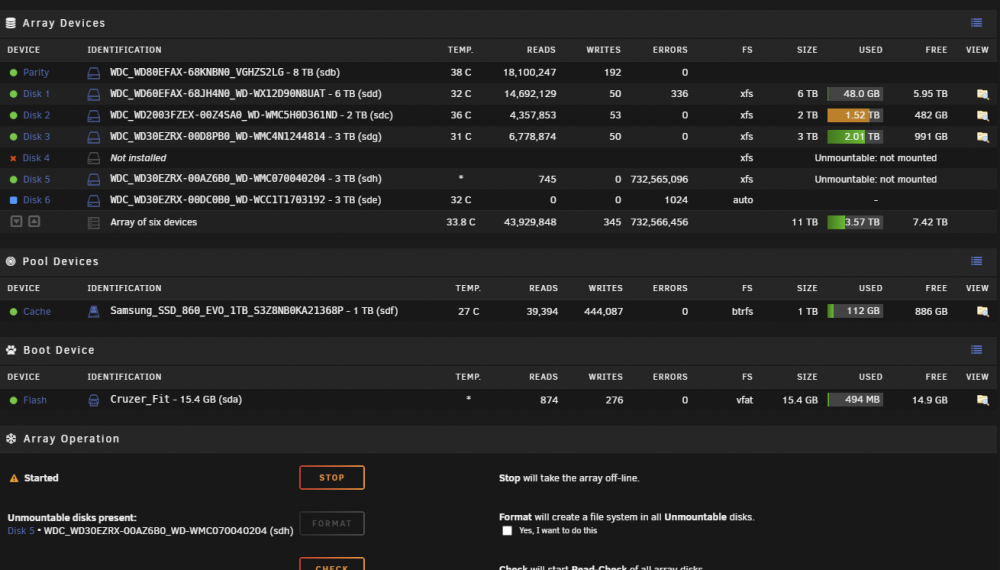
I'd love to use unBalance, but it doesn't recognize that either of the drives that have issues have content. Currently, I'd love to get any emulated data off both disk 4 and 5 (probably moving it all to disk 1): Is there a bash command to run, or can binhex-krusader help or...? I'm on Windows. cube-diagnostics-20211025-1701.zip
-
Ok, so if I have a drive that's no longer being recognized and its contents are being emulated, what's the best way to copy or move those contents to some other drive, so that they no longer need to be emulated?
-
Well, I suspect disk 5 has fully bit the bullet. I hear those telltale electronic clicks coming from its drive bay, and now unRAID reports it as unmountable, despite it being attached directly to the MB. cube-diagnostics-20211019-2140.zip
-
I had rebooted the system to see if that brought the data back, but now none of those three drives were detected. -.- Gonna see if they come back after plugging into the onboad SATA.
-
Is there any indication if this is possibly a problem with the SATA card (again)?
-
I've replaced cables, and now all drives seem to be getting recognized consistently. So I started the array and it began a parity rebuild, which finished "successfully". During that process, two drives reported nearly-identical numbers of read errors: WDC_WD30EZRX-00D8PB0_WD-WMC4N1244814 - 3 TB (sdf) with 732,487,239 errors (disk 3), and ST3000VN007-2E4166_Z730JMM1 - 3 TB (sdg) with 732,562,482 errors (disk 4). Additionally, I do appear to have lost all the data on disks 3, 4, and 5, despite them still showing as partly/mostly full. Finally, when I try to browse the filesystems of 3, 4, or 5, it just says "No listing: Too many files". What's going on? Fresh diags attached. cube-diagnostics-20211019-1139.zip
-
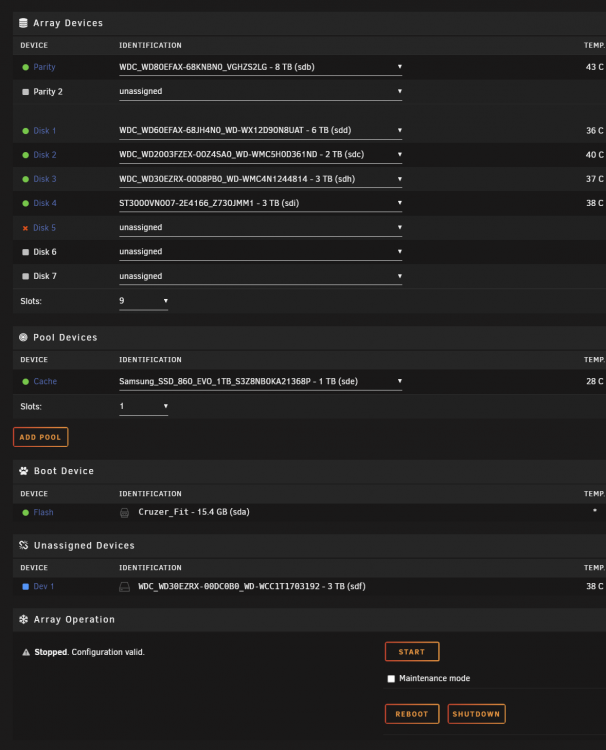
Ahh, great, thanks. So I clicked to add that disk to the array as disk5, but the page seemed to refresh and now the disk has disappeared (see attachment—I swear it was there a moment ago!). Fresh diagnostics posted. cube-diagnostics-20211018-2029.zip
-
Ok, so I have the SATA card, and it seems to at the very least allow unRAID to recognize drives plugged into it. The other card did that as well, so I'm not sure what that's worth. In any case, I have a crucial question: I have TWO disks that were excluded from the array when I had to stop using the previous SATA card, and I'm not sure which one was "disk5". The only way I have to reliably identify them is by their manufacturer ID (eg. WD30EZRX-00DC0B0). Can you tell me which was disk5? If it helps, I'm attaching an earlier diagnostic from Sep 26th; I think I might have had all the disks attached at that point. Alternately, if there's no way to tell what the manufacturer ID was for disk5, is there a way to browse the files on the disk without having to add it to the array? I'm pretty sure disk5 had lots of data, and disk6(?) was empty. cube-diagnostics-20210926-2115.zip
-
When you say "new config", do you mean to effectively recreate the current array config, with the addition of Disk 5? Or create a new, separate, second array (is that possible?) with Disk 5 as the only assigned device?


