





theruck
Members
-
Joined
-
Last visited
Everything posted by theruck
-
please correct me if i am wrong power loss on the S3 suspended system. if unraid does assume S3 -> no power = bad parity then it is equivalent to assuming that the S3 = bad parity because there is no difference for the spun down drive if it was spun down and disconnect with or without RAM being populated or not i have tested it during writes and if you S3 sleep during an intesive write operation the S3 takes longer because of the data being written to the drives if we assume that the parity is OK and we write to the drive and do S3 sleep we can assume that the parity drive is written correctly. any process writing to the drive would fail the write on the S3 suspend event anyway and will never be resumed writing on the wake so what is on the data drive is written to the parity as well and the write operation will fail on the process level which has nothing to do with parity integrity. hence the reason why i had never a parity error on those 78 dirty reboots because they all happen on an S3 suspended state.
-
do you know how it gets created? it does not exist then afeter dirty reboot it is created based on some logic by some process which detects the shutdown was not clean even before the array is started
-
this is same like you run the parity check today and it is OK then you have a hard drive failure a month later you do not know that the parity is still OK and would need to confirm it with a check. Its only assumption that the parity is OK same as i want it with my "dirty" reboot though there is nothing dirty about my reboot as the drives are already spun down and disconnected from power.
-
this is fine if you run your server 24/7 which has been explained above is not my case
-
i am not overlooking the fact, the vendor is overlooking the fact that this behaviour should be configurable because i have proof that the vendor is 100% of the checks wrongly assuming the parity is not in tact. Plus you are overlooking the fact that this is about the possibility to disable the incorrect assumption and not about giving me advices to buy an UPS which btw just proves you have not read the topic as it is about energy conserving and quick wake posibility not about electricity interruption. So if you have nothing to say to the topic of disabling parity check on dirty reboots and want to promote UPS usage just do it in different topic please. Or maybe you can try to explain how can a parity not be in tact on a spun-down drive. That would actually help.
-
if you have unclean shutdown 100 times and the parity is always 0 errors after the check i would say that the shutdown was not so unclean and it should be addressed more precisely as it has been just 700hours of hard drive and power over-usage
-
many of those were caused by unraid itself as it never did a proper shutdown in the previous versions in 2020 with my motherboard and recently its the unclean from suspend to shutdown due power loss as described above and the s3 sleep does not do its job even today properly as the inactivity measurements are so vague
-
Action Date Size Duration Speed Status Errors Parity-Check 2022-10-18, 21:57:37 4 TB 11 min, 7 sec Unavailable Canceled 0 Parity-Check 2022-10-18, 19:47:29 4 TB 4 min, 45 sec Unavailable Canceled 0 Parity-Check 2022-10-18, 19:23:39 4 TB 1 hr, 16 min, 55 sec Unavailable Canceled 0 Parity-Check 2022-10-18, 16:33:48 25.2 MB 6 hr, 49 min, 22 sec 162.9MB/s OK 0 Parity-Check 2022-10-16, 22:01:08 4 TB 4 hr, 5 min, 17 sec Unavailable Canceled 0 Parity-Check 2022-10-15, 10:09:35 5.1 MB 1 hr, 22 min, 16 sec 810.5MB/s Canceled 0 Parity-Check 2022-10-13, 11:45:25 4 TB 2 hr, 27 min, 24 sec Unavailable Canceled 0 Parity-Check 2022-10-10, 19:14:12 4 TB 4 hr, 35 min, 21 sec Unavailable Canceled 0 Parity-Check 2022-10-06, 17:42:08 4 TB 8 hr, 37 min, 33 sec Unavailable Canceled 0 Parity-Check 2022-09-30, 10:25:17 4 TB 1 hr, 23 min, 38 sec Unavailable Canceled 0 Parity-Check 2022-09-02, 09:19:40 87.8 MB 15 hr, 49 min, 34 sec 70.2MB/s OK 0 Parity-Check 2022-08-18, 17:52:00 25.5 MB 6 hr, 55 min, 37 sec 160.4MB/s OK 0 Parity-Check 2022-07-20, 11:17:07 4 TB 1 hr, 30 min, 35 sec Unavailable Canceled 0 Parity-Check 2022-06-21, 15:19:47 150 MB 1 day, 16 hr, 49 min, 8 sec 27.2MB/s OK 0 Parity-Check 2022-06-15, 16:53:03 69 MB 18 hr, 43 min, 30 sec 59.4MB/s OK 0 Parity-Check 2022-06-13, 10:18:47 56.5 MB 15 hr, 19 min, 53 sec 72.5MB/s OK 0 Parity-Check 2022-06-10, 16:00:29 15.4 MB 4 hr, 10 min, 2 sec 266.7MB/s OK 0 Parity-Check 2022-06-10, 11:46:42 4 TB 2 hr, 49 min, 14 sec Unavailable Canceled 0 Parity-Check 2022-06-07, 09:42:35 266 MB 15 hr, 49 min, 30 sec 70.2MB/s OK 0 Parity-Check 2022-05-24, 11:05:18 271 MB 17 hr, 35 min, 10 sec 63.2MB/s OK 0 - 2022-05-15, 09:22:06 88 MB 15 hr, 52 min 70.0MB/s OK 0 - 2022-05-14, 09:24:25 59.5 MB 16 hr, 7 min, 54 sec 68.9MB/s OK 0 - 2022-05-10, 20:07:54 36.6 MB 9 hr, 54 min, 56 sec 112.1MB/s OK 0 - 2022-05-10, 08:08:54 260 MB 14 hr, 38 min, 48 sec 75.9MB/s OK 0 - 2022-04-29, 16:54:21 25.5 MB 6 hr, 54 min, 26 sec 160.9MB/s OK 0 - 2022-04-23, 16:24:33 25.5 MB 6 hr, 54 min, 27 sec 160.9MB/s OK 0 - 2022-04-16, 16:24:03 25.4 MB 6 hr, 53 min, 57 sec 161.1MB/s OK 0 - 2022-04-09, 16:36:12 26.2 MB 7 hr, 6 min, 6 sec 156.5MB/s OK 0 - 2022-04-03, 14:58:55 2 KB 21 hr, 28 min, 48 sec 51.7MB/s OK 0 - 2022-03-28, 00:26:57 2 KB 6 hr, 56 min, 50 sec 160.0MB/s OK 0 - 2022-03-20, 16:22:41 2 KB 22 hr, 52 min, 34 sec 48.6MB/s Canceled 0 - 2022-03-13, 08:21:19 2 KB 14 hr, 51 min, 11 sec 74.8MB/s OK 0 - 2022-03-06, 07:43:58 2 KB 14 hr, 13 min, 51 sec 78.1MB/s OK 0 - 2022-02-27, 08:31:19 2 KB 15 hr, 1 min, 12 sec 74.0MB/s OK 0 - 2022-02-20, 08:52:49 2 KB 15 hr, 22 min, 44 sec 72.3MB/s OK 0 - 2022-02-14, 09:34:04 2 KB 16 hr, 3 min, 58 sec 69.2MB/s OK 0 - 2022-01-30, 08:23:18 2 KB 14 hr, 53 min, 12 sec 74.7MB/s OK 0 - 2022-01-23, 08:50:05 2 KB 15 hr, 19 min, 57 sec 72.5MB/s Canceled 0 - 2022-01-16, 23:18:23 1 KB 6 hr, 52 min, 50 sec 161.5MB/s OK 0 - 2022-01-08, 23:36:07 2 KB 6 hr, 54 min, 39 sec 160.8MB/s OK 0 - 2021-12-28, 18:03:33 1 KB 6 hr, 52 min, 28 sec 161.7MB/s OK 0 - 2021-12-25, 22:05:12 1 KB 6 hr, 58 min, 30 sec 159.3MB/s OK 0 - 2021-12-12, 11:27:00 2 KB 17 hr, 56 min, 54 sec 61.9MB/s OK 0 - 2021-12-09, 19:45:11 1 KB 6 hr, 52 min, 13 sec 161.8MB/s OK 0 - 2021-12-05, 09:06:44 2 KB 15 hr, 36 min, 39 sec 71.2MB/s OK 0 - 2021-11-28, 09:04:41 2 KB 15 hr, 34 min, 34 sec 71.3MB/s OK 0 - 2021-11-21, 08:03:59 2 KB 14 hr, 33 min, 53 sec 76.3MB/s OK 0 - 2021-11-15, 16:18:10 1 KB 6 hr, 52 min, 49 sec 161.5MB/s OK 0 - 2021-11-14, 08:57:52 2 KB 15 hr, 28 min, 28 sec 71.8MB/s OK 0 - 2021-11-07, 00:16:10 2 KB 7 hr, 1 min, 4 sec 158.4MB/s OK 0 - 2021-10-31, 00:18:41 2 KB 7 hr, 3 min, 34 sec 157.4MB/s OK 0 - 2021-10-17, 00:14:27 2 KB 6 hr, 59 min, 21 sec 159.0MB/s OK 0 - 2021-09-11, 23:17:08 1 KB 6 hr, 56 min, 10 sec 160.2MB/s OK 0 - 2021-09-11, 10:30:07 1 KB 2 hr, 59 min, 59 sec 370.5MB/s Canceled 0 - 2021-09-05, 00:12:27 2 KB 6 hr, 57 min, 21 sec 159.8MB/s OK 0 - 2021-08-28, 20:30:33 1 KB 6 hr, 56 min, 30 sec 160.1MB/s OK 0 - 2021-08-14, 23:09:06 1 KB 6 hr, 54 min, 49 sec 160.7MB/s OK 0 - 2021-08-01, 00:10:28 2 KB 6 hr, 55 min, 22 sec 160.5MB/s OK 0 - 2021-07-26, 18:28:10 1 KB 13 min, 4 sec 5.1GB/s OK 0 - 2021-07-04, 18:13:08 2 KB 1 day, 58 min, 1 sec 44.5MB/s OK 0 - 2021-06-19, 21:27:28 2 KB 4 hr, 12 min, 22 sec 264.2MB/s OK 0 - 2021-06-12, 17:56:34 1 KB 6 hr, 57 min, 29 sec 159.7MB/s OK 0 - 2021-06-07, 17:16:26 - 1 min, 32 sec Unavailable Canceled 0 - 2021-05-29, 17:15:08 1 KB 6 hr, 57 min, 45 sec 159.6MB/s OK 0 - 2021-05-23, 00:13:23 2 KB 6 hr, 58 min, 17 sec 159.4MB/s OK 0 - 2021-05-15, 16:38:48 1 KB 6 hr, 57 min, 48 sec 159.6MB/s OK 0 - 2021-05-08, 19:57:41 1 KB 6 hr, 57 min, 37 sec 159.7MB/s OK 0 - 2021-05-02, 16:42:34 1 KB 1 hr, 17 min, 48 sec 857.1MB/s OK 0 - 2021-04-18, 09:00:14 2 KB 14 hr, 56 min, 59 sec 74.3MB/s OK 0 - 2021-04-10, 19:22:04 1 KB 6 hr, 57 min, 2 sec 159.9MB/s OK 0 - 2021-04-10, 11:21:18 - 20 min, 11 sec Unavailable Canceled 0 - 2021-04-07, 14:17:44 1 KB 6 hr, 47 min, 11 sec 163.8MB/s OK 0 - 2021-04-06, 20:16:19 1 KB 6 hr, 44 min, 25 sec 164.9MB/s OK 0 - 2021-04-04, 18:16:00 - 6 hr, 53 min, 4 sec Unavailable Canceled 0 - 2021-04-04, 10:26:33 - 14 min, 30 sec Unavailable Canceled 0 - 1970-01-01, 01:00:00 - Unavailable nan B/s OK - 2021-03-30, 20:37:41 3.1 KB 3 hr, 7 min, 34 sec 355.5MB/s OK 0 - 2021-03-20, 21:42:14 1 KB 9 hr, 13 min, 4 sec 120.6MB/s OK 0 - 2021-03-06, 20:10:11 1 KB 9 hr, 41 min, 22 sec 114.7MB/s OK 0 - 2021-02-27, 08:21:10 - 32 sec Unavailable Canceled 0 - 2021-02-15, 20:08:47 - 9 hr, 10 min, 3 sec 121.2 MB/s OK 0 - 2021-02-14, 23:30:27 - 13 sec Unavailable Canceled 0 - 2021-02-13, 10:33:36 - 1 hr, 8 min, 40 sec 971.1 MB/s OK 0 - 2021-02-11, 12:23:22 - 27 sec Unavailable Canceled 0 - 2021-02-09, 14:20:16 - 5 hr, 24 min, 16 sec 205.6 MB/s OK 0 - 2021-02-08, 20:38:18 - 46 sec Unavailable Canceled 0 - 2021-02-07, 16:30:40 - 22 hr, 20 min, 54 sec 49.7 MB/s OK 0 - 2021-01-31, 15:56:11 - 6 hr, 46 min, 3 sec 164.2 MB/s OK 0 - 2021-01-23, 21:02:02 - 6 hr, 46 min, 24 sec 164.1 MB/s OK 0 - 2021-01-20, 09:06:44 - 7 sec Unavailable Canceled 0 - 2021-01-19, 22:47:12 - 5 hr, 42 sec 221.7 MB/s OK 0 - 2021-01-16, 19:00:48 - 3 hr, 55 min 283.7 MB/s OK 0 - 2021-01-15, 12:29:14 - 4 min, 6 sec Unavailable Canceled 0 - 2021-01-12, 16:23:35 - 7 hr, 35 min, 2 sec 146.5 MB/s OK 0 - 2021-01-06, 18:16:40 - 7 hr, 17 min, 13 sec 152.5 MB/s OK 0 - 2021-01-05, 23:40:26 - 5 hr, 6 min, 37 sec Unavailable Canceled 0 - 2020-12-31, 00:26:29 - 8 hr, 47 min, 55 sec 126.3 MB/s OK 0 - 2020-12-30, 13:49:30 - 3 hr, 41 min, 45 sec Unavailable Canceled 0 - 2020-12-30, 10:01:12 - 3 min, 33 sec Unavailable Canceled 0 - 2020-12-20, 16:42:27 - 3 hr, 11 min, 59 sec 347.3 MB/s OK 0 - 2020-12-20, 07:42:27 - 3 hr, 11 min, 59 sec 347.3 MB/s OK 0 - 2020-12-18, 08:40:26 - 12 sec Unavailable Canceled 0 - 2020-12-17, 12:13:16 - 11 hr, 50 min, 10 sec 93.9 MB/s OK 0 - 2020-12-14, 08:56:53 - 3 min, 21 sec Unavailable Canceled 0 - 2020-12-13, 14:38:19 - 12 hr, 30 min, 47 sec 88.8 MB/s OK 0 - 2020-12-12, 08:33:04 - 6 hr, 45 min, 48 sec 164.3 MB/s OK 0 - 2020-12-08, 09:11:09 - 8 min, 37 sec Unavailable Canceled 0 - 2020-12-08, 08:59:44 - 2 min, 26 sec Unavailable Canceled 0 - 2020-12-08, 02:29:36 - 35 min, 52 sec Unavailable Canceled 0 - 2020-12-07, 05:59:03 - 1 min, 44 sec Unavailable Canceled 0 - 2020-12-07, 00:58:25 - 11 hr, 18 min, 54 sec 98.2 MB/s OK 0 never any parity problem 78 times OK out of 118 parity checks - others were canceled. it really has no meaning to run the parity every single time what do you other ppl do when you have larger drives? i have only 4TB and it usually takes 7 and more hours
-
that actualy helps thanks i will check for the file creation and try to delete it before sleep to achieve what i need
-
actually there are several ocasions where you make a reboot while the parity is obviously in tact but the that weird algo detects the dirty shutdown and makes it to run so you have to cancel because you know its in tact
-
its the electricity that goes off when the server is in sleep mode because there is no way to know if the server is shut down or sleeping anyway the idea of dirty shutdown was something beyond me as it expects that the data is not in tact while i want it to be the other way around for the reasons i explained above. i understand why the vendor wants it the way it is all i am looking for is to switch it for me the data is in tact until proven otherwise so doing a parity check everytime i boot (and i had clean boots wrongly identified as dirty due to mainboards in the past) is just overkill
-
my use case is that the server is being used only few minutes maybe hour a day and then the server sleeps. then as it sleeps its power is turned off. so its considered dirty. technically its not as the drives are spun down anyway. so it boots and starts parity check which never ends because it takes so many hours and the process repeats anyway. so the parity check preserves the server from sleep because it is active and i want it to be sleeping when inactive. inactive i mean i dont use it. and why i dont do shutdown instead of the sleep? its because it boots so long and during the day i need to wake it and sleep it several times for some quick work i really can solve it with some external automation but honestly such basic thing should be configurable as there is absolutely no responsibility or warranty from the vendor to my data.
-
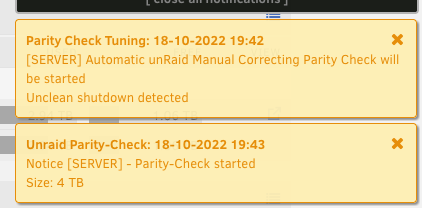
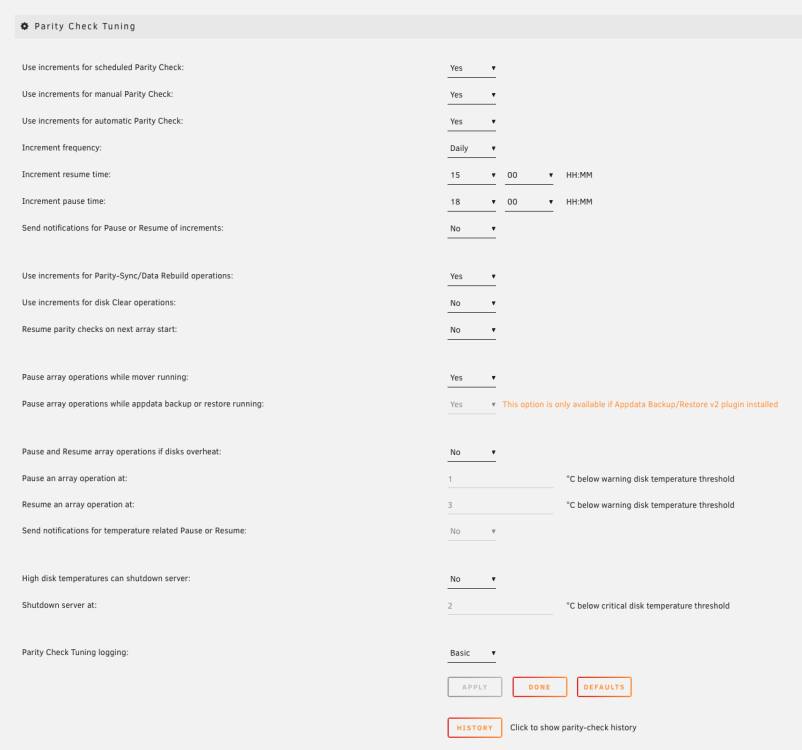
i would like to disable the parity check.simply because my server rarely runs not doing parity check. i really dont mind running it once in a while but its 2022 so even a dirty reboot is not a problem with todays filesystems. i did like hundreds of non clean shutdowns over the years and the parity check never helped me to do anything. this system can be called a daily parity check instead. i want the server to conserve energy not to do 9 hours parity checks every day. even with these settings the parity checks starts on every dirty reboot. is there a way to disable it? its really annoying to cancel the check and let the server sleep every day.
-
the problem is the conflict from the virbr0 interface 192.168.122.1:53 which shall not exist in the first place but its somehow by default listening on port 53 once the libvirt service is started there is nothing in the libvirt configs regarding that port 53 so it looks to be caused by the dnsmasq package
-
ok i seem to found out the reason and a solution the reason for the sleep/wake/sleep is the conflict between acpi handler script and the elogind configuration. they both react to the key press and acpi handler wins it first then when it wakes up the elogind continues so the solution for power button sleep is to edit or remove the /etc/acpi/acpi_handler.sh or just remove the +x attribute of the file so that it does not execute on the power press and edit the /etc/elogind/logind.conf so that the HandlePowerKey=poweroff is changed to HandlePowerKey=suspend that is being done in /boot/config/go by adding these lines #change power button handling and restart elogind to reload the edited config /usr/bin/sed -i -e 's/#HandlePowerKey=poweroff/HandlePowerKey=suspend/g' /etc/elogind/logind.conf /usr/bin/sed -i -e 's/#AllowSuspend=yes/AllowSuspend=yes/g' /etc/elogind/logind.conf /usr/bin/sed -i -e 's/#SuspendState=mem standby freeze/SuspendState=mem/g' /etc/elogind/logind.conf /etc/rc.d/rc.elogind restart chmod -x /etc/acpi/acpi_handler.sh
-
now in unraid 6.10 its even worse. the system sleeps on the button, i wake it up and then it sleeps again. then i wake it up and it shuts down May 21 07:58:21 Server tips.and.tweaks: Tweaks Applied May 21 08:00:07 Server crond[955]: exit status 1 from user root /usr/local/sbin/mover &> /dev/null May 21 08:35:18 Server sshd[20675]: Connection from 192.168.66.188 port 53626 on 192.168.66.100 port 22 rdomain "" May 21 08:35:18 Server sshd[20675]: Accepted key RSA SHA256:1nWx8rDlB0bS6Ff2u9d6GdYmZycLU4SqZpi1UTX8paE found at /root/.ssh/authorized_keys:1 May 21 08:35:18 Server sshd[20675]: Postponed publickey for root from 192.168.66.188 port 53626 ssh2 [preauth] May 21 08:35:18 Server sshd[20675]: Accepted key RSA SHA256:1nWx8rDlB0bS6Ff2u9d6GdYmZycLU4SqZpi1UTX8paE found at /root/.ssh/authorized_keys:1 May 21 08:35:18 Server sshd[20675]: Accepted publickey for root from 192.168.66.188 port 53626 ssh2: RSA SHA256:1nWx8rDlB0bS6Ff2u9d6GdYmZycLU4SqZpi1UTX8paE May 21 08:35:18 Server sshd[20675]: pam_unix(sshd:session): session opened for user root(uid=0) by (uid=0) May 21 08:35:18 Server elogind-daemon[905]: New session c1 of user root. May 21 08:35:18 Server sshd[20675]: Starting session: shell on pts/1 for root from 192.168.66.188 port 53626 id 0 May 21 08:36:46 Server elogind-daemon[905]: Power key pressed. May 21 08:36:46 Server elogind-daemon[905]: Powering Off... May 21 08:36:46 Server kernel: PM: suspend entry (deep) May 21 08:36:46 Server kernel: Filesystems sync: 0.076 seconds May 21 08:37:37 Server kernel: Freezing user space processes ... (elapsed 0.001 seconds) done. May 21 08:37:37 Server kernel: OOM killer disabled. May 21 08:37:37 Server kernel: Freezing remaining freezable tasks ... (elapsed 0.001 seconds) done. May 21 08:37:37 Server kernel: printk: Suspending console(s) (use no_console_suspend to debug) May 21 08:37:37 Server kernel: sd 2:0:0:0: [sdc] Synchronizing SCSI cache May 21 08:37:37 Server kernel: sd 3:0:0:0: [sdd] Synchronizing SCSI cache May 21 08:37:37 Server kernel: sd 3:0:0:0: [sdd] Stopping disk May 21 08:37:37 Server kernel: sd 2:0:0:0: [sdc] Stopping disk May 21 08:37:37 Server kernel: sd 1:0:0:0: [sdb] Synchronizing SCSI cache May 21 08:37:37 Server kernel: sd 1:0:0:0: [sdb] Stopping disk May 21 08:37:37 Server kernel: bond0: (slave eth0): link status definitely down, disabling slave May 21 08:37:37 Server kernel: device eth0 left promiscuous mode May 21 08:37:37 Server kernel: bond0: now running without any active interface! May 21 08:37:37 Server kernel: br0: port 1(bond0) entered disabled state May 21 08:37:37 Server kernel: bond2: (slave eth2): link status definitely down, disabling slave May 21 08:37:37 Server kernel: bond2: now running without any active interface! May 21 08:37:37 Server kernel: ACPI: PM: Preparing to enter system sleep state S3 May 21 08:37:37 Server kernel: ACPI: PM: Saving platform NVS memory May 21 08:37:37 Server kernel: Disabling non-boot CPUs ... May 21 08:37:37 Server kernel: smpboot: CPU 1 is now offline May 21 08:37:37 Server kernel: smpboot: CPU 2 is now offline May 21 08:37:37 Server kernel: smpboot: CPU 3 is now offline May 21 08:37:37 Server kernel: [Firmware Bug]: TSC ADJUST differs: CPU0 0 --> -4699937295. Restoring May 21 08:37:37 Server kernel: ACPI: PM: Low-level resume complete May 21 08:37:37 Server kernel: ACPI: PM: Restoring platform NVS memory May 21 08:37:37 Server kernel: Enabling non-boot CPUs ... May 21 08:37:37 Server kernel: x86: Booting SMP configuration: May 21 08:37:37 Server kernel: smpboot: Booting Node 0 Processor 1 APIC 0x2 May 21 08:37:37 Server kernel: CPU1 is up May 21 08:37:37 Server kernel: smpboot: Booting Node 0 Processor 2 APIC 0x1 May 21 08:37:37 Server kernel: CPU2 is up May 21 08:37:37 Server kernel: smpboot: Booting Node 0 Processor 3 APIC 0x3 May 21 08:37:37 Server kernel: CPU3 is up May 21 08:37:37 Server kernel: ACPI: PM: Waking up from system sleep state S3 May 21 08:37:37 Server kernel: sd 1:0:0:0: [sdb] Starting disk May 21 08:37:37 Server kernel: sd 3:0:0:0: [sdd] Starting disk May 21 08:37:37 Server kernel: sd 2:0:0:0: [sdc] Starting disk May 21 08:37:37 Server kernel: i915 0000:00:02.0: [drm] [ENCODER:73:DDI D/PHY D] is disabled/in DSI mode with an ungated DDI clock, gate it May 21 08:37:37 Server kernel: i915 0000:00:02.0: [drm] [ENCODER:82:DDI E/PHY E] is disabled/in DSI mode with an ungated DDI clock, gate it May 21 08:37:37 Server kernel: usb 1-2: reset high-speed USB device number 2 using xhci_hcd May 21 08:37:37 Server kernel: ata4: SATA link down (SStatus 4 SControl 300) May 21 08:37:37 Server kernel: ata3: SATA link up 6.0 Gbps (SStatus 133 SControl 300) May 21 08:37:37 Server kernel: ata3.00: configured for UDMA/133 May 21 08:37:37 Server kernel: igb 0000:01:00.0 eth0: igb: eth0 NIC Link is Up 1000 Mbps Full Duplex, Flow Control: RX/TX May 21 08:37:37 Server kernel: bond0: (slave eth0): link status definitely up, 1000 Mbps full duplex May 21 08:37:37 Server kernel: bond0: (slave eth0): making interface the new active one May 21 08:37:37 Server kernel: device eth0 entered promiscuous mode May 21 08:37:37 Server kernel: bond0: active interface up! May 21 08:37:37 Server kernel: br0: port 1(bond0) entered blocking state May 21 08:37:37 Server kernel: br0: port 1(bond0) entered forwarding state May 21 08:37:37 Server kernel: igb 0000:01:00.1 eth2: igb: eth2 NIC Link is Up 1000 Mbps Full Duplex, Flow Control: RX/TX May 21 08:37:37 Server kernel: bond2: (slave eth2): link status definitely up, 1000 Mbps full duplex May 21 08:37:37 Server kernel: bond2: (slave eth2): making interface the new active one May 21 08:37:37 Server kernel: bond2: active interface up! May 21 08:37:37 Server kernel: ata1: link is slow to respond, please be patient (ready=0) May 21 08:37:37 Server kernel: ata2: link is slow to respond, please be patient (ready=0) May 21 08:37:37 Server kernel: ata1: COMRESET failed (errno=-16) May 21 08:37:37 Server kernel: ata2: COMRESET failed (errno=-16) May 21 08:37:37 Server kernel: ata2: SATA link up 6.0 Gbps (SStatus 133 SControl 300) May 21 08:37:37 Server kernel: ata2.00: configured for UDMA/133 May 21 08:37:37 Server kernel: ata1: SATA link up 6.0 Gbps (SStatus 133 SControl 300) May 21 08:37:37 Server kernel: ata1.00: configured for UDMA/133 May 21 08:37:37 Server kernel: OOM killer enabled. May 21 08:37:37 Server elogind-daemon[905]: Delay lock is active (UID 0/root, PID 7302/libvirtd) but inhibitor timeout is reached. May 21 08:37:37 Server elogind-daemon[905]: System is powering down.. May 21 08:37:37 Server kernel: Restarting tasks ... done. May 21 08:37:37 Server kernel: video LNXVIDEO:00: Restoring backlight state May 21 08:37:37 Server kernel: PM: suspend exit May 21 08:37:37 Server kernel: PM: suspend entry (deep) May 21 08:37:37 Server shutdown[21101]: shutting down for system halt Broadcast message from root@Server (Sat May 21 08:37:37 2022): The system is going down for system halt NOW! May 21 08:37:37 Server init: Switching to runlevel: 0 May 21 08:37:37 Server kernel: Filesystems sync: 0.053 seconds May 21 08:38:14 Server kernel: Freezing user space processes ... (elapsed 0.003 seconds) done. May 21 08:38:14 Server kernel: OOM killer disabled. May 21 08:38:14 Server kernel: Freezing remaining freezable tasks ... (elapsed 0.001 seconds) done. May 21 08:38:14 Server kernel: printk: Suspending console(s) (use no_console_suspend to debug) May 21 08:38:14 Server kernel: sd 2:0:0:0: [sdc] Synchronizing SCSI cache May 21 08:38:14 Server kernel: sd 2:0:0:0: [sdc] Stopping disk May 21 08:38:14 Server kernel: sd 1:0:0:0: [sdb] Synchronizing SCSI cache May 21 08:38:14 Server kernel: sd 3:0:0:0: [sdd] Synchronizing SCSI cache May 21 08:38:14 Server kernel: sd 3:0:0:0: [sdd] Stopping disk May 21 08:38:14 Server kernel: sd 1:0:0:0: [sdb] Stopping disk May 21 08:38:14 Server kernel: bond2: (slave eth2): link status definitely down, disabling slave May 21 08:38:14 Server kernel: bond2: now running without any active interface! May 21 08:38:14 Server kernel: bond0: (slave eth0): link status definitely down, disabling slave May 21 08:38:14 Server kernel: device eth0 left promiscuous mode May 21 08:38:14 Server kernel: bond0: now running without any active interface! May 21 08:38:14 Server kernel: br0: port 1(bond0) entered disabled state May 21 08:38:14 Server kernel: ACPI: PM: Preparing to enter system sleep state S3 May 21 08:38:14 Server kernel: ACPI: PM: Saving platform NVS memory May 21 08:38:14 Server kernel: Disabling non-boot CPUs ... May 21 08:38:14 Server kernel: smpboot: CPU 1 is now offline May 21 08:38:14 Server kernel: smpboot: CPU 2 is now offline May 21 08:38:14 Server kernel: smpboot: CPU 3 is now offline May 21 08:38:14 Server kernel: [Firmware Bug]: TSC ADJUST differs: CPU0 0 --> -4568737850. Restoring May 21 08:38:14 Server kernel: ACPI: PM: Low-level resume complete May 21 08:38:14 Server kernel: ACPI: PM: Restoring platform NVS memory May 21 08:38:14 Server kernel: Enabling non-boot CPUs ... May 21 08:38:14 Server kernel: x86: Booting SMP configuration: May 21 08:38:14 Server kernel: smpboot: Booting Node 0 Processor 1 APIC 0x2 May 21 08:38:14 Server kernel: CPU1 is up May 21 08:38:14 Server kernel: smpboot: Booting Node 0 Processor 2 APIC 0x1 May 21 08:38:14 Server kernel: CPU2 is up May 21 08:38:14 Server kernel: smpboot: Booting Node 0 Processor 3 APIC 0x3 May 21 08:38:14 Server kernel: CPU3 is up May 21 08:38:14 Server kernel: ACPI: PM: Waking up from system sleep state S3 May 21 08:38:14 Server kernel: i915 0000:00:02.0: [drm] [ENCODER:73:DDI D/PHY D] is disabled/in DSI mode with an ungated DDI clock, gate it May 21 08:38:14 Server kernel: i915 0000:00:02.0: [drm] [ENCODER:82:DDI E/PHY E] is disabled/in DSI mode with an ungated DDI clock, gate it May 21 08:38:14 Server kernel: sd 2:0:0:0: [sdc] Starting disk May 21 08:38:14 Server kernel: sd 3:0:0:0: [sdd] Starting disk May 21 08:38:14 Server kernel: sd 1:0:0:0: [sdb] Starting disk May 21 08:38:14 Server kernel: usb 1-2: reset high-speed USB device number 2 using xhci_hcd May 21 08:38:14 Server kernel: ata4: SATA link down (SStatus 4 SControl 300) May 21 08:38:14 Server kernel: ata3: SATA link up 6.0 Gbps (SStatus 133 SControl 300) May 21 08:38:14 Server kernel: ata3.00: configured for UDMA/133 May 21 08:38:14 Server kernel: igb 0000:01:00.1 eth2: igb: eth2 NIC Link is Up 1000 Mbps Full Duplex, Flow Control: RX/TX May 21 08:38:14 Server kernel: igb 0000:01:00.0 eth0: igb: eth0 NIC Link is Up 1000 Mbps Full Duplex, Flow Control: RX/TX May 21 08:38:14 Server kernel: bond2: (slave eth2): link status definitely up, 1000 Mbps full duplex May 21 08:38:14 Server kernel: bond2: (slave eth2): making interface the new active one May 21 08:38:14 Server kernel: bond2: active interface up! May 21 08:38:14 Server kernel: bond0: (slave eth0): link status definitely up, 1000 Mbps full duplex May 21 08:38:14 Server kernel: bond0: (slave eth0): making interface the new active one May 21 08:38:14 Server kernel: device eth0 entered promiscuous mode May 21 08:38:14 Server kernel: bond0: active interface up! May 21 08:38:14 Server kernel: br0: port 1(bond0) entered blocking state May 21 08:38:14 Server kernel: br0: port 1(bond0) entered forwarding state May 21 08:38:14 Server kernel: ata1: link is slow to respond, please be patient (ready=0) May 21 08:38:14 Server kernel: ata2: link is slow to respond, please be patient (ready=0) May 21 08:38:14 Server kernel: ata1: COMRESET failed (errno=-16) May 21 08:38:14 Server kernel: ata2: COMRESET failed (errno=-16) May 21 08:38:14 Server kernel: ata2: SATA link up 6.0 Gbps (SStatus 133 SControl 300) May 21 08:38:14 Server kernel: ata2.00: configured for UDMA/133 May 21 08:38:14 Server kernel: ata1: link is slow to respond, please be patient (ready=0) May 21 08:38:14 Server kernel: ata1: SATA link up 6.0 Gbps (SStatus 133 SControl 300) May 21 08:38:14 Server kernel: ata1.00: configured for UDMA/133 May 21 08:38:14 Server kernel: OOM killer enabled. May 21 08:38:14 Server kernel: Restarting tasks ... done. May 21 08:38:14 Server kernel: video LNXVIDEO:00: Restoring backlight state May 21 08:38:14 Server kernel: PM: suspend exit May 21 08:38:14 Server init: Trying to re-exec init May 21 08:38:15 Server kernel: mdcmd (36): nocheck cancel May 21 08:38:16 Server emhttpd: Spinning up all drives... May 21 08:38:16 Server emhttpd: read SMART /dev/sdd May 21 08:38:16 Server emhttpd: read SMART /dev/sdb May 21 08:38:16 Server emhttpd: read SMART /dev/sdc May 21 08:38:16 Server emhttpd: read SMART /dev/sda May 21 08:38:16 Server emhttpd: Stopping services... May 21 08:38:16 Server emhttpd: shcmd (173): /etc/rc.d/rc.libvirt stop May 21 08:38:16 Server root: Shutting down VM: Windows 10 May 21 08:39:18 Server root: Forced shutting down VM: Windows 10 May 21 08:39:18 Server avahi-daemon[5993]: Interface vnet0.IPv6 no longer relevant for mDNS. May 21 08:39:18 Server avahi-daemon[5993]: Leaving mDNS multicast group on interface vnet0.IPv6 with address fe80::fc54:ff:feae:af75. May 21 08:39:18 Server kernel: br0: port 2(vnet0) entered disabled state May 21 08:39:18 Server kernel: device vnet0 left promiscuous mode May 21 08:39:18 Server kernel: br0: port 2(vnet0) entered disabled state May 21 08:39:18 Server avahi-daemon[5993]: Withdrawing address record for fe80::fc54:ff:feae:af75 on vnet0. May 21 08:39:18 Server root: Stopping libvirtd... May 21 08:39:18 Server dnsmasq[7398]: exiting on receipt of SIGTERM May 21 08:39:18 Server avahi-daemon[5993]: Interface virbr0.IPv4 no longer relevant for mDNS. May 21 08:39:18 Server avahi-daemon[5993]: Leaving mDNS multicast group on interface virbr0.IPv4 with address 192.168.122.1. May 21 08:39:18 Server avahi-daemon[5993]: Withdrawing address record for 192.168.122.1 on virbr0. May 21 08:39:18 Server root: Network 2214f59d-018d-4270-9f9c-550be516a722 destroyed May 21 08:39:18 Server root: May 21 08:39:21 Server root: Stopping virtlogd... May 21 08:39:22 Server root: Stopping virtlockd... May 21 08:39:23 Server emhttpd: shcmd (176): umount /etc/libvirt May 21 08:39:23 Server emhttpd: shcmd (178): /etc/rc.d/rc.docker stop May 21 08:39:27 Server kernel: vethe79c995: renamed from eth0 May 21 08:39:27 Server kernel: docker0: port 3(vethc6b155f) entered disabled state May 21 08:39:27 Server avahi-daemon[5993]: Interface vethc6b155f.IPv6 no longer relevant for mDNS. May 21 08:39:27 Server avahi-daemon[5993]: Leaving mDNS multicast group on interface vethc6b155f.IPv6 with address fe80::a48a:60ff:fe63:95b7. May 21 08:39:27 Server kernel: docker0: port 3(vethc6b155f) entered disabled state May 21 08:39:27 Server kernel: device vethc6b155f left promiscuous mode May 21 08:39:27 Server kernel: docker0: port 3(vethc6b155f) entered disabled state May 21 08:39:27 Server avahi-daemon[5993]: Withdrawing address record for fe80::a48a:60ff:fe63:95b7 on vethc6b155f. May 21 08:39:27 Server kernel: device br0 left promiscuous mode May 21 08:39:27 Server kernel: vethea0caf5: renamed from eth0 May 21 08:39:27 Server kernel: docker0: port 1(vethc6be7f5) entered disabled state May 21 08:39:27 Server kernel: veth118d11d: renamed from eth0 May 21 08:39:28 Server avahi-daemon[5993]: Interface vethc6be7f5.IPv6 no longer relevant for mDNS. May 21 08:39:28 Server avahi-daemon[5993]: Leaving mDNS multicast group on interface vethc6be7f5.IPv6 with address fe80::7473:60ff:fe4e:c2e7. May 21 08:39:28 Server kernel: docker0: port 1(vethc6be7f5) entered disabled state May 21 08:39:28 Server kernel: device vethc6be7f5 left promiscuous mode May 21 08:39:28 Server kernel: docker0: port 1(vethc6be7f5) entered disabled state May 21 08:39:28 Server avahi-daemon[5993]: Withdrawing address record for fe80::7473:60ff:fe4e:c2e7 on vethc6be7f5. May 21 08:39:28 Server kernel: docker0: port 2(vethf3953ac) entered disabled state May 21 08:39:28 Server kernel: veth2390438: renamed from eth0 May 21 08:39:28 Server avahi-daemon[5993]: Interface vethf3953ac.IPv6 no longer relevant for mDNS. May 21 08:39:28 Server avahi-daemon[5993]: Leaving mDNS multicast group on interface vethf3953ac.IPv6 with address fe80::4dc:15ff:fe05:20a. May 21 08:39:28 Server kernel: docker0: port 2(vethf3953ac) entered disabled state May 21 08:39:28 Server kernel: device vethf3953ac left promiscuous mode May 21 08:39:28 Server kernel: docker0: port 2(vethf3953ac) entered disabled state May 21 08:39:28 Server avahi-daemon[5993]: Withdrawing address record for fe80::4dc:15ff:fe05:20a on vethf3953ac. May 21 08:39:30 Server root: stopping dockerd ... May 21 08:39:31 Server root: waiting for docker to die ... May 21 08:39:32 Server avahi-daemon[5993]: Interface docker0.IPv6 no longer relevant for mDNS. May 21 08:39:32 Server avahi-daemon[5993]: Leaving mDNS multicast group on interface docker0.IPv6 with address fe80::42:c4ff:fe7e:44e8. May 21 08:39:32 Server avahi-daemon[5993]: Interface docker0.IPv4 no longer relevant for mDNS. May 21 08:39:32 Server avahi-daemon[5993]: Leaving mDNS multicast group on interface docker0.IPv4 with address 172.17.0.1. May 21 08:39:32 Server avahi-daemon[5993]: Withdrawing address record for fe80::42:c4ff:fe7e:44e8 on docker0. May 21 08:39:32 Server avahi-daemon[5993]: Withdrawing address record for 172.17.0.1 on docker0. May 21 08:39:32 Server emhttpd: shcmd (179): umount /var/lib/docker May 21 08:39:32 Server s3_sleep: ---------------------------------------------- May 21 08:39:32 Server s3_sleep: command-args=-q May 21 08:39:32 Server s3_sleep: action mode=sleep May 21 08:39:32 Server s3_sleep: check disks status=no May 21 08:39:32 Server s3_sleep: check network activity=no May 21 08:39:32 Server s3_sleep: check active devices=no May 21 08:39:32 Server s3_sleep: check local login=no May 21 08:39:32 Server s3_sleep: check remote login=no May 21 08:39:32 Server s3_sleep: version=3.0.8 May 21 08:39:32 Server s3_sleep: ---------------------------------------------- May 21 08:39:32 Server s3_sleep: included disks=sdb sdc sdd May 21 08:39:32 Server s3_sleep: excluded disks=sda May 21 08:39:32 Server s3_sleep: ---------------------------------------------- May 21 08:39:32 Server s3_sleep: killing s3_sleep process 5918 May 21 08:39:32 Server emhttpd: shcmd (180): /etc/rc.d/rc.samba stop May 21 08:39:32 Server wsdd2[5973]: 'Terminated' signal received. May 21 08:39:32 Server winbindd[5976]: [2022/05/21 08:39:32.697373, 0] ../../source3/winbindd/winbindd.c:247(winbindd_sig_term_handler) May 21 08:39:32 Server winbindd[5976]: Got sig[15] terminate (is_parent=1) May 21 08:39:32 Server wsdd2[5973]: terminating. May 21 08:39:32 Server winbindd[5978]: [2022/05/21 08:39:32.697973, 0] ../../source3/winbindd/winbindd.c:247(winbindd_sig_term_handler) May 21 08:39:32 Server winbindd[5978]: Got sig[15] terminate (is_parent=0) May 21 08:39:32 Server winbindd[7454]: [2022/05/21 08:39:32.699165, 0] ../../source3/winbindd/winbindd.c:247(winbindd_sig_term_handler) May 21 08:39:32 Server winbindd[7454]: Got sig[15] terminate (is_parent=0) May 21 08:39:32 Server emhttpd: shcmd (181): rm -f /etc/avahi/services/smb.service May 21 08:39:32 Server avahi-daemon[5993]: Files changed, reloading. May 21 08:39:32 Server avahi-daemon[5993]: Service group file /services/smb.service vanished, removing services. May 21 08:39:32 Server emhttpd: Stopping mover... May 21 08:39:32 Server emhttpd: shcmd (183): /usr/local/sbin/mover stop May 21 08:39:32 Server root: mover: not running May 21 08:39:32 Server emhttpd: Sync filesystems... May 21 08:39:32 Server emhttpd: shcmd (184): sync May 21 08:39:32 Server emhttpd: shcmd (185): umount /mnt/user0 May 21 08:39:32 Server emhttpd: shcmd (186): rmdir /mnt/user0 May 21 08:39:32 Server emhttpd: shcmd (187): umount /mnt/user May 21 08:39:32 Server emhttpd: shcmd (188): rmdir /mnt/user May 21 08:39:33 Server emhttpd: shcmd (190): /usr/local/sbin/update_cron May 21 08:39:33 Server emhttpd: Unmounting disks... May 21 08:39:33 Server emhttpd: shcmd (191): umount /mnt/disk1 May 21 08:39:33 Server kernel: XFS (md1): Unmounting Filesystem May 21 08:39:33 Server emhttpd: shcmd (192): rmdir /mnt/disk1 May 21 08:39:33 Server emhttpd: shcmd (193): umount /mnt/cache May 21 08:39:33 Server kernel: XFS (sdd1): Unmounting Filesystem May 21 08:39:33 Server emhttpd: shcmd (194): rmdir /mnt/cache May 21 08:39:33 Server kernel: mdcmd (37): stop May 21 08:39:33 Server kernel: md1: stopping May 21 08:39:33 Server emhttpd: shcmd (196): rm -f /boot/config/forcesync May 21 08:39:33 Server emhttpd: shcmd (197): sync May 21 08:39:33 Server emhttpd: Starting services... May 21 08:39:33 Server emhttpd: shcmd (199): /etc/rc.d/rc.samba start May 21 08:39:33 Server root: Starting Samba: /usr/sbin/smbd -D May 21 08:39:33 Server smbd[22411]: [2022/05/21 08:39:33.647262, 0] ../../source3/smbd/server.c:1734(main) May 21 08:39:33 Server smbd[22411]: smbd version 4.15.7 started. May 21 08:39:33 Server smbd[22411]: Copyright Andrew Tridgell and the Samba Team 1992-2021 May 21 08:39:33 Server root: /usr/sbin/wsdd2 -d May 21 08:39:33 Server wsdd2[22425]: starting. May 21 08:39:33 Server root: /usr/sbin/winbindd -D May 21 08:39:33 Server winbindd[22426]: [2022/05/21 08:39:33.733572, 0] ../../source3/winbindd/winbindd.c:1722(main) May 21 08:39:33 Server winbindd[22426]: winbindd version 4.15.7 started. May 21 08:39:33 Server winbindd[22426]: Copyright Andrew Tridgell and the Samba Team 1992-2021 May 21 08:39:33 Server winbindd[22428]: [2022/05/21 08:39:33.750910, 0] ../../source3/winbindd/winbindd_cache.c:3085(initialize_winbindd_cache) May 21 08:39:33 Server winbindd[22428]: initialize_winbindd_cache: clearing cache and re-creating with version number 2 May 21 08:39:33 Server emhttpd: shcmd (200): cp /tmp/emhttp/smb.service /etc/avahi/services/smb.service May 21 08:39:33 Server avahi-daemon[5993]: Files changed, reloading. May 21 08:39:33 Server avahi-daemon[5993]: Loading service file /services/smb.service. May 21 08:39:33 Server emhttpd: shcmd (203): /etc/rc.d/rc.avahidaemon restart May 21 08:39:33 Server root: Stopping Avahi mDNS/DNS-SD Daemon: stopped May 21 08:39:33 Server avahi-daemon[5993]: Got SIGTERM, quitting. May 21 08:39:33 Server avahi-dnsconfd[6002]: read(): EOF May 21 08:39:33 Server avahi-daemon[5993]: Leaving mDNS multicast group on interface bond2.IPv4 with address 192.168.66.101. May 21 08:39:33 Server avahi-daemon[5993]: Leaving mDNS multicast group on interface br0.IPv4 with address 192.168.66.100. May 21 08:39:33 Server avahi-daemon[5993]: Leaving mDNS multicast group on interface lo.IPv6 with address ::1. May 21 08:39:33 Server avahi-daemon[5993]: Leaving mDNS multicast group on interface lo.IPv4 with address 127.0.0.1. May 21 08:39:33 Server avahi-daemon[5993]: avahi-daemon 0.8 exiting. May 21 08:39:33 Server root: Starting Avahi mDNS/DNS-SD Daemon: /usr/sbin/avahi-daemon -D May 21 08:39:33 Server avahi-daemon[22446]: Found user 'avahi' (UID 61) and group 'avahi' (GID 214). May 21 08:39:33 Server avahi-daemon[22446]: Successfully dropped root privileges. May 21 08:39:33 Server avahi-daemon[22446]: avahi-daemon 0.8 starting up. May 21 08:39:33 Server avahi-daemon[22446]: Successfully called chroot(). May 21 08:39:33 Server avahi-daemon[22446]: Successfully dropped remaining capabilities. May 21 08:39:33 Server avahi-daemon[22446]: Loading service file /services/sftp-ssh.service. May 21 08:39:33 Server avahi-daemon[22446]: Loading service file /services/smb.service. May 21 08:39:33 Server avahi-daemon[22446]: Loading service file /services/ssh.service. May 21 08:39:33 Server avahi-daemon[22446]: Joining mDNS multicast group on interface bond2.IPv4 with address 192.168.66.101. May 21 08:39:33 Server avahi-daemon[22446]: New relevant interface bond2.IPv4 for mDNS. May 21 08:39:33 Server avahi-daemon[22446]: Joining mDNS multicast group on interface br0.IPv4 with address 192.168.66.100. May 21 08:39:33 Server avahi-daemon[22446]: New relevant interface br0.IPv4 for mDNS. May 21 08:39:33 Server avahi-daemon[22446]: Joining mDNS multicast group on interface lo.IPv6 with address ::1. May 21 08:39:33 Server avahi-daemon[22446]: New relevant interface lo.IPv6 for mDNS. May 21 08:39:33 Server avahi-daemon[22446]: Joining mDNS multicast group on interface lo.IPv4 with address 127.0.0.1. May 21 08:39:33 Server avahi-daemon[22446]: New relevant interface lo.IPv4 for mDNS. May 21 08:39:33 Server avahi-daemon[22446]: Network interface enumeration completed. May 21 08:39:33 Server avahi-daemon[22446]: Registering new address record for 192.168.66.101 on bond2.IPv4. May 21 08:39:33 Server avahi-daemon[22446]: Registering new address record for 192.168.66.100 on br0.IPv4. May 21 08:39:33 Server avahi-daemon[22446]: Registering new address record for ::1 on lo.*. May 21 08:39:33 Server avahi-daemon[22446]: Registering new address record for 127.0.0.1 on lo.IPv4. May 21 08:39:33 Server emhttpd: shcmd (204): /etc/rc.d/rc.avahidnsconfd restart May 21 08:39:33 Server root: Stopping Avahi mDNS/DNS-SD DNS Server Configuration Daemon: stopped May 21 08:39:33 Server root: Starting Avahi mDNS/DNS-SD DNS Server Configuration Daemon: /usr/sbin/avahi-dnsconfd -D May 21 08:39:33 Server avahi-dnsconfd[22455]: Successfully connected to Avahi daemon. May 21 08:39:33 Server emhttpd: no mountpoint along path: /mnt/user/system/docker May 21 08:39:33 Server emhttpd: no mountpoint along path: /mnt/user/system/libvirt May 21 08:39:34 Server avahi-daemon[22446]: Server startup complete. Host name is Server.local. Local service cookie is 1291745752. May 21 08:39:35 Server kernel: md: unRAID driver removed May 21 08:39:35 Server avahi-daemon[22446]: Got SIGTERM, quitting. May 21 08:39:35 Server avahi-dnsconfd[22455]: read(): EOF May 21 08:39:35 Server avahi-daemon[22446]: Leaving mDNS multicast group on interface bond2.IPv4 with address 192.168.66.101. May 21 08:39:35 Server avahi-daemon[22446]: Leaving mDNS multicast group on interface br0.IPv4 with address 192.168.66.100. May 21 08:39:35 Server avahi-daemon[22446]: Leaving mDNS multicast group on interface lo.IPv6 with address ::1. May 21 08:39:35 Server avahi-daemon[22446]: Leaving mDNS multicast group on interface lo.IPv4 with address 127.0.0.1. May 21 08:39:35 Server avahi-daemon[22446]: avahi-daemon 0.8 exiting. May 21 08:39:35 Server wsdd2[22425]: 'Terminated' signal received. May 21 08:39:35 Server winbindd[22428]: [2022/05/21 08:39:35.345121, 0] ../../source3/winbindd/winbindd.c:247(winbindd_sig_term_handler) May 21 08:39:35 Server winbindd[22428]: Got sig[15] terminate (is_parent=1) May 21 08:39:35 Server wsdd2[22425]: terminating. May 21 08:39:35 Server winbindd[22430]: [2022/05/21 08:39:35.346152, 0] ../../source3/winbindd/winbindd.c:247(winbindd_sig_term_handler) May 21 08:39:35 Server winbindd[22430]: Got sig[15] terminate (is_parent=0) Connection to server closed by remote host. Connection to server closed. its the elogind-daemon shutting it down obviously
-
i am trying to use the power button to sleep with some success on unraud 6.9.2 i use the acpi_handler.sh #!/bin/sh # Default acpi script that takes an entry for all actions IFS=${IFS}/ set $@ case "$1" in button) case "$2" in power) echo -n mem > /sys/power/state ;; *) logger "ACPI action $2 is not defined" ;; esac ;; *) # logger "ACPI group $1 / action $2 is not defined" ;; esac the problem is that when i wake up the server with a WOL packet, most of the time it goes to sleep again in a second or two and i need to wake it up 2nd time it looks like there is some unfinished business when it sleeps first time which is finished after it wakes up first time. is there any way how to do this properly? this happens on the button press May 18 07:58:45 Server kernel: PM: suspend entry (deep) May 18 07:58:45 Server kernel: Filesystems sync: 0.051 seconds this happens when it goes to sleep immediately after wake up May 18 08:00:16 Server crond[1667]: exit status 1 from user root /usr/local/sbin/mover &> /dev/null May 18 08:00:19 Server kernel: PM: suspend entry (deep) May 18 08:00:19 Server kernel: Filesystems sync: 0.070 seconds May 18 08:00:44 Server kernel: Freezing user space processes ... (elapsed 0.001 seconds) done. May 18 08:00:44 Server kernel: OOM killer disabled. May 18 08:00:44 Server kernel: Freezing remaining freezable tasks ... (elapsed 0.001 seconds) done. May 18 08:00:44 Server kernel: printk: Suspending console(s) (use no_console_suspend to debug) May 18 08:00:44 Server kernel: sd 1:0:0:0: [sdb] Synchronizing SCSI cache May 18 08:00:44 Server kernel: sd 1:0:0:0: [sdb] Stopping disk May 18 08:00:44 Server kernel: sd 2:0:0:0: [sdc] Synchronizing SCSI cache May 18 08:00:44 Server kernel: sd 3:0:0:0: [sdd] Synchronizing SCSI cache May 18 08:00:44 Server kernel: sd 3:0:0:0: [sdd] Stopping disk May 18 08:00:44 Server kernel: sd 2:0:0:0: [sdc] Stopping disk May 18 08:00:44 Server kernel: bond0: (slave eth0): link status definitely down, disabling slave May 18 08:00:44 Server kernel: device eth0 left promiscuous mode May 18 08:00:44 Server kernel: bond0: now running without any active interface! May 18 08:00:44 Server kernel: br0: port 1(bond0) entered disabled state May 18 08:00:44 Server kernel: bond2: (slave eth2): link status definitely down, disabling slave May 18 08:00:44 Server kernel: bond2: now running without any active interface! May 18 08:00:44 Server kernel: ACPI: Preparing to enter system sleep state S3 May 18 08:00:44 Server kernel: PM: Saving platform NVS memory May 18 08:00:44 Server kernel: Disabling non-boot CPUs ... May 18 08:00:44 Server kernel: smpboot: CPU 1 is now offline May 18 08:00:44 Server kernel: smpboot: CPU 2 is now offline May 18 08:00:44 Server kernel: smpboot: CPU 3 is now offline May 18 08:00:44 Server kernel: [Firmware Bug]: TSC ADJUST differs: CPU0 0 --> -4571538639. Restoring May 18 08:00:44 Server kernel: ACPI: Low-level resume complete May 18 08:00:44 Server kernel: PM: Restoring platform NVS memory May 18 08:00:44 Server kernel: Enabling non-boot CPUs ... May 18 08:00:44 Server kernel: x86: Booting SMP configuration: May 18 08:00:44 Server kernel: smpboot: Booting Node 0 Processor 1 APIC 0x2 May 18 08:00:44 Server kernel: CPU1 is up May 18 08:00:44 Server kernel: smpboot: Booting Node 0 Processor 2 APIC 0x1 May 18 08:00:44 Server kernel: CPU2 is up May 18 08:00:44 Server kernel: smpboot: Booting Node 0 Processor 3 APIC 0x3 May 18 08:00:44 Server kernel: CPU3 is up May 18 08:00:44 Server kernel: ACPI: Waking up from system sleep state S3 May 18 08:00:44 Server kernel: sd 1:0:0:0: [sdb] Starting disk May 18 08:00:44 Server kernel: sd 3:0:0:0: [sdd] Starting disk May 18 08:00:44 Server kernel: sd 2:0:0:0: [sdc] Starting disk May 18 08:00:44 Server kernel: usb 1-2: reset high-speed USB device number 2 using xhci_hcd May 18 08:00:44 Server kernel: ata4: SATA link down (SStatus 4 SControl 300) May 18 08:00:44 Server kernel: ata3: SATA link up 6.0 Gbps (SStatus 133 SControl 300) May 18 08:00:44 Server kernel: ata3.00: configured for UDMA/133 May 18 08:00:44 Server kernel: igb 0000:01:00.1 eth2: igb: eth2 NIC Link is Up 1000 Mbps Full Duplex, Flow Control: RX/TX May 18 08:00:44 Server kernel: bond2: (slave eth2): link status definitely up, 1000 Mbps full duplex May 18 08:00:44 Server kernel: bond2: (slave eth2): making interface the new active one May 18 08:00:44 Server kernel: bond2: active interface up! May 18 08:00:44 Server kernel: igb 0000:01:00.0 eth0: igb: eth0 NIC Link is Up 1000 Mbps Full Duplex, Flow Control: RX/TX May 18 08:00:44 Server kernel: bond0: (slave eth0): link status definitely up, 1000 Mbps full duplex May 18 08:00:44 Server kernel: bond0: (slave eth0): making interface the new active one May 18 08:00:44 Server kernel: device eth0 entered promiscuous mode May 18 08:00:44 Server kernel: bond0: active interface up! May 18 08:00:44 Server kernel: br0: port 1(bond0) entered blocking state May 18 08:00:44 Server kernel: br0: port 1(bond0) entered forwarding state May 18 08:00:44 Server kernel: ata2: link is slow to respond, please be patient (ready=0) May 18 08:00:44 Server kernel: ata1: link is slow to respond, please be patient (ready=0) May 18 08:00:44 Server kernel: ata2: COMRESET failed (errno=-16) May 18 08:00:44 Server kernel: ata1: COMRESET failed (errno=-16) May 18 08:00:44 Server kernel: ata2: SATA link up 6.0 Gbps (SStatus 133 SControl 300) May 18 08:00:44 Server kernel: ata2.00: configured for UDMA/133 May 18 08:00:44 Server kernel: ata1: SATA link up 6.0 Gbps (SStatus 133 SControl 300) May 18 08:00:44 Server kernel: ata1.00: configured for UDMA/133 May 18 08:00:44 Server kernel: OOM killer enabled. May 18 08:00:44 Server kernel: Restarting tasks ... done. May 18 08:00:44 Server kernel: PM: suspend exit May 18 08:00:44 Server kernel: PM: suspend entry (deep) May 18 08:00:44 Server kernel: Filesystems sync: 0.086 seconds and this after it wakes normally May 18 07:59:30 Server kernel: Freezing user space processes ... (elapsed 0.001 seconds) done. May 18 07:59:30 Server kernel: OOM killer disabled. May 18 07:59:30 Server kernel: Freezing remaining freezable tasks ... (elapsed 0.000 seconds) done. May 18 07:59:30 Server kernel: printk: Suspending console(s) (use no_console_suspend to debug) May 18 07:59:30 Server kernel: sd 3:0:0:0: [sdd] Synchronizing SCSI cache May 18 07:59:30 Server kernel: sd 2:0:0:0: [sdc] Synchronizing SCSI cache May 18 07:59:30 Server kernel: sd 3:0:0:0: [sdd] Stopping disk May 18 07:59:30 Server kernel: sd 2:0:0:0: [sdc] Stopping disk May 18 07:59:30 Server kernel: sd 1:0:0:0: [sdb] Synchronizing SCSI cache May 18 07:59:30 Server kernel: sd 1:0:0:0: [sdb] Stopping disk May 18 07:59:30 Server kernel: igb 0000:01:00.1 eth2: igb: eth2 NIC Link is Up 1000 Mbps Full Duplex, Flow Control: RX/TX May 18 07:59:30 Server kernel: bond0: (slave eth0): link status definitely down, disabling slave May 18 07:59:30 Server kernel: device eth0 left promiscuous mode May 18 07:59:30 Server kernel: bond0: now running without any active interface! May 18 07:59:30 Server kernel: br0: port 1(bond0) entered disabled state May 18 07:59:30 Server kernel: ACPI: Preparing to enter system sleep state S3 May 18 07:59:30 Server kernel: PM: Saving platform NVS memory May 18 07:59:30 Server kernel: Disabling non-boot CPUs ... May 18 07:59:30 Server kernel: smpboot: CPU 1 is now offline May 18 07:59:30 Server kernel: smpboot: CPU 2 is now offline May 18 07:59:30 Server kernel: smpboot: CPU 3 is now offline May 18 07:59:30 Server kernel: [Firmware Bug]: TSC ADJUST differs: CPU0 0 --> -4572017360. Restoring May 18 07:59:30 Server kernel: ACPI: Low-level resume complete May 18 07:59:30 Server kernel: PM: Restoring platform NVS memory May 18 07:59:30 Server kernel: Enabling non-boot CPUs ... May 18 07:59:30 Server kernel: x86: Booting SMP configuration: May 18 07:59:30 Server kernel: smpboot: Booting Node 0 Processor 1 APIC 0x2 May 18 07:59:30 Server kernel: CPU1 is up May 18 07:59:30 Server kernel: smpboot: Booting Node 0 Processor 2 APIC 0x1 May 18 07:59:30 Server kernel: CPU2 is up May 18 07:59:30 Server kernel: smpboot: Booting Node 0 Processor 3 APIC 0x3 May 18 07:59:30 Server kernel: CPU3 is up May 18 07:59:30 Server kernel: ACPI: Waking up from system sleep state S3 May 18 07:59:30 Server kernel: sd 2:0:0:0: [sdc] Starting disk May 18 07:59:30 Server kernel: sd 1:0:0:0: [sdb] Starting disk May 18 07:59:30 Server kernel: sd 3:0:0:0: [sdd] Starting disk May 18 07:59:30 Server kernel: bond2: (slave eth2): link status definitely down, disabling slave May 18 07:59:30 Server kernel: bond2: now running without any active interface! May 18 07:59:30 Server kernel: usb 1-2: reset high-speed USB device number 2 using xhci_hcd May 18 07:59:30 Server kernel: ata4: SATA link down (SStatus 4 SControl 300) May 18 07:59:30 Server kernel: ata3: SATA link up 6.0 Gbps (SStatus 133 SControl 300) May 18 07:59:30 Server kernel: ata3.00: configured for UDMA/133 May 18 07:59:30 Server kernel: igb 0000:01:00.1 eth2: igb: eth2 NIC Link is Up 1000 Mbps Full Duplex, Flow Control: RX/TX May 18 07:59:30 Server kernel: bond2: (slave eth2): link status definitely up, 1000 Mbps full duplex May 18 07:59:30 Server kernel: bond2: (slave eth2): making interface the new active one May 18 07:59:30 Server kernel: bond2: active interface up! May 18 07:59:30 Server kernel: igb 0000:01:00.0 eth0: igb: eth0 NIC Link is Up 1000 Mbps Full Duplex, Flow Control: RX/TX May 18 07:59:30 Server kernel: bond0: (slave eth0): link status definitely up, 1000 Mbps full duplex May 18 07:59:30 Server kernel: bond0: (slave eth0): making interface the new active one May 18 07:59:30 Server kernel: device eth0 entered promiscuous mode May 18 07:59:30 Server kernel: bond0: active interface up! May 18 07:59:30 Server kernel: br0: port 1(bond0) entered blocking state May 18 07:59:30 Server kernel: br0: port 1(bond0) entered forwarding state May 18 07:59:30 Server kernel: ata2: link is slow to respond, please be patient (ready=0) May 18 07:59:30 Server kernel: ata1: link is slow to respond, please be patient (ready=0) May 18 07:59:30 Server kernel: ata2: COMRESET failed (errno=-16) May 18 07:59:30 Server kernel: ata1: COMRESET failed (errno=-16) May 18 07:59:30 Server kernel: ata2: SATA link up 6.0 Gbps (SStatus 133 SControl 300) May 18 07:59:30 Server kernel: ata2.00: configured for UDMA/133 May 18 07:59:30 Server kernel: ata1: SATA link up 6.0 Gbps (SStatus 133 SControl 300) May 18 07:59:30 Server kernel: ata1.00: configured for UDMA/133 May 18 07:59:30 Server kernel: OOM killer enabled. May 18 07:59:30 Server kernel: Restarting tasks ... done. May 18 07:59:30 Server kernel: PM: suspend exit May 18 07:59:30 Server kernel: PM: suspend entry (deep) May 18 07:59:30 Server kernel: Filesystems sync: 0.001 seconds May 18 07:59:50 Server kernel: Freezing user space processes ... May 18 07:59:50 Server kernel: Freezing of tasks failed after 20.003 seconds (1 tasks refusing to freeze, wq_busy=0): May 18 07:59:50 Server kernel: task:PMS Logger state:D stack: 0 pid:30488 ppid: 30440 flags:0x00004324 May 18 07:59:50 Server kernel: Call Trace: May 18 07:59:50 Server kernel: __schedule+0x45e/0x4a4 May 18 07:59:50 Server kernel: schedule+0x73/0x99 May 18 07:59:50 Server kernel: request_wait_answer+0xfa/0x1e7 May 18 07:59:50 Server kernel: ? init_wait_entry+0x24/0x24 May 18 07:59:50 Server kernel: fuse_simple_request+0x1b5/0x1f0 May 18 07:59:50 Server kernel: fuse_perform_write+0x324/0x45e May 18 07:59:50 Server kernel: fuse_file_write_iter+0x1c1/0x2f0 May 18 07:59:50 Server kernel: ? futex_wait+0xab/0x1cb May 18 07:59:50 Server kernel: ? asm_common_interrupt+0x1e/0x40 May 18 07:59:50 Server kernel: do_iter_readv_writev+0x97/0xd7 May 18 07:59:50 Server kernel: do_iter_write+0x7f/0xc0 May 18 07:59:50 Server kernel: vfs_writev+0x74/0xb4 May 18 07:59:50 Server kernel: ? __seccomp_filter+0x185/0x368 May 18 07:59:50 Server kernel: ? __raw_spin_unlock_irq+0xa/0xb May 18 07:59:50 Server kernel: ? finish_task_switch+0x125/0x1ee May 18 07:59:50 Server kernel: ? _cond_resched+0x1b/0x1e May 18 07:59:50 Server kernel: do_writev+0x79/0xe7 May 18 07:59:50 Server kernel: do_syscall_64+0x5d/0x6a May 18 07:59:50 Server kernel: entry_SYSCALL_64_after_hwframe+0x44/0xa9 May 18 07:59:50 Server kernel: RIP: 0033:0x154e76dbf691 May 18 07:59:50 Server kernel: RSP: 002b:0000154e735f7320 EFLAGS: 00000202 ORIG_RAX: 0000000000000014 May 18 07:59:50 Server kernel: RAX: ffffffffffffffda RBX: 0000154e735f7330 RCX: 0000154e76dbf691 May 18 07:59:50 Server kernel: RDX: 0000000000000002 RSI: 0000154e735f7330 RDI: 0000000000000007 May 18 07:59:50 Server kernel: RBP: 0000154e735f7990 R08: 0000000000000001 R09: 0000000000000100 May 18 07:59:50 Server kernel: R10: 0000154e735f7160 R11: 0000000000000202 R12: 0000000000000064 May 18 07:59:50 Server kernel: R13: 0000000000000064 R14: 0000000000000001 R15: 0000154e735bf010 May 18 07:59:50 Server kernel: May 18 07:59:50 Server kernel: OOM killer enabled. May 18 07:59:50 Server kernel: Restarting tasks ... done. May 18 07:59:50 Server kernel: PM: suspend exit
-
you might want to try: disabling enhanced C1 power saving state (C1E) in the BIOS settings, or disabling TCP checksum offloading with ethtool -K eth0 tx off rx off disabling TCP Segmentation Offload (TSO) with ethtool -K eth0 tso off try one at a time
-
sorrry i am just curious, so what is the difference in having a parity drive and not having parity drive in case of a unclean shutdown? without parity drive i lose the unwritten data from the cache, i reboot and nothing i can do about the lost data with parity drive i lose the same data cannot do anything about the lost data as in the previous case but have to run parity check. so where does the parity get corrupted then? why is it considered not clean?
-
isn't it the same case with unlcean shutdown? I still have my data on my ok drive with journaling filesystem so whenever it is suitable i want it to run the parity check. There is just no balance in it anymore. One unclean shutdown and half a day of unusable storage is just a too big price, especially if i know that the shutdown was not really so unclean and i know i was not writing to the drives any data i would need to be parity re-checked
-
come on guys, sorry for writing it into this plugins topic but your arguments are from the past. UPS for small form factor home appliances is larger than the storage appliance itself and cost 25%-50% of the appliance price. And in case you did not know. it is 2021 and everybody is using journaled filesystems anyway. You are booting from USB so what is the big danger of having a dirty reboot here? The parity makes already enough performance drawdown so i bet that the parity consistency is already being solved on different level when writing. imho if there is a dirty reboot for any reason, the automatic parity check after the reboot has no profits. I am happy to learn otherwise. If the reboot was due to failing hardware other than disk, running 12 hours of parity check does not help the situation. You either have the data readable on the drive or not and stressing the system more before investigation is just more risky. See the multiple topics on sudden reboots here on the forum. If the reboot was due to failing hard drive the parity check is useless as you have already a failing drive and you either have the data from the parity drive or you have data loss. If you have more drives and one or none of them was being written during the dirty reboot, there is no need to rebuild the non-used drives parity. If the reboot was due to software error, you will likely experience another dirty reboot during the parity check while you try to find out and re-test why the reboot happened. If you have services like vms and dockers running and need to get the services up and running asap, the parity check just lowers the whole performance of the whole storage system. Again, contra-productive. If you unplug your boot USB by mistake there is nothing wrong with your drives or parity but you get another parity check on the reboot. "unclean shutdown is if the system has to forcibly kill processes because they refused to shutdown normally" - another silly reason to rebuild parity Is there anyone on this forum not running the unraid in 24/7 mode at home who does not cancel the check after the dirty reboot and lets it run for days? Whenever this happens to me i have a ton other stuff to do rather than waiting for the parity check to complete. During parity check you cannot backup MACs or iphones effectively. Sometimes you cant even watch movies if they have too high rate for unraid to handle both at the same time. and last, with this type of parity consistency check, the moment your parity check stopped, you do not know if the pairty is valid anyway. From its behavior there is no difference between a parity running for weeks and a parity after a dirty reboot. You just need to run the check to know that your parity is ok. So you can only hope that your parity is ok even without dirty reboots. The system is just not aware of the parity status all the time! I was hoping that this plugin could have a checkbox which would just cancel the check on reboot automatically and let it run only during the scheduled window time. That would be the proper way of handling the parity check for home use storage imho. Anyway i am just curious if after every dirty reboot the parity is really 100% invalid if limetech made it the default action. What will happen if you do a dirty reboot and fail (one of) the data drive?
-
well if your plugin schedules the parity check to run at specific time i really do not bother having a dirty parity until the schedule anyway. either the parity saved my data during the power outage or i am screwed anyway. the parity check running on boot does not help a single thing in this scenario. and your plugin existance just confirms it that people are annoyed by the parity check running at inapropriate times which on the boot is just always. for home users this is crucial as a simple power outage creates low performance for home applicance services, vms, really anything. and if i am not at home there is just nobody who can click the stop parity check so the feature to cancel the current parity check and run onlyt the scheduled one would be really helpful
-
can it be finally disabled not to run automatically after not clean reboot? its the most annoying thing really when after a power outage the array performance sucks for half the day
-
i am using encryption on btrfs on all drives for a month without any issues so far
-
https://github.com/RehabMan/OS-X-Null-Ethernet install this if possible. i am not sure if that still works for Big Sur.


