





TheDragon
Members
-
Joined
-
Last visited
Everything posted by TheDragon
-
last 3
-
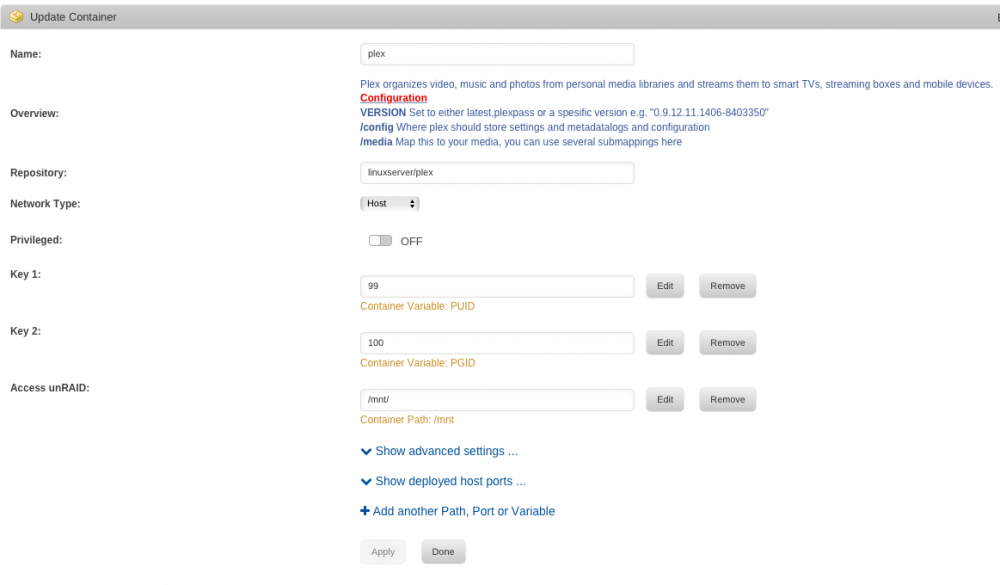
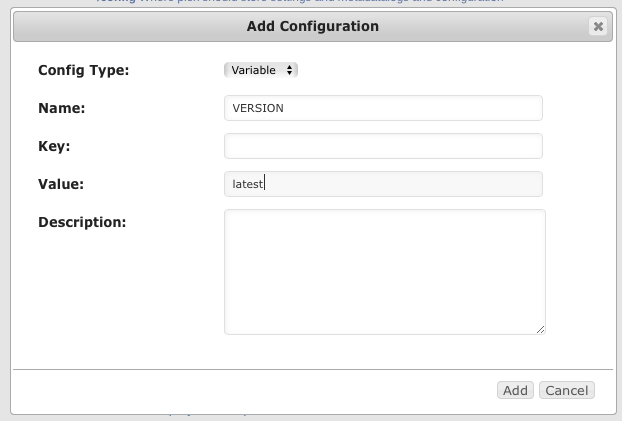
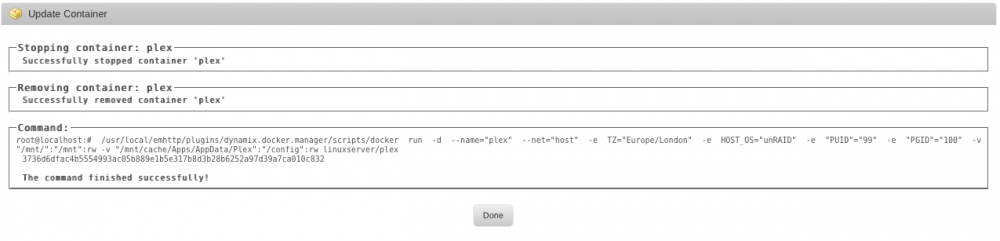
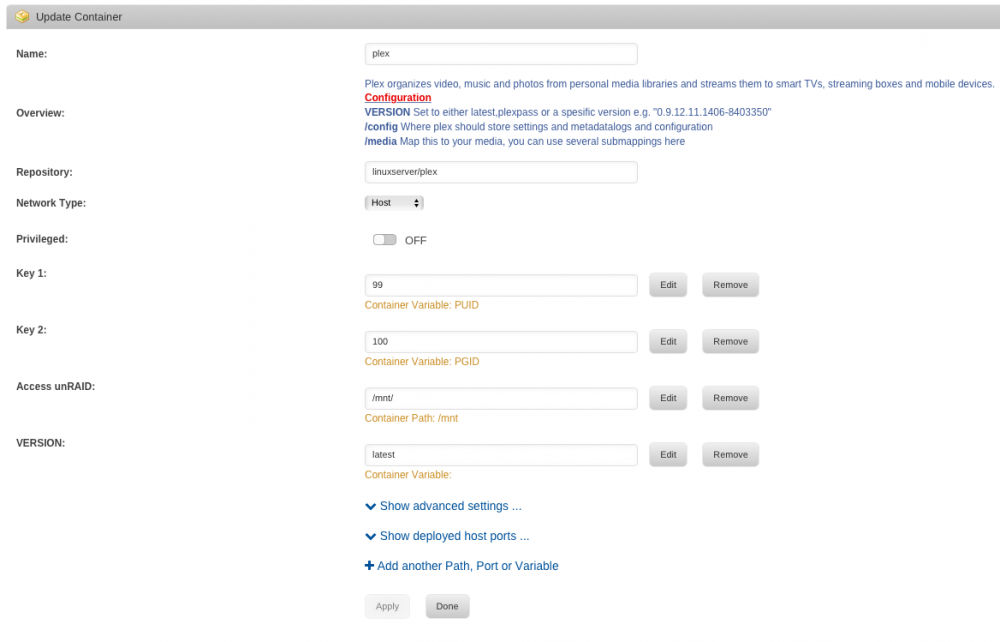
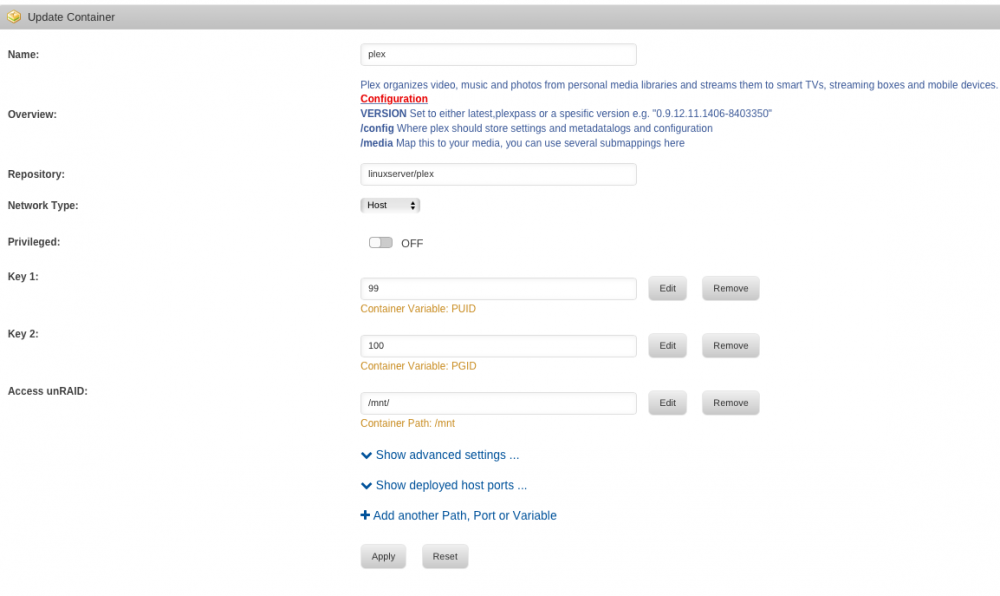
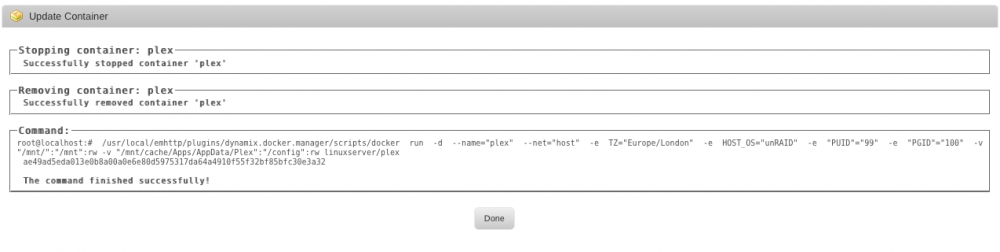
Here are some screenshots illustrating the steps I'm taking to remove and re-add the version variable, along with the docker run commands after each change.
-
just double checked that, and definitely not doing that
-
I've just had a look and the version I'm on now isn't the DVR Beta, and the VERSION number I'm on (1.1.4.2757) is lower than the DVR Beta version number. Is there a way to edit the file that is called for the docker run command directly? Just thinking if so maybe I can just add the version variable to that, instead of trying to do it via the GUI
-
Try deleting the version variable, start the container and then add the version variable again. Look if the variable is in the run command after that. just gave that a try but no luck, it still doesn't show in the run command
-
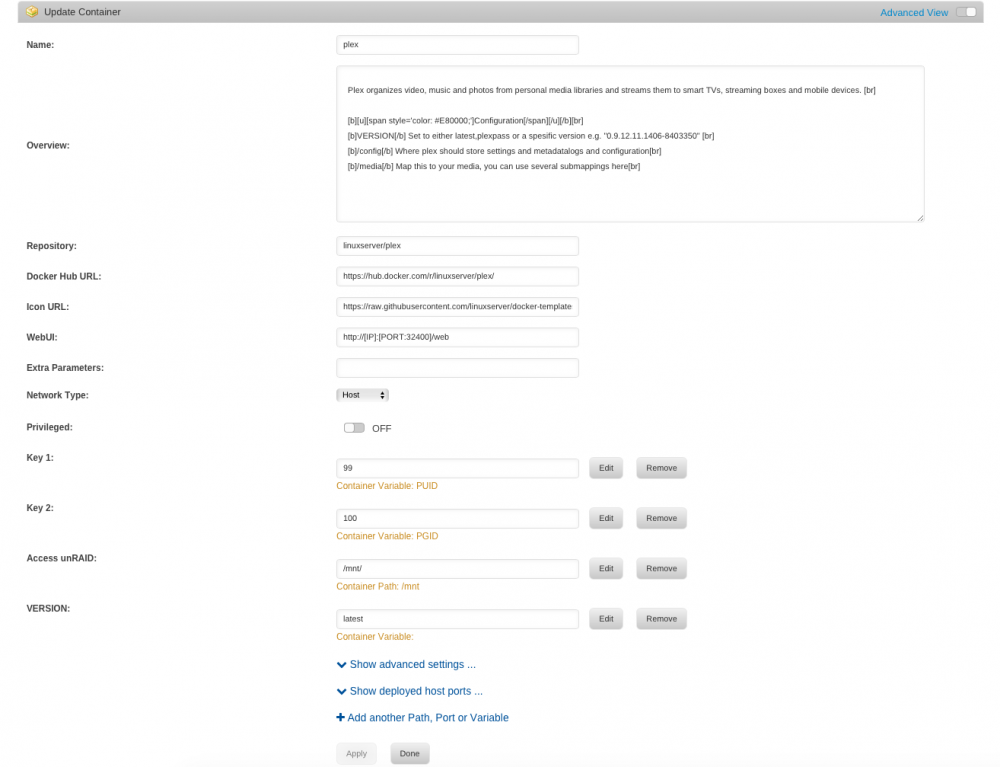
Here it is
-
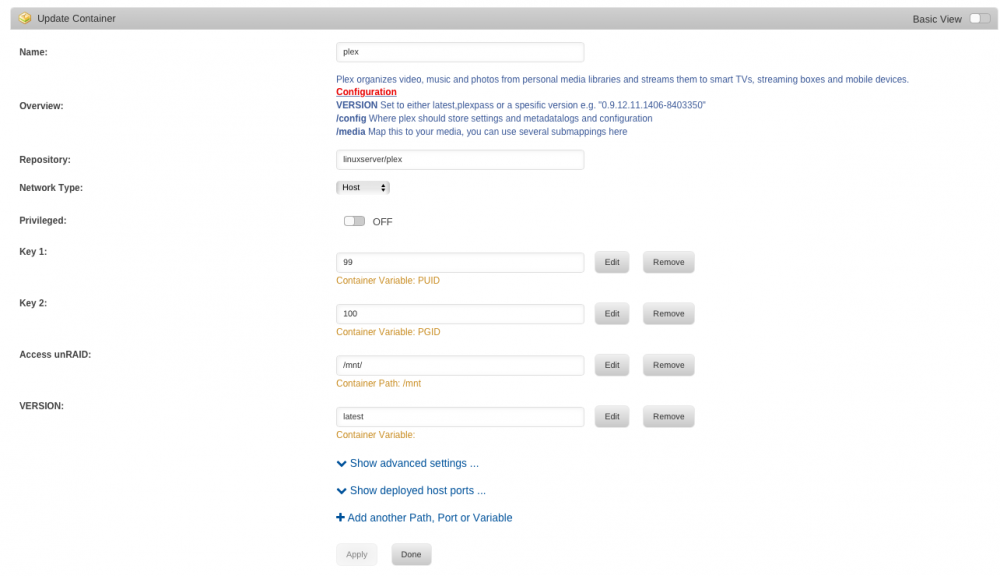
I think you're right, heres the run command root@localhost:# /usr/local/emhttp/plugins/dynamix.docker.manager/scripts/docker run -d --name="plex" --net="host" -e TZ="Europe/London" -e HOST_OS="unRAID" -e "PUID"="99" -e "PGID"="100" -v "/mnt/":"/mnt":rw -v "/mnt/cache/Apps/AppData/Plex":"/config":rw linuxserver/plex 66398a1d5bac042c0a5296df1cbe36788100161f82a62c7c4d5c49a7acd0714a The command finished successfully! I can't see the version variable listed... heres a screenshot of my settings
-
Been using this docker for quite a while without any issues. I tried the Plex DVR Beta by changing the VERSION variable to the string for the DVR version. I just changed it back to latest but I can't seem to get it to update to the current latest plexpass version. Seem to be stuck on version 1.1.4.2757, despite there being a newer version available. I've also tried specifying the string for the latest version, which didn't work. I've also deleted and recreated the docker using CA but again, it doesn't seem to have changed anything. Any ideas what else I can try? Not sure if it's related but I spotted this in the docker log: ####################################################### # Update routine will not run because you havent set # # the VERSION variable or you opted out of updates. # # For more information checkout :- # # https://github.com/linuxserver/docker-plex # #######################################################
-
I've just discovered some strange behaviour with the SSD Trim plugin See this thread: https://lime-technology.com/forum/index.php?topic=52587
-
I think you've got the options right, I can't see us adding comskip into the container, especially as Plex DVR is rudimentary at the moment to say the least, afaik it supports only the HD Homerun devices, with no support for native DVB devices. It's certainly of no use to us in Europe at the moment. Sure I've seen a similar post recently, but i can't place where... Just wanted to chime in on this - HDHomerun do offer a device suitable for Europe. I can confirm this as I own one! I would also be interested in a way to leverage comskip - though how this can be achieved I'm completely unsure, as I'm not a developer. So they do, I stand corrected, I do however stand by my assessment of Plex DVR. Any DVR that only supports HDHomerun isn't exactly bringing it to the masses... That's a fair point. I do believe though that this is just the starting point. I've tried Plex DVR but admit I'm not using it full time at the moment. Hopefully as the software becomes more mature and more devices are supported the popularity will increase too. On a side note, thanks for all the work you guys have put into this container - has worked flawlessly ever since I installed. Keep up the great work! ?
-
I think you've got the options right, I can't see us adding comskip into the container, especially as Plex DVR is rudimentary at the moment to say the least, afaik it supports only the HD Homerun devices, with no support for native DVB devices. It's certainly of no use to us in Europe at the moment. Sure I've seen a similar post recently, but i can't place where... Just wanted to chime in on this - HDHomerun do offer a device suitable for Europe. I can confirm this as I own one! I would also be interested in a way to leverage comskip - though how this can be achieved I'm completely unsure, as I'm not a developer.
-
Sorry for the slow reply, taken me some time to get round to running it! Here are the results from the short test, will run the longer one now. --- INITIAL BASELINE TEST OF CURRENT VALUES (1 Sample Point @ 30sec Duration)--- Test | RAM | stripes | window | reqs | thresh | MB/s ------------------------------------------------------- 1 | 68 | 1280 | 384 | 128 | 192 | 107.6 --- FULLY AUTOMATIC nr_requests TEST 1 (4 Sample Points @ 60sec Duration)--- Test | num_stripes | sync_window | nr_requests | sync_thresh | Speed --------------------------------------------------------------------------- 1 | 1536 | 768 | 128 | 767 | 107.2 MB/s 2 | 1536 | 768 | 128 | 384 | 104.5 MB/s 3 | 1536 | 768 | 8 | 767 | 107.8 MB/s 4 | 1536 | 768 | 8 | 384 | 107.3 MB/s Fastest vals were nr_reqs=8 and sync_thresh=99% of sync_window at 107.8 MB/s This nr_requests value will be used for the next test. --- FULLY AUTOMATIC TEST PASS 1a (Rough - 4 Sample Points @ 30sec Duration)--- Test | RAM | stripes | window | reqs | thresh | MB/s | thresh | MB/s ------------------------------------------------------------------------ 1 | 40 | 768 | 384 | 8 | 383 | 95.3 | 192 | 100.0 2 | 68 | 1280 | 640 | 8 | 639 | 94.8 | 320 | 94.4 3 | 95 | 1792 | 896 | 8 | 895 | 94.8 | 448 | 91.0 4 | 122 | 2304 | 1152 | 8 | 1151 | 90.9 | 576 | 90.8 --- FULLY AUTOMATIC TEST PASS 1b (Rough - 2 Sample Points @ 30sec Duration)--- Test | RAM | stripes | window | reqs | thresh | MB/s | thresh | MB/s ------------------------------------------------------------------------ 1 | 6 | 128 | 64 | 8 | 63 | 103.7 | 32 | 89.5 2 | 34 | 640 | 320 | 8 | 319 | 105.3 | 160 | 99.0 --- END OF SHORT AUTO TEST FOR DETERMINING IF YOU SHOULD RUN THE NORMAL AUTO ---
-
When will this be happening? Just so I know when to look for the update Soon ™
-
When will this be happening? Just so I know when to look for the update
-
I too would like to know this - possibly create a version of this docker app that doesn't update automatically and lets you install a package manually ? The only way you can install this beta now is to install the plugin plex are providing themselves and use that instead of plex in your docker. I would back up your app data tho, just in case the beta screws something up! Be warned though, anyone posting specifics about how to do this, I'll ask a moderator to remove those posts. That would be infringing upon plex's legal property. Agreed. If you have plexpass and download the unRAID plugin version through the secure link plex provided in their recent communication and use it, this link and package shouldn't be shared with anyone - as sparky has said, that's plex legal property.
-
I too would like to know this - possibly create a version of this docker app that doesn't update automatically and lets you install a package manually ? The only way you can install this beta now is to install the plugin plex are providing themselves and use that instead of plex in your docker. I would back up your app data tho, just in case the beta screws something up!
-
I think VERSION needs to be set to latest. Plexpass isn't an accepted variable anymore (read back through this thread to find out why). Also to reassure you I am also a plex pass subscriber and I get the latest plex pass version by using latest as the version variable. ?
-
Have created a signature, hopefully with all the required info!
-
My specs are: Intel® Core™2 Duo CPU E8500 @ 3.16GHz Supermicro C2SEA 8 GB RAM M1015 Single Parity 12 x WD Red 3TB
-
Ready and waiting! ?
-
Hi Paul I'm using the latest 6.2 RC and would be more than happy to help you test your revised script and report back results. ?
-
There are several reports about issues with watched status at the Plex forum. Some clients works fine but a few have this issue. Thanks yeah, it seems PHT now doesn't work properly with PMS and isn't going to be fixed! I'd recommend switching to PMP (Plex Media Player). Think it's intended to replace PHT. I switched to it a while ago and really like the layout, which is now in line with the Roku interface. It also seems to work more reliably with less common media types, which is a big bonus for me.
-
Works perfectly for me too. Just restarted the docker as usual, no special action required.
-
I'm running 0.9.16.6.1993-5089475 Looks like this does affect the version I'm running. Guess will have to wait for the next major release before trying again. Thanks for posting this mr-hexen
-
I'm running 0.9.16.6.1993-5089475


